We remain fully operational. Our teams are working around the clock to ensure your deliveries continue safely.

DOWNLOAD THE APP


Customer Services
Copyright © 2025 Desertcart Holdings Limited
DOWNLOAD THE APP




Buy anything from 5,000+ international stores. One checkout price. No surprise fees. Join 2M+ shoppers on Desertcart.
Desertcart purchases this item on your behalf and handles shipping, customs, and support to Vanuatu.
❄️ Dominate your cooling game with industrial-grade precision and silence.
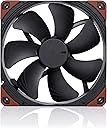
The Noctua NF-A14 industrialPPC-2000 PWM is a premium 140mm heavy-duty cooling fan designed for professional-grade thermal management. Featuring a robust 2000 RPM max speed, advanced PWM control for dynamic airflow adjustment, and IP52-rated rugged construction, it delivers exceptional static pressure and airflow (182.5 m³/h) with minimal noise (31.5 dB). Its fibre-glass reinforced polyamide frame ensures durability in demanding environments, while a 6-year warranty and >150,000 hours MTBF guarantee long-lasting performance. Ideal for high-performance PCs and industrial applications requiring superior cooling efficiency and reliability.


| ASIN | B00KFCRMSG |
| Air Flow Capacity | 182.5 Cubic Meters Per Hour |
| Best Sellers Rank | #627 in Computer Case Fans |
| Brand | Noctua |
| Brand Name | Noctua |
| Compatible Devices | Desktop |
| Cooling Method | Air |
| Customer Reviews | 4.8 out of 5 stars 800 Reviews |
| EU Spare Part Availability Duration | 6 Years |
| Global Trade Identification Number | 00842431014399 |
| Item Dimensions L x W x H | 5.51"L x 5.51"W x 0.98"H |
| Item Weight | 0.2 Kilograms |
| Manufacturer | Noctua |
| Material Type | fibre-glass reinforced polyamide |
| Maximum Rotational Speed | 2000 RPM |
| Noise Level | 31.5 Decibels |
| Power Connector Type | 4-Pin |
| Product Dimensions | 5.51"L x 5.51"W x 0.98"H |
| UPC | 804067218879 842431014399 804904101173 801940470881 807320187714 731215279539 |
| Unit Count | 1 Count |
| Voltage | 12 Volts |
| Warranty Description | 6 year manufacturer’s warranty |
N**.
Top Quality Fan
Using four of these in push/pull on a Corsair H115i radiator and I am loving them. Gives truly exceptional flexibility between near silent to quiet performance from 550 to 850rpms via PWM control. These can also move air with authority at 100% but noise does begin to be a problem. Although with four working together they are moving around 200 cubic feet per minute with essentially just the sound of rushing air. The 3 phase motor, Self-Stabilizing Oil Bearing, and rubber corner inserts work well to help mitigate unwanted vibration. My personal experience with their cooling capability while paired with the Corsair H115i is that while using a PWM hub and Corsair's Link software absoloutely surpases the stock Corsair 140mm fans. They cool the radiator more effectively and quietly. I can usually just keep Corsair's Link software at quiet to balanced which results in water temps not going above 29 degrees C in a 68 to 70 degree F room. This will keep my overclocked I7-5820k (4.5GHz at 1.31v) under 60 degrees C for gaming and even some other CPU intensive tasks. I have these fans mounted as an exhaust for my case. Pros: - Top quality construction materials - Vibration isolating rubber inserts - Smooth PWM control through entire RPM range - 3 Phase motor - 150,000 hour MTBF and 6 year warranty - Square frame for better performance on radiators - 4.18mm H2O of static pressure - good for use on radiators - 107 CFM (182.5m^3/h) open air flow rate at 31.5 dB/A Cons: - Cost, but you're getting top of the line - Higher noise output than usual for Noctua but that can be remedied with PWM control - Stock vibration isolating rubber inserts are still brown, although you can get other colors Bottom line: You are getting great fans that will last for years with a warranty to match. Their performance to noise ratio is tough to beat and they deliver exceptional cooling when circumstances require exceptional solutions.
K**K
Is this fan worth your $30?
As the title suggests is this $30 fan worth your money? I've compiled some figures that I find interesting and hopefully they will help you in choosing. I purchased this fan to upgrade the NZXT FX-140 PWM fan that came with my Kraken X40 liquid cooler. It was between this fan and the Noctua NF-A14 Premium Quiet fan. I got the PPC version because of its superior static pressure and wider range of RPM, while hoping I can find the perfect balance between cooling performance and sound. Due to the design of my Ibuypower Revolt Mini ITX case there is no room for a case fan. My Kraken X40 Liquid Cooler and its single 140mm fan is the only thing I have extracting heat out of the case. So with that in mind I needed something that had very good static pressure and could hopefully be quieter than the stock fan my cooler comes with. Even the fan intake is obstructed by the CD/DVD Drive, making a high static pressure fan even more important. Based on the specifications the Noctua should easily out-perform with lower RPMs and more pressure. My method for testing might not be the most scientific but the results are repeatable and I'm confident in their figures. Your numbers may vary based on your own system, location, software and tools but my purpose is just to compare and demonstrate the various properties of this fan compared to the one it is replacing. Software for testing ~ NZXT Kraken Control I can manually control fan speeds using the NZXT software as well as monitor liquid temps. Fans will be running the stock 12 volts. ~ Intel Extreme Tuning Utility Intel Extreme Tuning Utility allows me to test the cooling performance gains if any. Each Stress test will run for 10 minutes, waiting until liquid temperatures settle back under 37c before testing again. ~ Sound Meter via Smartphone App This is an application that turns your smartphone's microphone into a Decibel meter. The decibel reading won't be an exact representation of the fan dBA but it will give me something to compare the sound of the two fans I'm testing, while removing my own ears from trying to guess which one sounds quieter. The fan will be installed within the computer with the case closed. The computer is inside its own cabinet within an enclosed entertainment center (backing removed). The phone is about 6 inches away from the computer itself and not the fan. Noctua NF-A14 PWN fan 500-2000 RPM 4.18 mm-H2O 31.5 dBA 107.4 CFM NZXT FX-140 PWM fan 800-2000 RPM 0.8-2.2 mm-H2O 21-37 dBA 54.0 - 98.3 CFM The NZXT FX-140 PWM Stress tests 100% [*1950 RPM] fan speed keeps the liquid temperature at 41.8c Decibels: 64.5 50 % [*1350 RPM] fan speed keeps the liquid temperature at 44.3c Decibels: 53.5 25 % [*950 RPM] fan speed keeps the liquid temperature at 48.0c Decibels: 51.5 * Fan speeds are +/- 30 RPM, observed with NZXT Kraken Control. The Noctua NF-A14 Industrial PPC Stress tests 100% [*1800 RPM] fan speed keeps the liquid temperature at 39.8c Decibels: 56.0 50 % [*1075 RPM] fan speed keeps the liquid temperature at 43.0c Decibels: 50.5 25 % [*540 RPM] fan speed keeps the liquid temperature at 46.8c Decibels: 49.5 * Fan speeds are +/- 30 RPM, observed with NZXT Kraken Control. Conclusion The Noctua fan only has 7 blades with a gap large enough to fit a finger between them. This is by no means a quiet fan, anything over 50% fan speed is quite audible but its smooth operation makes the noise less annoying even at 100%. It's build quality holds up to its reputation and the results are in black and white. This is quite an expensive fan ($30) but for me it offers a lot of advantages over cheaper alternatives. For my purposes, and lucky to only need a single fan, I feel slightly ok with its price but of course wish they were a little less expensive. Open Hardware Monitor and Kraken Control both show the Noctua fan reaching maximum speeds of 1850 RPM, so within the +/- 10%. The fan simply outperforms the outgoing fan in every category offering lower temperatures, RPMS, and noise. The static pressure is definitely showing its worth and it's unfortunate to not know the minimum specs of this fan since Noctua doesn't advertise them. Still though even at 100% this fan is much quieter and because of its awesome cooling it won't need to stay at 100% for very long. So to answer the question... is it worth $30? That's for you to ultimately decide. I'm happy as I can now live in relative peace without the ramping up of a loud fan while also and getting cooler system temperatures. It didn't make as big of an impact on cooling as I would have liked, but that shows the radiator isn't that restrictive. I can also set my fan curve to be a little more aggressive without the obvious added noise. I think this may be the current king of 140mm SP fans, but not without a price.
H**D
The Right fan for a Radiator
Was 'pseudo' thermal throttling under full load on my 5950X with the stock Arctic Fans (280mm rad) - I say 'pseudo' because while I wasn't nearing the 90 C limit, my clocks were dropping drastically past 80 C. Now, they stay stable right at 79 C. I originally bought two Chromax fans to make the upgrade (1500 RPM), but ended up getting 4 used in a row...being sold as new through Amazon...be sure to check your stuff. It's clear in 2023, fraud is up, even though prices on things like these fans haven't changed in price. So watch out for that. Pros: - Great airflow, even at low RPM. Comparable in noise to the standard brown NF-A14 at lower speeds. - Noise generated is not fan motor noise, it's the noise of air whooshing Cons: - The fan's cable is super long and management can be a pain. Noctua has it right with the NF-A14 Chromax - those fans have a stub where you can choose to attach your own extension, or plug directly into an AIO without lots of excess cable, all right at the fan. I wish this was the standard on all of their fans, not just the Chromax line. - Airflow is noisy at higher RPM's, similar to that of a slim/quiet bathroom exhaust fan Opinion: Anyhow, after I returned all four Chromax fans, I debated whether to jump for the 2000 or the 3000 iPPPC. I think the 3000 iPPPC would be the best fan to get if you don't mind the noise of a tiny jet engine; however, some people are saying to just adjust your fan curves to account for that noise; only let them hit 3000 RPM when absolutely necessary. While that may be an acceptable venture for some, I think the motor in the 3000 is still louder than the 2000 at the same RPM. Plus, you should consider the diminishing returns on that extra 1000 RPM: noise being the biggest one and power draw being the second. Sure, there is an additional 2.4 mm H2O gained from the 2000 to the 3000 iPPC. And sure, the 3000 is going to move more air; but I think at those numbers of airflow and pressure, the limit of cooling is the thermal capacity of the radiator and not necessarily how fast the radiator's fins can be cooled. I think if you're in the market for fans that 'get the job done' on an radiator (AIO or otherwise), you'd probably do best to get the fan that most closely scales to the size of the radiator. For example: Standard NF-A14 (1500 RPM) on a 420mm radiator Industrial NF-A14 iPPC (2000 RPM) on a 280mm radiator Industrial NF-A14 iPPC (3000) on a 140mm radiator On a 280mm radiator, the 2000 iPPC is just fine. I think even the Chromax or the standard NF-A14 would be fine, depending on your CPU. Of course, it's just an opinion.
K**R
Good but fairly loud
I know other reviews will mention the sound but do know they are fairly loud. These are industrial fans no louder than rack mounted pc fans but considerably louder than traditional case fans. You have been warned. My AIO died which prompted me to swap to an air cooler and upgrade fans. A year ago I upgraded to Noctua Chromax fans trying to limp my AIO along but once it finally died I opted to replace my intake and exhaust fans to 140mm fans but didn’t want the regular 1700rpm Noctua Chromax 140mm fans. I am now using a Thermalright Phantom Spirit Evo w/ 2 120mm Chromax fans in place of Thermalrights fans on the cooler itself and now 2 140mm Noctua 140mm 2000rpm intake and exhaust fans in a Thermaltake Tower 100 ITX case. With the new cooler and 120mm Chromax fans I was hanging at 48c idle. After the 140mm case fans idle was 42c and 85c at 70% running Cinebench. So far I have not had them ramp up to a full 100% with a custom fan curve. At full 100% these fans maintained 32c idle and did not test Cinebench to provide a load test though I should have. Might try it later and update this review. I am happy with the results so far they move a noticeable amount more air with an an acceptable amount of noise over the 120mm Chromax. Again just know these are louder fans and might require playing with the fan curve in the device bios. I will update this review later.
R**Y
Great fans, if you are using a corsair cooler read this
Bought 5 of these for my Corsair 750D case. Love them. Most of the time the 3 I used for the case are off, only the 2 on my H110i GTX are on full time. Those 2 are noticeable, but easily drowned out by music or games. At load the fans turn on at what I assume to be their lowest setting which is pretty quiet considering there's 5 of them. If you are looking at Noctua fans you probably already know what these are, but in case you don't, these are basically your top of the line fans. At this stage you are just trying to squeeze out every last bit of cooling performance you can. The upside of spending a bit more on fans is that they last a very long time and can be taken from build to build, so unlike other components you may replace every year or so, fans can stay with you virtually forever. The Noctua's have a 7 year warranty so, take the amount you are paying divided by 7 and that's your max yearly cost for the fan. So I got these for use with my Corsair H110i GTX. They were LOUD, even with Corsair link set to run them at 25%, they were still very loud. But I noticed the RPM reading on them was always around 1900-2000 RPM. I don't know why, but when hooked to the Corsair controller they always ran at max RPM. I put them on my motherboard headers instead and configured the pump to always run at max speed. Now in silent mode at idle they run between 0-500RPM. Basically it just bursts them every few seconds to get them to move a little air over the rad. They are truly silent now, you could hear a pin drop over these fans.
Q**N
Great fans, no exceptions.
I believe the majority of reviews complaining about them being loud are over exaggerating, far to sensitive to even the slightest amount of fan noise coming from their pc, or don't know how to set a proper fan curve so they don't run at full blast 24/7. I bought 6 of these for my airflow case and are all running around the same speeds on a custom fan curve to keep my pc as cool as possible and only going slightly higher under load and it doesn't bother me at all sitting on my desk next to me. Yes they can get loud up to 2000rpm but should not be the case since they cool so well unless you have a bad case with with bad airflow. If your to sensitive to fan noise and want purely silence over performance then you probably should not be looking at industrial high rpm fans and should check out the other more silence focused fans since noctua even stated that these are not meant for pure low noise applications. If you can't tolerate fan noise then don't buy the noisy fans XD.
H**E
Admirable option in a lackluster 140mm radiator optimized market
Lets get one fact out first. as of this writing, there aren't that many options for radiator optimized high static pressure 140mm fans out there. the only real options as of this writing are: Corsair SP140L (the newest SP140L that came out with H110 GTX, not the previous generations) Noctua NF-A14 IPPC 2000/3000 PWM in an overcrowded 120mm market, you have the old tried and true Gentle Typhoon AP-15's, Noiseblocker Eloop B12-P/B12-4, the new EK Vardar F3/F4, Noctua F-12 IPPC 2000/3000 PWM, Swiftech Helix, Corsair SP120L etc. They all are very close in terms of performance, with Gentle Typhoon being the king, and EK Vardar and Eloop closely second. unfortunately in the still infant 140mm market, the only two fans that can get some air through a rad are the two mentioned above. which means you're left with either a Corsair SP140L, which seems to have an overwhelmingly large QC related problem with bearing rattle noise, or Noctua NF-A14 IPPC 2000, which in reality actually under performs its stated static pressure and airflow. the NF-A14 IPPC 2000 is very quiet in comparison to the stock Corsair SP140L, however, pinning it against a real-world radiator, it doesn't push as much air as the box rating suggests. some believe that the Noctua NF-A14/F12's box rating is more suitable for heatsinks as oppose to a radiator. this has been confirmed by a recent review by Thermalbench. Even the lesser box rating of EK Vardar out-performs the F12 IPPC 2000 by a pretty good margin in terms of radiator-out airflow vs noise at the same RPM in the 120mm test. I've also confirmed this in my personal 140mm test comparing my stock SP140L (H110 GTX version) vs the A14 IPPC 2000. the SP140L pushes more air, but at the cost of sheer tornado like noise environment. in fact, i believe the SP140L's box rating is slightly understated. i clocked SP140L (H110 GTX version) to be at 2450rpm instead of the box suggested 2000rpm, which means the real-world noise rating could be even higher than what was stated on the box. i am following closely to the development of the 140mm rad optimized fan market, in hoping that EK will release a 140mm 2200rpm version of their Vardar, or Noiseblocker releasing a high rpm version of their 140mm Eloop. until then, the Noctua NF-A14 IPPC 2000 RPM or the Corsair SP140L are the only two viable options. note that as of this writing, Corsair is still having availability problem, and in my personal opinion, QC problem with their newest version SP140L. they still owe me a replacement SP140L for the H110 GTX and it's been on back order and won't be in stock for an indefinite time. so pick your poison. EDIT: Oct 26, 2015 the official test results are in. pinning the Noctua A14 IPPC 2000/3000 RPM model against the newest lineup of EK Vardar F3/F4 140mm showed a VERY similar performance between the two. http://thermalbench.com/2015/08/21/ek-vardar-ff4-140-140mm-fan/3/ as the results show, the A14 IPPC 2000 is nearly identical in linear airflow through a radiator comparing to a EK Vardar F3 140mm. in an even earlier review of the A14 IPPC 2000, the test result showed that the real static pressure of the A14 IPPC 2000 to be 2.7mmH2O, which is very close to the static pressure rating of the new EK F3 140mm, farther confirms the two near identical performance. Note that it is still a far cry from the stated 4 mmH2O box rating Noctua would have you believe. Both the Noctua A14 IPPC 3000 RPM and EK Vardar F4 140mm also demonstrate a very similar test result in terms of linear airflow through Radiator and noise, with the Noctua A14 IPPC 3000 having an edge on being higher speed (3000 RPM vs EK's 2500RPM), which also comes with the even higher noise and airflow. i think overall, depends on the street pricing of these fans and availability. EK is currently working on making their F3/F4 140mm inventory available, as the 1st batch of their F3/F4 suffered from bearing noise problem and therefore was recalled. i am told that the new identical revision will be available in about 5 weeks. depending on the street pricing, i think whichever you can get your hands on for cheaper will be the one to go, as both the Noctua IPPC and EK F3/F4 in the 140mm lineup offer near identical performance and noise ratio in the same RPM range. in the 120mm model lineup is where you'll see the EK F3/F4 120mm outshine Noctua F12 IPPC by a noticeable margin. http://thermalbench.com/2015/02/11/ekwb-vardar-f3-120-fan/3/
L**T
Great performance
These fans move an incredible amount of air through my radiator. I'm very pleased with my purchase overall. I did have to use a fan controller on one of them due to some issues with my motherboard. I also noticed that the BIOS sometimes registers the fan speed as lower than the recommended minimum, even when set to a floor of 600rpm. It's a X370 motherboard from a big name. I've found that I can actually run them around 1600rpm and the noise level is quite manageable. If you intend to run them at full speed, they're going to be loud. I have an open case design on my system and use three of these on a radiator. They've been exceptional for that purpose. Expect to need a fan controller or to customize the bios settings for fans. Don't go below 600rpm with this model. I've had extremely good luck with noctua products over the last few years. --- Update Jan 2024. (original was 2019) I ended up repurposing these fans from a radiator to case fans. At the time I purchased, the static pressure was decent compared to my older fans. However, compared to modern fans they perform poorly. I've switched to another brand and am able to get better performance at 1200 rpm. Much quieter and temps are even lower than these at full tilt. if you do choose to use them with a radiator, they are better with thinner radiators. I had an extra thick rad that just needs stronger pressure. The fans held up very well though. They still work.
Trustpilot
2 months ago
5 days ago