๐ Elevate Your Internet Experience!
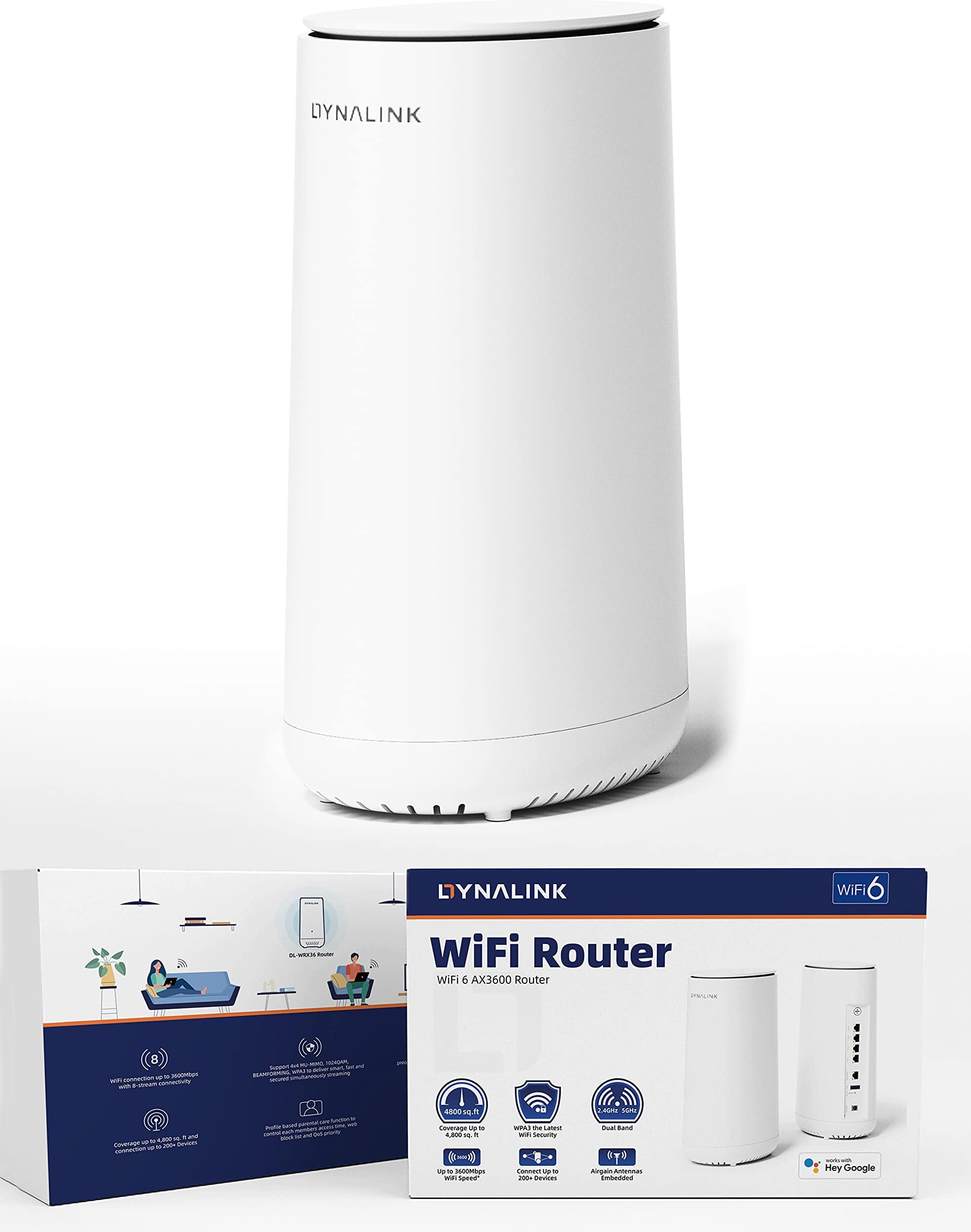
The Dynalink WiFi 6 AX3600 Router (DL-WRX36) is a high-performance dual-band router designed for modern homes and gaming setups. With speeds up to 3.6 Gbps, extensive coverage, and the ability to connect up to 200 devices, it ensures seamless connectivity for all your online activities. Featuring a powerful Qualcomm 2.2 GHz Quad-Core CPU, easy setup via an app, and multiple connectivity options, this router is built to meet the demands of today's digital lifestyle.


| ASIN | B096K9SVCT |
| Antenna Location | Security |
| Antenna Type | Internal |
| Best Sellers Rank | #158,887 in Electronics ( See Top 100 in Electronics ) #1,005 in Computer Routers |
| Brand | Dynalink |
| Color | White |
| Compatible Devices | Personal Computer |
| Connectivity Protocol | Ethernet, Wi-Fi |
| Connectivity Range | 4800 Square Feet |
| Connectivity Technology | Ethernet, Wi-Fi |
| Control Method | App |
| Controller Type | Google Assistant |
| Coverage | 4,800 sq. ft |
| Customer Reviews | 4.2 out of 5 stars 635 Reviews |
| Data Transfer Rate | 3.6 Gigabits Per Second |
| Frequency | 5 GHz |
| Frequency Band Class | Dual-Band |
| Has Internet Connectivity | Yes |
| Is Modem Compatible | No |
| Item Dimensions L x W x H | 3.94"L x 3.94"W x 9.06"H |
| LAN Port Bandwidth | 1000 Mbps |
| Manufacturer | Dynalink |
| Maximum Upstream Data Transfer Rate | 1800 Megabits Per Second |
| Mfr Part Number | DL-WRX36 |
| Model Name | DL-WRX36 |
| Model Number | DL-WRX36 |
| Number of Antennas | 4 |
| Number of Ports | 3 |
| Operating System | RouterOS |
| Other Special Features of the Product | WPS |
| RAM Memory Installed | 1 GB |
| Router Network Type | wireless with wired ports |
| Security Protocol | WPA2-PSK |
| Special Feature | WPS |
| UPC | 840151200146 |
| Unit Count | 1 Count |
| Voltage | 240 Volts |
| Wi-Fi Generation | WiFi 6 |
| Wireless Communication Standard | 2.4 GHz Radio Frequency , 5 GHz Radio Frequency |
| Wireless Compability | 2.4 GHz Radio Frequency, 5 GHz Radio Frequency |
A**R
Excellent combination of hardware package, OpenWRT firmware compatibility, and pricing.
This review is for ASIN=B096K9SVCT Title=WiFi 6 AX3600 Router (DL-WRX36), Dual Band, 8-Stream , Wireless Speed Up to 3.6Gbps, MU-MIMO, 2.5G WAN & 4 Gigabit LAN Ports, for Home & Gaming (1 Pack). =========== A. Hardware =========== Hardware capabilities that interested me: 1. Dual-band Wifi 6 (802.11ax) router with 5Ghz and 2.4Ghz bands. No 6Ghz band; but it is not expected at this price. 2. Broadcast power is up to 1000mW on non-DFS channels. 3. CPU is Quad-core Qualcomm IPQ8072A at 2200 MHz (2.2 GHz). 4. Memory is 1024 MB. 5. Disk is 256MB NAND flash. 6. WAN is 2500 Mbps (2.5 Gbps). 7. LAN is 1000 Mbps (1.0 Gbps). 8. WLAN is 4x4 MIMO at 80MHz. Also capable of 2x2 MIMO at 160MHz; this usually performs worse and depends on the Wifi density in your area. 9. Dynalink hardware is shared with Askey RT5010W. Askey is owned by ASUSTeK (yes, that ASUS). From my understanding Dynalink is a branding manufactured by a subsidiary of ASUSTeK. 10. Has internal heat-sink and sufficient ventilation, does not overheat, does not require a fan. Adding a fan lets the router run very cool -- below 45C measured with thermal probe. =========== B. Firmware =========== The stock firmware is OK (not great). See other reviews for more information on the stock firmware. I switched firmware to OpenWRT and all features that I require are working as expected. "Band-Steering" does not always work, but I do not use this feature. It is better to define multiple vlans and connect Wifi 4 (N) devices to the 2.4GHz band and Wifi 6 (AX) devices to the 5GHz band. Broadcast power and range finding is good; no drop-outs that I can trace. =========== C. Pricing =========== The hardware package and OpenWRT compatibility is excellent for this price range. Price usually stays between $80, $64, $60 per unit. =========== Summary: =========== Router is capable of reaching 1.0 Gbps on downstream and 1.0 Gbps on upstream. That's no surprise, it is a 2.2GHz Quad-core. Good OpenWRT firmware compatibility. Good pricing.
O**S
Very good value, nice quality, fast CPU, latest (23.05.2) OpenWRT compatible
I ran this for a month with standard software to make sure it was reliable & had no problems. This seems to be a private label re-badge of a major cable provider's unit, so it is nicely made and probably produced at scale. Stock UI and firmware is respectable and seems to be based on OpenWRT 15.05 ChaosCalmer. I had hoped to preserve a few config settings when I flashed over to 23.05.2 (stable) but the OEM settings backup was encrypted. I have been running Openwrt with AdGuard and a network share of the USB3 off which I have a 1TB external SSD for my Duplicati backup target. Speed for all tasks is excellent. I do not use the wifi. WAN-side it has a 1GB FIOS link connected via Ethernet. LAN-side I have Unifi network APs which run stock firmware as they are so easy to manage that way. One minor complaint -- the machine itself is a little on the large side but fortunately it is not ugly. The Dynalink has been running perfectly with over a month of uptime since I last touched it. I am very pleased with the unit.
M**0
Great Affordable Performer
If youโre looking for a wifi router that doesnโt break the bank and offers some good features for the price, this is the router for you. Pros; wifi 6 (most devices donโt have wifi 6e yet) plus i feel like skipping wifi 6e router considering wifi 7 comes out this year 2023 and have better benefits compared to paying for 6e at the moment. The router is stable and easy to set up, has a 2.5gb wan port which most if not all others do not have around this price point. Stays cool and quiet and seems to operate very well. You can keep the 2.4 and 5 gigahertz bands separately or combine them for one name, but i prefer them separate so I can choose what to connect to. Cons; i initially had problems keeping some devices connected on 5 gigahertz band, but the fix for me was to forget the network and reconnect. They pushed out a firmware update not to long ago that might have helped also. I also think the power brick is to large, they should invest into something like usb C to a GaN charger. That way they can be reused. Not the best looking router, but overall i prefer over the antenna designs. Last would be the range is not the best, but suitable for a single story home around 1,500sq ft. Would have gave 5 stars if it came with a smaller/possibly usb charger that would save space and be reusable.
T**Y
WILL Run OpenWRT; nice price
Installing OpenWRT is a bit of a high-wire act BUT once installed you have all that it does on every other device, which is nice. I'm not a huge fan of all the modern "native" software; this is a nice WiFi 6 router at a very attractive price, its fast and the radio coverage is pretty good. But the real show-winner here is simply that for a competent access point its downright reasonable in terms of cost unlike many, and it also is spec'd up considerably compared with many other units. Thus you'd expect it can deliver on the throughput to your WiFi devices, and it does. That it also runs WiFi 6 and thus can do WPA3 for enhanced security is a very nice bonus. Recommended.
T**S
Died, 2 Months 10 Days later
Pros: Easy to set up Strong initial performance Sleek design Cons: Stopped working after 2 months and 10 days.. Bought the Dynalink WiFi Router DL-WRX36 to replace an older WiFi Router been using for quite a while. Reason being upgraded the broadband service to 1Gbps and the old WiFi Router just could not handle the new speed. For 2 month's and 10 days the Dynalink WiFi Router DL-WRX36 worked fine. Then out of the blue Dynalink WiFi Router was complaining it no longer has internet access. After doing some trouble shooting turned out the WAN port on the Dynalink WiFi died. While the 1Gbps ethernet ports on the Dynalink WiFi Router was still working and so was the Wi-Fi radio part of the Router. But if the WAN port of the Router died there is no reason to use it cause won't have internet access. Only have broadband service which is how any sort of media is viewed so can't go without internet access. So sending in the dead Dynalink WiFi Router was not an option cause would be waiting for who knows how long for replacement. Ended up going to local retail store to get a Mesh WiFi Router setup and put that through the house. Now get Wi-Fi signal further than the Dynalink WiFi Router gave. It did not cost much more compare to the cost of the Dynalink WiFi Router.
G**C
Great AX (WI-FI 6) Router for the money
This router turned out to be easy to configure with the app on my iPad. For some reason it just wouldn't work on my iPhone 7. But, I got it up and going on the iPad. The configuration interface feels pretty good. I think you can get to any setting you'd be after. I bought and configured this for a remote family member and this looks like an excellent router for $100. It's every bit as fast (in my very limited testing) as my Asus AX3000. It's actually 2MBs faster on the Speed Test. 474MBs as compared to 472MBs for my 400MBs Spectrum service. It appears to have adequate whole house coverage in its new home that's about 2,500 square feet. This isn't from one of the main stream big names. But, it does seem to be a very solid & fast AX router that's much more affordable.
R**N
Best value OpenWRT compatible router in 2024
This router is really only good if you're looking for something to use for OpenWRT. The factory firmware is not very good, it's confusing, buggy and a little slow. It is lacking some features that much cheaper routers have. The manual is downright bad, it's definitely not for a beginner and is confusing even for more advanced users due to non-standard terminology used. That said, it's a great value if you're looking for something to run OpenWRT. I get very good wireless range and speed, and it runs cool even during heavy usage. The setup process is a little complicated, but someone who's good at following directions will have no issue. It does SQM/Cake for my 300mbps fiber connection without issues. SQM is vital for dealing with bufferbloat, which is latency that arises during heavy bandwidth use. Downloading a large file while trying to play a low latency game causes issues even with very expensive routers because of bufferbloat. SQM helps this, and Cake is the most effective solution available. OpenWRT is the best router firmware for Cake and was originally developed on OpenWRT.
C**N
Maybe the best single WiFi 6 router
This thing is an absolute beast. The signal in my 2000 square foot house is a full, five bars... everywhere. Out in my yard, 4 bars. In the street, 3 bars. Latency was reduced, speeds are increased, and this thing takes a load off of my modem, allowing it to do one job. The Snapdragon CPU stays cool. Setup was a breeze, literally taking under 2 minutes. For under $100, this is a no brainer. Wish I'd bought one a long time ago. If you have T-Mobile 5G home internet, this is an absolute must. The load taken off of the gateway made for about 30 to 40 percent higher connection speeds, and my WiFi throughout is about 50 percent better. Awesome product.
Trustpilot
3 weeks ago
2 weeks ago