Buy anything from 5,000+ international stores. One checkout price. No surprise fees. Join 2M+ shoppers on Desertcart.
Desertcart purchases this item on your behalf and handles shipping, customs, and support to Vanuatu.
🚀 Elevate your workspace and play anywhere with InnoView’s sleek, travel-ready second screen!
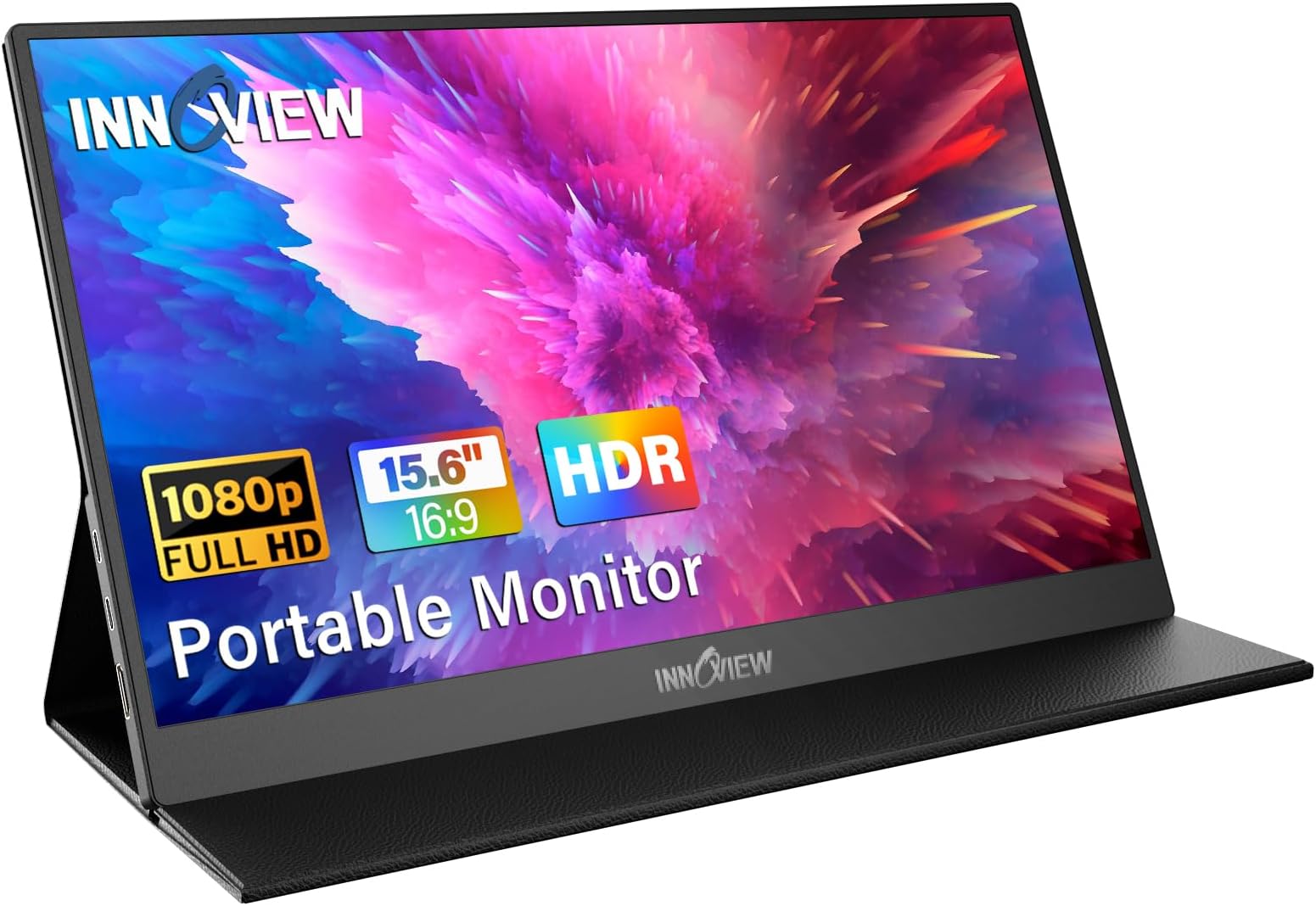
The InnoView Portable Monitor is a 15.6-inch Full HD (1920x1080) IPS display featuring HDR and 178° viewing angles, designed for professionals and gamers on the move. It offers dual USB-C and HDMI connectivity with plug-and-play ease, a slim 4mm profile, and a smart PU leather cover that doubles as a stand. Compatible with laptops, MacBooks, phones, tablets, and gaming consoles, it includes built-in speakers and eye-care technology, backed by an 18-month warranty.


| ASIN | B095GG31KX |
| Adaptive Sync | FreeSync |
| Additional Features | 18 Months Warranty, 4MM Ultra Thin, A+ IPS , HDR , 80% sRGB, Multiple Ports & Wide Compatibility, Smart Cover |
| Aspect Ratio | 16:9 |
| Best Sellers Rank | #340 in Electronics ( See Top 100 in Electronics ) #10 in Computer Monitors |
| Brand | InnoView |
| Brightness | 250 Candela |
| Built-In Media | 1x Portable Monitor, 1x full-featured Type-C ports, 1x standard HDMI port |
| Color | Black |
| Color Gamut | 80 |
| Compatible Devices | Desktop |
| Connectivity Technology | HDMI |
| Contrast Ratio | 1200:1 |
| Customer Reviews | 4.4 out of 5 stars 5,780 Reviews |
| Display Resolution Maximum | 1920 x 1080 |
| Display Technology | LCD |
| Display Type | LCD |
| Hardware Connectivity | HDMI |
| Has Color Screen | Yes |
| Image Contrast Ratio | 1200:1 |
| Item Dimensions D x W x H | 0.26"D x 13.99"W x 8.7"H |
| Item Weight | 2.65 Pounds |
| Manufacturer | InnoView |
| Model Name | INVPM406Black |
| Model Number | INVPM406 |
| Mounting Type | Desk Mount |
| Native Resolution | 1920x1080 |
| Number of Component Outputs | 1 |
| Picture Quality Enhancement Technology | HDR |
| Power Consumption | 18 Watts |
| Refresh Rate | 60 Hz |
| Resolution | FHD 1080p |
| Response Time | 3 Milliseconds |
| Screen Finish | Matte |
| Screen Size | 15.6 Inches |
| Screen Surface Description | Matte |
| Shape | Rectangular |
| Specific Uses For Product | Business |
| Total Number of HDMI Ports | 1 |
| Total USB 3.0 Ports | 1 |
| Total Usb Ports | 2 |
| UPC | 797032826196 784619878143 |
| Unit Count | 1.0 Count |
| Viewing Angle | 178 Degrees |
| Voltage | 5 Volts |
| Warranty Description | 18 Month Warranty |
| Warranty Type | 12 Months Manufacturer Warranty |
T**E
Impressed with quality, size, and clarity.
At first I wasn’t sure how it would be given the size of monitors I am accustomed to in the office. However, this is the perfect second monitor while traveling. Compact and light. Very clear screen and easy adjustment settings on the side. The only this I would have done differently is to purchase the touch screen model. I will do that next time. It was super simple to setup and connect. Allows me to be more productive with a second screen.
I**A
The screen is lightweight
This is an excellent product. The screen is lightweight and easy to carry with you. It is very sharp in terms of color and brightness; I like it a lot because it’s portable and very useful for work. Highly recommended
G**G
This is the one to buy.
I tested many of these, and I have to say that this one is absolutely perfect because you don't need a mini adapter for HDMI. It's a full HDMI. You could just go stick a Fire Stick in there and not worry that you have the adapter or it's hanging off the edge. For example, it's ready to use. It can be powered by the device if necessary, with limited functionality, but still, like off your cell phone. But with full functionality, you could probably power it With a power bank of any size, and the quality of the screen is awesome. It's thin, it wraps into its own case, which you can use as a stand at two different levels. The speakers are decent, but considering everything else is awesome, it won't matter. It's got 120 hertz coverage, v-sync, and it has HDR at 1080p. You can't go wrong for the price compared to all the others.
K**V
Great portable monitor. Case optional would be nice.
I have two iterations of this portable monitor, one where the monitor is not attached to the case in any way, and this one, in which it's glued. both have their issues depending on how you want to use it. How about some velcro instead of permanent glue to make the case attachment optional? Regardless, overall, this little monitor works well, has sufficient resolution for most use cases, and is super convenient.
D**J
Great monitor
Works great! I purchased a lap desk wi Th extra monitor holder and this is the perfect size. Easy to connect and portable.
M**L
Second purchase.
Quality build, the stand is very versatile it works as a cover.doesn't draw too much power for my laptop. Only a little added weight but well worth the convenience. Good color representation. This is actually the second one I bought.
J**H
i wanted to love it..........
I needed a travel monitor to help make a chore that I do for work a little easier while I was away from home with my dual monitor setup. The work I do is mostly in databases, so not graphical (photographer, graphics artist, etc.) So, I'll say up front that it was a purchase that I kind of just needed in a pinch and the image quality just needed to be satisfactory, not stellar. I will also give a nod to the fact that this was only about $85. If I had spent any more than that, I would have returned it... Kind of wishing I had anyway now. While I gave the monitor some leeway in my statements so far, I do want to say that I've worked in IT for over 30 years now and I am also a huge photography nerd. I do know what a great monitor looks like and the importance of color management. I lowered my expectations considerably prior to making this purchase, and it still disappointed me. My issue with it is that the colors aren't just "off", they are wayyyyyy off. Attempts to make it better in the monitor's configuration are lackluster at best. I can occasionally fumble my way into making it look "ok" (which was my initial objective) but I will come in the next day and it looks horrible again. There does not seem to be any rhyme or reason on what it takes to get it back to looking "ok". The menu system for the monitor is pretty typical... It's a little annoying because the wheel that you push in to make a selection has a pointy place on it for traction, but it is actually a little painful to operate because it "stabs" you in your index finger.... after dozens of clicks trying to find whatever combination of settings it is going to like each time, your finger is a little raw, so that only makes the experience even more frustrating. Back to the settings though. Out of the box, the picture is bad.... really bad. When trying to improve it, It will do weird things like... if I've made adjustments and the display is too dark, I'll then go to the Brightness setting (which I have already pushed to the max of "100") and I will click it anyway like I'm going to adjust it and, magically, the screen gets brighter even though it is already at 100 and I didn't actually attempt to make an adjustment... I just go into it like I am going to do so. The colors/tone... again, without any apparent logical reason, are next to impossible to get trued up. By trued up, I just mean "pretty close to what they should look like". Sometimes adjusting Tone will get it there, sometimes not. Sometimes adjusting the individual R G B values will get it close, sometimes not. Sometimes enabling/disabling the HDR setting will help, sometimes not. Sometimes (like now which caused me to come write this review!) it doesn't seem to matter what I do... it just won't get there. If/when I do get it to the point where it's tolerable for things like email, it doesn't last. A reboot of the laptop it is tied to (a Macbook Pro) will cause it to revert back to "unusable" and I have to go through the same process again. Physically powering the monitor off causes it to reset too. Sometimes it resets for no obvious reason. I searched on their website to see if maybe there was a firmware update that might straighten some of this out, but there didn't appear to be. It does have a vibe to it that there's some buggy firmware... Adjusting the contrast up actually washes out the image... which is just wrong. Maybe mine has an issue and it isn't reflective of the monitor in general but if you need this for graphical work, I'd absolutely keep shopping. If you need it for general text based work, I'd probably still suggest either paying a bit more for a name brand or perhaps rolling the dice and trying one of the other budget options from another vendor.
N**E
Best monitor for a fair price!!
Okay this is by far the best thing I’ve ordered for myself me and my friends always have movie nights on Discord and sometimes I find it VERY hard to see the movies on such a tiny screen plus I can hook my game systems up to this! and game comfortably when at a family’s house without having to worry about trying to use a TV. With this i don’t need to worry about waiting to game now me and my nephew can both game happily together 🥰💕 he has the TV and I have my monitor and the size??!, 😍 love how big it is! Tho I wish the sound was a tad bit louder so I could here be warned it’s not as loud as it sounds in this clip of mines. I have my speakers hooked up to it for surround sounding. The brightness could be a tad bit better but not an issue for me at all now that I have adjusted the colors it looks so much more bright and not dull. Overall besides the sound not being loud and brightness i absolutely LOVE THIS! 5 ⭐️’s!!
L**N
Good buy
Easy to use, light and i like the folable stand design
う**め
電源ONにクセがある
2023/10/31追記 TYPE-C接続便利なんだけど、ゲームの音は鳴るのにYouTubeの音はなぜか鳴らない。ゲームの音が鳴るから何かしらの解決方法ありそうだけど、現状謎なので困ってる。 プロジェクターとかHDMI変換しないと繋がらなかったSwitchがケーブル1本で繋がって表示出来るのが楽。車の後部座席用タブレットホルダーが13インチ対応だったから設置の仕方考えないとと思ってたら、15インチのこのモニターが13インチのホルダーにはまったから、タブレットみたいに手を伸ばしてタッチして操作たのが、SwitchやFire TV stickでYouTube見られるようになったから、手が届かなくても操作出来るようになったのが子供にとっては〇。 電源ボタン押しても電源入らなかったり、ケーブル繋いだだけで入ったり、ケーブル繋いでも入らなかったり、電源入るまでの動作がどうも一定しないし分かりにくいので子供が画面点かないとよく困ってるのは×。 音はFMラジオ音質で満足な自分でもちょっと悪いなと思ってしまう程度。
り**ん
Switchのモニターとして
Switchのモニターとして購入。 ドックを使ってHDMI接続すれば画質がマシになります。 type-c接続はオススメしません。ぼやけてしまいます。 音割れしたり、最低限のスピーカーなので、イヤホンか別途スピーカー推奨です。 14000円で購入。
P**Y
Monitor is fine...Samsung DeX is not.
The monitor was clear and bright. but the DeX interface with my Samsung Galaxy S22 is a disaster. Can't scroll or tab on many screens, or move to next object. It was unworkable for me, so using a remote monitor and keyboard is out. Using a laptop instead.
M**4
使いやすい
全体的に高評価でした。モニター本体に着いているカバーがあれば、どこでも立てて使うことが出来ますし、全体を覆うタイプのカバーなので持ち運ぶ際にも汚れをあまり気にしなくていいのも高評価です。モニターの明るさや色設定に関しても細かいところまで設定できるのでこだわりがある人は嬉しいと思いました。また付属品のケーブルも種類がある上にしっかりとした固めのケーブルで安心して使えます。
Trustpilot
1 week ago
1 week ago