🔍 Secure Your Space, Anytime, Anywhere!
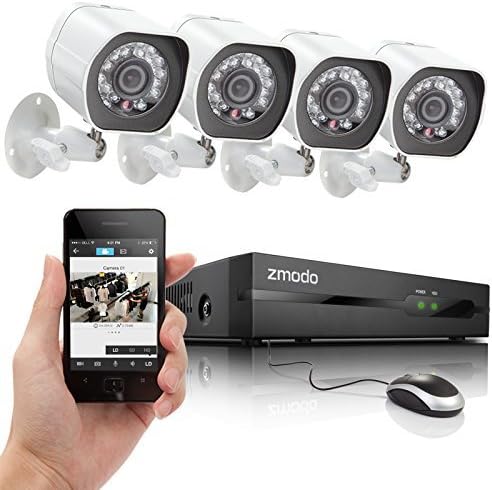
The Zmodo 4 Channel SPOE NVR system includes four 720p HD cameras with advanced sPoE technology for easy installation. It features night vision up to 65 feet, a user-friendly mobile app for remote monitoring, and intelligent recording capabilities to optimize storage.
R**H
Terrible, but not really
This is a mixed review, I have bought and installed this system as well as several other systems. I run an IT consulting firm and we install security systems for our customers.S E T U P:Everything works plugged in out of the box, you could wire it and plug it in and it will just work, however if you want to secure it, and access it via web browser from outside of your home you are going to need to know how to forward ports, and chances are you are going to need to use a port other than port 80. Also you will need to change the passwords on all of the cameras (through a web browser) and set their password as well as change the password on the DVD box. I suggest that you make this a very complex password because it will be accessible from the internet and there is NO security preventing someone from brute forcing until they have the password.A C C E S S:D V R I n t e r f a c e: In my opinion this is only useful if you have the camera feeds up. Navigating the menus and reviewing saved video is a frustrating waste of time.I n t e r n e t B r o w s e r: Terrible! I am an IT Professional and it took me about an hour to figure out that I needed to go back to IE8 in compatibility mode to get into the system. It is a shame because the best way to view the events is through the web browser, you just select a day and hit search and view the events one by one. Unfortunately I have one computer out of 4 that can actually log into them without instantly crashing. My favorite parts is how it says "operate successed" when you send a command to the camera, if you out source your coding you get what you pay for I guess.P C: The other option is a PC program that they have called Zviewer is located on their downloads page not on the zviewer page on the zmodo website (Which only has smartphone downloads) which does access the cameras and DVR box and also allows you to review the files but this is just as clunky as using the DVR interface. This program is so terrible that you cannot even drag it to your second monitor, you can only minimize or maximize it! You can also choose to save the video locally on your pc, but so far I have not gotten it to work reliably and it saves the files in a proprietary format so you need to download their "zplayer" to view them, LOL. It is so terrible I seriously do not even know why they bother. However, if you connect the cameras directly into it (and not through the dvr system) you can adjust the network and video settings of the cameras and set the passwords.I P h o n e A p p: This was surprisingly easy to setup and does work well for viewing the live feed, but you cannot review any of the saved videos.C A M E R A SI n s t a l l a t i o n: The cameras are smaller than I was expecting and seem very sturdy and weatherproof. They are powered by the network cables So you only have to run 1 cable to the cameras which is nice, but it means that you are stuck with that infernal DVR system if nothing else but to power the cameras. The cables provided are not cat5 cables, there are only 4 wires in them, but this did not matter to me because I needed to run my own cables anyway, but if you are stuck with them be careful because they will not survive a lot of pulling or bending.D a y t i m e: Overall they perform well, the cameras sometimes get a little washed out during certain times of the day, it is almost like they need to reach a certain threshold to reduce/increase their brightness or switch in and out of night vision and that threshold is behind what would produce a decent picture. This means that during times of transition the cameras are going to be too dark or washed out for a period of time.N i g h t t i m e: At night these cameras have the best night vision I have ever seen. It is very clear and if you have a street light to help it out you can see everything. I can see across my street and into my neighbors back yards at night which is over 50-60 feet away.Overall this is a good system for the price, but they NEED to do SOMETHING about the terrible video reviewing capabilities. Even if I have something that I want to save I have no way of getting that file off of the dvr box and into a format that any computer can play (without zviewer, lol). If you buy a third party program that will allow this to me managed from a PC or server then you can get the benefits of the great cameras without the hassle of the painful DVR box's many useless interfaces.
I**D
Do not reboot the cameras at night or the images will become blurry.
UPGRADING THE RATING OF THIS PRODUCT To 4 Stars (August 12, 2014)Ok, quick update; the image quality and camera field of view of this system is very good, overall system performance is very good also. Per Zmodo product manual recommendation I installed a high performance 2TB Seagate ST2000VX000 harddrive with this system. At highest image quality settings and 25 frame/second each camera uses about 25 Gigabytes per day disk space. So, that's about 100 Gigabytes/day for 4 cameras or about 18 days of constant recording using BEST CBR quality at 25 frames/second. If image quality is reduced from BEST to Very Good, and change CBR to VBR, and reduce frame rate from 25 to 15, the recording time can be increased about 50% while sacrificing very little on image quality.As far as I know, among all ZMODO products 720p cameras offer the best image quality, even better images than the 960h analog cameras. All things being equal a digital camera seems to have better color detail than an analog camera such as 960h.Unfortunately, if you reboot the cameras in the dark, they will not focus properly and images look blurry until sunrise or a bright flash of light (such as car headlights) shines on the camera and allows the camera to refocus. So I avoid restarting the system at night and fortunately after a few days of tweaking/configuring the system once you adjust the configuration settings to your liking, you won't have to reboot frequently. I hope this problem will be addressed in the future firmware updates...The other downside with this system is that there are 3 different user interfaces that you need to use in order to access all the functions/configuration settings of the system (direct Console offers some functions, but not all, ZVIEWER software has some functions but not others, and finally using Internet Explorer ACTIVE X plugin gives you some other functions (firmware upgrade and browsing video files is easier using AcvtiveX mode). But unfortunately there's not a single user interface that provides all the functions and configuration settings in one place, so you have to switch back and forth using 3 different user interfaces to adjust all system configuration settings and functions.Hopefully in the coming weeks/months ZVIEWER software interface will be upgraded/refined so all system settings can be configured with it. Browsing and downloading previously recorded files through internet explorer interface is much easier than ZVIEWER software. You can see details such as file size, duration information using internet explorer. But, you must use ZVIEWER software to change default recording length or image quality or change frame rate of each channel.==================================================Original Review Below:Do not reboot or power cycle the cameras at night or when it's dark or the image will become blurry/out of focus.I just got this system couple days ago with 2TB Seagate hard disk, and just like another reviewer I found that my cameras become blurry if I reboot them at night! If a bright flash of light shines on the camera (like car headlights) the image restores to normal (or you have to wait till morning for the sun rise). Rebooting the camera or resetting image settings does not help at all once camera becomes blurry.ZMODO please test this problem in your lab/factory and hopefully issue a software fix. I believe during the reboot that takes about 30 seconds, the camera is initializing image settings (white balance, focus, etc...) and during this time the IR lights may not be turned on or it maybe too dim for camera to properly initialize the camera. Whatever the problem, this is very disappointing.Otherwise (as long as you don't reboot the cameras in dark) the images during the day and night are very detailed and clear. The wide viewing angle (2.8mm lens) allows me to see the entire street 180 degrees with just 2 cameras.There's some learning curve with the software, the IP cameras individually have too many configuration settings that are redundant (NTP, etc)Zviewer software can not remotely make all configuration as from the console and the console does not have some of the features as the ZVIEWER software, so you end up going back and forth using both of them.I'm thinking about returning this system and getting the analog 960h version.
C**S
En general bien
Está muy bien en la entrega, el producto llega completo de acuerdo con lo ofrecido por el vendedor, la instalación en tu casa es muy sencilla solo conectas y listo ya tienes imágenes de inmediato, también me gusta que solo con un cable tienes video y corriente en cada cámara, lo que no me gusta es que es muy complicado ver las cámaras fuera de tu casa porque la configuración para el teléfono, tableta o pc no está disponible en español y tienes que buscar tutoriales en internet ya que en la página del fabricante no son claras. Hay que pedir apoyo de tu proveedor de internet, etc para poder ver lo que sucede en tu casa cuando estás en el trabajo o en otro lugar lejos de ella
C**E
Pésimo producto y limitado
Una de las cuatro cámaras venía descompuesta, para visualizar las cámaras debes ingresar a la pagina de zmodo, utiliza flash para funcionar en mac y en windows tecnología muy vieja que solo soporta internet explorer, no puedes conectarte mediante otro visualizador de cámaras que no sea el sitio web de zmodo, en si este producto es malo por las limitantes del fabricante y después de un año se descompuso otra cámara, la verdad no estoy contento con este sistema y el soporte técnico es muy malo; compré este sistema por el tipo de conexión sPOE pues con un sólo cable puedes conectar las cámaras y eso funciona bien, pero insisto las cámaras vienen bloqueadas para que sólo funcionen con el NVR de zmodo.
C**N
antonio
Buen precio,Pros:PrecioIncluye cables UTP para las cámarasFácil de configurar e instalarVisión nocturna dejó de funcionar después de un apagón de energía, esperando que se arregléContras:NO HDMIVISIÓN nocturna POBRENO HAY Notificaciones sms o emailApp móvil básica
W**E
Excellent - as good as the much more expensive lines.
I managed to score this when they dropped the price at Amazon Warehouse for $149 (now $649). Best security deal ever. The cameras are sharp, cover a wide area, and have true colouring daylight. The software for IPad and IPhone works very well and is simple to install. I have our system up and running in a little over hour, all outside, and am very pleased.Further, when I requested instructions for the software, they quickly sent me copy and when one camera failed, they sent a replacement very quickly. Now, I am not a CCTV expert, but I got an excellent system for a wonderful price which also had excellent service from the company...
M**N
Después de 1 año dejó de funcionar
El NVR dejó de funcionar después de un año, a pesar de estar en un cuarto aislado del polvo y calor. Y no solo es eso lo que me molesta, sino que las cámaras no son "estándar", es decir PoE de 48V, sino "sPoE" de19V y solo pueden ser usadas con NVR de su misma marca, por lo que ahora estoy atrapado entre un set nuevo de cámaras o comprar otro NVR de su misma marca...
Trustpilot
1 month ago
1 month ago