🎥 Elevate your smartphone videography—never miss a moment, always look like a pro!
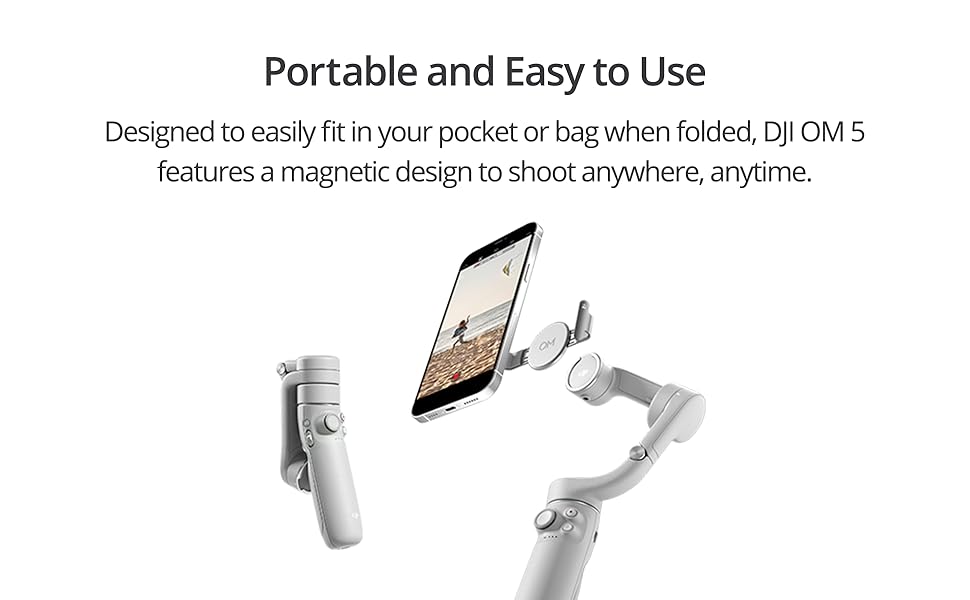
The DJI OM 5 is a lightweight, foldable 3-axis smartphone gimbal stabilizer featuring a built-in 215mm extension rod and magnetic quick-mount system. It offers advanced ActiveTrack 4.0 for smooth subject tracking, AI-driven ShotGuides for creative shooting assistance, and a compact design perfect for on-the-go content creators aiming for professional-quality videos and selfies.


| ASIN | B099ZXD27F |
| Best Sellers Rank | #46,350 in Mobile Phones & Communication Products ( See Top 100 in Mobile Phones & Communication Products ) #145 in Mobile Phone Handheld Gimbals & Stabilisers |
| Item model number | CP.OS.00000167.01 |
| Manufacturer | DJI |
| Product Dimensions | 26.45 x 11.11 x 9.23 cm; 290 g |
S**T
Because Nobody Likes a Shaky Cam!
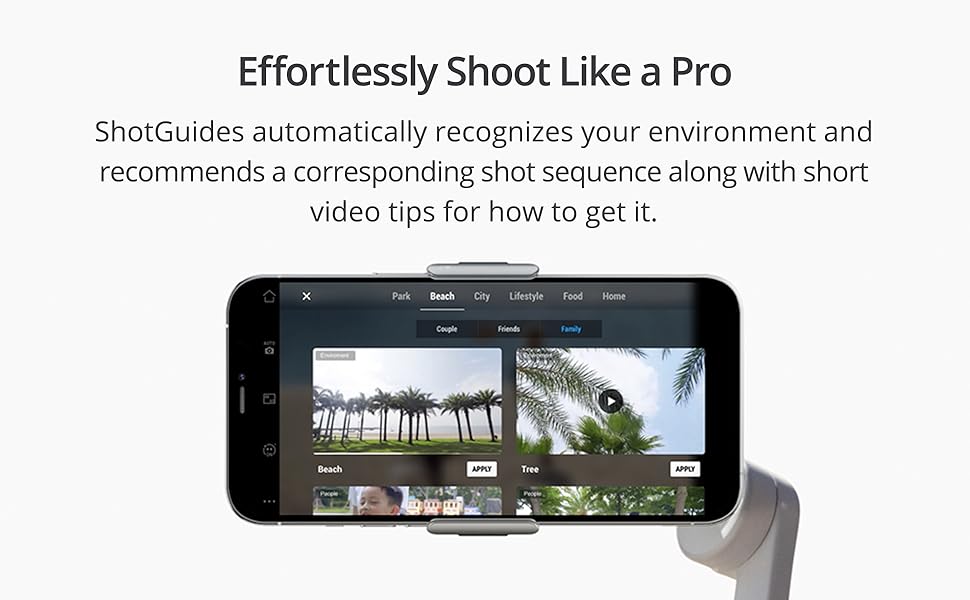
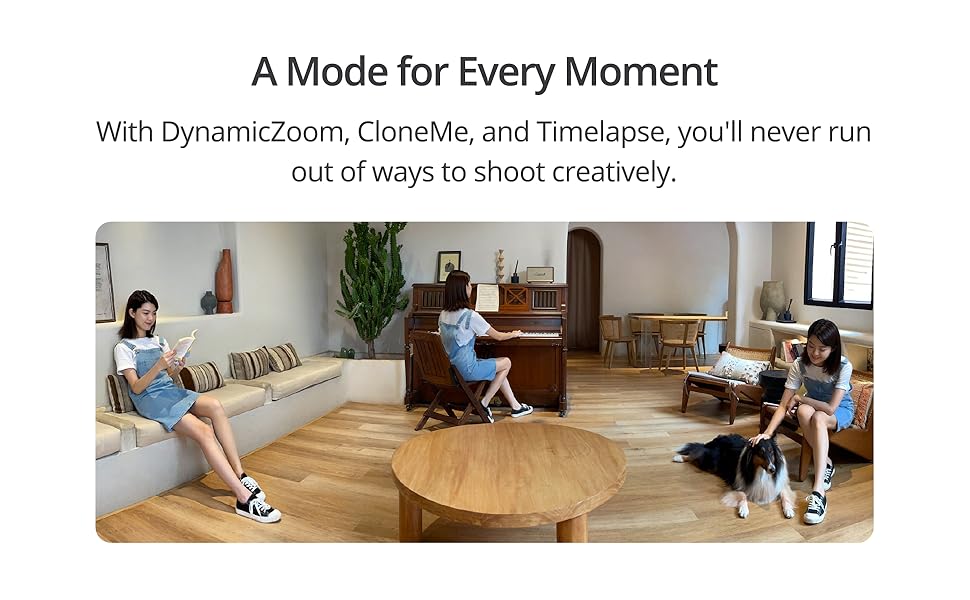
Are you tired of shaky smartphone videos that lack that professional touch? Look no further than the DJI OM 5 smartphone gimbal stabilizer. As a recent purchaser and enthusiast of this groundbreaking device, I'm thrilled to share my comprehensive review, highlighting its exceptional features and why it's a must-have for any aspiring videographer. Horizon Leveling: One of the standout features of the DJI OM 5 is its remarkable horizon leveling capability. Whether shooting in portrait or landscape mode, this gimbal ensures that your footage remains steady and perfectly aligned, delivering cinematic results every time. Button Layout: Controlling your gimbal and camera functions has never been easier, thanks to the thoughtfully designed button layout. With intuitive controls, including a joystick, record, flip, trigger, zoom, and mode buttons, you have complete command over your shooting experience. Active Track: Say goodbye to manually adjusting your shot's framing – the OM 5's Active Track feature automatically tracks and centers your subject, even as you zoom in or out, allowing you to focus on capturing the moment without worrying about composition. App Features: With the companion app, you can access many advanced features and settings. The possibilities for creative expression are endless, from manual control to various shooting modes like hyper-lapse, time-lapse, and slow motion. Magnetic Attachment: Gone are the days of struggling to attach your phone to the gimbal. The OM 5's magnetic attachment system ensures hassle-free setup, accommodating phone cases more effectively than its predecessors. Portability: Designed with convenience in mind, the OM 5 boasts a compact and lightweight build, making it the perfect companion for on-the-go videography. Its ability to fold down to pocket size ensures you'll never miss a shot, no matter where your adventures take you. Extension Rod: Need to capture a broader perspective? The OM 5's extension rod extends the reach of the gimbal, providing additional flexibility and allowing you to experiment with different angles for truly dynamic shots. Shot Guide: For those seeking inspiration, the OM 5's shot guide feature offers valuable suggestions based on the scene, empowering users to create professional-looking videos effortlessly. Filmmaking Mindset: Perhaps the most invaluable aspect of the OM 5 is its ability to cultivate a filmmaking mindset. By encouraging users to think more creatively and intentionally about their shots, this device elevates the quality and style of your videos, transforming amateur footage into cinematic masterpieces. In conclusion, the DJI OM 5 smartphone gimbal stabilizer is a game-changer for smartphone videography. Its innovative features, intuitive design, and unmatched versatility empower users to unleash their creativity and easily capture stunning videos. Whether you're a seasoned filmmaker or an amateur enthusiast, investing in the OM 5 is a decision you won't regret. Elevate your videography experience – upgrade to the DJI OM 5 today.
F**B
excellent
excellent
S**J
Not as expected
Bought it and wanted to shoot a runing video for friend, the video quality is so shaking, not so much difference between using it or just handled by hand, also auto tracking movement is not ao fast, only good for shooting slow ad stable picture, and for this situation my hand is also capable of doing that, so not very useful to me.
P**R
Excellent Buy!
Superb and works well right from the box! Very good quality and build. Superb features!
G**H
Light weight & extendable
Gimbal is light weight, it can be extended which helps us to take selfie videos for vlogging and low level video shoots without much strain. The magnetic holder makes it easy to remove the phone from gimbal to attend calls. A must have gadget if you are a YouTuber or a vlogger.
A**A
Amazing
This is very fun to use, and allows you to take amazing shots. The only downside is that sometimes it’s hard to connect to my iPhone, even if I reset everything (including the gimble).
T**U
Trust Seller & Quality Product
I think fast delivery on this. 100% Good product. We can trust this seller.
A**R
Works ok, but with an external mic attached it develops a resonant wobble
This gimbal works fine, but I wanted to use it with an external mic connected, so there’s a cable connected to the phone. The gimbal is very sensitive to this cable and gets thrown off balance resulting in strong wobbling from side to side. Probably something that could be fixed with a software update, if that’s possible.
D**S
I purchased this for a once in a lifetime holiday to Canada, and don't regret a single penny. It enabled me to produce some really nice and quirky footage, which makes the final result that much more interesting. I did, and I would, recommend that you watch some videos on tips and hints. There are some really good channels on youtube, so worthwhile investing some time watching. It has an excellent build quality. light and comfortable to carry. Easy to setup. Since purchasing mine, a newer model has been released, but I don't believe there is a great difference in functionality. The clip that goes on the phone is magnetic and fits the phone snuggly. The only issue is you have to have it central to the phone so it may or may not interfere with side buttons. The magnetic clip is very powerful and unless you shake it really excessively, has never fallen off. The DJI Mimo software is very reasonable however you have to download it and install (Android) manually as it is not in the playstore. Why? I don't really know. You can use your native cameral software though, but the Mimo does add more options. My only gripe with the software is that your phone connects via bluetooth and when you put it into suspend mode, more often than not it doesn't automatically reconnect. I also had an issue which I reported to the DJI which was to do with the software not correctly identifying the GPS location, so registered a lot of my video being in Russia rather than Canada. They did eventually acknowledge the bug and hopefully by now has been resolved.
C**K
Ik gebruik deze gimbal heel vaak en hij stelt me nooit teleur. Mooie stabiele beelden en de batterij gaat erg lang mee. De uitschuiffunctie is fantastisch!
T**Z
Ich bin restlos begeistert vom DJI OM 5 Smartphone-Gimbal-Stabilisator und möchte meine positive Erfahrung teilen! Dieser Gimbal hat nicht nur meine Erwartungen in Bezug auf Stabilität und Funktionalität erfüllt, sondern bietet auch eine beeindruckende Plattform für kreative Videografie mit dem Smartphone. Die 3-Achsen-Stabilisierung des DJI OM 5 ist schlichtweg brillant. Egal, ob beim Gehen, Laufen oder in Bewegung - der Gimbal gleicht jede Erschütterung und Unregelmäßigkeit aus und liefert so butterweiche Aufnahmen. Das Ergebnis sind professionelle Videos, die sich sehen lassen können. Die Einrichtung und Verbindung mit dem Smartphone ist kinderleicht. Die DJI Mimo App ermöglicht eine intuitive Steuerung und eröffnet eine Vielzahl von Funktionen. Die Smart-Tracking-Technologie ist besonders beeindruckend, da sie es dem Gimbal ermöglicht, sich automatisch auf das gewünschte Motiv auszurichten und es zu verfolgen. Die ausziehbare Teleskopstange des OM 5 bietet zusätzliche Flexibilität bei der Aufnahme. Sie ermöglicht nicht nur Selfie-Aufnahmen in beeindruckender Qualität, sondern eröffnet auch neue Perspektiven für kreative Videoaufnahmen. Die Zoom-Funktion unterstützt dabei, das Bild zu vergrößern und Details hervorzuheben. Die hochwertige Verarbeitung und das ansprechende Design machen den DJI OM 5 zu einem optischen Highlight. Das robuste Material liegt gut in der Hand, und die Bedienungselemente sind gut platziert. Die Möglichkeit, den Gimbal leicht zusammenzuklappen und zu transportieren, macht ihn zu einem idealen Begleiter für unterwegs. Die Akkulaufzeit des DJI OM 5 ist beeindruckend und ermöglicht ausgiebige Aufnahmen ohne Unterbrechung. Die praktische Powerbank-Funktion erlaubt es sogar, das Smartphone unterwegs aufzuladen, was besonders auf längeren Touren von Vorteil ist. Insgesamt kann ich den DJI OM 5 Smartphone-Gimbal-Stabilisator uneingeschränkt empfehlen. Er ist nicht nur ein leistungsfähiges Werkzeug für Videografie-Enthusiasten, sondern auch für alle, die ihre Smartphone-Aufnahmen auf das nächste Level heben möchten. Mit dem DJI OM 5 erlebt man nicht nur Stabilität in Perfektion, sondern auch grenzenlose Kreativität bei der Aufnahme von Videos. Ein absolutes Must-have für alle Smartphone-Filmer!
M**E
This review is after I've owned and used this DJI OM 5 for two months. Several friends have inquired, commented on, congratulated me on picking up this gimbal. What does one call this? A stabilizer, a gimbal, a tripod or selfie stick? It is all-of-the-above, so I just call it a gimbal because it's more than just a stabilizer. Certainly, fewer people know the word gimbal, in casual conversation, but I don't really talk about this sort of thing to people. It catches peoples eye when using, and I just smile as a friendly passer-by and nod. But you know, even for myself, after about two months of use, it still feels like I'm just starting to get used to it. So I don't know what I call it, except a gimbal with a learning curve! Indeed, this was my first gimbal, stabilizer, etc. Before buying, there was no idea how I'd adapt, but I presumed it'd be easy for a few minutes, I'd use it for walking in parks. Yes, and yes. But there are many gotchas, and one doesn't realize it until making a video, reviewing and seeing "whoops". Some "whoops" are mistakes that come from experimental applications, as in a park live stream to youtube, the park has poor cell reception but I didn't think about that until later review, and everything was so low-resolution from the live stream app that I de-listed the video. When walking, in a single video if you go from a very-high (7-8 feet above the ground) to a very-low (1-2 feet above the ground) so you can capture feet walking, depending on the way you do it, the gimbal MIGHT flip the camera, in a way that the video viewers are watching is upside down (this, if done by a 180-degree tilt/roll), or it may work perfectly well (this, if done by a 180-degree pitch adjustment). The pitch adjustment has definite limits on extremes, and if you click the trigger twice to reset the camera orientation to "home", depending on a pitch position relative to gravity, the camera may be pointing diagonally upward toward sky or downward toward ground, rather than straight forward. Stuff like this, and there are many more examples, take a lot of learning and experimenting. It's all good though, and I have used this to create videos for business and pleasure. One of the best features is the built-in learning library, tutorials baked into the app. I must say that is one direct path to a 5-star review, and without that I'd definitely be some ways back on this learning curve. I really enjoy this, worth the money.
T**O
Muito bom para efeitos em vídeos, estabilidade perfeita
Trustpilot
1 day ago
3 weeks ago