Buy anything from 5,000+ international stores. One checkout price. No surprise fees. Join 2M+ shoppers on Desertcart.
Desertcart purchases this item on your behalf and handles shipping, customs, and support to Vanuatu.
๐ Scan smarter, translate faster, and lead the knowledge game!
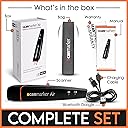
The Scanmarker Air is a compact, Bluetooth-enabled pen scanner delivering 300 dpi OCR accuracy and supporting over 140 languages. Designed for busy students, professionals, and those with reading challenges, it instantly transfers scanned text to your device with real-time text-to-speech functionality. Compatible across Mac, Windows, iOS, and Android, it offers unmatched portability at just 27 grams, backed by free software updates, 24/7 support, and a 1-year warranty.


| ASIN | B01N07J2AE |
| Customer Reviews | 3.9 out of 5 stars 4,436 Reviews |
| Global Trade Identification Number | 00798304391268 |
| Item Weight | 0.06 Pounds |
| Standard Sheet Capacity | 1 |
| UPC | 798304391268 |
H**S
Reliable, targeted product.
I'm an academic and this is a great device. Caveat: when I got mine, it would not stay connected to my computer. I filed a request for assistance on their web page (as per instructions) and they got back to me within a few hours. We set up a phone appointment, and in less than 10 minutes they corrected the problem, and I've had zero difficulties since. Now, with that caveat, here is my review: this is a very targeted device. It has one primary job, and it does it splendidly. That job is to copy text from the book or paper you are reading (or from a Kindle: it works flawlessly with kindle paperwhite reader) from the page, into your notes. It will scan into Scrivener, into Word, into Pages, into plain text. It does so quickly and accurately and reliably. Why would you pay to have that done? Why not just type the quotes in yourself? Well, you could, but this is so much faster and more accurate. And when you are doing initial research on a project, your first weeks involve little more gathering quotes and possible notes from others. You can spend an entire day in the library doing nothing but collecting relevant snippets for your paper, and during those long hours, this device is a godsend. You get so much more done in so much less time. You scan in your quote (maybe even a paragraph or two) in no more time than it would take you to highlight it. Then type in your comments and cross-references and the whole thing is already sitting in your notes, and so what, in earlier days would have been your highlights and your marginalia are suddenly already filed away and they are both searchable text-- so you can actually find that quote again when you need it. Brilliant. Especially if you are working with library texts that you cannot highlight, this is great. Pros: speed, accuracy, battery life, workload reduction, faster research and writing: all plus plus plus. The only con, and it's a reach: This is not a device for older texts-- I am thinking here of anything 18th century or before--even some 19th century. Like any OCR scanner, the software simply cannot read the older fonts. Additionally, you should be aware that the pen lights up strongly as it scans and transfers text, so any text the library will not let you photograph with a flash will not be available for use with this pen either. Also, this is a text only device. It will not scan formulae or images. But even with that sort of very limited limit, this thing is worth its weight in gold to any academic or student. I've a dear young man in my life who is headed off to university this year, and I will absolutely be purchasing a second one of these to send with him. I don't doubt he'll put some miles on the thing.
D**D
Invaluable tool for a PhD candidate
This Scanmarker is just phenomenal. Setting up the device on windows is simple (you have to use the dongle provided not bluetooth) and using the device with apps like Microsoft Word is even simpler. It holds a charge well (a few days depending on the amount of use), and I use my Scanmarker regularly when doing research and writing my literature review for my PhD dissertation. It makes note taking from hardcopy books/articles very easy and time efficient. The device is also compatible with Android and iOS devices; whereby, it connects via bluetooth and not the dongle (like on windows). It allows to you to skip a line or create a space when scanning, a very innovative and convenient feature. It does require a little bit of technique to use, but you get the hang of it quite easily. If there are any errors when scanning, you can always re-scan the particular line or sentence (or edit the text). I love the fact that you can almost instantaneously see what you are scanning appear on the screen as "editable" text. It scans directly onto Microsoft word as text that can be edited. The device can also detect text in other languages and scan those as well. The support from the manufacturer this exceptional, they provide speedy responses and feedback. Overall, this is in indispensable and invaluable device for any research-oriented professional or student.
H**Z
Don't Use for Japanese Text!
I bought this product specifically to scan Japanese text and translate to English. I already knew from experience with other devices that most have a problem with translating Japanese to English for some reason but I thought this one would be different based on the reviews I read here on Amazon. I figured as long as this Scanmarker Air didn't use Google Translate there was hope that it might give a good translation. That hope was short-lived as I removed the product from the shipping package and the first thing I spotted on the back of the box was the Google Translate icon. I immediately assumed I spent over $100 on another "Google Play Store app wrapped in plastic". Still, I had to go through the motions just to confirm my fears... After a couple hours practicing just holding the scanner (I was about to trash the device just because it kept telling me my scan attempts were not smooth, too slow, etc.) I thought I finally got the hang of it. I was scanning English text from books, research papers, etc. for practice and it worked fine in that regard. It worked great scanning English from books to MS Word, Excel, etc. My next test was trying to scan regular horizontal Japanese text and translate to English. I tested on a few book titles, paragraph sentences, both single words and single line of text. Both tests failed. I got nothing but garbled gibberish... I tested some of my vertical text Japanese books and in this test I got gibberish + odd symbols. I tried horizontal Japanese text from a document published this year but instead of translating, I just scanned the Japanese text it produced to Word then copy/pasted the scanned text into other online translation apps (Yes, Google Translate too) and got the same results... gibberish that made no sense what-so-ever. I don't know if this product bases its translations from the Google Translate database but when will someone on this earth come up with a half-descent Japanese to English translator? Until there is an answer to this question, I will just have to continue relying on my poor wife (who's Japanese) to translate Japanese for me until I become fluent. It is not a total loss, I am a researcher and so I think I may still hold on to this product for note scanning (from English text) however, I would NOT recommend this product to anyone that hopes to use this to translate lines for Japanese text (horizontal and vertical) from literature.
J**R
Good product - does the job.
On the whole, this scanner is about as good as you can get for its price range. Its reading accuracy is superb as long as it is used intelligently and with an eye to its limitations. Limitation 1 - I simply cannot get a good scan without using a ruler or straight edge to keep it straight. The product guidelines say that the software self corrects for small wavers in freehand scanning but if you are scanning books, as I do, rather than a flat sheet of paper, ... well, you will have to re-scan or correct it manually. So... use a ruler. I use a drafter's triangle which has a conveniently placed handle to hole in place. Works like a charm and a very high scan accuracy except for limitation 2. Limitation 2 - Words that curve into the fold. This scanner is very sensitive to the speed of the scan as well as the flatness of the page. When scanning lines in a book, as you approach the margin near the fold the scanner tends to slip and you get deformed text or graphic. If you slow down as you approach the end of the line it can also give you an error message and just simply not pick up the words. If you recognize its limits, then this product does well. I use it a fair amount and the only real pain for me is the second limitation. I can't afford one of those big whole page scanners so this one will remain my staple.
J**B
Works for simple text; not so good on complex text
I purchased this unit in order to "highlight" quotes from various printed academic sources, scanning directly into Word. Positives: ยปยป Scanning is accurate for simple, well-spaced text ยปยป Unit is light-weight and easy to hold ยปยป There is a protective capt that covers the plastic tip ยปยป Scanning speed is very fast ยปยป It's wireless (using a dongle on my Windows 10 system) Negatives: ยปยป It's difficult to scan the left-hand pages of smaller books that tend to have narrow margins. I have to switch to left-hand scanning (using the settings dialog), and then either scan with my left hand or turn the book upside down to scan with my right hand. Awkward either way. Also, right-to-left scanning is noticeably less accurate than left-to-right scanning. ยปยป Although the scans of larger simple text are relatively accurate, the unit fails completely when trying to scan words with "foreign" characters. For example, "Thรฉrรจse of Lisieux" is scanned as "Therese of Lisieux" -- perhaps adequate for casual use but unacceptable for academic use. ยปยป As I'm a relatively fast typist, I find it takes longer to get an accurate rendition using the scanner than it does to simply type the text. That's because the scan time includes (1) time to get the scan pen reconnected to Bluetooth, (2) scan the text, (3) proof-read the text, and (4) edit the text character by character. ยปยป When source lines are closely spaced, it's difficult to keep the scanning tip on just one line, leading to transcription errors. Bottom line: It's a good solution for casual scanning of printed sources with good spacing between the lines and with larger type. But for serious (academic) use, it falls far short of expectations. I will be returning it.
F**K
Save time creating notes and outlines!
Just finished highlighting the key points from a whole chapter in the book I'm reading. Overall, I am very happy with this product - will make note taking much easier. It was also very easy to share it once I was done with the document (I uploaded it to my Dropbox directly from the app). I am using it with my Samsung Galaxy 6(Android), and it was working within 5 min of trying to get it setup. Very easy to use. I tried setting it up with an older Android tablet, but the app was not compatible (something to be aware of if you have an older Android!). Things to get used to: - I noticed that it seems to scan best when you try to be smooth and scan faster rather than slower (as the tips suggest). But when you get the technique down, it really does a nice job recognizing the correct letters. - I sometimes noticed the first or last words being left out of lines that I scanned. Apparently I need to scan a few spaces in front of the line, then keep going past the last word in the line a little too. - It doesn't scan apostrophes very well (it usually just leaves them out) - When a line ends in a hyphen (to designate the middle of a word), it usually just puts a space between the first half of the word and the second half of the word (requiring you to go back manually and delete that space). - There is a limit to how big of font it will scan (then it just starts to scans in a funny way). Some chapter titles were hard to scan, but you won't have problems with normal text. A possible area of improvement (it'd be great if the developer notes this!): - As another reviewer noted, it would be really nice if they updated the app so that if you don't like the line you just scanned, with the press of a button it would allow you to delete it and try again. As of right now, it is a pain in the butt to delete the whole line (either hold down backspace for 100 characters until it is deleted, or highlight with your fingers the words you want deleted - either way it just takes way too long)
B**.
Great scanner pen with great customer support.
I'm a writer who has been using the Scanmarker Air Pen Scanner to scan key quotes and passages from books and articles without having to transfer handwritten notes or constantly page through source material to locate highlights. It's very easy to use - and provided you follow a smooth line along the text as the instructions note, it's very accurate. The only time I've had any real issues has been when I've haphazardly tried to highlight and zig-zagged along the lines. It works easily with an app on my phone or via the desktop software so that scanning directly to documents where I save this content is easy. The customer support is also very strong - live human beings who care about the product and who replied when I had initial questions about its use via the app vs. desktop. Overall, I gave it a high rating because it does what it is supposed to do - accurately capture text for use in one's work. Very much a timesaver.
A**N
incredible customer service
5-9-2024 In 2018 I purchased a Scanmarker Air pen scanner. Very glad I did. Used it frequently until my circumstances changed and I had to store away my computer toys for several years. Recently I tried to use the Scanmarker and could not get it to perform as desired. After several emails to/from customer service, I came to realize the problem is with me: Essential steps had been forgotten. Long story short: I received a surprise very lengthy phone call from the owner of Scanmarker who patiently got my case straightened out. I also learned the company is based in the Middle East and that is where their call originated. Never heard of any customer service willing to go this distance to help. As we all know, In the last few years, customer service just about everywhere, has slid downhill so fast that it seems unlikely it will ever be what it once was. This is one company that shines above the rest. Fabulous service and without it, I still would be unable to scan as intended. Oddly, I could not find adequate video or other online instruction to solve my concerns. Finally, I was assured if any further problems, I am always welcomed to reach out again. Scanmarker earned ten stars from this satisfied USA customer!
Trustpilot
2 months ago
3 weeks ago