

Buy anything from 5,000+ international stores. One checkout price. No surprise fees. Join 2M+ shoppers on Desertcart.
Desertcart purchases this item on your behalf and handles shipping, customs, and support to Vanuatu.
๐ Elevate your workspace Wi-Fi game with TP-Link EAP610 โ where speed meets smart control!
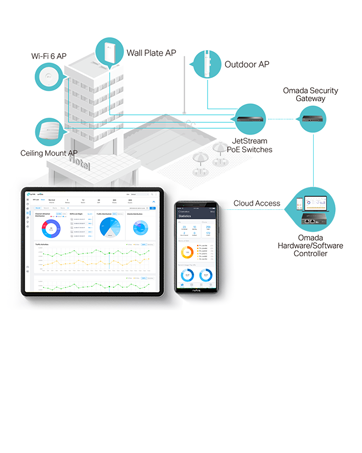
The TP-Link EAP610 is a high-performance Wi-Fi 6 AX1800 dual-band access point designed for professional environments. Featuring 4 spatial streams, OFDMA, MU-MIMO, and seamless roaming, it delivers ultra-fast wireless speeds up to 1800 Mbps. Integrated with Omada SDN and cloud management via the Omada app, it offers centralized, remote network control. PoE+ support simplifies installation, while advanced security protocols like WPA3 ensure enterprise-grade protection. Ideal for businesses seeking reliable, scalable, and easy-to-manage Wi-Fi coverage.




| ASIN | B09G5H4XS2 |
| Antenna Location | Home |
| Antenna Type | Fixed |
| Best Sellers Rank | #4 in Computer Networking Wireless Access Points |
| Brand | TP-Link |
| Built-In Media | EAP610 |
| Color | PVC |
| Compatible Devices | Personal Computer |
| Connectivity Protocol | Ethernet, Wi-Fi 6 |
| Connectivity Technology | Ethernet |
| Control Method | App |
| Controller Type | Switch |
| Coverage | Mesh WiFi coverage |
| Customer Reviews | 4.5 4.5 out of 5 stars (210) |
| Data Transfer Rate | 1800 Megabits Per Second |
| Frequency | 5 GHz |
| Frequency Band Class | Dual-Band |
| Has Internet Connectivity | Yes |
| Is Modem Compatible | No |
| Item Dimensions L x W x H | 9.57"L x 9.57"W x 2.52"H |
| Item Type Name | Access Point |
| Item Weight | 0.68 Kilograms |
| LAN Port Bandwidth | 1000 Mbps |
| Manufacturer | TP-Link |
| Maximum Upstream Data Transfer Rate | 1201 Megabits Per Second |
| Mfr Part Number | EAP610 |
| Model Name | EAP610 |
| Model Number | EAP610 |
| Number of Antennas | 4 |
| Operating System | Omada OS |
| Other Special Features of the Product | Access Point Mode, WPS |
| RAM Memory Installed | 128 MB |
| Router Network Type | wireless |
| Security Protocol | WPA3 |
| UPC | 840030703614 |
| Warranty Description | Limited Lifetimw Waranty |
| Wireless Compability | 802.11ax |
T**S
Best Access Point I've paid for
The access point comes with wall mount easy to install supports POE {Power Over Ethernet} but does come with a power brick shortttt cable like welp better have a POE device because the cable is only long enough to be waste high i'm 6ft 2" so yeahhhhhhhhhh luckily i have a POE switch by Araknis overall power brick needs to be longer Tech Support even though the company is not US based SUPPPER NICE for me Wifi Signal has it all and oddly lol 6GHz yeah this router has 2.4GHz, 5GHz, and 6GHz wifi is strong and solid doesn't fail USER INTERFACE i'll simply laugh at that as most people doing this BETTTTTERRRR UNDERSTAND NETWORKING because if your have no clue what IPVSEC or ipv6 or vlan and much more then don't waste your money THIS IS NOT PLUG AND PLAY I'm not afraid to say this about myself ZERO NETWORKING DEGREE or knowledge before entering hell my knowledge is mostly codding and script development so when coming into this i was waaaaayyyyy over my head because not only did i buy this access point i got the tp-link switch and vpn router as well as the controller i went with the whole wham bammm welcome to networking situation All of tp links stuff can be used in "standalone" meaning you dont need everything to make one thing to work but even then it's a hassle 5 weeks i finally figured out the vpn router by tp link 1 day with the switch it's a switch give it internet and thats it (There's more to it but simply no configuration needed with switches in depth you can designate a whole side or some ports limit such and so on) 9 weeks yes 9 weeks to understand the wifi access point again me no clue what i'm doing but did this so can anyone do it yes was it EASY heck no can say and know that if i go into networking school i basically understand it all the controller controls everything! makes it easy but man oh man i do understand networking now ahhaah
M**M
Works perfect in my detached garage
I wanted internet access in my detached garage that's ~75 feet from my house so I can have things like security cameras and Wi-Fi operated garage door openers. I buried cat6 cable and connected it in the garage to the EAP610 mounted on the ceiling. Wi-Fi signal is strong and fast. Running an Xfinity Gig speed 1 gb/s plan, I'm seeing over 700 Mb/s in my garage and I have strong Wi-Fi coverage in most of my backyard now. Very happy with this access point for the price.
J**N
Does the job. Mounting Options Could be Improved
I live in a small home with wifi-eating metal-mesh-backed plaster walls - about 1800 sf including the unairconditioned spaces. I have never been able to get acceptable signal strength more than two rooms away from my wi-fi router. When I've walked around the house with a signal strength checking app on my phone, I've often gotten better signal strength from my neighbors' wi-fi when I'm near windows. I have turned old routers into access points before and hard wired them back to the main router. This has never worked acceptably. Over the holidays I decided to try and fix this problem (while the attic was cool). I upgraded my router to a TP-Link WiFi 6 AX3000 Smart WiFi Router โ 802.11ax Wireless Router, Gigabit Internet Router, Dual Band, OFDMA, MU-MIMO, OneMesh Compatible (Archer AX55) located in a corner of my house and paired it with this access point which I mounted to the ceiling of my living room (central room in the house). It is hard wired back to the router. It has worked flawlessly for more than a month now. I haven't lost signal or needed to reset it. It hands off to and from the main router without problems. I now have a strong signal in every room of my house. Some are still not at the highest strength, but it works well anywhere in my house and throughout my front yard. I did have some challenges mounting the AP to my plaster ceiling. I am a product designer and consider myself pretty handy. I didn't want to use any of the included options and just wanted to screw the mounting plate to the ceiling with some drywall screws. This turned out to be a real chore. If they would just increase the depth of the mounting plate about 1/8" it would be simple. I modified the plastic part with a Dremel and then it was a simple installation. It could also use a more refined way to accept the incoming ethernet cable. These are minor issues. Overall I'm very happy with this AP.
T**W
Very solid unti
WiFi 6 coverage is great
P**A
Very good AP
This AP works very well in my Omada network setup. Range and speed are great. My only gripe with these APs is their size. I believe TPLink has released a new version which is more reasonably sized.
S**E
Great Customer Service
Had issues with product after about 2 years of use. Tech support answered right away and connected me to Ronald. He helped me fast and answered all my questions.
Y**T
This is easy to set up provided you are comfortable in configuring it (as you would a primary router), for example you need to go into the 'router' settings and manually add a password. Being wired, this gives much better wifi coverage than a wireless connection.
Y**N
A great access point
L**Y
๐๐ผ
R**N
I had a deadzone in the guest bedroom in the basement. Installed this access point. I was surprised as to how strong the signal was. When used with PoE (power over ethernet), you do not need to plug it into a wall. Only hard part was phishing the cable and needed to get help with this. This solution is the most reliable and the fastest over the alternative wifi solutions.
S**Y
This is a crazy fast Wi-Fi Access Point from TP-Link! I LOVE IT AND RECOMMEND IT TO ANYONE WITH GIGABIT INTERNET ON A BUDGET! More than doubled my Wi-Fi speeds and my PC got a 1.2Gbps wireless link with the AP! :) I'M SO HAPPY AND CANNOT STOP SMILING! Solved my Wi-Fi problems with this shiny AP! WooHoo!
Trustpilot
1 month ago
4 days ago