We remain fully operational. Our teams are working around the clock to ensure your deliveries continue safely.

DOWNLOAD THE APP


Customer Services
Copyright © 2025 Desertcart Holdings Limited
DOWNLOAD THE APP
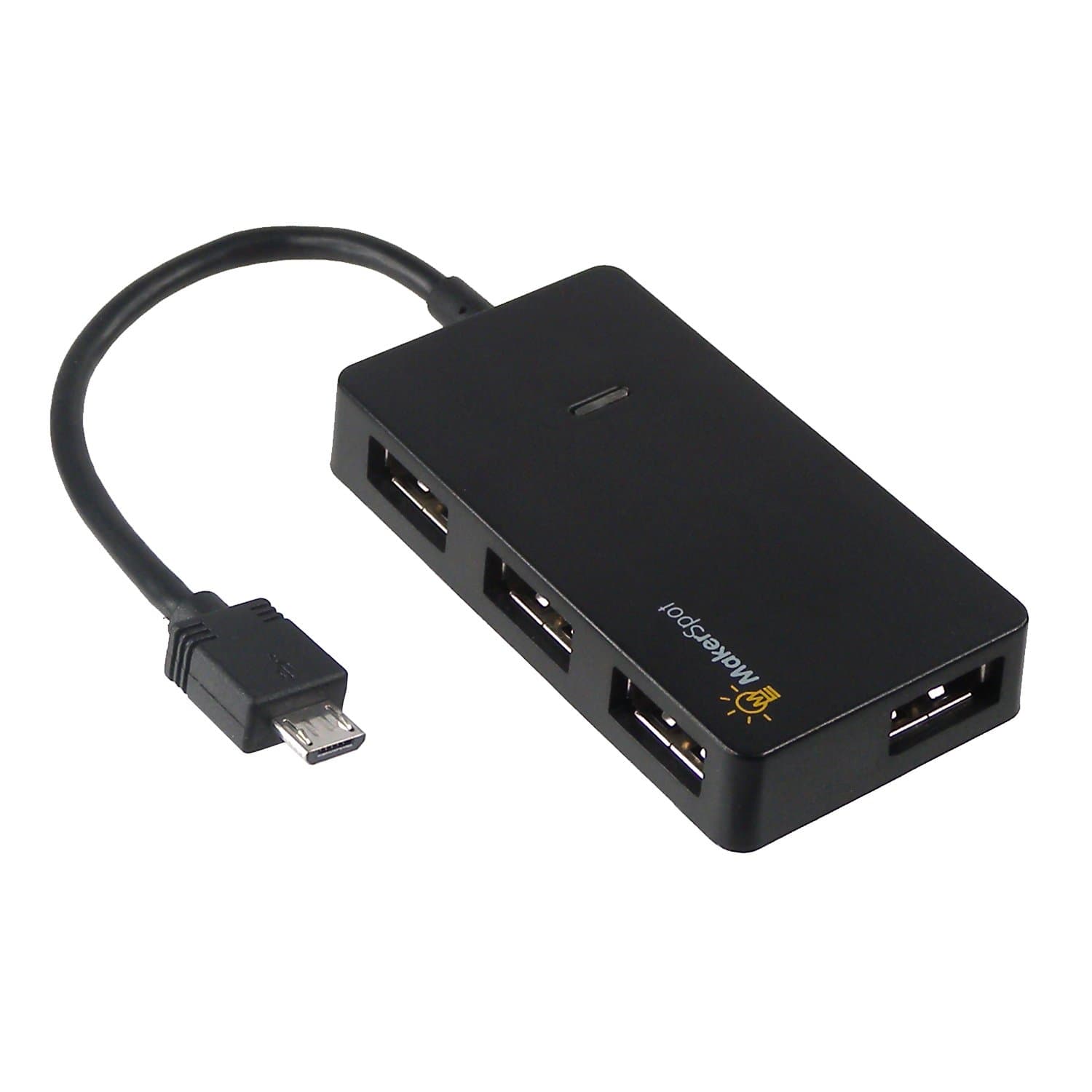
🔗 Unlock your Pi Zero’s full potential with 4x USB power!
The MakerSpot Micro USB OTG Hub transforms your Raspberry Pi Zero and compatible devices by expanding a single micro USB OTG port into 4 high-speed USB 2.0 ports. With plug-and-play ease, no external power needed, and broad compatibility across Android and Linux systems, it’s the sleek, durable solution for professionals seeking seamless multitasking and enhanced connectivity on the go.
| ASIN | B01JL837X8 |
| Additional Features | Play, Plug |
| Best Sellers Rank | #192 in USB Hubs |
| Brand | MakerSpot |
| Color | Black, Silver |
| Compatible Devices | Desktops, Keyboards, Mouse, Printers, Smartphones, Tablets |
| Customer Reviews | 4.6 out of 5 stars 812 Reviews |
| Data Transfer Rate | 480 Megabits Per Second |
| Enclosure Material | Plastic |
| Hardware Interface | Bluetooth, USB, USB 2.0 |
| Item Dimensions L x W x H | 3"L x 2"W x 1"H |
| Item Weight | 0.04 Pounds |
| Manufacturer | MakerSpot |
| Number of Ports | 4 |
| Operating System | Android,Linux |
| Special Feature | Play, Plug |
| Total USB Ports | 4 |
| Total Usb Ports | 4 |
| Unit Count | 1 Count |
S**!
Interesting
What an awesome little gadget. It does everything that I needed, it fits perfectly behind my raspberry pi. So compact, so fast. Self supplied power. Feels durable, connected easily. It was a great price when I found it, works so well. Usb ports galore. Cheers!
E**N
Rpi zero compatible
Only USB 2.0 but works great with rpi zero w2.
R**R
Perfect charging solution for my Peloton
Use case: I wanted a USB-A hub for charging my AirPods and heart rate monitor at my Peloton bike. It took me several months with my Peloton bike (original not Bike+) to realize its tablet has a micro USB port that I could use for charging. I had been charging my AirPods and heart rate monitor at an outlet in a different room and that was sometimes annoying as I would find myself clipped into the bike and only then realize I had left one or both of those devices charging in the other room. So that's where this handy little hub came into the picture. It functions perfectly and I particularly like how thin it is. I was a little worried that whatever hub I got would look bulky or out of place on the aesthetically pleasing Peloton bike but this little guy blends in nicely. With just a tiny piece of double-sided foam tape I had this hub mounted and it's hardly even noticeable. The only minor complaint I have is the red power indicator light inside the hub. The hub's black plastic is translucent so the red light diffuses through. It is somewhat helpful to know the hub is plugged in and receiving power but ultimately unnecessary. I solved this by putting a piece of black electrical tape over the area where the light was shining through the most. This isn't a particularly special piece of hardware but worthy of praise for how well it worked for my needs.
D**L
Great to use with the DE 10 NANO
I would this USB Hub useful with the DE 10 Nano for use in the MiSTer FPGA console. It's small, cheap and fits right into a MiSTer setup. If you flip the plastic guard for the Mister to the bottom of the board, and use longer brass stand offs, you can place the USB Hub on it and hold it down with some double sided tape. Only two downsides, when I try to later pull the USB hub off the plexy I taped it to, the case came apart. Not a huge deal as it just pushed back together, but it was a surprise nonetheless. The other thing is to watch out for is this is a non-powered USB hub, any power hungry devices, or having too many wireless dongles are going to suffer as there only so much power the DE 10 nano can supply with it's stock AC power adapter. If you are experiencing intermittent device failure on your USB devices, ether use fewer devices or switch to a powered USB hub. This is ment for a few low power devices like a keyboard, a wired gamepad and a mouse. I don't find this a fault of the Hub it self, its just that the hub is meant to offer some low power OTG options.
S**S
Plugs in Upside Down
I bought this hub for my Raspberry Pi Zero. I found out, the hard way, that not all USB hubs work with the Raspberry Pi Zero. However, this one works perfectly. It's small, inexpensive and works out-of-the-box. My only annoyance is that if you're using it with a Raspberry Pi Zero, the micro USB plug is upside down. So when you plug it in, the top of the device will be face down on the table, and you'll be looking at the bottom of the hub. You could twist the cord, in order for it to be right-side up, but it's extremely unnatural. The cord is short and the device is light, so twisting it doesn't work very well. The device keeps trying to flip back over. Besides, who wants to twist their cord? Other than the fact that it plugs in upside down, I would easily recommend this hub to anyone who wants to use it with a Raspberry Pi Zero.
S**R
Great for PI Zero 2 W
Using it to connect raspberry Pi to Victron MPPT, and has been working great.
A**X
Does what it’s supposed to do
Works well
G**.
Great value for the money - Works great
I bought this after one reviewer said he used it with his 2nd Gen Fire TV Cube and that's exactly what I needed it for. Well, he was right, it works great, and I couldn't be happier. Don't be put off by the small size when you first take it out of the box. It just makes it easier to move around when you need to add addtional devices. Excellent product at a great price.
Trustpilot
1 month ago
1 month ago