Buy anything from 5,000+ international stores. One checkout price. No surprise fees. Join 2M+ shoppers on Desertcart.
Desertcart purchases this item on your behalf and handles shipping, customs, and support to Vanuatu.
🚀 Elevate your home network — fast, smart, and future-ready Wi-Fi that keeps you connected everywhere.
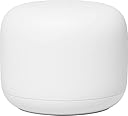
The Google Nest Wifi AC2200 (2nd Gen) is a sleek, dual-band mesh Wi-Fi system designed to deliver fast, reliable internet across up to 1600 sq.ft. It supports up to 200 connected devices and streams multiple 4K videos simultaneously. Featuring WPA3 security, automatic network optimization, and easy app-based management, it also doubles as a smart speaker with Google Assistant integration. Perfect for modern homes seeking seamless coverage and smart home compatibility.
| ASIN | B09NSDHQ8J |
| Antenna Location | Home |
| Antenna Type | Internal |
| Best Sellers Rank | #14,548 in Electronics ( See Top 100 in Electronics ) #144 in Whole Home & Mesh Wi-Fi Systems |
| Brand | |
| Color | Snow |
| Compatible Devices | Personal Computer |
| Connectivity Protocol | Wi-Fi |
| Connectivity Technology | Wi-Fi |
| Control Method | App |
| Controller Type | Google Assistant, Nest |
| Coverage | 1600 sq. ft. |
| Customer Reviews | 4.2 out of 5 stars 230 Reviews |
| Data Transfer Rate | 1200 Megabits Per Second |
| Frequency | 5 GHz |
| Frequency Band Class | Dual-Band |
| Is Modem Compatible | Yes |
| LAN Port Bandwidth | 1200.0 Mbps |
| Manufacturer | |
| Maximum Upstream Data Transfer Rate | 1200 Megabits Per Second |
| Model Name | AC2200 |
| Model Number | AC2200 |
| Number of Ports | 3 |
| Operating System | Google Proprietary OS |
| Other Special Features of the Product | Access Point Mode, WPS |
| Security Protocol | WPA3 |
| Smart Home Compatibility | Smart Home Compatible |
| Special Feature | Access Point Mode, WPS |
| UPC | 697333827611 |
| Wireless Communication Standard | 802.11ac |
| Wireless Compability | 802.11ac |
K**N
Works great, and note that router can be used as either a router or an add-on point
I needed two more add-on points to provide better coverage in my U-shaped brick ranch-style home that has had additions added over the years. Not only is the exterior of the house all brick, but the family room and master bedroom are additions that have bricks on all four walls, thus severely impeding the wifi signals. So I decided to buy a couple more add-on points to supplement the 3-node network I already had (one router plus 2 add-on points). I actually found this two-node set with a router and one point selling for cheaper than I could buy two points, so after verifying that a router can be configured either way, I bought it. If you have the same need, don't hesitate to buy a router instead of a point if it's cheaper. Although one would think it should be more expensive, and it originally was, I suspect because few people are now purchasing these routers since they're older technology and not what Google Nest is currently selling, the demand for routers has really dropped, whereas the demand for add-on points has continued to be strong. When you install the router, it asks you if you want to configure it as a router or a point. It's that easy! Choosing point will make it work exactly like any other point. It simply doesn't use the router circuitry and it will show up on your network as just another point. Just remember that the router and point aren't the same size, if that matters to you. Also the feature set is a bit different: the points have speakers and microphones; the router doesn't, whereas the router has two ethernet jacks (downstream and upstream). But I just installed the router as another point and other than the minor size difference and the fact it doesn't have mic and speaker, which I don't use anyway, it works the same. Tip: I downloaded a free open-source Android app called WiFi Analyzer by VREM Software. I've used it several times over the past decade and it works great. For best results you need to disable an Android setting on your phone called Wi-Fi Scan Throttling. It only needs to be disabled while you're using the analyzer, then you can turn it back on. Using the analyzer lets you very accurately measure your wifi signal and place your points in the exact best location. It's not always intuitive! And it's amazing how even a few inches can make a big difference in your signal. In my situation, I needed to place my bedroom point in the doorway, as it was the only place I could get a direct line-of-sight connection to the router without having a brick wall in the way (no, I don't have bricks showing in my bedroom; the bricks are buried in the foot-thick walls, covered by drywall). Once I realized where the bedroom point needed to go, I purchased a Delidigi ABS Wall Mount https://www.amazon.com/dp/B083NCFM83?ref=ppx_yo2ov_dt_b_fed_asin_title&th=1 which I attached to the inside of my plastic bedroom door (I assume a traditional wooden door would also not impede the signal nearly as much as my brick wall). I was able to place it in the most optimal position for the signal, while also not bumping the wall when the door was fully opened. Some small Command cable clips made the installation surprisingly neat. And it works great! My main point here is to download the wifi analyzer app and experiment with it. You'll likely find you can improve your wifi performance significantly simply by locating places with the strongest wifi signals. Remember that adding wifi points does not inherently speed up your network. To the contrary, it slows it down! Every relay slows down your bandwidth. In my family room I have the slowest wifi of anywhere in my house, as the signal goes from my router to the living room point, then through a wall to a dining room point, then a line-of-sight connection to a point sitting on an end table in my family room. Each link slows down the bandwidth as the signals need to be received, then retransmitted to the next point. So don't expect to magically get the same bandwidth at each point. My broadband service is 1 gigabit coming from the cable company to the modem. My modem is an older model that peaks at about 850 megabits, which is plenty fast enough for my needs and isn't motivating me to buy a new modem yet. The Nest speed test shows about 850 at the router. But by the time I get to the family room via multiple hops, I usually get between 100 and 150 megabits at my device, depending on what kind of device and where it's located. It's plenty of bandwidth for our TV and other devices. But the point here is that there is a balance to be struck between the signal strength and bandwidth. For example, if I only had my router and one point in the family room, I'd have a direct connection between those two devices, so no relay delay. But the signal would be so weak I'd get very little bandwidth, even though the router is being fed 850 from the modem. Putting one or two intermediate points between the two ends of the house introduce some relay delay, but each point has a strong enough signal with its adjacent components that it can pass along a higher bandwidth. If you're a network engineer, I'm sure you can contradict a dozen mistakes I made in explaining this, but I think you'll agree that for a non-engineer like myself, my conclusions are correct, even if I used the wrong terms.
E**S
Excellent Whole-Home Wi-Fi System
This Google Nest WiFi system is an excellent purchase. Setup was quick and easy, and the coverage improved significantly throughout the entire house. The connection is fast, stable, and works perfectly with multiple devices at the same time. The design is modern and blends in nicely. Highly recommended for anyone needing reliable whole-home Wi-Fi.
B**R
Must have for larger spaces.
A mist have if you need to extend your Wi-Fi network. The system was easy to set up using the Google home app and it gives a lot of control over various wifi connected devices. The coverage is pretty good and you can add more points for more coverage. The reliability and speed is on par with our normal router.
K**K
It's a great product as both your WiFi mesh and Google nest home devices. I strongly recommend it.
The product is really good and delivery service was good too. No more deadzones in my 7500 SQ FT house. What I did get irritated was initially some of the WiFi points took way too long to add into my setup and then later on I had realised that I was supposed to install all the devices and WiFi points all at the same place before I placed it away in different rooms. So please make sure you add all your routers and WiFi points together in a room before putting them in different rooms of your house. The brick walls are tricky but overall, I do have coverage everywhere. The product is accurate when it comes to technical quality.
J**S
Easy setup, solid signal
I ordered the Google Nest WiFi Router and Access Point because my old router was dying and was no longer reliable. I used to work in a company that resold refurbished consumer electronics, and was impressed at the range this router had! I received my order yesterday morning and set the router up this morning. I have been just as impressed with it as I was with the same one of its make and model at the refurbished electronics company I tested. I'm counting on no more "globe of death" on the lower right-hand corner of my Windows 11 screen and no more drop outs. So far so good, but only time will tell.
H**S
This would not stay connected to the Internet.
Setup? Easy. Network WiFi? Works well and good strength thru the house. Support? Very good. So what happened? The main station (the router) would not stay connected to the Internet. Google support really tried to help, but nothing worked. I could have replaced them, assuming a defect. Decided to try TP Link mesh instead. So far, that system works and has some setup options that Google WiFI does not. I had a 4 station Google ver 1 system and liked it until it would not maintain a connection to Ethernet devices. This failure combined with the failure (for me) of the new Google WiFi version is why I changed brands.
J**1
Easy setup but still requires an external modem
I love them so much at my house that I bought them for my girlfriend’s house. She set them up while I was deployed to make her Internet stronger throughout her house so that she would be available whenever I had time to call her now whenever we get a bigger house together, we will have for them to use across the whole house that will link together
W**.
Excelentes producto
Excelente producto. Cubre 100% toda la casa. Fácil de instalar y la app es super sencilla de usar
A**R
Great
Works perfectly. Very easy to set up.
A**O
Mi mejor compra en 2023
Este equipo mejoró la estabilidad del internet en toda mi casa. Fácil de instalar y un dato que yo desconocía es que los point funcionan como bocinas con el asistente google.
M**K
Working well
Great product works well very slick design at a great price
A**M
Heavily Used Item Sold as New
The units I received showed clear signs of prior use, including noticeable wear and handling marks. This was not what I expected for this product and raises concerns about quality control and consistency. Based on my experience, the condition did not meet reasonable expectations. I would advise others to carefully confirm product condition before purchasing.
A**D
Buen producto
Tengo mayor cobertura de señal, encima es mucho más estable
Trustpilot
3 weeks ago
1 month ago