🔧 Build Your Dream Keyboard Today!
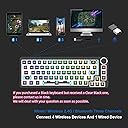
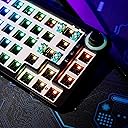
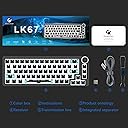
The GK GAMAKAYLK67 is a 65% RGB modular mechanical keyboard kit featuring 67 keys, hot-swappable 3pin/5pin switches, and triple mode connectivity (Bluetooth 5.0, USB-C, and 2.4GHz). Designed for customization, it offers a multi-function knob, fully programmable settings, and immersive RGB lighting, making it perfect for gamers and professionals alike.


| ASIN | B09PRN726P |
| Additional Features | Backlit, Customizable Display Keys, Hot-Swappable |
| Antenna Location | Gaming |
| Best Sellers Rank | #34,055 in Video Games ( See Top 100 in Video Games ) #1,629 in PC Gaming Keyboards |
| Brand | GK GAMAKAY |
| Built-In Media | USB Cable |
| Button Quantity | 67 |
| Color | Black |
| Compatible Amazon Tablet Models | Amazon Fire HD 10 11th Generation, Amazon Fire HD 10 13th Generation, Amazon Fire HD 10 5th Generation, Amazon Fire HD 10 7th Generation, Amazon Fire HD 10 9th Generation, Amazon Fire HD 6 4th Generation, Amazon Fire HD 6 Kids 4th Generation, Amazon Fire HD 8 10th Generation, Amazon Fire HD 8 11th Generation, Amazon Fire HD 8 12th Generation, Amazon Fire HD 8 5th Generation, Amazon Fire HD 8 6th G… |
| Compatible Devices | Laptop, PC, Smartphone, Tablet |
| Compatible Operating System Family | MacOS, Windows |
| Connectivity Technology | Bluetooth, USB-C, Wireless |
| Customer Reviews | 4.3 out of 5 stars 658 Reviews |
| Enclosure Material | Plastic |
| Generation | 3rd Generation |
| Hand Orientation | Ambidextrous |
| Item Dimensions L x W x H | 12.99"L x 4.72"W x 1.38"H |
| Keyboard Backlighting Color Support | RGB |
| Keyboard Description | Mechanical, Gaming |
| Keyboard Layout | QWERTY |
| Manufacturer | GK GAMAKAY |
| Model Name | LK67 |
| Model Number | LK67 |
| Number of Keys | 67 |
| Number of Sections | 6 |
| Power Source | Battery Powered |
| Recommended Uses For Product | Gaming |
| Special Feature | Backlit, Customizable Display Keys, Hot-Swappable |
| Style Name | Contemporary |
| Theme | Gaming Keyboards |
| Unit Count | 1.0 Count |
| Warranty Description | 1 |
M**H
This board is an INSANE value for the money
Now I just want to say that this is my first custom built mechanical keyboard and this review may be long because I don't want to stop typing lol. My current setup: Personally Lubed Glorious Panda Switches Green matcha keycaps with hiragana from Amazon 4 layer tape mod on the PCB Microfoam surgical Foam tape on the bottom plastic Glorious coiled nebula cable Building the board: Taking the board apart for modding was actually a fairly straight forward experience. The top case comes off by snapping it out of place and lifting it off of the bottom case. Then you unscrew a few screws to take off the plate and PCB from the bottom case. This is the part that usually trips people up though. While taking off the plate and PCB (which are attached by screws on the underside of the PCB), you have to be EXTREMELY careful so as not to destroy the mode selector switch on the back of the case. This part took the longest for me to do because I really wasn't trying to have to buy another board. Be cautious and take your time with this part if you are planning on modding your board. After taking the PCB out and not breaking the switch, I was able to start modding. I lubed my stabilizers and got them feeling perfect. Then I proceeded to tape mod the PCB by using 4 layers of masking tape. I know people generally use 3 layers but I was going for and extremely deep thocky sound. After tape modding the PCB I then applied hospital like foam tape to the bottom case to help dampen the sound even further. Used about 4 to 5 layers on this part. After applying my mods, I had to create holes in the tape on my PCB to allow me to be able to screw it back in. I was careful putting the mode selector switch back in place and all was well. Features: The board comes with MANY RGB features. I'm not a super fan of RGB in general but the mode I use kind of serves as a decent backlight at night. The three modes it comes with are nice to have. You can essentially connect up to 5 devices for this keyboard. 3 bluetooth devices, 1 2.4 GHz device and a wired connection. Layout: The keyboard layout is your standard ANSI layout so not much to say there. Functionality: I checked all the connections on the keyboard with a pair of tweezers before setting the board up just to make sure all the keys worked. They did. The rotary knob also works flawlessly and is really convenient when trying to change the volume of media. Even works on Mac. Connectivity: Connectivity is great on this keyboard. I have no issues whatsoever using the 2.4GHz connection on my MacBook Pro M1, BT on my iPad Pro and wired for my custom gaming PC. No dropouts or anything like that. Sound: Overall I did not try this keyboard stock because based on the reviews I watched it would have sounded akin to my corsair K65 lux that I finally retired after 5 years of use. I wanted nothing to do with the hollow sounds of a keyboard. I wanted something way more substantial and deep. My cost breakdown: This keyboard - $70 Personally Lubed Glorious Panda Switches - $50 for 2 packs Green matcha keycaps with hiragana from Amazon - $35 4 layer tape mod on the PCB - $4 Microfoam surgical Foam tape on the bottom plastic - $7-8 Glorious coiled nebula cable - $50 Krytox 205g0 - $13 Switch lubing supplies - $10 Glorious Switch opener (I would not recommend this one) - $10 TOTAL: $250 oof... Final thoughts: For $70, this keyboard is a phenomenal value. It is of decent quality and you can really make it sound like an expensive board. Now as you saw above this board cost me $250+ dollars to build and about 6 hours of build time. You're probably wondering why I turned a $70 board into one thats $250... Well that is because I had to buy all the supplies for it. I didn't have switch lube, I didn't have brushes, a switch opener, masking tape, keycaps, switches, etc. I was literally starting from 0. I also wanted a really nice coiled cable to go with the board instead of the one that was included. I didn't have to do any of this. A simple setup without lubing and starting from 0 can literally cost you around $130 with just the board, Akko switches, and $30 keycaps and possibly no mods if you don't have masking tape lying around. Even at $130 this board is still a very great value. I would HIGHLY recommend to anyone thinking of buying this to use for a build. Thank you for coming to my TED Talk lol. P.S. I ended up using Microsoft Power Toys to change the keybindings, because I didn't really trust the software that was recommended to use for the board.
A**R
Great keyboard
Great keyboard. Still use to this day. Easy to attach switches and keycaps. No issues. Rgb colors are fun and pretty to use and set up. Perfect size for what I needed
M**S
Great entry keyboard for enthusiasts! :)
Really enjoyed this 65% design mechanical keyboard, I fitted them with Cherry MX Red switches and this board is easy to hotswap/customize. The build quality is very good for this price point, nothing felt rattly or flimsy and it just looks great: sleek, minimalist, and clean. My one issue with these mass produced off brand boards is that the default RGB lighting combination options are okay, but not too flexible. You get your standard rainbow, reactive, flashing...etc patterns to choose from, but there's no hardware or option that I knew of to further customize each key's lighting. That only matters if you're someone that's into fine tuning the lights though, if you just want some basic LED running this will do the job. Key strokes and presses are decent and very fast keypress registration running it on Valorant and Apex Legends. Absolutely love the knob, I have a thing for analog controls so the press-able knob for light and volume control is great :)
J**.
Great Board, Mod Friendly, Great Customer Support
Writing this review after fully completing my keyboard build. Firstly, props to the vendor for providing such an excellent board with great value, AND for providing great customer support. Although being constructed of mostly plastic, this board feels great and weighty for its price point. Second, modding with this board is fairly simple, yet a little complex. For this board, I have used a mix of lubed Gateron Clears and Browns. For some misc. mods, I have used electrical tape and packing foam to get a "thocky" sound profile and the typing experience has never been smoother. The stabilizers are alright as well, although I do not really like the spacebar stab out of the lot. There were a few issues that I did not like. The selection switch for the 3 connection modes, feels really frail and does not slide in a way that indicates that the mode has changed. To remedy this, I placed thin pieces of electrical tape around the hole cutout so that the switch is a bit sturdier. Another issue I ran into was with the hot swap sockets, upon first impressions, these sockets are a bit hard to press switches into but get easier the more you swap switches. I noticed that after inserting the switches the first time, it took quite a bit of force and it put unnecessary pressure on my fingers. Over time as I modded and tested out the board over two weeks, the sockets became much more loose and easier to insert switches into. Overall, I am glad to say that for my first build, I am glad to have chosen the LK 67. This is one of the cheaper beginner boards and it was fairly simple to mod and get amazing results. As a plus, the customer support is top notch as they follow up quickly with any reviews and questions that anyone might have. I will definitely keep Gamakay in mind for my next keyboard build!
C**E
Budget boss!
This is a really great keyboard for the price. The build quality is much higher than I thought it would be and the hot swap sockets are quality. The software is extremely poor but that is to be expected at this price range, there are some newer models from other companies that are doing a better job there but if you're not planning on rebinding keys or only doing simple remaps it's sufficient. The RGB is very nice and diffuses through the board well. I used the included stabilizers but lubed them and they sound great. Built it out with Gateron Milky Yellow Pro's, Razer PBT shine through keycaps, a genuine Fender Tone Pot for the knob. Mods were tape mod and silicone pour. I attempted burger o ring mount and PE foam but the case wouldn't close, unless you're going to cut up small pieces of foam or use something like polyfill you'll likely have that same problem. Be careful when opening the case so you don't damage the wireless switch, I recommend you look up badmark's LK67 video on youtube that shows how to properly open and close the case to avoid this trouble if you are going to be modding it. All 3 connection modes work great. When buying keycaps be sure that they include 65% compatibility because this does have a smaller shift key. I think it is 1.5 or 1.75u. If you do not have the correct keycap you will be stuck using an oddly sized smaller one. I had to pull one from a different set of mine since the Razer set does not include non-standard compatibility.
V**.
The TM680 at a better price with a few important notes.
You cant beat the value of this keyboard as a wireless option with a knob. Theres just a few important things that you need to keep in mind : 1. the stock usb cable that is given with this keyboard is better not to be used, especially for the wired version. I havent specifically heard of issues for people using the wireless, but the cable has been known to fry the keyboard on the wired version. Just use a different cable. 2. if you wish to mod it, CAREFULLY research tear down videos, because it it easy to break the wired/wireless mode switch button, and if you are very careless, you can also break the wire to the battery. Its A PAIN to open this thing tbh. and you must be careful to not break the button when putting back together too. That thing is intensely fragile and if you break it when modding, you shouldnt go crying to the seller. Honestly it sounds good stock anyway, and the lighting modes are a lot of fun. If you have issues with the rgb lights, you can probably solve by contacting seller for firmware, as its likely a firmware issue. The stock stabs on this keyboard are also exemplary. They are generously and adequately factory lubed, and I didn’t have to holee mod them at all. Even with a boba u4t switch, which is notorious for having horizontal wobble, and not recommended with stab keys overall, there is no noticeable rattle or extra wobble. All I did was add stab pads under the stab bottom out point (you can do the same with bandaid), and it’s perfect. Overall this is a really nice, fun, and great looking keyboard.
J**L
Keystrokes not registering + Hotswap connections most likely not fully connected
Used this product with Gateron milky yellow switches ( 5 pin ) with the milky top and black housing. I tested these switches on 3 separate keyboards and they were working fine. The keyboard also came with a hair and some dirt on it leading me to believe it has been used and returned by someone who also had the issue with the keystrokes not registering Problem: The keys sometimes work fine, lightly pressed or bottomed out. The problem is that it just doesn't register some keystrokes at times and it is very difficult to use without fully bottoming out the switches and even then it does not work sometimes. The keyboard is at a very good price of 64 dollars with the coupon and it has a volume knob but the issues on these boards seems to be very common among the Tm680 and variants. TLDR: Hot swap connections not fully connected leading to issues with keystrokes not registering Dont recommend as this seems to be a very faulty board and other reviews have complaints too. Side note: Build quality is bad with some plastic or screws rattling around the inside, feet which tilt when being typed on and when squeezed or being lifted it will creak like crazy. 0.5/5 if possible Edit: Also it would not connect via bluetooth to any of my devices.
T**P
Perfect for a first time build and it has arrow keys!!!
This was my first ever custom keyboard, and I think it speaks for itself! This was an absolute pleasure to build in and I’d buy another one for another build. What really drew me to this board in particular, was the fact that it does have arrow keys. For the longest time, I had been trying to stick to boards that had arrow keys so I was very limited in my selection and usually had to use cheaper Chinese mechanical keyboards. However, after learning about This GMK 67, I was overjoyed to learn that it actually had support for arrow keys which I need. Upon opening the package, you get the board and PCB, a braided USB-C cable, and a keycap puller switch puller combo tool. For the money, I don’t know if you could do much better for a custom keyboard platform. One thing that should be noted is that between the PCB in the middle back plate, there is a layer of foam sandwiched in between the layers. What does does, is it allows for a big dampening of the noise from the key switches which you can hear in my video. You’ll notice that the switches don’t sound very penny and they have a pretty deep sound to them, this is due to the foam soaking up the pinging noise from the switches. Overall, very satisfied with this purchase, and I will be purchasing another one for a future build.
S**D
Amazing value
Once I got the keyboard, I started modding it, I put a thin layer of foam in the case, tape modded the pcb, lubed all of the stabs and lubed the switches, the wire balance is amazing and it’s poppy, the parts for this is the Akko cs crystal switches, milk Japanese keycaps
N**H
GK gamakay lk67
the lk67 is an amazing pcb, this was my first custom keyboard build using novelkey x cream switches and it was super easy to put together the stabilisers are perfect and it looks incredible, it is on the expensive side but well worth it!
T**N
Es grandiosos este teclado, sin embargo...
Es magnífico si vienes de un teclado ya armado, es decir, el típico teclado barato que ni si quiera se puede considerar ga de entrada. Ahora bien, viene la explicación del porqué de las 4 estrellas, y la razón es que el plástico se deforma cuando lo abres, puede que yo no sepa manejar correctamente el plástico, pero en mi caso, el plástico se deformó. Por lo que les recomiendo no abrirlo, utilizen mods que se puedan implementar sin abrir el teclado, como el PE Foam qje es como una pegatina y ya sería todo lo recomendable que le podrían hacer y la ultima modificación que le podrían hacer son los estabilizadores. Si gustan arriesgarse adelante, pero no lo estén abriendo constantemente solo abranlo 1 vez, pero en esa vez hagan las modificaciones correctas y traten de no equivocarse en ellas, para así evitar abrirlo, es mas si pudieran cómprense 2,uno que sea su conejillo de experimentación y el otro que sea el bueno. Muchas gracias por leer. Edicion: Si lo llegan a modificar no corten todos los postes, simplemente corten los postes de en medio, los que están en el del backspace, el de multimedia, el de las flechas, el del shift izquierdo, el de espacio y el del tabulador son los que no deben de cortar porque ayudan a que el Top Housing cierre correctamente, no cometan el error mio de cortar el del espacio. Y si quieren realizar el Tape mod solo pongan una capa para que así la entrada USB-C no esté descentrada del agujero. El PE Foam si es muy recomendable mejorará mucho más el sonido que ya tiene de stock. Y ya son todas las recomendaciones que tengo para que no cometan los mismos errores que desgraciadamente yo cometí. Segunda edicion: Después de un par de modificaciones para lograr la mejor experiencia sonora, el teclado obtuvo una cierta curvatura que hace que baile sin la presencia de un mouse Pad, por lo que recomiendo que si vas a modificar el teclado, pienses muy bien en lo que le vas a realizar para evitar el Case se deforme.
G**Y
great but got a defective one
this is a great little board. was a pleasure to bulid in, the software could be better and unfortunately mine did have a defect, but for 65 pounds its a great beginner board
Trustpilot
4 days ago
3 weeks ago