Buy anything from 5,000+ international stores. One checkout price. No surprise fees. Join 2M+ shoppers on Desertcart.
Desertcart purchases this item on your behalf and handles shipping, customs, and support to Vanuatu.
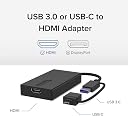
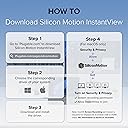
Extend Your Monitor—The Fast and Simple Way There’s no shortage of options when it comes to adding screens to your laptop, and that’s where things can get complicated (and expensive). The Plugable USB 3.0 and USB-C to HDMI monitor adapter (UGA-HDMI-S) keeps things simple. A one plug solution that adds one HDMI port to your computer, the UGA-HDMI-S leaves your other ports open for peripherals. And because this USB A to HDMI adapter has a single function, it’s a lot more affordable than a docking station. Extend or Mirror 8 Screens on Windows and 4 Screens on macOS With the UGA-HDMI-S adding an extra display is just the start. Combining multiple USB to HDMI Adapters makes it possible to add up to 8 monitors on Windows computers and up to 4 monitors on macOS computers. Quad HD Add a 2560x1440p @ 60hz Quad HD monitor through a USB 3.0 port, USB-C, or even a Thunderbolt port. Connection Simplicity A hybrid 2-in-1 cable means you don’t have to choose between a USB Type A and USB Type C to HDMI adapter picking an adapter that matches your computer. The UGA-HDMI-S works with the ports you have now, and the ports you’ll have on your next computer—USB 3.0, USB-C, USB4, even Thunderbolt to HDMI. It’s compact, too, so it’s as portable as your laptop. This USB A to HDMI adapter ensures you always have the right connection for your devices. For Best Compatibility Silicon Motion is a versatile software that enables you to be more productive by adding additional displays through USB 3.0, USB-C, or Thunderbolt ports on your computer. SMI drivers on Windows will automatically install through Windows Updates. SMI macOS InstantView driver download and installation is required for MAC. This USB to HDMI converter is the perfect solution for extending your display setup with ease and affordability. Review: Great Product with Plug and Play Simplicity! - First off, I want to state that I have looked at a couple of similar items from this brand, "Plugable" recently and it is fast becoming one of my most trusted accessory brands. Their products do not seem to disappoint and this USB to Single HDMI adapter was no exception. As before, this device has good build quality and is more than durable enough for its intended role. It is quite compact and is a very simple yet very effective device. I appreciate that there is a tethered dongle that will allow you to make use of this with either a "legacy" USB-A connection or a USB-C. However, I would have liked it more if it were the other way around with a permanent USB-C with the legacy USB-A connector as the tethered dongle adapter piece. I say that just because USB-C is fast becoming the norm or defacto standard and if you intend to use this with a newer notebook pc, you will more than likely be making the connection via USB-C and not legacy "A". In any event, it functions very well using either method of connection, so I am not really complaining but just pointing out what my preference would have been. In actual use I am pleased with the operation of this HDMI Adapter. It works just described and it is basically just a straight plug and play device. Just to clarify, I only made use of this with a Windows based system, so I cannot offer opinion on a Mac based setup. In my application, I was making use of this to create a second display for use in a Virtual Pinball setup using a notebook PC that had only a single video output. This Plugable adatper functions perfectly so that I can use the main 15.6" display of the notebook for the "backglass/DMD" screen and this Plugable adapter is feeding a 27" screen, in vertical mode, to function as the main pinball "playfield". Overall, I am impressed with this Plugable USB to Single HDMI Adapter. I have now looked at several differing products from this brand it is seems to impress me each and every time. They also have a 2 year warranty with email technical support so I feel you can purchase their products with confidence. At the current listing price of $89, I feel this is more than reasonable considering the good build quality and how well this item works. My only issue is that as I noted previously, I would have preferred that USB-C was the primary connector in the dongle setup, but I am still giving this product a 5 out of 5. Highly Recommended! Review: It works with M1 Mac and supports rotations - I have a Macbook air (M1, 2020). Once download their app 'IntantView', it just plugs and plays. Can change rotation, resolution and refresh rate up to 72 hertz.


| ASIN | B09R45WGHY |
| Best Sellers Rank | #15 in USB-to-VGA Adapters |
| Brand | Plugable |
| Color | Black |
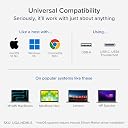
| Compatible Devices | With Silicon Motion Driver Install Required:. Supports full-featured USB-C, USB4, and Thunderbolt 3 / Thunderbolt 4 systems running Windows 10 / 11 & ChromeOS 100 or newer & macOS 11 and later including Macbook Pro 13" / 14" / 15", 16", MacBook Air, MacBook Retina, MacBook M1 / M2 / M3 / M4, HP Spectre x360 / Pavilion / Envy, Dell XPS / Precision / Latitude, Lenovo ThinkPad / IdeaPad / Yoga / Flex, Surface Pro 7 / 7+ / 8 / 9, Surface Laptop 3 / 4 / 5 / Go / Go 2 / Studio / SE, LG Gram, Acer Aspire / Swift / Spin, ASUS Zenbook / Vivobook, Most Windows systems with Windows 10 or newer, Most Chromebooks running ChromeOS 100 or newer Compatible Devices With Silicon Motion Driver Install Required:. Supports full-featured USB-C, USB4, and Thunderbolt 3 / Thunderbolt 4 systems running Windows 10 / 11 & ChromeOS 100 or newer & macOS 11 and later including Macbook Pro 13" / 14" / 15", 16", MacBook Air, MacBook Retina, MacBook M1 / M2 / M3 / M4, HP Spectre x360 / Pavilion / Envy, Dell XPS / Precision / Latitude, Lenovo ThinkPad / IdeaPad / Yoga / Flex, Surface Pro 7 / 7+ / 8 / 9, Surface Laptop 3 / 4 / 5 / Go / Go 2 / Studio / SE, LG Gram, Acer Aspire / Swift / Spin, ASUS Zenbook / Vivobook, Most Windows systems with Windows 10 or newer, Most Chromebooks running ChromeOS 100 or newer See more |
| Connector Type | HDMI |
| Current Rating | 1 Amps |
| Customer Reviews | 4.3 out of 5 stars 137 Reviews |
| Finish | Hdmi |
| Global Trade Identification Number | 00819927012641 |
| Item Dimensions | 5.5 x 4 x 0.75 inches |
| Item Weight | 3.84 ounces |
| Item dimensions L x W x H | 5.5 x 4 x 0.75 inches |
| Manufacturer | Plugable |
| Mfr Part Number | UGA-HDMI-S |
| Model Number | UGA-HDMI-S |
| Nominal Power | 5 Watts |
| Number of Items | 1 |
| Number of Ports | 1 |
| Package Quantity | 1 |
| Power Plug Type | No Plug |
| Smart Home Compatibility | Not Smart Home Compatible |
| Specific Uses For Product | Docking Station, Laptop, Monitor |
| UPC | 819927012641 |
| Unit Count | 1.0 Count |
| Warranty Description | 2 Year Limited Parts and Labor |
| Warranty Type | Limited |
L**E
Great Product with Plug and Play Simplicity!
First off, I want to state that I have looked at a couple of similar items from this brand, "Plugable" recently and it is fast becoming one of my most trusted accessory brands. Their products do not seem to disappoint and this USB to Single HDMI adapter was no exception. As before, this device has good build quality and is more than durable enough for its intended role. It is quite compact and is a very simple yet very effective device. I appreciate that there is a tethered dongle that will allow you to make use of this with either a "legacy" USB-A connection or a USB-C. However, I would have liked it more if it were the other way around with a permanent USB-C with the legacy USB-A connector as the tethered dongle adapter piece. I say that just because USB-C is fast becoming the norm or defacto standard and if you intend to use this with a newer notebook pc, you will more than likely be making the connection via USB-C and not legacy "A". In any event, it functions very well using either method of connection, so I am not really complaining but just pointing out what my preference would have been. In actual use I am pleased with the operation of this HDMI Adapter. It works just described and it is basically just a straight plug and play device. Just to clarify, I only made use of this with a Windows based system, so I cannot offer opinion on a Mac based setup. In my application, I was making use of this to create a second display for use in a Virtual Pinball setup using a notebook PC that had only a single video output. This Plugable adatper functions perfectly so that I can use the main 15.6" display of the notebook for the "backglass/DMD" screen and this Plugable adapter is feeding a 27" screen, in vertical mode, to function as the main pinball "playfield". Overall, I am impressed with this Plugable USB to Single HDMI Adapter. I have now looked at several differing products from this brand it is seems to impress me each and every time. They also have a 2 year warranty with email technical support so I feel you can purchase their products with confidence. At the current listing price of $89, I feel this is more than reasonable considering the good build quality and how well this item works. My only issue is that as I noted previously, I would have preferred that USB-C was the primary connector in the dongle setup, but I am still giving this product a 5 out of 5. Highly Recommended!
J**E
It works with M1 Mac and supports rotations
I have a Macbook air (M1, 2020). Once download their app 'IntantView', it just plugs and plays. Can change rotation, resolution and refresh rate up to 72 hertz.
あ**め
良い意味で想定外! WQHD 60FPS,4K 30FPSで利用可能でした。
【総合評価】 余っているHDMIポートが無くディスプレイを追加したい際に大いに役立つ製品です。まさかの4K対応は大きなアドバンテージだと思います。 またCPU負荷が殆どないためスペックの低いパソコンでも気軽に利用できます。 62社のオンラインスキャンを実施しましたがドライバにウイルス等見つかりませんでした。 【検証結果】 検証環境 ・Windows11 ・CPU i7-12700 ・GPU インテル® UHD グラフィックス 770 商品説明には1080P 60FPSとありますが、以下の出力に対応している事が確認できました。 WQHD 60FPS,4K 30FPS。 動作状況からHDMI 1.4相当の出力に対応している可能性があります。 1080P 120FPS(未検証),WQHD 60FPS(検証済み),4K 30FPS(検証済み) また本製品と姉妹製品を混在させた環境でドライバの動作テストを実施しましたが、2画面とも問題なく動作することが確認できました。 モニタ1:USB⇒HDMI(本製品)4K 30FPS出力 モニタ2:USB⇒DP(姉妹製品)WQHD 60FPS 【技術的な考察】 USB3.0の通信速度の理論値は5Gbpsであることから、非圧縮では1080P 60FPS,1440P 30FPSの伝送が限界と考えられます。 本製品では実際使用したところCPU使用率に大きな変化はありませんでしたが類似製品がそうであるように、CPUにて画面データを圧縮して転送している物と推測されます。 この事から本気でゲームをする人には不向きかもしれません。 【注意事項】 利用前にドライバのダウンロード&インストールが必須です。 PCの初期セットアップ時やBIOS(UEFI)では使用できないものと考えられます。
N**O
not bad to use
Good to use
C**.
Buena calidad sin embargo requiere alto procesamiento de procesador en Mac como 4 monitor
El producto es de muy buena calidad, pero no es para todos, funcional para PC o para MAC solo como segundo o tercer monitor, tiene un chip silicon motion sin embargo al utilizar en una MacMini con procesador intel para 4 monitor la aplicación consume muchos recursos de procesador lo cual genera un lag que es de perceptible a muy perceptible dependiendo del contenido y la aplicación que se encuentre en ese monitor, tuve que devolver y cambiar a un Dell docking ud22 con chip mas eficiente o poderoso de DisplayLink.
Trustpilot
3 weeks ago
2 months ago