Buy anything from 5,000+ international stores. One checkout price. No surprise fees. Join 2M+ shoppers on Desertcart.
Desertcart purchases this item on your behalf and handles shipping, customs, and support to Vanuatu.
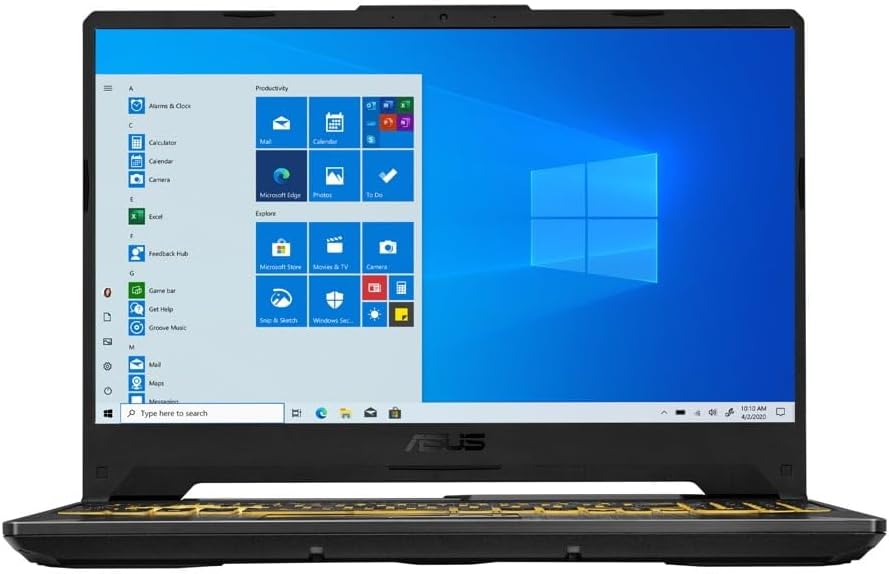
🎮 Level up your game with ASUS TUF F15 — power, speed, and durability in one sleek package!
The ASUS TUF F15 Gaming Laptop combines a 10th Gen Intel Core i5 processor with NVIDIA GeForce GTX 1650 graphics, a 15.6" 144Hz Full HD IPS display, and 8GB DDR4 RAM paired with a 512GB PCIe NVMe SSD. Designed for mid-range gaming and multitasking, it features military-grade durability, Wi-Fi 6 connectivity, and an innovative self-cleaning cooling system. Its upgrade-friendly design ensures longevity, making it a smart choice for professionals and gamers seeking performance and reliability on a budget.


| ASIN | B09SVQ25XH |
| Audio Output Type | Speakers |
| Audio Recording | Yes |
| Automatic Backup Software Included | Windows 10 |
| Battery Cell Type | Lithium Ion |
| Battery Life | 7.7 Hours |
| Best Sellers Rank | #41,501 in Computers & Accessories ( See Top 100 in Computers & Accessories ) #6,548 in Traditional Laptop Computers |
| Bluetooth support? | Yes |
| Brand | ASUS |
| Built-In Media | FX506LH-AS51, Power cord & Adapter, Warranty Card |
| CPU L2 Cache | 2 MB |
| CPU Model | Core i5 |
| CPU Model Generation | 10th Gen |
| CPU Model Number | Intel Core i5-10300H |
| CPU Model Speed Maximum | 4.5 GHz |
| Cache Memory Installed Size | 6 |
| Camera Description | Front |
| Color | Bonfire Black |
| Compatible Devices | External displays, mice, keyboards, storage devices, printers, wireless headphones |
| Connectivity Technology | wireless |
| Customer Reviews | 4.5 out of 5 stars 1,915 Reviews |
| Display Resolution Maximum | 1920x1080 Pixels |
| Display Technology | FHD |
| Display Type | FHD |
| Form Factor | Laptop |
| Graphics Card Ram | 4 GB |
| Graphics Coprocessor | NVIDIA GeForce GTX 1650 |
| Graphics Description | GTX 1650 |
| Graphics Ram Type | DDR4 SDRAM |
| Hard Disk Description | SSD |
| Hard Disk Interface | Solid State |
| Hard Disk Size | 512 GB |
| Hard-Drive Size | 512 GB |
| Hardware Interface | Solid State Drive |
| Has Color Screen | Yes |
| Human-Interface Input | Keyboard |
| Item Dimensions L x W x Thickness | 14.13"L x 10.08"W x 0.97"Th |
| Item Weight | 6 Pounds |
| Keyboard Description | Gaming |
| Keyboard Layout | QWERTY |
| Lithium-Battery Energy Content | 48 Watt Hours |
| Manufacturer | ASUS |
| Memory Clock Speed | 4.5 GHz |
| Memory Speed | 2933 MHz |
| Model Name | ASUS TUF Gaming F15 |
| Model Number | FX506LH-AS51 |
| Model Year | 2022 |
| Native Resolution | 1920 x 1080 pixels |
| Number of Ports | 3 |
| Operating System | Windows 11 Home |
| Optical Storage Device | No Drive |
| Other Special Features of the Product | Backlit Keyboard, HD Audio, Numeric Keypad |
| Processor Brand | Intel |
| Processor Count | 4 |
| Processor Series | Core i5 |
| Processor Speed | 2.5 GHz |
| RAM Memory Installed | 8 GB |
| RAM Memory Technology | DDR4 |
| RAM Type | DDR4 SDRAM |
| Ram Memory Maximum Size | 8 GB |
| Resolution | 1080p |
| Screen Size | 15.6 Inches |
| Specific Uses For Product | Gaming |
| Total Usb Ports | 2 |
| UPC | 195553584807 |
| Unit Count | 1.0 Count |
| Video Output | HDMI, DisplayPort |
| Video Processor | NVIDIA |
| Virtual Reality Ready | No |
| Voltage | 20 Volts |
| Warranty Description | 1YR International*/Eligible for 1YR free Domestic ADP upon registration with 1-way free shipping/2-way FREE shipping for standard hardware warranty repair |
| Warranty Type | Extended |
| Webcam Capability | Yes |
| Wireless Compability | 802.11ax |
| Wireless Technology | Wi-Fi |
R**R
Perfect for me!
For clarity, this review is for the 15.6" GTX 1650 version, not the 17.3" GTX 1650Ti version. Positives! This laptop is perfect for me and what I need right now. I am currently in between homes, over the road a lot for work and have all of my stuff in storage, including my main PC, so I bought a laptop so I could continue doing work and gaming while on the go. This laptop is not top of the line by any means, it's no $2,000 laptop with an RTX 3080 or anything like that, but if you want a good mid-range laptop that can get 60FPS on some everyday gaming, this is as good as mid-range laptops get in my opinion. Even on my main, much beefier PC, I've never been one to crank up the settings and enable raytracing, 4k etc. I'm more of a framerate type of person and this laptop does a great job getting high frame rates if you're willing to adjust the settings accordingly. The screen is a clean 1920x1080, lovely quality (though the brightness isn't that great), comes with an NVME 512GB hard drive which is not a bad start if you're not trying to install a Call of Duty game with 100gb patches, but that leads into another glowing positive - this thing is upgradeable and I love it! One of the hardest things about picking a laptop for me is the eventual obsolescence, so in the few times I've bought a laptop in my life, I prefer ones you can upgrade which will allow you to skirt by the expected lifespan for a bit longer. Overall, my complaints a few, but I will point them out. Negatives! Honestly, 8GB of RAM is... well, it's not enough for any modern PC that you want to do more than browse the internet, but this negative hardly counts against it because once again, it is upgradeable! I added 32GB to mine and it runs like a dream now. The fact it ships with such low RAM is forgivable because that's probably why the price of entry is as low as it is. I also had a few problems with the Wi-Fi antenna at first, which I know is not unique to my laptop, but after a few online searches, troubleshooting and settings adjustments, it hasn't dropped the connection for a couple of days, so I think I'm over that hump. My last complaint and honestly maybe the only one that could be considered "major" is the screen brightness. To be clear, I'm talking about BRIGHTNESS, not QUALITY. The resolution is wonderful and the screen is a clear HD experience, but keep this thing away from the sunlight if you want to see it easily... I took it to the park one day and while I could see the screen, I felt like I was squinting, and I had to change my preferred dark mode to light mode just to see the Windows UI better. Once again, I consider this a minor gripe and won't take a star off, because if you're using this thing indoors or in appropriate shade, the screen is beautiful. Overall, if you're looking for an affordable, upgradeable, laptop suited for everyday gaming (as long as you're not trying to push max settings, 4k or raytracing), you won't be disappointed!
T**P
It’s been a while since I’ve given 5 stars: See Review
Well , where to begin, ….. I review a lot of tech in my profession and I am very impressed with this product. I initially bought this for business and of course the occasional gaming ;) This thing is a beast still ! I upgraded the ram to 32gb and everything else I kept the same and it’s handled everything I’ve thrown at it from games AAA titles to video editing and much more . Now, the CPU/GPU is not the newest it’s about 2 years old in the tech world but it still packs a punch, starting from the seller , to deliver , and presentation , it came in perfect condition.It’s been a long time since I had not a single complaint. This was the smoothest purchase I have had in a while . The build quality is great , the I/O has everything you need , it’s all around a total package. I’d say it’s great for the average Joe to a power user. It also is future proofed as everything is upgradable which is also nice. It has a ram card of DDR4 3200mhz that can be maxed out to 60gb’s and super easy to work on. I can happily answer any regular or advanced questions for anyone that has them. This honestly was a steal for the price and a 2 year warranty. I love the screen, it has the matte finish to cut down on glare, I am also glad the laptop is backlit, and I can put it to one color although it can pulse , strobe and a slew of other options but I always felt RGB screams “a 14 year olds first game rig” which I am sure gamers will get it, so it’s nice to choose a color and stay there. The keyboard and trackpad is super responsive, and feel nice. I was actually really impressed with the sound quality as I also use a MacBook Pro for business and they just have great sound but this ASUS just romps ! It sounds good . Another nice thing was it’s actually is as advertised, no surprises and it is specked out the way it said it was . My only suggestion is to immediately jump up to 16gb of ram and you can buy it as a bundle, I’d suggest the “crucial” brand of ram sticks they have never let me down or had any compatibility issues. Obviously there isn’t a whole lot I can say that the posting does not but I can say once actually getting it in your hands the listing doesn’t do it justice , it’s really nice. I’ll say it again the seller was great , I had it rushed shipped and it was here earlier than planned, the box and presentation was spot on and the PC performs , isn’t that what it’s about ? It does the job and it’s durable and well made. If your looking for a entry level gaming laptop that realistically can be upgraded to a mid range gaming PC , this is it . I saw the 2022 version of this TUFF laptop and honestly you’d be best getting this one at this price point which is a late 2020 model and Its basically the same laptop other than internals( obviously). If there was one thing I would like to have change is the bloat these companies put on the PC. I really don’t mind windows 11 it’s a welcomed change. I requested a clean install , unfortunately and I get it , it’s just business and the way these companies work together to make money but it would have been nice to not have to wipe it and debloat the machine. However I will always recommend to do so anyway as it makes a huge difference. That’s really the only meh vibe I had to say about this awesome product and let’s be real , there will always be bloat from anywhere you buy new machine from. Just run a clean install of win11 and you’re golden! Before I forget the battery life is actually pretty good I saw others saying otherwise but again a clean install of windows 11 will definitely improve that, the screen has a decent brightness maybe if it had 1 more level up it would be perfect otherwise this is as close as to a all inclusive total package your gonna get. Great price for a great machine . Best of luck and I hope this helps someone make a decision, if you have questions feel free to ask away , I’m a straight shooter and happy to help! Happy Holidays!
E**Q
Very nice when I'm away from my desktop. Especially for only $650 US.
This laptop feels very nice. I normally am using my custom desktop (RTX 3080 and Ryzen 5800x). This laptop's specs are very nice for the price of $650 US. Runs any game on 1080p; newer ones are on low quality (as of games released during this review). Screen quality looks good. Nothing crazy for someone who wants to video edit, but for everyday use and gaming it looks great. Track pad feels very smooth and responsive. Webcam is pretty bad like all laptop webcams. Speakers have good volume; not the best balance. I think the port selection is really nice. The potential upgrade this laptop has is very nice. It has an extra slot for either an m.2 SSD or a 2.5in drive (comes with an adapter for m.2 to 2.5in. It also has another slot for RAM, or you can remove the current one and throw in two new sticks. I added a second 8GB of RAM, and if I want to add more storage I can. Temps are totally fine as well. Playing COD MW2 2022 at 1080p low with the fan and power profiles all set to performance mode. I was getting 79C on the CPU and 68C on the GPU. Battery life is not so good, but it can be around 1-2hrs. This is more than enough to move your laptop around and replug in. If you aren't gaming or doing anything heavy on it, you may get around 2-3hrs of battery. IDK why it advertise a 90Whrs when it has 48Whrs. May be a mistake on Amazon's website because it says 48 on ASUS's site. Also, I recommend doing a fresh install of windows to remove the bloatware. Then go to ASUS's site for the drivers and apps. this is what I did.
B**O
Decent laptop for casual gamers.
--Note, after 3 weeks of owning i decided to return this. I stand by my review, i feel the laptop is good for casual gaming, but i ended up wanting to PC game full time, and this wasn't going to cut the mustard. This is my first gaming PC, and overall its good. For the price, i think its a great snag, BUT if you plan on using this PC as your main gaming station, or plan on playing every game out there, id buy something else. This PC has run every game ive thrown at it, but it runs noticeably worse when running newer games, or higher demanding games. You wont be getting 144 frames on majority of games without dropping every graphics setting to low, and even after that you most likely will not get 144 frames. Max i was able to get for Insurgency Sandstorm was 80ish, Ready or not 80ish, Death Stranding 60, Madden 23 60, Apex Legends 120s, GTA 4 60s. I had to run these games on low settings to get these frames, and it wasn't steady. I was dropping down to the 20-30 ALOT when playing Insurgency and Ready or Not. Even GTA4 was pretty janky while driving and shooting. I got max Frames in Valorant, Counter Strike GO, and all older games like Fallout 4, Skyrim, Left4Dead 2 i was able to play on ultra graphics. Graphics card is meh. I can easily notice the graphics dropoff when playing Apex and Madden on here, then hopping on Series X and playing them, its a steep drop off. The issue is you cant play a majority of games on medium or high settings, which also hurts the graphics big time. The screen is excellent. Its anti glare, and very clear. Its very well made, but 15inches is quite small, so an upgraded side monitor might be needed. Battery is pretty bad, but i usually always have it plugged in. Just web browsing at 50% brightness youre getting 2 hours battery life. I see some reviews claiming that the Wifi adapter is bad, i havent experienced this. I game upstairs on wifi, my router is downstairs, and i usually get 25 ping in online games, which is pretty great. I also got 150ish download on steam. Ive never gotten buffering when watching a video, or live stream(I watched the Bills vs Rams game last night on this without any buffering). I highly recommend upgrading the ram if you do end up buying, the max this PC can use is 24 RAM, so i installed the Crucial RAM 16GB DDR4 3200MHz CL22, very easy install. Speeds for the PC are very fast. From web browsing, to gaming, to tab switching, everything is very fast, even faster than my Macbook 2020. Overall its a solid gaming laptop, just go in knowing the limitations going in. Id recommend for casual /light gamers.
D**D
Great budget laptop.
Ordered this laptop to use for work. I work from home and use it a minimum of 8 hours up to 16 hours 5 days a week. Battery will last 4 to 6 hours on performance settings so decent battery life. Good graphics on the laptop its self but the 1660 graphics card will not maintain on a hi performance external monitor. I run 2 external monitors both are gaming monitors. One I had set on 70 Hz the other on 140 Hz. Had to turn down the 140 one to 60 to get it work with this laptop. Fast processor for running multiple programs at once. I run normally 6 programs all day while working and there is never any lag or slow performance. So for work its great. I have tried a few games such as WOW and COD it does pretty good on normal settings but not great on max settings. I have upgrade RAM from 8 gig to 32 gig and did see a major improvement. So if your wanting a hard core gaming machine this one isn't for you you will need a better graphics card but if your wanting a good performer for work and mild gaming I highly recommend this laptop
S**T
Review from a non gamer user
ASUS TUF Gaming F15 Gaming Laptop, 15.6” 144Hz FHD IPS-Type Display, Intel Core i5-10300H Processor, GeForce GTX 1650, 8GB DDR4 RAM, 512GB PCIe SSD, Wi-Fi 6, Windows 11 Home, FX506LH-AS51 This is a "basic user" review, not a review from a gamer. I did a lot of research over the last year to replace my 13 year old 13" Toshiba laptop running Windows 7. BTW there was nothing wrong with that computer, just finally decided to get a new one. Note: even a $300-$400 basic laptop would have been an upgrade to my old laptops speed. I bought this Asus from Amazon $100 off for $649 in Sept. '22 I wanted a new computer that was a few steps up from ones that are easily purchased at Best Buy, Walmart or say Target for around $300-$400. I also wanted a computer that I will get more than a few years use of life. 13 years is asking for too much but who knows maybe this one will. Things that I wanted were 15" display, nice sounding speakers, lots of ports, some extra LED status lights, easy to replace battery, backlight keyboard along with a few other features. Not knowing how the speakers sounded or the keyboard key travel felt on this computer, I will say that I am very happy with those also. I will note that even though the speakers are plenty loud enough, they are down and side firing. If they would have put them facing up on the top deck they would be 2/3 louder and sound even better. I do like the base they give. When the computer is sitting on a desk or hard surface, the sound is better as it reflects backup, but while on one's lap. the sound would be better if the speakers were facing up. One of the complaints from other reviewers was the fans were too loud. I do not find this as a problem. In fact they are hardly ever on past the lowest speed, but this due to the fact I am using this computer as a daily driver not as a gaming computer, so it is not being worked very hard at all. I have noticed that when the computer is flat on the desk the fans do ramp up (not very loud) to cool it down. But when more space is given underneath the computer the fans settle down to the lowest speed and one cannot even hear them. In other words it likes to have space under it. The back vents are where the heat exhausts out, intake is from the bottom. The web cam is good in low light and clear. Being that I am coming from an old computer, I was use to having the right/left track pad buttons as separate, not integrated into the the pad. This computer is one of the last ones that still have those separate buttons instead of built into the pad so thumbs up to that. The keyboard back light is as you know is single zone color with settings to be color changing or pick the color you want. It is nice that you can change the brightness. When it is plugged in, the keyboard backlight does not time out. I have researched and there is a setting in the registry editor and this can be changed. Found it and changed it but had no luck setting a timeout delay after last key stroke. It might have something to do with the "Armoury Crate" gaming app, as that is the only place I could find that has to do with keyboard backlights in settings. I will try again later to get this setting changed. I do like the keyboard backlight to time out especially at night, but for now just turning the brightness down is working. It does timeout when not plugged in and is on battery about 45 seconds after last key input. As for the top deck LED status lights they are better than the default usual only 1 or 2 that most computers have. It would have been much nicer to have them on the edge at the front instead of at the top on the back. This would make it easier to see at an angle instead of needing to look down when the lid is closed. The battery LED does change from white to orange and it, along with the power LED next to it, changes according to what state it is in. Power button also has red LED power-on light. I decided to get this with the i5/512gb/8gbRAM. It has the smaller 3 cell 48wh battery. It does not have the 90wh battery. You need to upgrade to i7/1tb/16gbRAM for the 90wh battery. Another one of the big draws for me on this computer was the easy to access inside upgrades. I bought from Amazon also the Crucial RAM 8GB DDR4 3200MHz CL22 (or 2933MHz or 2666MHz) Laptop Memory CT8G4SFRA32A the 3200MHZ one. It was a breeze to install. No hidden screws and everything right there once the bottom is off. Took me less than 15 minutes to install and that was being very careful as I am a novice computer person. The other open spaces are right there and the battery is very easy to upgrade to the 90wh or replace the smaller battery when that time comes. The RAM I added was 8GB stick to match the one it has from the factory. The slot was open and ready for it. The computer recognized it automatically so it now has 16GB of RAM, a mere $32 upgrade. Nice open spot for another SSD drive so that would also be easy to increase the drive size. As for the ports, I still prefer more USBa ports than USBc ports. I am not at the point where I need a USB Thunderbolt so this was okay for me to not have and this model does not have it. If I was to complain or give any strikes I would be comparing this machine to my very old Toshiba that has lots of LED status lights, buttons/switches, a DVD drive, external removable battery (that now costs well over $150), media keys. So there is no comparison at this price point. This Asus hit all my marks for the price without going well past the $1,000 price point. I am not a fan of Windows 11 nor Windows 10, but that will change overtime or I will install one of those programs that emulates the look of Windows 7. Yes the laptop came with windows 11 installed...at least that is what it has after turning on the first time and it did the auto updates in initial set up. First update took a very short time out of the box, so I am sure it was just updating the windows 11 OS to current. Out of the box there was about 400GB of free space for the user on this 512GB SSD. Adding to my likes for this Asus would be the overall size, the non-glare screen, ability to have it charge only to 50% or 80% to extend battery life. It boots up in less than 10 seconds and the same for shutting down. As said these comments are from an everyday user, not a gamer. Please read other reviews if you want to use this as a gaming computer. This review was written after having it for 7 months. I would recommend this computer.
A**S
Excellent product
Excellent
L**.
A great portable machine for daily use. Mediocre gaming machine.
I bought this as a replacement for a Dell Inspiron that decided to abruptly fail. I had been wanting to get a laptop that had a dedicated graphics card, a backlit keyboard, good system specs, upgradeability, at a good price. Throw in the fact that Asus includes one year of ACCIDENT PROTECTION, and this is a winner!! While only having this laptop for a couple of days (Edit: Weeks now) now, I am so far, not disappointed with the purchase. Here are my initial impressions, the pros and the cons. Pros: Audio: The onboard speakers are quite adequate. While not some of the "loudest" they are more than needed for watching youtube, hearing system alerts, recreational music, video calls, stuff like that. I have not yet tried the speakers while gaming. [Edit] Ok these speakers are definitely high volume. Watching youtube, I have the speakers at 50% and the audio of the video at 5% ! And I'm worried that the people across the hall might be kept awake while I insomnia the night away. Also for the fact that these are laptop speakers, the quality is REALLY good. I've been listening to MP3s on this machine and its been quite satisfactory. I had a soundbar on my older "gaming" laptop, because the speakers were crap. Definitely not the case here. The screen: The screen is very good resolution, quite bright, and very comfortable to read on. Whether in regular daylight, a lit room, or in the dark. I have not yet tested it as far as gaming. CON: This screen is SMALL. Coming from laptops with 17.3" screens, this is quite an adjustment. The screen does have very small, thin bezels, so it does a good job giving you the most screen for footprint. However, as somebody who does a lot of video and text editing, this is not what I would really want. If I were working with 3d models, I would definitely want an external monitor or two. It also does NOT fold flat. This is no problem at all for me. But for those that are looking for a device that will do so, this is not it. [Edit] Finding the settings to adjust saturation, color balance, stuff like that, I can't find it! And when I'm editing images, this screen has a very high yellow saturation. So unless I can find, or download something that will let me see colors the way their meant to be, and external monitor is going to another costly expenditure. (Edit: After a lot of web searching, I've fixed the problem with too much yellow saturation. It's a windows 11 problem, not the machine. Poorly implemented color scheme files by Microsoft in the windows 11) Build Quality. So far, this machine is quite sturdy. The materials are good, and it doesn't feel like I am going to break it. Or worry about having problems with it in my backpack. Everything fits together very nicely. Also when removing the bottom shell to get into the guts of the machine, I didn't feel like I was going to break it, or anything else, while using the spreader to pop the clips apart. I do recommend the proper tool for the job tho. Don't just try to jerk it apart after taking all those screws out. Keyboard: As with any new laptop, getting used to the key layout is almost always a chore. There is no unified layout for the specialty keys. For just typing, the layout is REALLY good. The keys are spaced together Just Right, and doesn't cause me to make as many typos as my larger machines, where the keys are spaced further apart. They are very tactile, and make very little noise. They don't have the feel of mechanical keyswitches. They may be membrane keys, or a combination. [Edit] Membrane keys. I would rather have switches personally, as it's less to replace, if one key, or a couple of keys fail. But they work really well in this machine. Other than when I have the machine sitting awkwardly on my lap, I have absolute NO problems typing on this, and can hit the keys that I'm aiming for quite intuitively, with very little in the way or typos induced by the machine. The backlighting is GREAT. I can very clearly see and read the keys in low, and no light. I do wish that they could use combined colors, so that I could set one part of the keyboard to one color, and a different part to a different color. Which really assists in gaming, using keyboard shortcuts. But for me, that's not a dealbreaker. I can read them in the dark, and that is what I was wanting. The layout for the specialty keys is "Fairly" standard. Tho the sleep mode key being on F11 and especially the airplane mode being on F12 is something that is not a wise choice as those are pretty common shortkeys for quite a few programs. Mouse: The mouse functioned quite well, right out of the box. I do wish that it was set a bit further to the left, in an offset style. As the butts of my thumbs do pass across the pad. But for a laptop this size, you get what you get. The cursor sweeps across the screen quite well, with minimal effort, right out of the box. Big plus. It also uses hardwared mouse buttons. Not corner clicks on the mousepad. Honestly, thats a HUGE win, IMO. The corner click system I've never really liked, its an area that collects dust and crud, and has to be cleaned. Whether this suits you or not, well, that's individual taste ;) CON: This mousepad collects oil. It collects oil REALLY bad. Weight: This machine is VERY PORTABLE. The weight is quite light. I was actually very surprised when I opened the box. I almost wondered if there was something missing. Between the machine itself, and the power brick, this is QUITE light. My Sager laptop is a brick. The powerbrick is huge and weighs a ton. This machine is most definitely a very welcomed upgrade from that! Noise: This machine really surprised me as far as the (lack of) noise from the fans. I have had cooling pads with fans in them that have made more noise than the cooling system in this machine! ASUS has really outdone themselves with the cooling system. Tho as stated, I haven't tried gaming on this thing yet. But so far, the noise level from this is quite pleasant, and very unobtrusive. [Edit] Ok, so the fans have kicked on. They are no means loud, compared to some of the other laptops that I have owned. It's actually pretty subdued, for laptop fans. Somebody else had mentioned that they sound kind of like airplane turbines. Yeah! They actually kind of do! :D Which is cool! But again, they're fairly quiet. I seriously doubt that they would bother anybody except for maybe a fairly light sleeper. Heat: Again, a very pleasant surprise! I've run this machine a straight, solid 24 hours, and have not had the fans kick on high. There is no hot air blowing out of the side ports, and it's extrememly comfortable on the lap. (One of my HP laptops has literally left bald spots on my legs from the heat!) Upgrades: There are two slots for RAM. Which are the standard open the clips, slide the new one in/out variety. This makes upgrading the RAM very simple. There are two slots for m2 type Solid State boards, which are spaced widely apart. This is not only making it very easy for install/removal, but also for heat control. Next to the battery, (NOT removable!) [Edit] (The battery IS removable. Just not externally like older laptops. You have to open it up, disconnect it, and then it can be removed/swapped. ) There is a connector for a 2.5" SATA drive. Which included connectors. I myself don't like the idea of putting a drive that close to the battery. But considering how little this machine is, and how little space there is inside... it has to go somewhere, right? And at least, we can add a 3rd drive! Boot up: With the operating system installed on a SSD, this machine boots up really fast. Granted windows will really slow it down when it decides to do a mandatory update. But without those, I press the power up button and within seconds, I'm typing in my password. Very nice! Edit 3/25/23: After installing 32gb of ram, the first boot up was a tad slow as the BIOS updated to the new system specs. However. After that. Oh lord! I hit the power button and I could log into the machine almost instantly. Speed: So far the processor/RAM/SSD combination is a winner. Even Adobe Photoshop CS6 fires right up. Haven't tried it with gaming so far, but so far, my intensive programs aren't suffering any kind of slow-down, stuttering, or lag. The exception to this is my browser. I run A LOT OF TABS when I am surfing. And browsers are heavy RAM hogs. Yeah, one of my browsers is getting a lot of hesitation. But that will go away when I upgrade RAM. Edit 3/25/23: I've just installed 32gb of T-Force Zeus DDR4 3200 CL-22 Memory to the machine. It was super easy as far as the computer was concerned. The packaging for the memory gave me more trouble than putting it into the laptop, LOL. But then, I'm also a computer technician, so your mileage may very depending on your experience level. The machine now boots up at 9% memory usage. The clockspeed is reporting at 2933. This is not a defect in the laptop. This is the BIOS not automatically being set to run memory at higher speeds. You can look up the instructions of how to do this online. It takes a few minutes. But do so on another machine, as you will need to be able to read the instructions while this laptop boots up. Look up "How to enable XMP to run your RAM at full speed". CONS Size: As I said before, this is a very small, portable machine. In that aspect it is fantastic! However. The palm rest is small enough that if you use an external mouse there is VERY little room on the palmrest to put a mouse on it, much less use it. I am constantly running the mouse over the arrow keys and part of the numpad. This has caused me problems as those keys interact with programs, when I don't want them to! This for me, is a huge con, as I really do use a laptop ON my LAP. The screen is also small. While I don't have very good eyes anymore, it's clear and easy to read. But for some of the applications that I use my machines for, a larger, external monitor is going to be a must. Windows 11: This is a personal choice. I myself believe that Microsoft went in a very, very bad direction with the latest release of their OS. I will be backtracking the Operating System on this machine backwards to Windows 10 at the very first opportunity. [Edit] I really do hate this operating system. The look of it is similar, but much different in ways that I don't like. I also do not like the way that MS did the new taskbar. The right click context menus are also way, way different, and very much not to my liking. [Edit] I found how to revert the context menus, looking around on the web. Especially since the changes that they made to the right click context menus are NOT compatible with a lot of the software that I use. Disassembly: Ok. This is a pro/con situation. Taking this machine apart to get to the guts is actually really simple. There are 11 screws holding the plate underneath to the machine. They are easy to take out, and the plate is fairly easy to remove. HOWEVER. These screws are all different lengths! So you HAVE to keep track of which one goes where! NON-Removable External battery: This is an obvious con. Not only can you not carry around a spare, but you cannot easily replace the existing one, if it goes bad. [Edit] As I noted before, yeah the battery can be replaced, but you have to open up the lower shell. It's not a hot swappable battery that we got used to on older machines. RAM slots. Ok, this was a huge let down for me. I was planning to simply take out the RAM from the machine that died, and put it in here to upgrade the low 8gb of ram that it comes with. It doesn't FIT!! The pin arrangement is different, and the slot in the board is spaced further to the left. I will have to look up what RAM this thing takes and purchase new boards to perform the upgrade. HOWEVER. And this... this is awesome. There's only ONE 8gb stick in this machine, when it arrived. NOT paired 2x 4gb sticks. What that means is that I can just throw another 8gb stick in here, and double the memory. Without having to sacrifice a stick that was already in it. Because it wasn't already in it! Or, I could just throw in a single 16gb stick and instantly TRIPLE the ram, at significantly less coss. I'm reading conflicting information about how much this machine supports. Most say it's 32gb, while some say 64gb. I am more inclined to believe 32, but I don't know for sure. Expansion slots: Pretty much all of the connectors for USB, Video Out, and audio are all on the left side. This, since an external monitor is going to be a must, will cause some arrangement problems. It could cause problems for people that also will be using this on a desk. One thing that I love about my older Dell laptops is that they have some of the afore mentioned ports at the BACK of the machine. Or at the Rear Corners. More USB ports would also be a very nice addition. No Optical Drive. Maybe I'm just a dinosaur, but I do miss having an optical drive bay. Being able to watch DVDs or burn disk was a habit from way back in the day. Or just taking the tray out, and swapping in a 2.5 sata drive through an adapter was also a very seriously nice option. Ahhhh, progress LOL. 8 Gb of ram: This combined with Win11, the LOAD of software marked with ASUS, and that crapware McCaffee pre-installed... the machine is running at around 50% memory usage. The Asus Monitoring software, along with the bloated goat OS is taking up quite bit of the system memory. After uninstalling worthless McCaffee, I've cut it down to about 40% with 8gb RAM. And as stated above, this machine takes different RAM boards than those used by machines from a few years ago. 512 GB Solid State Storage: Ok. This is a pro/con situation. 512 is quite good, in comparison to what similar machines are offering, which is half that. At the same pricepoint as these machines. And as mentioned above, the machine will support up to 1tb storage boards, or SATA drive. So there is definitely room for expansion with this machine. However, to do so, IS an added expense. And if you are planning on adding on a lot of games to this, you are definitely going to want to expand on the storage capacity! Fortunately, it does have a sata slot. Which means that you can add in a 1tb sata drive for considerably less money. Overall, the only thing that I'm going to complain about, is the size of the palm rests. It's very comfortable for typing on. But, as most of the applications that I use, I need those concise, accurate mouse movements. And not having room to use a mouse on this machine is going to be a problem. That, and having to purchase windows 10 and what I will have to go through reinstalling drivers. But again, that's a personal choice.
E**O
Excelente opcion
La laptop presenta un acabado muy bueno, me gusto mucho el color, yo la agarre en promoción y precio muy accesible, encontre otras con menos especificaciones mucho mas caras, lo que si trae teclado en ingles pero al menos yo estoy acostumbrado a esto, en cuanto peso siento que es muy liviana respecto a otras laptop gamer que he llegado a manejar, lo que si siento que la ram se queda algo corta de inicio, por lo que yo la aumente, como dato lo maximo que aguanta son 32 gb a 2933mhz o eso es lo que dicen las especificaciones, yo por comodidad puse unas de 3200 ya que no encontraba de 2933 en existencia y funciona al 100, lo que no encontre la forma de cambiar perfil xmp o al menos no se si el modelo que yo tengo lo permita que es al F15-AS51. Lo recomendaria como pc auxiliar, o si no hay mucho presupuesto, pero como main game station sugeriria invertir en algo un poco mejor, yo solo la he usado para juegos como Smite y HOTS ya que es lo que tiendo a jugar fuera de casa , al momento no he tenido problemas con las temperaturas pero yo vivo en un lugar frio , lo que si en varios reviews si mencionan que llega a calentarse por lo que se sugiere alguna base para enfriamiento.
D**R
Nice one
The device runs as it should. The battery is decent for a 2 years old device too. Performance is good for daily usage, still didn't test it in gaming (will test MC and Subnautica) The screen is OK. The keyboard is OK. The speakers with the DTS X are amazing. I think they're even better than the 2022 model with Atmos. The box came with a slot for the stickers, but didn't have them. That is a small thing but it really disappointed me. Edit: there's a newer version now (same everything except for +1 gen CPU and 2050 instead of 1650, so they're basically identical in performance. Buy the cheapest one you can find.
C**N
Muy buena laptop, esta super genial
La computadora esta super genial, en lo estético es muy linda en un color negro cepillado. No es tan pesada como imaginé y su pantalla y sonido soy muy buenos para su precio, su webcam esta bien para ser laptop y su teclado retro iluminado es configurable ademas de que sus teclas son muy ergonómicas y no son tan ruidosas. En cuanto a su funcionamiento va super bien, no eh tenido ningún inconveniente mueve varios programas para el estudio de manera fluida como los son: Paquetería de Office. MATLAB. AUTOCAD. Simulink. Inventor. Su batería dura entre 3 a 3 horas y media dependiendo el uso. No eh corrido muchos juegos en ella pero el Fall Guys va super fluido y al máximo de sus gráficos. Lo que no me agrada es que su teclado viene en ingles y la distribución de las teclas igual en teclado norteamericano, pero eso se puede configurar, otra cosa es que no cuenta con un lector para memorias micro SD. La verdad super recomiendo esta laptop, es una chulada.
M**N
Exelente laptop
Llevo dos semanas usando la lap, y la verdad que es excelente para el precio, estoy totalmente satisfecho, la calidad de imagen es muy buena, la lap es muy rápida es general, el teclado es bastante llamativo y cómodo, para juegos va muy bien, en algunos que he probado. El envío fue muy rápido, me llegó casi una semana antes de lo previsto y la lap sin ningún problema. Los únicos detalles son que si necesita expandir la memoria al menos a 16gb, le agregue otra memoria a los 3 días. Yo la estoy usando con varios discos externos así que el poco almacenamiento no me ha sido un problema, pero si recomendaría agregarle otro SSD. Otro un punto es la batería, que le dura entre dos y tres horas en un so básico sin jugar, aunque es de esperar para una lap Gamer.
G**A
Las tres B
Buena calidad de materiales, no me gustó mucho que el teclado está en inglés pero bueno, es lo de acuerdo a la descripción, algo que tiene es que hace mucho ruido. Actualmente para el 2026 si está desactualizada pero da batalla para trabajo en diseño y edición de videos mediano.
Trustpilot
2 days ago
2 weeks ago