We remain fully operational. Our teams are working around the clock to ensure your deliveries continue safely.

DOWNLOAD THE APP


Copyright © 2025 Desertcart Holdings Limited
DOWNLOAD THE APP
Buy anything from 5,000+ international stores. One checkout price. No surprise fees. Join 2M+ shoppers on Desertcart.
Desertcart purchases this item on your behalf and handles shipping, customs, and support to Vanuatu.
🖨️ Print smart, save big, and stay effortlessly connected!
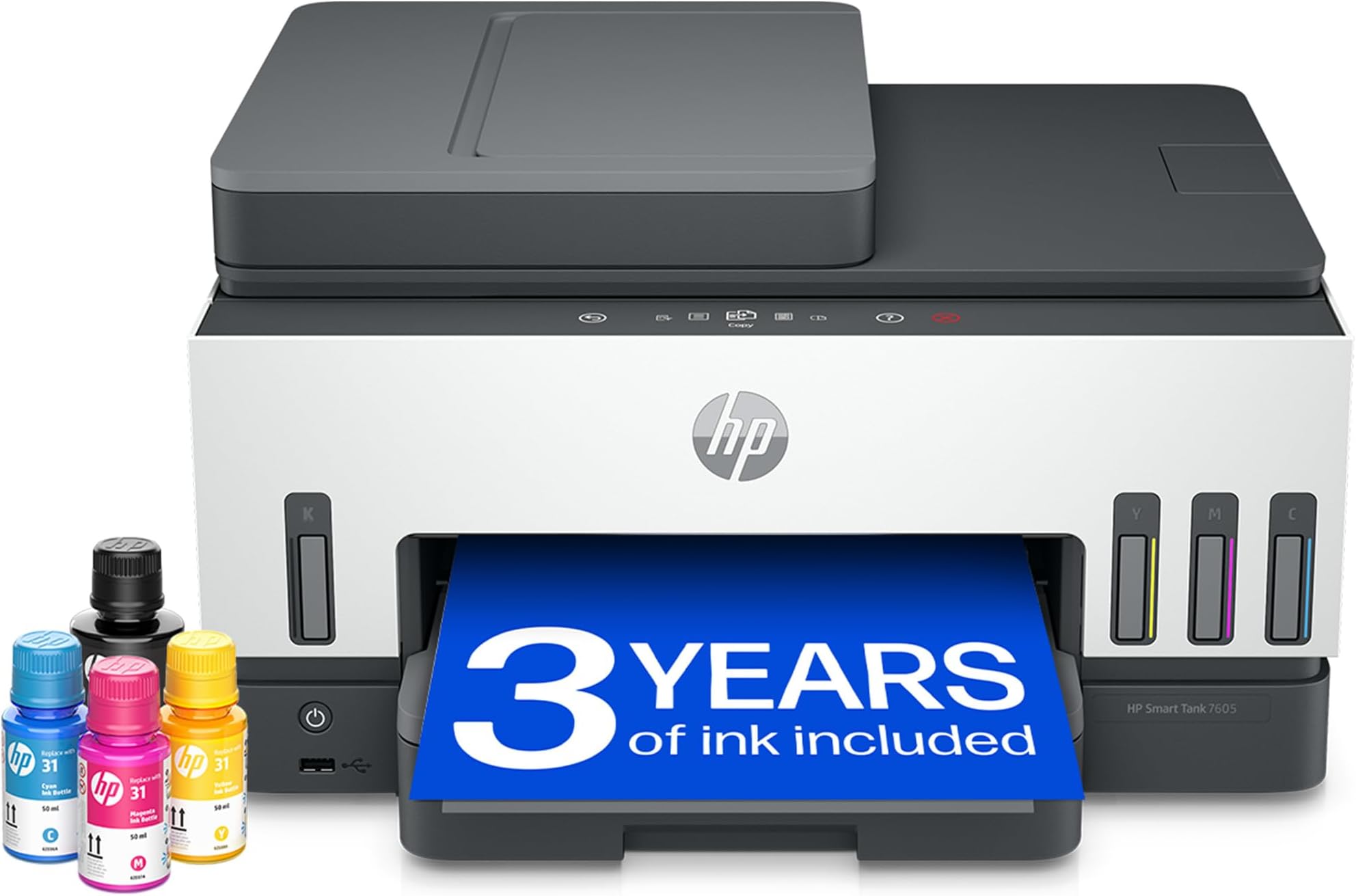
The HP Smart Tank 7605 is a versatile all-in-one printer designed for busy home environments, offering high-volume, low-cost printing with refillable ink tanks that last up to 3 years. It supports wireless and Ethernet connectivity, automatic duplex printing, and a 35-page automatic document feeder to streamline your workflow. With spill-free ink refills, smart user guidance, and essential security features, it delivers professional-quality color and black-and-white prints while keeping operational costs low.


| ASIN | B09GPQTK7L |
| Additional Printer Functions | Copy |
| B&W Pages per Minute | 23 ppm |
| Best Sellers Rank | 2,624 in Computers & Accessories ( See Top 100 in Computers & Accessories ) 6 in Ink Tank Printers |
| Box Contents | HP Smart Tank 7605 All-in-One, Print, Copy, Scan, Fax, ADF and Wireless, 35-sheet ADF; Scan to PDF; Two-sided printing |
| Brand | HP |
| Brand Name | HP |
| Color Depth | 24 |
| Color Pages per Minute | 22 ppm |
| Colour | Grey |
| Compatible Cartridge | Ink Bottles |
| Compatible Devices | Printer |
| Connectivity technology | USB, Wi-Fi |
| Control Method | App |
| Controller Type | Android |
| Country of Origin | China |
| Customer Reviews | 4.0 out of 5 stars 1,280 Reviews |
| Display Type | LCD |
| Dual-sided printing | Yes |
| Duplex | Automatic |
| EU Spare Part Availability Duration | 10 Years |
| Hardware Interface | Ethernet, USB 2.0 |
| Initial Page Print Time | 16 Seconds |
| Ink Colour | Black, Cyan, Magenta, Yellow |
| Item Dimensions D x W x H | 3.64D x 4.28W x 2.4H metres |
| Item Type Name | Multifunction Printer |
| Item Weight | 7.7 Kilograms |
| Manufacturer | HP |
| Maximum Copies Per Run | 250 |
| Maximum Copy Resolution Black and White | 1200 x 1200 dpi |
| Maximum Copy Resolution Color | 4800 x 1200 |
| Maximum Copy Speed Black and White | 13 Pages per second |
| Maximum Print Resolution Black and White | 1200 x 1200 dpi |
| Maximum Sheet Capacity | 250 |
| Maximum Supported Paper Size | A3 |
| Maximum print Resolution Color | 4800 x 1200 |
| Model Name | Smart Tank, HP Smart Tank 7605 All-in-One, Print, Copy, Scan, Fax, ADF and Wireless, 35-sheet ADF; Scan to PDF; Two-sided printing |
| Model Number | 28C02A |
| Model Series | HP Smart Tank All-in-One |
| Model name | Smart Tank, HP Smart Tank 7605 All-in-One, Print, Copy, Scan, Fax, ADF and Wireless, 35-sheet ADF; Scan to PDF; Two-sided printing Model name Smart Tank, HP Smart Tank 7605 All-in-One, Print, Copy, Scan, Fax, ADF and Wireless, 35-sheet ADF; Scan to PDF; Two-sided printing See more |
| Network Connectivity Technology | USB, Wi-Fi |
| Number of Drivers | 4 |
| Number of Ethernet Ports | 1 |
| Number of Trays | 1 |
| Other Special Features of the Product | Auto-Duplex |
| Output sheet capacity | 250 |
| Paper Size | A4 Centimetres |
| Print media | Paper (plain) |
| Printer Output Type | Colour |
| Printer Resolution Horizontal Max in Color | 4800 Centimeters |
| Printer Type | Thermal |
| Printing technology | Thermal |
| Product Warranty | 1 year |
| Resolution | 4800 x 1200 |
| Scanner Type | Sheetfed |
| Special feature | Auto-Duplex |
| Specific Uses For Product | Wide range of uses including document and photo printing, high volume printing as well as home and office use, compatible with desktops, laptops and smartphones. |
| Total USB 2.0 Ports | 1 |
| Total USB Ports | 2 |
| UPC | 195908302643 |
| Unit Count | 1.0 count |
| Warranty Type | Lifetime |
| Wattage | 32 watts |
O**O
Brilliant.
Fast delivery via amazon prime, the HP Smart Tank 7605 All in One Printer is very well made, setup instructions are straight forward, ink capacity is brilliant, functionality is very good, noise level is low, wireless connectivity is simple to set up and strong, the ink filling is very easy and effortless, print quality is excellent, printing speed is more the adequate, looks very pleasant on the eye, this is my 2nd HP printer and I must say so far its a masive improvement, the new type of ink refilling is so much better and easier than the old type; This is a brilliant unit.
J**S
Brilliant for Home Use – Just Follow the Setup Carefully!
As an office manager used to large industrial printers, I wasn’t sure what to expect from a home colour printer but I’ve been really impressed with the HP Smart Tank 7605. It's a fantastic choice for home use if you take your time with the setup, which is straightforward if you’re patient and follow the instructions exactly, even down to removing the bits of internal packing cardboard in the right order. I recommend going straight to the HP website once it’s plugged in, as it’ll walk you through linking it to your Wi-Fi and handle most of the installation with helpful prompts. I also downloaded the app, and can also print direct from my iPhone too. Filling the ink is easy — just press the bottles down firmly until they click into place. Installing the print heads takes a bit of care to make sure they’re facing the right way, but again, the instructions guide you through it. Print quality is great, especially for colour and photos. It’s not lightning-fast (don’t expect office-grade speeds!), and it can be a little noisy and clunky, but for home projects, it does the job beautifully. A few tips: Keep it switched on 24/7 — it uses hardly any energy in standby mode, but this helps it stay updated and prevents the print heads and ink from drying out. Print a page once a week if it’s not in regular use, which stops it from drying out too. I bought the optional 3-year warranty for peace of mind — worth it at the sale price. It’s light enough to move around and compact enough to live happily in a corner of my kitchen. Overall, I’m really pleased. It’s a solid, well-designed printer with refillable ink tanks and smart features that make it a great investment for home use. The ink supplied should last for 6,000 pages and original refills are good value for money. UPDATE: It's now June and I've been using this printer a lot, without any issues. However, 2 weeks after I bought it my PC did a big update and whenever I tried to print, my PC said 'rendering error'. After a while, I realised I could still print perfectly from my iPhone, so it wasn't a printer error. I realised that I had installed the HP Smart App on my PC, but my PC had uninstalled the printer. So if you get this error, just install the printer the old fashioned way on your PC and only after doing that, reinstall the HP Smart app. That'll fix it.
M**D
Over all this Printer is worth buying despite the niggles.
I had read most of the reviews before I purchased this item. It arrived on time and in good condition. I took extra care unpacking the printer from the box. The first thing I noticed was that the instruction book did not match the number on the printer and that the instructions were not in the usual packaging.I took extra care to make certain that I removed all tapes and cardboard around and within the printer. Don’t rush this. After 2 hours I had the printer set up, or so I thought. There are a few annoying things that with a little extra thought could be fixed. I is the annoying Privacy settings notice that prints over the top of your page 1 of your documents. To get rid of it you have to convert anything you want to print to PDF. I purchased this printer to save on ink and paper. Unfortunately re paper you can’t fix to print both sides as once you have printed documents the system reverts back to single pages. Speaking of pages for some reason the printer always goes back to single page print and envelope therefore I have to remember to set the printer to A4 and both sides. Connecting to the router was a tad fiddly and a bit antiquated. My very old HP ENVY Printer was fast at printing two sides/ fax/scan was an absolute dream to operate sadly they don’t make them any more. Any way back to HP smart tank Filling the ink was easy. You will have two regular inks It took me a few minutes to figure out where they went and how to remove the orange safety gadget. It’s a good enough printer but for the price I was expecting a more modern set up. Why did you choose this product over others?: I trust HP Connectivity: Fiddly Good but slower than expected. Fixed settings would be preferred as the constant need to readjust is annoying. Scanning capability: Very good at scanning picture quality very good Printer functionality: A tad old fashioned and fiddley but workable Ink capacity: Excellent Colour quality: Excellent Functionality: Could be improved. Nothing major just needs a more modern approach to settings.
A**N
Regret ….
I’m at my wits end - convinced that HP7605 smart printer was state of the art, I bought into the hype …. Teething problems though have turned into a major issue …. It’s just so unreliable- not because of the printer itself but the HP software app that sits on the pc/mac etc is just so ridiculously unreliable- I go to print / scan but I never know if it’s going to work - sometimes it all connects and prints effortlessly- other times the software/app just sits there saying printer can’t be connected - even though it’s there - other times saying it is connected but still doesn’t print…… look, don’t let me put you off - if you are keen to spend endless hours of your life looking at a screen and trying to work out how to print a document that you have to urgently print out today then good luck - you’ll need it. Sadly I’m gutted. my love affair with this printer is over, because that hp app simply isn’t ‘appy!!! I seriously am now having to contemplate the unthinkable ….. sling the hp smart printer out and get an epson or brother. I’m gutted - it means I’ve made a costly mistake and it’s all my fault - I should not have assumed all online positive reviews were accurate. Oh well, deep breath, I’ll give it one more week ….. then it’s crunchy time. Wish me luck. UPDATE; Reliability problems with HP app etc continued, even after getting expert help - the IT said hp printers are good but their app is a nightmare! - er, excuse me, I could have told him that! - but seriously it shows it’s not me, the HP app is what makes this or indeed and HP printer a potential costly mistake. I’m ditching it, cutting my losses has buying an Epsom!
C**G
Good quality printer for busy family home
I recently acquired a new printer, selecting this model primarily for its Smart Tank capabilities. The setup process was straightforward, and the printer was operational within approximately 15 minutes. The print quality is excellent, and the printer's speed is notably efficient. I highly recommend this printer for those seeking a new device, and its price point is considered reasonable.
I**Y
Great quality printing!
Great printer with loads of ink, out of the box, and no need to worry about an Instant Ink subscription! The only minor downside is that there will be an on-going price to replace the printheads, although I've no idea how long they are expected to last! Took a little while to install as WiFi didn't want to communicate with HP Smart but as I need to connect to my Ethernet for wider compatibility that was fine and everything is working perfectly now. My only criticism is the fact that you cannot control the brightness of the "power on" light - which would have been nice as I haven't found a way to enable "power on Ethernet" to be able to switch it off and continue to be able to print wirelessly!
A**R
So far so good
Prints fairly quickly, even for double-sided and mixed pictures/text. Connectivity set-up worked smoothly - both to laptop and (after a bit of delay caused by advertising things like Tik-Tok) to Android phone - the HP software was better than I expected from some reviews - it made Wifi connection, ink loading and printer-head installation easy even for a non-techy pensioner like me. Print quality reasonable. The machine's appearance as a home printer is better than I thought it would be - I really wanted the shiny-black-box look of the Canon Pixmas, but now this HP is on my desk I quite like it. Very pleased with first impressions, hope it keeps up the standard!
R**Y
The end of ink cartridges?
For the sake of context, I bought this to replace an HP OfficeJet pro 9600 that had developed a fault in the printing system. The things that I particularly like about this printer are: 1. It uses ink bottles rather than cartridges, which seems to me a much better approach. 2. The printer comes with "3 years of ink". Whereas I cannot yet be sure exactly how long it will last, I can report that it does come with a substantial quantity of ink, which will last significantly longer than the average inkjet cartridge printer. 3. It comes with an ADF (Automatic Document Feeder). Unfortunately, it is not a duplex scanner, unlike my previous printer, but I didn't seem to be able to find one in the range that had this facility, so that is worth bearing in mind. 4. Although HP has been criticised for some of its aggressive DRM on its inkjet cartridges, I am a Linux user and they have consistently supported my favourite OS. However, bear in mind that most modern printers are "driverless", so other printers would likely work okay anyway. 5. It has an ethernet port, which allows me to use a wired connection that I prefer (and is what I used with my previous printer). It does of course have Wi-Fi connection capability. The printing quality is as good as one might expect from a modern inkjet printer, so I have no complaints. It is capable of borderless prints up to A4 size, so par for the course. There are one or two things that I have personally found some difficulties with: When using the ADF, it does have a nasty habit of pulling in a couple of pages at a time, which you have to watch out for. To be fair, this is something that I sometimes experienced with that old HP OfficeJet pro. Also regarding the ADF: it is sometimes surprisingly difficult to get the paper to feed in and not end up with a scan that is slightly out of alignment. You have to be very careful about how you feed the paper in. Finally, although this is a theoretical advantage for now, it is obvious from when you set the printer up in the first place, that the print head should be easily replaceable. As this is a component that is most likely to fail in some way, there is at least a chance that you might not have to throw the whole printer away if something goes wrong – although that does depend on how much a replacement would cost! All in all, I would recommend this printer/scanner.
Trustpilot
1 month ago
3 weeks ago