Buy anything from 5,000+ international stores. One checkout price. No surprise fees. Join 2M+ shoppers on Desertcart.
Desertcart purchases this item on your behalf and handles shipping, customs, and support to Vanuatu.
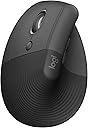
🖐️ Elevate your left hand, elevate your workday.
The Logitech Lift Vertical Ergonomic Mouse is a left-handed, wireless mouse featuring a 57-degree vertical design that promotes natural wrist posture and reduces strain. Compatible with Windows, macOS, iPadOS, Chrome OS, and Linux, it offers Bluetooth and Logi Bolt USB connectivity with up to 2 years of battery life on a single AA battery. Equipped with 6 customizable buttons, whisper-quiet clicks, and a precision SmartWheel, it’s crafted from 70% recycled plastic and ergonomically certified for professional comfort and sustainability.


| ASIN | B09J1SYX5B |
| Additional Features | Bluetooth/Radio Frequency |
| Antenna Location | Mouse |
| Are Batteries Included | Yes |
| Are Batteries Required | Yes |
| Battery Average Life | 24 months |
| Best Sellers Rank | #26 in Computer Mice |
| Brand | Logitech |
| Built-In Media | 1 x AA Battery, Lift Ergo Mouse, Logi Bolt USB Receiver, Quick Start Guide |
| Button Quantity | 6 |
| Color | Graphite |
| Compatible Devices | Personal Computer |
| Connectivity Technology | Bluetooth |
| Customer Reviews | 4.5 out of 5 stars 7,056 Reviews |
| Embellishment Feature | LED |
| Enclosure Material | Graphite,Plastic |
| Global Trade Identification Number | 00097855170897 |
| Hand Orientation | Left |
| Hardware Platform | Mac, PC |
| Item Dimensions L x W | 4.3"L x 2.7"W |
| Item Type Name | Mouse |
| Item Weight | 125 Grams |
| Manufacturer | Logitech |
| Mfr Part Number | 910-006467 |
| Minimum Required Operating System Version | Windows 10 |
| Model Name | Lift Ergo |
| Model Number | 910-006467 |
| Mouse Maximum Sensitivity | 4000 Dots per Inch |
| Movement Detection | Optical |
| Movement Detection Technology | Optical |
| Number of Batteries | 2 Lithium Polymer batteries required. (included) |
| Number of Buttons | 6 |
| Operating System | Chrome OS, Mac OS X 10.15 Catalina, Windows 10, Windows 11, iPadOS 14 |
| Pattern | Mouse |
| Power Source | Battery Powered |
| Range | 30.0 feet |
| Special Feature | Bluetooth/Radio Frequency |
| Style Name | Left-Handed |
| UPC | 097855170897 |
| Unit Count | 1.0 Count |
| Warranty Description | 1 Year Limited Hardware Warranty |
C**S
I love this mouse! No pain in my hand after a full day at the desk!
I really have enjoyed this mouse. First of all it’s pink so it’s cute and that is important for my office design. More importantly it’s comfortable. Before this one I only had the traditional mouse design so this one being the sideways hold I wasn’t so sure I’d like it but I LOVE it. No cramping or carpal tunnel pain after using it all day. For a corporate working mom, this has been perfect for my home office. Looks good, feels good. And the battery life is great. I’ve also never had issues with it disconnecting or anything.
R**M
This is wonderful
I haven't written a review for a long time. I fell in love immediately with this mouse. I was getting a bit of wrist pain from my other standard mouse and wanted to try something new like this. Right away I notice the increased comfort and more natural holding style. It just makes sense, your wrist naturally rests in a more upright position like this, not flat and turned towards the ground. The best thing about the mouse, which honestly I hadn't even considered before buying, is that IT IS TOTALLY SILENT. I'm not exaggerating...I cannot hear any clicks ever. The scroll wheel also is entirely quiet. The mouse glides smoothly, there is less friction involved than a standard mouse. It also feels like less wrist and forearm action is involved overall, like all movements are minimized and reduced, and yet I am more accurate and quicker with everything I'm doing with the pointer on the screen. The scroll wheel is the best I've ever used. It moves in such a frictionless yet intentional way, it is perfect. I never go past where I want to scroll or even consider that I am using the feature, and yeah it's totally silent! I have long fingers and my hands are on the larger size, maybe medium to large. For me the mouse feels like it should, it could even be a bit bigger but I like that it doesn't consume my entire grip. Maybe it could feel a bit smallish for a larger, fatter hand, or too large for petite hands, but for most this will be a great fit. I have not had it long enough to test the battery life, but I expect no issues there. Also, it's just one single AA battery, which I find more convenient and economical than the 2 AAA batteries which my other mouse was taking. The mouse does come with a single AA battery. I had a bit of splurge money and I'm very happy I got this. $70 for a mouse feels like a lot, but consider that it's actually the most important part of using a computer. It is the vehicle through which you navigate everything in the virtual world. I can lose myself much easier in what I'm doing when I can forget my hand is even being used! Totally worth it.
L**N
The best ergonomic mouse I have ever used!
This is the best ergonomic Mouse I've ever used! I should know because I've used many different designs in my job performing ergonomic assessments for office and industrial workers. Of course the whole point of ergonomics is that everyone is different, so you have to find something that works for you. One size does NOT fit all! Here's why I like this one for me. * This mouse feels very comfortable in my hand * It allows my hand to be in a "handshake" position when using it- vertical instead of horizontal pushing a mouse across a desktop. This feels more natural, especially when scrolling with my index finger. * I use my whole forearm to move it instead of just the tiny muscles in my fingers and wrists. This is better to prevent repetitive trauma * It is made for people with small hands like me. People with medium sized hands will still find it comfortable. (Logitech makes model with similar design for those with large hands.) * Best of all, it comes in a version for left-handed people! This is exceptionally hard to find an ergonomic mice! The only Improvement I would make for this design is on the magnetic cover for the battery, located on the underside of the mouse. The magnets need to be stronger. Since this mouse is tall, I have accidentally knocked it off of my desk several times and the little magnetic cover goes flying off (usually under the desk where it is very hard to retrieve without using a stick or grab-it tool). I have now taped it onto the mouse body so that doesn't happen anymore. My advice for all ergonomic tools is to try to go someplace where you can put your hands on them to see if it is a good fit for you. They do carry these in my local office supply stores. I always try everything out whenever I see it because even if I don't need it at the time, perhaps a client will, so I know where to direct them. I really hadn't planned on replacing my mouse back then, but now my mouse and keyboard decided to stop working and I needed something immediately. That's why I ordered it from Amazon and it came quickly. I would order this again in a heartbeat without hesitation. In fact, I'm thinking about buying another one to have as a backup. Hope this information is helpful to others. .
A**T
My favorite mouse ever
I'm very particular when it comes to mice. It has to be: - quiet click and scroll - scroll wheel, not track ball - bluetooth - vertical - real battery, NOT rechargeable There are actually several mice that fit all those criteria, and I've tried nearly all. This Logitech is double the price of most of the others, but for me well worth it. Prior to this I used the Mojo which is about half the price, and that mouse is probably my 2nd favorite but it is a distant second. Compared to the Mojo and others, this mouse has more precise movement, smoother scrolling, and more reliable clicks. Because of the vertical orientation, my finger tends to click diagonally downward with gravity instead of fully horizontal in line with the intended click direction. That causes the Mojo to sometimes miss my clicks, forcing me to constrain my finger direction more carefully, often requiring several tries just to click something. But this Logitech has no such issue, it's very responsive every time even with my sloppy clicks. So while I used to think the Mojo was the best I could find given my requirements, this Logitech is clearly better. When I spend all day at the computer, these minor things make a big difference to me, therefore well worth the extra money. Also want to mention I'm 6' 4" tall and the size of this mouse is fine for me. It is a little smaller than some others, but it feels fine in my hand, it's not abnormally tiny or anything. I was concerned because the description says it's intended for smaller hands and suggested I should get their larger MX Vertical model instead. I would have considered it but the MX Vertical has a rechargeable battery which is a deal-breaker for me. What's my beef with rechargeable batteries? Earlier I had the Seenda vertical mouse but its rechargeable battery died after a year, unable to recharge, so I figured it was a fluke and bought another, and same thing happened after a few months. So after that I switched to replaceable batteries and never looked back. Replaceable batteries last forever (well, they only last a year too, but then you just replace the battery!). I've been very happy using replaceable batteries, way more reliable and durable, because all rechargeables die eventually, and it is easier to replace a battery than an entire mouse! So in summary, if you're price sensitive you could get a usable vertical mouse for less. But if you're OK to spend a little more for a tool you might well use all day for years, then this one is totally worth it IMO.
W**E
Vast improvement over traditional mice
This review is primarily for the left handed version. When Logitech introduced the left handed Mouseman in 1991, it was the first and only ergonomic mouse for left handers. Merchants refused to dedicate shelf space to it, so it was short lived. The latest version is leaps and bounds above the original and is the most comfortable and natural feeling mouse that I've ever used. At first, it was awkward to use. After about 20 seconds, it felt natural, and traditional mice started feeling very awkward. This mouse lets you keep your arm and wrist in a natural position, whether you are using it as a desk mouse or a couch mouse. The primary button is the index finger button, whether you use the left or right handed version. The Logitech software doesn't have a true setting for swapping buttons, and uses the Windows setting. So if you had your buttons swapped for your old mouse, you need to unswap them. It also means that your old mouse becomes a right handed mouse on that computer. There's no way of having both set to left handed. There's a switch to change the sensitivity. The normal one lets you do work needing fine movements, such as drawing programs. The other setting makes it more sensitive to movement, which means more mouse movement with less hand movement. It's also a good feature if you have limited desk space or are using an airplane tray. This lets you avoid having to use the setup screens to change sensitivity. The scroll wheel is smooth and accurate. It also works for horizontal scrolling if used in conjunction with one of the buttons on the thumb side. It takes getting used to, and is still awkward for me. Those buttons are forward and back buttons by default, so don't use it while editing something on a web page until you are used to it, or you could end up losing everything. A problem is that their Logi software doesn't let you set the scroll increment. It can be done with the Windows mouse settings, but you shouldn't have to go two places to set what the mouse does. Pressing the middle button changes from moving the pointer up and down to scrolling the page up and down. Unfortunately, there's no speed adjustment. The round symbol that pops up should really be a longer vertical symbol that allows greater control over speed. The mouse includes a Logibolt receiver that can plug into a USB port, or you can use the mouse directly with your computer's Bluetooth if it meets the specs. If you use it with your computer's Bluetooth, you remove the tab from the mouse so the battery connects, and then use your computer's Bluetooth configuration. That will save you a USB port. If you need to use the mouse to set up Bluetooth, use the receiver, and then store it inside the mouse once you have your computer's Bluetooth set up. If you use the receiver, plug it into a USB port first, then pull the tab. If you want to be able to use both, there's a button on the bottom to let you set it for up to three different devices. So if it's set for your computer's Bluetooth, and want to set up the receiver to use on another computer, plug in the receiver, touch the button on the bottom of the mouse (the light will move from 1 to 2) and you will be paired. You can also use the third setting for another device. If you paired it to both using the same computer, you can unplug the receiver and use the button to go back to setting 1. If you have a desktop computer, you will want to have the receiver paired, and can use it if you need to change a bios setting, since Windows won't be loaded. So it's good to pair it, even if you will just store it inside the mouse. It would be good to pair it anyway with any computer, so it's ready to go if you ever need it. There's no instruction manual included, nor do they give you a link to one in the configuration software. The QR code takes you to the software download page, but doesn't give a link to the online manual. So some of this wasn't clear to me without searching online. Their original Mouseman came with a 148 page manual and a 48 page getting started guide. The new one comes with pictorial printed on the cardboard it's wrapped in. Something in between might have been nice, even if it were just a link to the manual. Update: 18 months later, it's still working well but the battery is down to 5%. I'm changing the battery.
A**N
Bad auto driver install. Great mouse. Few of the left hand mfgs.
Really crappy auto driver install. Locked up my USB ports for my usb keyboard, usb mouse, all usb ports in fact. Had to reboot multiple times with an old style 5pin keyboard since the software screwed up my usb ports. All of them. Lucky I have a motherboard with an old style keyboard port. A reboot of W11 in safe mode, ripped out auto-installed software, registry keys and rebooted to regain control of my USB ports. I do not know what went wrong. Alls I know is Logitech loaded something, it locked up my USB ports and I had to rip everything Logitech out to get control again. I downloaded the software, installed it and it worked fine. I've had no problems since. I'm an old lefty and as such am ambidextrous in most areas, since there just was not left handed oriented items readily available. You had to have left handed stuff made so you learned to do things right handed. I've developed carpal tunnel in both elbows and had purchased a couple of vertical mice, one left and one right. I took the left into work and was looking for a replacement. My other two were around $30 ea. I liked the right handed vertical mouse (Anker). They do not make a left handed version. The left handed mouse is ok, not as good as the Anker. I decided to go above my spend tolerance and get the Logi after reading many reviews. It has not disappointed me. The auto-install sucked. Never letting that happen again. It is a nice smooth mouse. Fine movements that are easily adjustable. The hand position is excellent. I can use this all day without switching to the right because of elbow pain. If you have the pain, you know what I am talking about when it flares. It takes some getting used to the subtlety of the clicks when coming from lower cost mice. Soft and gently like a newborn's .... One of my big criteria for a vertical mouse is a landing area for the outer two fingers (pinky and next to pinky for finger orientation challenged). When you go to a vertical mouse, it takes some adjustment to moving the mouse since you can't really press down with your palm and inside two fingers (the ones next to the outside two fingers). It is helpful to be able to use the two outer fingers and thumb to aid in moving the mouse. You have to experience a vertical mouse to understand. The right handed only Anker goes from an inch to a half inch in the length of my pinky below the buttons on the side. This is a really nice landing area for the outside fingers to assist moving the mouse around. You can squeeze a little and the mouse glides. The Logi mouse is a wee shorter than the Anker and the area below the buttons in a mostly straight 3/4". Both mice curve quickly down to the inside below this area. I was used to a vertical mouse by the time I purchased the Logi and I have no issues with the pinky dragging the table and the finger next to pinky resting on the landing. I move the mouse with no problems. It is the subtlety of how one interacts with these style of mice. The big plus, takes a long time before mouse use causes pain flareups. And this isn't just a pain and done. Depending on how one ignores the pain, often determines how many days life sucks. The Logi mouse minimizes the flare ups. I'm thinking of taking the Anker in and getting a right handed Logi for home. I like the Anker, I'm frugal and highly recommend it for getting your feet wet. I love the Logi (auto-install sucks) and will probably ignore my frugal tendencies and get a right handed one since I don't switch hands as frequently with the Logi in the mix. Don't have to suffer auto-install either.
S**N
Best mouse ever!
I am right handed but have used a mouse on the left side for years. I was using an Apple trackpad and I noticed wrist pain from the side to side motion so decided to look for an ergonomic left hand mouse. This Lift is AMAZING! I love it. Can be on the computer all day and I have no wrist, arm or hand discomfort. And the battery life is insane. I am going on 7 months and the original AA battery in the mouse is presently at 90%. The size options are super helpful as well to customize your experience. Don't hesitate - just get it - you'll love it!
C**S
BUY IT
Best mouse EVER. No lag, so quiet, glides perfectly, and way more comfortable on my wrist. It doesn’t hurt that it’s so pretty too!
Y**A
Yes but depends
I really love it! Works great but for me it hurts my hand more than the horizontal one.
S**G
The best left handed mouse ever
The only and best left handed mouse made by logitech. Quality quality quality product. I would buy this again and again forever if I need to. It surely has made my wrist pain disappear.
Y**.
Un mouse ergonómico efectivo
Está bastante bien. El diseño es interesante, la suavidad de los botones izquierdo y derecho es suficiente, la anchura de la protuberancia superior para descansar el pulgar cuando no se tiene del lado de los botones laterales es útil, y el software que se descarga Logi Options+ es más de lo que me esperaba. Puedes configurar granularmente la sensibilidad del puntero y cambiar lo que hacen los botones laterales según el programa que utilices. Además puedes configurar para que se conecte hasta con 3 dispositivos, dos de ellos con bluetooth. [Me falta probar la funcionalidad de pasar archivos entre computadoras con Logi Flow] Solo hay una cosilla, y es que la rueda del ratón me gustaría que tuviera más tracción y fuera menos sensible al movimiento, no demasiado, pero sí un poco más. Actualización: Ya me acostumbré a la rueda del ratón. Ahora me parece que está bien. Vengo de haber utilizado muchos años un G502, y el cambio es sustancial. Algo que sí me gustaría que agregaran es la rueda libre del G502, lo que permite hacer scroll vertical más rápido. Me parece una función más útil que el botón para cambiar la sensibilidad, que yo que no me dedico a los videojuegos, no lo echaría en falta ni un poco si lo quitaran. Actualización: Tiene una cosa que se llama SmartWheel, y en lugar de presionar un botón para que la rueda gire libremente y te desplaces más rápido en vertical, si empujas la rueda con un poco más de fuerza o impulso ya sea hacia adelante o hacia atrás, tiene una función similar, corre libremente. Esto lo entendí unas semanas después de comprarlo. También, aunque no tiene desplazamiento horizontal desde la misma rueda del ratón, puedes mantener presionado uno de los dos botones laterales del lado del pulgar y mover la rueda para ese desplazamiento horizontal, lo que me gusta más que si pudieras empujar la rueda hacia los lados como en el G502. Actualización: Pasados varios días de utilizarlo me pasa que llego a golpearlo sin querer al tratar de agarrarlo. Es la costumbre de tomar un mouse que tiene una altura mucho menor, como el G502 o el mouse tradicional de la Mac. Ya veré si deja de suceder con el paso del tiempo. Actualización: Sí dejé de pegarle sin querer por la altura pasadas unas semanas. [Me falta ver si se ensucia luego de algunos meses al punto de no quitarse como dicen otros comentarios] También tengo que ver si es verdad que se reduce la tensión en mis tendones, porque siento piquetes y algo de dolor con un mouse tradicional, ya veré si no es solo marketing. Actualización: Suelo sentir piquetes en los antebrazos, y aunque la tensión sigue sintiéndose (no es sustituto de hacer estiramientos regulares), sí he notado una reducción considerable de los piquetes. Recomiendo descansar el pulgar en la protuberancia cuando lo sostienes y no lo estás utilizando, y colocar el pulgar en la parte cóncava del lado izquierdo cuando lo utilices. He notado que esto me ofrece la mejor experiencia con respecto a la tensión. P.D: Si hay alguien de logitech leyendo esta reseña, ya que hicieron el esfuerzo por diseñar y materializar este mouse ergonómico, propongan un teclado que se separe por la mitad. El Moonlander MARK I de ZSA solo se puede traer por importación, lo que lo vuelve relativamente inaccesible para el mercado latino. Hay mercado para ese teclado por acá, de eso estoy seguro. Yo sé que compraría una alternativa convincente de logitech, porque sé que me han durado sus productos, y la angulación de un teclado de un solo corte para las muñecas no es óptima, además de que los teclados separados por la mitad suelen no tener la "ñ" y mucho menos son ortolineales, otro pero más para el mercado latino y otra área más de oportunidad para ustedes como empresa. En resumen, hagan un teclado mecánico con switches brown, que son los más populares, que sea ortolineal, y que esté dividido por la mitad para acomodar a la angulación de las muñecas, además de agregar de accesorios descansa muñecas y unas patas detrás del teclado para acomodar la altura de forma granular.
A**R
Comfortable and Efficient
I got one for my partner and myself, and we've been using 'em for about 1-2 (1 month me, 2 her) months and here is our thoughts: Comfort and Feel: The mouse feels really nice in hand. It’s extremely comfortable to use. Battery Life: The battery lasts a long time, which is great for uninterrupted use. I haven't charged it once in the 1-2 months we've had them Performance: It has good sensitivity and the clicks are really quiet, which I appreciate. Multi-Device Pairing: Being able to pair it to three devices is a fantastic feature. Switching between my laptop, PC, and Steam Deck is seamless. Scroll Wheel: The free-wheel scroll is decent, but not as satisfying as I hoped. It’s not quite up to the standard of the Razer scroll wheel, but it gets the job done. Gaming: I can play games with it without any issues. It took about a day to adjust, but once I did, there was no loss in click accuracy. Overall, the Logitech Lift Vertical Ergonomic Mouse is a solid choice - though the scroll wheel could be more satisfying.
E**Z
Escelente calidad, altamente recomendable si tienes problemas de tendinitis o túnel carpiano.
Soy diseñadora gráfica y este ratón es perfecto si tienes problemas de tendinitis o túnel carpiano, me ayudó mucho para relajar mi mano y evitar el esfuerzo al estar tanto en la oficina y con mis trabajos freelance y de excelente calidad. Además puedo configurarlo para 3 dispositivos diferentes, así que funciona tanto en mi computadora personal como en la del trabajo sin tener que estar moviendo la configuración, solo es picar un botón. Altamente recomendable. El único problema que tengo es directo con el sistema de logitech porque su aplicación me deja de servir a ratos en la MacBook y se me desconfiguran los botones derechos pero fuera de eso está todo bien. Llevo casi un año usándolo y no se ha dañado ni nada ha empezado a fallar.
Trustpilot
1 month ago
2 weeks ago