Buy anything from 5,000+ international stores. One checkout price. No surprise fees. Join 2M+ shoppers on Desertcart.
Desertcart purchases this item on your behalf and handles shipping, customs, and support to Vanuatu.
🌍 Smart Living Made Simple!
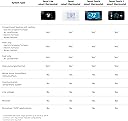
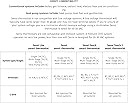
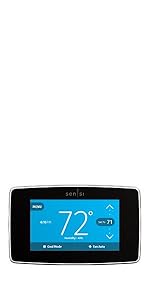
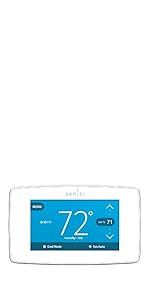
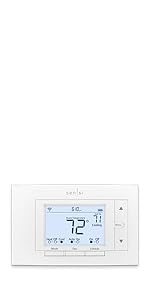
The Sensi Smart Thermostat combines 100 years of expertise with cutting-edge technology to offer a user-friendly, energy-efficient solution for modern homes. With easy DIY installation, robust data privacy, and compatibility with popular smart home systems, it’s designed to enhance your living experience while saving you money.


| ASIN | B01NB1OB0I |
| Additional Features | Data Privacy, Easy DIY Install, Energy Savings, Filter Indicator, Programmable |
| Backlight | Yes |
| Best Sellers Rank | #1,058 in Tools & Home Improvement ( See Top 100 in Tools & Home Improvement ) #4 in Home Programmable Thermostats |
| Brand | Sensi |
| Brand Name | Sensi |
| Color | White |
| Connectivity Protocol | Wi-Fi |
| Connectivity Technology | Wi-Fi |
| Control Method | Voice |
| Control Type | Button Control |
| Controller Type | Amazon Alexa, Google Assistant, SmartThings, Vera |
| Customer Reviews | 4.4 out of 5 stars 22,717 Reviews |
| Display Type | LED |
| Finish Types | Glossy |
| Global Trade Identification Number | 00786710554827 |
| Included Components | Thermostat, free mobile app, 2 AA batteries, mounting hardware, wire stickers, installation guide, welcome guide with Sensi code, warranty booklet |
| Item Dimensions D x W x H | 1"D x 5.88"W x 3.75"H |
| Item Type Name | , Works with Alexa, Energy Star Certified |
| Item Weight | 0.85 Pounds |
| Manufacturer | Copeland |
| Manufacturer Part Number | ST55 |
| Manufacturer Warranty Description | 3 years. |
| Material Type | Plastic |
| Model Name | Wi-Fi Thermostat for Smart Home, DIY Version |
| Model Number | ST55 |
| Mounting Type | Wall Mount |
| Number of Batteries | 2 AA batteries required. (included) |
| Power Source | Corded Electric |
| Product Dimensions | 1"D x 5.88"W x 3.75"H |
| Product Style | DIY |
| Screen Size | 5 Inches |
| Shape | Rectangular |
| Smart Home Compatibility | Smart Home Compatible |
| Special Feature | Data Privacy, Easy DIY Install, Energy Savings, Filter Indicator, Programmable |
| Specific Uses For Product | Air Conditioner, Boiler, Furnace, Heat Pump |
| Temperature Control Type | Programmable, Smart/Remote |
| UPC | 786710554827 |
| Unit Count | 1.0 Count |
| Voltage | 24 Volts (AC) |
J**F
Easy to use app
Works great as they both gave me unable to connect early in but nothing again and I live the easy usage and reporting it gives you too. Easy to mount and connect with a c wire or just a battery too.
B**I
Step by step app is AWESOME!!!!! Install app BEFORE removing old thermostat.
We've had this thermostat a month and I really like it so far. It makes me think our old thermostat wasn't actually working for a long time before it started setting itself to 85°. Since it wasn't even programmable, I knew it had to go and if I was going to upgrade I may as well go with something just a bit more...modern than a set-temp-and-it-stays-unless-you-change-it thermostat. I'm going to do pros and cons below. I do want to say, I took my old thermostat off the wall first, wrote down all the wire colors and the letter each was connected to on a piece of paper. The app removes the need for pen and paper. I just used my pen and paper to place the flags mentioned below on the correct wires. Pros: 1. This thing is super easy to install. Open the box and there are instructions for you to download the Sensi app. Once the app is downloaded it has you choose which letter slots you have wires connected to (R, RH, C, E, OB, etc.). The app then tells you how to use the flags they provide to label the wires. For example I had a wire that went into a slot labeled "R", but Sensi only had "RH" and "RC" (I think it was RC), so the app told me which R my wire needed to go in. Not having any electrical wiring experience, the app was SUPER helpful. It even had you take a picture of your wiring to save to your phone, just in case. 2. The piece that attaches to the wall has a built in level. I am super annoyed when things aren't straight on walls, so this right here, was awesome. 3. The app is really easy to set up. I just have a daytime and nighttime cycle, but I could set up all kinds of things super easily. Vacation modes, turning the AC up when I leave the house... It was great. It even walked me through how to sync the app with my Google assistant and the Samsung Smart Things app, which I didn't end up continuing to use. (See cons #1) 4. The report that tells you how long your AC is running is really helpful as well, especially since we had issues last year with it not being able to keep up. We have better insulation and updated windows and it's nice to see they are working, even when it's 99° with a heat index at 112°. (See cons #2) 5. I like that you can do things like temp and humidity offsets, have the AC turn on to help maintain proper humidity levels (we live in Florida, so this is a big thing for me), change the cycle rate (ended up choosing this one over another brand because people had issues with not being able to adjust the cycle rate on that one), and easily turn heat boost on or off. (See cons #3) Cons: 1. It doesn't work with Bixby. This is something I don't really understand, but I'm guessing they assume if you're gonna use Bixby you use Smart Things? But I can just use Google for that instead. 2. The recent usage section only shows how long the AC ran that day, not which times it ran or how long at a time it ran. It would be nice to see how long the AC was running at a time, especially in the afternoon when it gets really hot. I have not yet gotten a monthly report since I got the thermostat mid-June and it's now mid-July. Interested to see what the monthly report looks like at the end of the month. 3. Sometimes I had to change settings a couple times before they "stuck". I found after changing a setting I needed to wait a few seconds before returning to the settings menu and that helped. 4. Shortly after I got the thermostat the AC drain line clogged. This resulted in my app/thermostat constantly saying cooling was on, but the AC wasn't running. My usage for that day was like 21hrs, but I know it wasn't actually on for the majority of that. Not really a huge issue, but you won't have an accurate reading for that day. Summary: Overall, this is a really amazing unit and I have been really glad to have it. It was seriously a breeze to instakl and set up and functions well. I do wish I could connect it to Bixby without using Smart Things and I do wish I had a more detailed daily usage report, but those are very small inconveniences. I normally keep our house at 78° during the day and 77° at night and sometimes that feels cold. I would often feel hot before and wondered if our AC was not working correctly, but it would seem it was actually the thermostat. Very happy with this purchase.
T**N
Works great and priced right!
This unit was easy to install and easy to set up. The only issue was that I ended up having to call their tech support and we had to do a "reset" to the unit to get it to find my WiFi so I thought that the installation instructions should have had a contingency for that but it was easily corrected and their tech support is available 24/7 so they even answered on a Saturday evening!! The App GUI is a bit cumbersome and could be a little more user friendly but once you figure it out it works well enough. Overall, I'm happy with the unit and I would definitely recommend it!!
B**V
Great product
Excellent thermostat. Provides the wifi connection that I wanted to monitor and manually adjust temperature. Is programmable, but not required. Which is what I wanted. Instructions are clear and effective for DIY installation.
D**K
It just works
Why did you pick this product vs others?: I came from a Nest Thermostat, two generations, that seemed to never be able to control my central AC system properly. I thought I was making a good decision last year switching to the Ecobee Premium Thermostat after reading all of the mostly positive reviews. It was one of the worst electronic purchases I've made, and I love technology. The one I received never seemed to measure the correct temperature or humidity, and that was with putting plumbers putting in the opening behind the plate. I had to offset both the temp and humidty of it by almost 10 degrees, which is simply unacceptable. That one was replaced, and the second was equally as bad. If you pay $250 for a device that's primary function is to read temperature and humidity accurately, it seems like basic functionality. So, I recently had to start offsetting the temp and humidity on it, and I noticed that it was never reaching the appropriate temperate on the unit all while continually running. As soon as I would turn it off, the temperature on the thermostat would drop two degrees. So, I sought out something different. Enter the Sensi Smart Thermostat. I liked what seemed like a relatively simple device all while having connected integration to Google Home. It was very easy to connect. The WiFi setup was a bit odd as it seemed like it connected, bu the app wasn't really reflecting that. After getting everything fully installed, I was able to get it all connected and registered. I have a hygrometer hanging on the wall beside the thermostat, and I also have an Air Things Air Quality monitor below it that reads both temp and humidity. Guess what - the Sensi has virtually identical readings for temp and humidity to both of them. It just simply works. Configuration and settings were easy. The app is simple and easy to use. I couldn't be happier. Don't waste your money on an Ecobee Premium thermostat, that's for sure. This one right here does the job and does it appropriately and without complication.
J**.
Fairly east to set up, works well with Google Home
(Long, but I hope worth the read) Overall, I am extremely happy with the Emerson Sensi smart thermostat. For me it was a pretty easy project, but it is important that you know what type of cooling/heating system you have prior to attempting the installation. Although the basic installation is made very simple using the Sensi app, there were some very important things not covered. I suggest you check out how to configure your Sensi on their site (Configuring Thermostat | Sensi US (emerson.com)). I’m a pretty good DIYer, but have very little experience with AC/heating systems. I was 99% sure I had a heat pump setup, but I called a local AC technician I know to confirm and am glad I did. Having installed a few smart thermostats, to include this one, he not only confirmed I had a heat pump, he also informed me I would have to go into the system settings on the thermostat and change the outside setting from ‘AC1’ to ‘HP1’. This was confirmed when I checked out the Sensi website. Armed with this information, installation went without a hitch and I was up and running in no time. Pros: - Easy to install, if you have a little DIY experience, all the information needed concerning your AC/Heating system and gather the additional information before starting. - Very easy to connect to WiFi and integrate with Google Home. Connected to my WiFi with in seconds following the instructions; when I opened my Google Home app, there was an icon to add Sensi, clicked on it and moved the thermostat to the appropriate room. I have not experienced any drop-offs or loss of the WiFi, even when I turned off my WiFi for a few hours, removed the batters or installed old, weak batteries as tests; in every case, the thermostat remained connected or automatically connected right back up in seconds with no need to go through the WiFi setup operations again. - The Sensi app, in addition to walking you through the installation, allows you to set up various cooling/heating programs to run automatically, as well as change other settings. Once added to Google Home, you can switch programs (cool, heat, auto), turn it on/off and set the temp. You can also use voice commands through Google to do this as well. - The ability to adjust the thermostat to compensate for temperature offsets. In my case, where my thermostat is located the temp registers about 3 degrees off from what it is in our master bedroom or living room. I simply adjusted the offset in the Sensi app to compensate for this and now our bedroom and living room remain closer to the set temp then they have in the past. - It can be operated manually by those less tech savvy. The controls on the face plate look and operate like those on our old ‘conventional’ one. I also like that you can lock out the manual operation from the app so that no one else can mess with the settings; like during the holidays when you have family members over who feel they can change the settings without asking .. lol. - Being able to adjust the system cycling rates. There are three settings (short, medium, and long) that can be set independently for heat, heat aux and cooling. I don’t mind having my temps vary a degree before the system cycles back on, so I have all mine set to long; during the summer, I may switch cooling to short to see how much of a difference it makes. Con: I only have one and it is the reason for my 4 rating. The instructions, at least those in the box, should include information on the additional settings that may need to be needed depending on the AC/heating system you have. At a minimum, they should inform you that you may need to make additional setting changes and where to find the instructions online.
V**R
Great product and purchase price from the used section on Amazon
This is the second Sensi smart thermostat that I have purchased. One for the detached garage and one for the main house. This was purchased from the used section on Amazon at a great savings and functions as the first one I purchased at full price. It is great to know that from anywhere, you can turn on, turn off, or adjust the temperature of the house or set your temperature to switch between heating or cooling automatically. My system does not use the C wire.
J**D
Simple Install, Great App, and Truly Practical Smart Upgrade
I can honestly say this thermostat was plug-and-play. Installation was very simple—I just followed the instructions and had it up and running with no issues at all. The app works great and makes it incredibly easy to adjust the temperature right from my phone. That’s what really makes this a smart thermostat in a practical sense—it’s not just technology for the sake of it, it’s actually useful day-to-day. I’ve been using it for about a month now and have had zero problems. I’m looking forward to seeing how it performs through the extreme heat of summer and the cold of winter, but based on my experience so far, I expect to be very satisfied long-term. An added bonus was being able to participate in my electric company’s program, where they can make small adjustments during extreme weather events in exchange for a rebate—that’s a nice extra benefit. As a 70-year-old, I’ll say this: I’m genuinely impressed with how easy this was to install and use. The technology is straightforward, and it just works. Highly recommend. 👍
Trustpilot
3 weeks ago
3 weeks ago