


Desertcart purchases this item on your behalf and handles shipping, customs, and support to Vanuatu.
💼 Unlock your legacy data — anytime, anywhere!
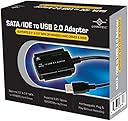
The Vantec CB-ISATAU2 is a versatile SATA/IDE to USB 2.0 adapter that supports up to 2TB hard drives across 2.5", 3.5", and 5.25" form factors. With transfer speeds up to 480 Mbps and hot-swappable plug-and-play functionality, it enables quick, hassle-free access to legacy or additional storage on both Windows and Mac systems. Its external power supply ensures stable operation for all drive sizes, making it an essential tool for professionals needing flexible, portable data recovery or storage expansion.


| ASIN | B000J01I1G |
| Best Sellers Rank | #112 in SATA Cables |
| Brand | Vantec |
| Built-In Media | Adapter, Manual, cables, Converter, ac Adapter |
| Color | Black |
| Compatible Devices | Desktop, Laptop |
| Connector Type | USB Type A |
| Customer Reviews | 4.5 out of 5 stars 4,448 Reviews |
| Finish | Black |
| Input Voltage | 12 volts |
| Item Dimensions | 2.76 x 1.69 x 0.39 inches |
| Item Weight | 9.6 ounces |
| Item dimensions L x W x H | 2.76 x 1.69 x 0.39 inches |
| Manufacturer | Vantec |
| Mfr Part Number | CB-ISATAU2 |
| Model Number | CB-ISATAU2 |
| Nominal Power | 24 watts |
| Number of Items | 1 |
| Number of Ports | 2 |
| Package Quantity | 1 |
| Power Plug Type | Type A - 2 pin (North American) |
| Specific Uses For Product | personal |
| UPC | 807031750276 808111653906 172302723380 872182642282 887590247042 731215278747 809185315769 804066535052 044113270448 809385165089 191120079677 737989665271 132018266922 172304256459 844767003641 |
| Unit Count | 1 Count |
| Warranty Description | 1 year parts and labor |
| Warranty Type | Limited |
J**A
Tested and examined it - seems solid & fully-functional
I just tested my new Vantec CB-ISATAU2 today. I have seen everything from very positive to very negative reviews on this product, but my experience so far is quite good, though I have only owned the product for one day. So I would recommend this product based on my initial experience, but I cannot vouch for its longevity. I conducted my tests using Windows XP Pro 32-bit on a Dell Inspiron E1505 laptop with USB 2.0 ports. (I did not test the transfer speed as this is very much dependent upon the particular source and destination drives used and the nature of the data transferred (sequential or random). I don't feel like doing a proper speed test.) Here are the results: 3.5" IDE Hard Drive Test ------------------------ This is an old IBM Deskstar from 2001. The connection to the IDE port and to the power were both solid and the connections were easy to make and held firmly. I initially used the Cable Select jumper configuration because that is what was already set and this worked fine. I then tried Master and Slave and both of those worked equally well. I have read in at least one review that it may be important to turn on the power to the drive before connecting the USB to the computer, but connecting the USB before the power worked just as well for me. However, disconnecting the power before the USB resulted in the operating system not recognizing that the device was no longer present, until I disconnected the USB. No problems resulted. In neither case did I bother to "Safely remove hardware". Sometimes when I connected the drive Windows gave me a "USB device not recognized" followed by a "This device can perform faster" notice. I did not determine what caused this, but the drive was still accessible in both cases. Sometimes there was a fairly long (I counted 32 secs. once) delay between the time I connected the USB and when Windows began scanning the drive and mounting it, particularly after receiving the above mentioned notices. This delay seemed to happen most consistently and for the longest time if I plugged in the USB and then unplugged it without ever powering on the drive, then powered on the drive and plugged the USB in again. Windows always recognized the drive eventually. So be patient before deciding that the device isn't working. 2.5" SATA Hard Drive Test ------------------------- This is a Hitachi drive from 2008. My experience with this drive was the same as with the other, excluding the jumper configuration tests which do not apply, and the delay problem which did not seem as bad. Everything connected well and the drive was recognized and worked properly, regardless of which order I connected the power and USB. Again, I did not "Safely remove hardware" first and no problems resulted that I am aware of. General Assessment ------------------ As I stated before, all connections were easy to make and held firmly. Just as in the case of internal molex power connections, this one, too, is very tight. The power switch on the cord works perfectly and seems to be of decent (not excellent) build quality. The build quality in general seems decent as well. The power block has what I consider to be a reasonable weight for such low wattage (12.0V @ 2000mA and 5.0V @ 2000mA). Nothing rattles and everything seems reasonably durable. The only minor exception is the molex to SATA adapter which appears cheaply constructed. But it worked, and it can be cheaply replaced if necessary. The power switch block on the cord has a small, green LED on it which indicates the status of the switch. The data adapter has a red LED which lights up when the USB is connected, and flickers between bright and dim to indicate activity.
J**7
Wonderful Purchase
This is the best $15 I have ever spent. First of all, I am not very computer literate. I had a computer that I spent about 2 grand on about 7 years ago. I spent a lot of time downloading all of my music CD's and downloading free music (at the time) to this computer. About 5 years ago, the power went out at my house and the computer never turned back on. I have been in a state of remorse for the past 5 years about losing all of my music. I kept this entire computer in my garage for years, collecting dust, until my wife finally made me e-waste it about 2 months ago. I decided to take out the hard drive first, for safety reasons, and just in case I ever decided to pony up the couple of hundred dollars to take it into a computer repair shop to see if they could recover my music. I am a huge cheapskate when it comes to things like services. Well, just this past weekend I was looking at this hard drive which was sitting on my newest computer's desk and decided to google what I could do myself to try to recover the music. An article I read suggested one of these SATA to USB adapters and said that I wouldn't even need to take apart my current computer. So I hopped onto Amazon and found this baby for $15 with Prime shipping. Got the adapter on Tuesday morning at work, and all of my old music is once again on my new computer on Tuesday evening! I thought I would never have this collection back! I am so happy with this purchase. The process could not be more simple! Ironically, after downloading everything from my old hard drive to my new computer, the hard drive fell about 3 feet to the hardwood floor and now its toast. It only makes a discouraging sounding tune in chimes, which I googled and found that the spindle is stuck and basically unfixable. LOL! I think I'll now take a Louiville Slugger to the old hard drive, but I got everything I wanted off of it thanks to this little kit!
S**F
Recovered my files from crashed laptop
I only bought this product as a last resort. My laptop had crashed and I could no longer access my photos and other files that I may have wanted to save. At first, I was unsure whether or not I could recover my photos and files myself or if I would have to take it to a professional. I didn't want to pay someone as I deemed my photos and files not that important. I did some research and found this adapter to suit what I was looking for, and my budget, for this situation. I researched a lot to make sure of what I needed to do the job and this had everything I needed and more at a reasonable price. I read the instructions carefully to help insure that there would be no problems in the process. it was fairly easy to set up. It was easy to get to my laptop's hard drive and to detach it from the laptop and to attach it to the adapter. I connected the usb cable from the adapter to my desktop computer(Windows XP). At first, I wasn't able to transfer the files. It turned out that I needed a software program to be able to read the files. I don't know if it's because I have Windows XP on my desktop rather than a newer operating system or not. I finally settled on the program called Recuva. It showed my photos and files from my laptop's hard drive as I was viewing it from my desktop pc. It took time to sort through all the files and also to decide which I wanted to save and which to keep, but I was able to recover most of the photos and files. I assume the other photos were either not on my laptop's hard drive anymore or they weren't recoverable. It would have been a small percentage anyway. I saved all the photos and files into folders on my desktop pc and later burned them with a new DVD burner that I bought for my desktop pc. There was one small problem. At first the adapter was not showing power. The lights did not light up. But I fiddled with the connections and it worked. It stayed on overnight but then it turned off again, possibly by me stepping on it or pulling it accidentally. It turned on again after I fiddled with the connections again. It's probably just a semi-faulty unit, and since I may not use it anymore as it was a rescue-type thing, I'll probably just deal with it and keep it. In the end, I recovered what I could and wanted from my laptop's hard drive and I'm satisfied with the results. I don't know if or when I'll need to use this adapter anymore though but I suppose it could come in handy later. My lesson learned is to save/back up photos and files that I want to save, sooner rather than later.
M**L
Saved my life for 20 bucks!
My 6.5 year old desktop died on me last week and I although I have been warned many times that I should regularly back-up my data, I was very lax about doing this (my last back-up was nearly 2 years ago). Of course panic started setting in when I began realizing all of the work documents, photos, TONS of music, etc. that I have added since then. Thankfully after doing some quick research online I learned that as long as the old hard drive was still ok in the desktop (it was), then one of these USB adapter kits was all I needed to retrieve all my old files and move them on to another drive. I had some difficulty removing the old drive from the "slim" tower it was in, but that's because I've never done this before and really doesn't have anything to do with this product. One of the tech sites I was looking at recommended another version of this product made by a different company (sorry their name escapes me at the moment), but upon doing a little more investigating (mainly through customer reviews), I saw that many people had trouble with that brand not working properly and even destroying their HDD altogether (eek!). I came across this model by Vantec on Amazon and saw that most people were giving positive feedback on it so I went ahead and made the purchase. BEST 2O BUCKS I EVER SPENT!!! All my data is now safely residing on another computer (along with an external back-up) thanks to this device. It's not the prettiest looking thing (definitely a case of "function over form" which is much better than the other way around) and the instructions are a little sparse, but it was easy enough to figure out anyway. In case anyone is wondering, the hard drive I used this on is a Maxtor IDE 3.5" IDE drive. I also should note that this drive was from a Windows XP PC and all the data was transferred to a laptop running Vista and it worked like a charm (no software needed, the laptop immediately recognized it as an external USB drive). I was unsure about where the jumper on the back of the old drive should be set to, so I called Vantec for support (got the number off their web site) and the person I spoke with was extremely knowledgeable and helpful (the jumper should be set to MASTER by the way). I would highly recommend this product based on my experience with it. Hopefully this review can be just as helpful to others who find themselves in this predicament as the other customer reviews here helped me.
F**N
EXCELLENT! FAST, SAFE, RELIABLE, BEAUTIFUL
I ran two TRANSFER TESTS using my five-year-old PC Seagate Barracuda 160GB 7200 RPM SATA 6.0Gb/s 3.5" Internal Hard Drive (I threw away the PC today finally). I "plugged in" the hard drive using this product to my Dell Inspiron 1545 running Win 7 Ultimate x64, Dual Core T4400 @ 2.2GHz, 3gb RAM. Test 1: 3gb from laptop to hard drive: 3mins. Speed: 20-22MB/s. 3gb from hard drive to laptop: 2:10mins. Speed: 22MB/s-26MB/s. Test 2: 3gb from laptop to hard drive: 2:38mins. speed: 21MB/s-24MB/s. 3gb from hard drive to laptop: 2:10mins. Speed 22Mb/s-26mb/S. Things to know about this awesome product: 1) The adapter comes with an ON/OFF switch. This is really nice because it allows you to leave the hard drive connected to your other computer but you can choose to leave it ON or OFF!! 2) Remember to always use the built-in feature of your OS to eject/unmount the hard drive before physically disconnecting it. This will prevent anything bad from happening. 3) In my case, it was "plug & play." Super easy. Took me 1-2 minutes. I didn't have to do anything whatsoever besides connecting the cables. My computer immediately detected it and I was able to immediately access my files. 4) This looks like a very SAFE device to use. I checked other products on Amazon and some people said their drives got fried. This product let me tell you it looks and feels very safe. The way everything is connected. Very happy with this! If your hard drive gets too hot then get a big fan and give it air or just stop using it for a few minutes. I highly recommend this product. UPDATE 6/21/12: I'm still extremely satisfied with this product. I use it a lot with my two super old SATA hdd and IDE hdd. Transfer speeds are great and I feel very safe with I connect my HDDs to this device. I still love the ON/OFF switch because after I eject an HDD (using windows) I can turn the hdd off and leave it plugged in, so if I want to use it again I just have to turn the switch ON and windows will recognize it again. Very neat!
T**E
Why did I wait so long to get one?
I've been looking at these USB to everything drive adapters for quite a while now, and I finally decided to get one. Wow, this thing rocks! I should have got one years ago! So easy to use, and so useful. In the past I'd just disassemble one of my external drives to use the interface, but this is so much easier. Only had it a few days, but so far I've used to to dump data from old "spare" hard drives and to install Linux on my new Acer Netbook (just grabbed an old DVD drive I had in the closet and hooked it up. The Netbook booted from the drive and installed Linux with no trouble). I've also tested it with a new Blu-ray/DVD burner combo drive using the SATA interface. The Netbook was also able to boot from that drive and burn discs perfectly. Obviously this is not a solution for permanent installations. This is for "techy" types who have the need to hook up a variety of different drives temporarily to format, recover data, secure erase, remove viruses, etc... This Vantec unit has 2 major parts. The interface itself, which has a standard desktop 3.5/5.25 EIDE/PATA interface, the smaller interface used by EIDE/PATA notebook drives, and a standard SATA data connector (SATA data cable included). The 2nd piece is the power "brick" which (conveniently) uses a regular computer type AC cord and has the standard 4-pin Molex power plug with a SATA power adapter. The interface has an attached USB cable that is just under 3 feet long (34 inches), which seems just about right. Long enough to reach the back of a computer if needed, but not so long that you're tripping over it when you don't need the length. All in all I'm very happy with my purchase. The device works great, and Amazon's price and shipping were awesome, as always!
M**A
LIFE SAVER! WORKED PERFECT DATA SAVED
my computer motherboard smoked. burned out literally. i had backed up my data but there was some i didn't back up never thinking i would need to. big mistake! almost lost it all and it was important to my business and my personal life. long story said. this linked up my hard drive and i was able to access everything and transfer to a new computer easy as plug and play! just like it says. so very grateful i ran across this option...it saved me time, money and headaches. best thing i have bought from amazon. hands down! all the extra cables they provide were exactly what was needed for my older system...14 year old computer. and it linked right up. i couldn't believe how easy it was. going to buy a 2nd kit real soon!
G**Y
Works with a little tweaking
I wish I could give it 2.5 stars... it only works if you position it right. You have to make sure the red sata cable is plugged into the adapter block and elevated just right. If it is not elevated then you will lose connection to the drive. This is actually my 2nd usb to sata adapter kit. I gave my first one to my father in law because it blew his mind you could actually connect an external drive to your usb. The first one I bought cheaply at some computer store always worked with no issues (and I got it for $9.98). After I gave it away I decided I could get another for <$10. Unfortunately I could not. After reading all the reviews I settled on this one. Shipping was a little late, but I chose the slowest option... so not the companies fault. It was well packaged and in new condition. Pros: has a red light to indicate if power is on, on/off switch for power, new condition, well packaged, not too expensive, average read/write speeds, have been able to recover data on friends "broken" HDs with it. Cons: must position the red sata cable just right to not lose connection Conclusion: I would not purchase this again if I had the choice. If I remember correctly there were multiple other options in the same price range for usb to sata adapter kits. I only chose this one because it had a lot of avg to good reviews. Perhaps I just received a lemon?! Poor QC?
C**N
Buen producto
Adquirí este producto realmente me ha funcionado muy bien sobre todo para realizar respaldos en discos duros IDE, llego antes de la fecha esperada, los materiales son de buena calidad, lo recomiendo.
A**S
Cool Product
I bought this product because I was not prepared to put out 100.00 to have a computer shop do it for me.I am not a real computer savvy person and I felt that it was cool to have some thing more than my hard drive info after all was done. Got what I was after plus some pictures I had forgot about.This product worked fine for me.I had a 2.5 inch IDE hard drive from a old Dell laptop that packed it in and I did not relize that there was a adapter over the pin bar on the hard drive.A fellow at Staples set me straight on it and all was good..Just pulled it off.And it fit right into the reader..Cheers
H**I
Watch the Power - Could Burn the HDD
I bought this to use on my 3.5" drive, but I wasnt able to use it. One - the power output was too high for my 2TB WD Caviar Green drive and so smoke started appearing from the HDD while using it. I dont know if I damaged by HDD yet, but the lack of power control is a serious issue with this. MOdern HDD's are quite efficient, so utility of this is questionable without power control. The cables are also delicate to touch and need to be handled very carefully. Overall, not an easy experience and not what was expected.
S**Y
Save your PATA data
Had to pick this unit up to transfer some old hard drive data to newer, modern drives. Even helped some people out in recovering data from laptop drives, where the drive was fine, but the laptops suffered various board/power failures. As others have mentioned, this thing works in a pinch. Does what it's meant to do, no fuss, no fluff. Did not experience issues with drive detection or interruptions in transfers. The whole power brick is a bit inconvenient, but it's nothing to raise a real complaint about. I didn't expect a fantastic price, but it was fair considering I had no headaches using the unit.
H**.
Supero espectativas a pesar del del precio
Llego en buen estado y super util, trae lo necesario para poder respaldar mis programas en discos duros IDE y DATA, hasta el momento ninguna falla
Trustpilot
1 month ago
1 month ago