Buy anything from 5,000+ international stores. One checkout price. No surprise fees. Join 2M+ shoppers on Desertcart.
Desertcart purchases this item on your behalf and handles shipping, customs, and support to Vanuatu.
🔌 Power up your Dell, power up your hustle!
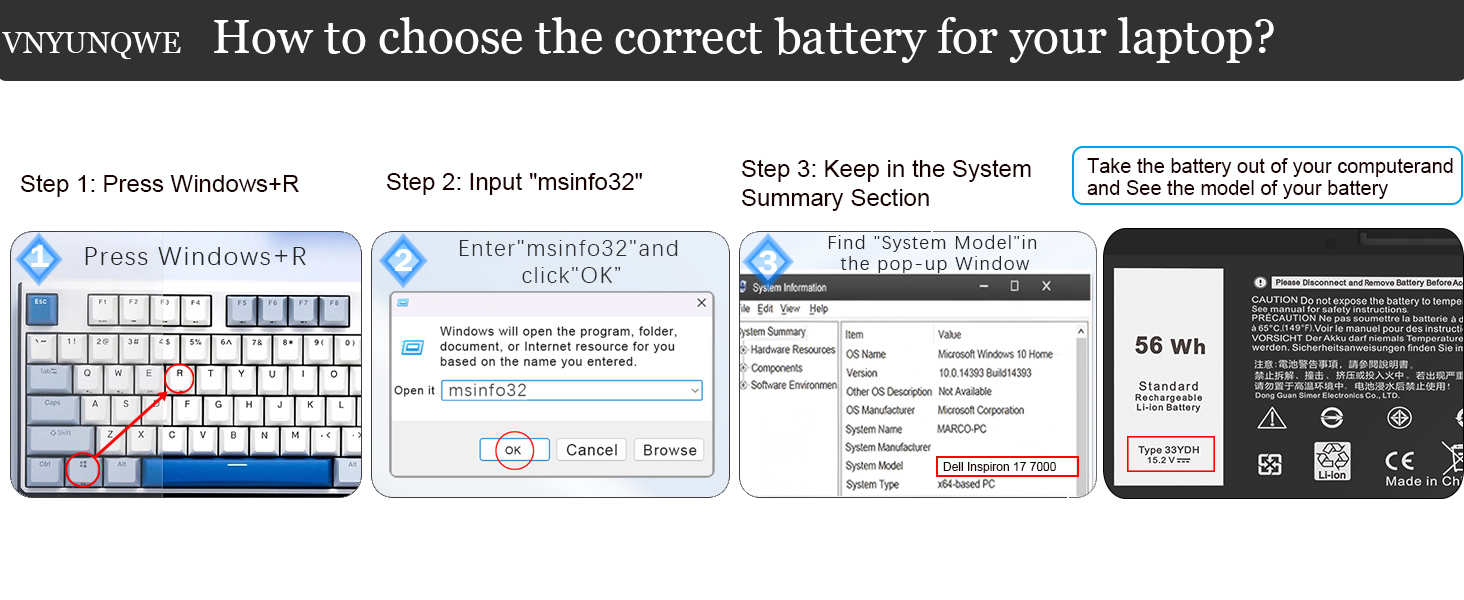
This 56WH 33YDH lithium polymer laptop battery replacement is engineered for Dell Inspiron 17 7000, Latitude, G, and Vostro series laptops. Operating at 15.2 volts with 4-cell design, it offers long-lasting performance with up to 1000 recharge cycles. Built-in multi-layer safety protections ensure reliable, worry-free use. Includes essential tools for easy installation and backed by responsive 24/7 support.


| ASIN | B09VZDLB21 |
| Antenna Location | Laptop |
| Battery Capacity | 56 Watt Hours |
| Battery Cell Type | Lithium Polymer |
| Battery Weight | 11.49 Ounces |
| Best Sellers Rank | #3,555 in Electronics ( See Top 100 in Electronics ) #9 in Laptop Batteries |
| Brand | VNYUNQWE |
| Built-In Media | Battery, Two Free Screwdrivers |
| Compatible Phone Models | Compatible with Dell Inspiron 17 7779 battery, Compatible with Dell Inspiron 17 7000 series 7773 7778 7786 7779 2-in-1, Inspiron 15 Gaming 7577 Series, Compatible with Dell G3 15 3579, Compatible with Dell G5 5587,G5 15 5587, Compatible with Dell G7 15 7588, G7 7588, G3 17 3779 Series, Latitude 13 3000 3380, Latitude 15 3590, Latitude 15 3580, Latitude 14 3490 Series, Vostro 15 7580, Vostro 15 757… |
| Customer Reviews | 4.5 4.5 out of 5 stars (1,345) |
| Item Dimensions | 9.53 x 4.4 x 0.23 inches |
| Manufacturer | DongGuan Simer Electronics Co LTD |
| Model Name | 33YDH |
| Model Number | 33YDH |
| Number of Batteries | 1 Lithium Ion batteries required. |
| Reusability | Rechargeable |
| UPC | 794094161470 |
| Unit Count | 1 Count |
| Voltage | 15.2 Volts |
| Warranty Description | 1 year |
M**P
Great Product
If you own a Dell XPS 13 9360 and have been struggling with a battery that barely holds a charge, look no further: this replacement battery is exactly what you need, at a price hard to beat. I installed this battery on my Dell XPS 13 9360, and the difference was immediately noticeable. Battery capacity is now back to like-new performance, and I no longer find myself tethered to a power outlet throughout the day. The installation was straightforward, and the battery was recognized by the system without any issues. For the price, this product delivers exceptional value. Purchasing a third-party replacement battery at a fraction of the cost of an OEM unit, while achieving the same functional result, makes this an easy recommendation for budget-conscious users who do not want to retire an otherwise capable machine. The build quality appears solid, and the battery includes built-in protection circuits for overcharge, over-discharge, over-temperature, and short-circuit conditions, which add a meaningful layer of safety and peace of mind for everyday use. Overall, I highly recommend this product to any Dell XPS 13 9360 owner looking to breathe new life into their laptop. It works as advertised, delivers on its promise of restored battery performance, and represents outstanding value for the money.
G**S
Quick and easy
Exactly what I needed, fit perfectly and works as expected. Thank you.
M**T
Generic battery that fits Dell Latitude 5410
Battery was well packaged. Included two screwdrivers (Phillips and torx) and a pick/shim. I didn’t use any of the tools. Was about a 5 minute install. You will have to reuse the battery cable and mounting screw. Battery arrived charged to 46% and bios shows health as excellent. I use this with a dell latitude 5410. Longevity is unknown, but if something bad does happen I’ll update the review.
C**N
Good buy and works well.
Replacement for the Dell Battery. Works well and is less expensive than Dell's.
R**S
Product is a good, sound, and inexpensive replacement. Recommended. 4.5 Stars I give it.
My laptop is a Dell Latitude E5570. The product works fine if you know what you are doing, have the manual, and pay attention to detail. I now have a working battery in my laptop again. Installation takes 15-20 minutes. My original battery was no longer charging and I found out why. The original battery had almost exploded. It was probably pretty close. One cell had expanded to the point where the heat shields had popped off. It was ballooning. Anyway, step one for battery removal and installation is download the Owners Manual for the Latitude E5570 Laptop from Dell if you don't have it already. My laptop is refurbished and didn't come with a manual. It gives explicit instructions on how to remove the old battery and install a new one. The instructions are really good. This battery comes with NO INSTRUCTIONS. Use the Dell instructions. You won't need the star screwdriver, just the small Phillips head. The kit comes with a white guitar pick thing. Discharge the old battery down to 5% by disconnecting the a/c and letting it discharge to almost nothing. Flipping the laptop over so the top is facing down and with the back facing you, after unscrewing all the back plate screws, use that guitar pick thing to pry between the cover groove starting at the back right corner, where it's easiest. The cover snaps on, so you have to break it out off the back. Just do it slowly with even pressure. Then once you've got the back cover off, simply follow the Manual instructions to remove the old battery. Once you remove the old battery, I recommend doing a hard reset by pressing the power button for 45 seconds to remove all static electricity in the laptop and it does other things that will let your laptop recognize the new battery. Install the new battery per the manual and put it back together. Make sure you take the green film off of the battery heat shields before installing. Also make sure that the battery cable is fit into the battery connector fully, and also the end of the battery cable that goes to the circuit board connector. I failed to properly seat the cable into the circuit board connector the first time and thought I had a bad replacement battery. Snake the cable between the cells. Hook up the a/c and charge to 100%. Then disconnect a/c and let it discharge to 5%. You might want to do that at least twice. It's sets the battery and increases battery life, just like a phone battery (same thing actually). My battery is charging to 100% as I write this. It had 46% charge when installed. So for the product, I recommend it. I only gave it four stars because there were no instructions of any kind. They could have at least provided a link to a video on YouTube or something. Not everyone is an electronics technician. I recommend this product. There IS some information you should read in the product information on Amazon. One last thing, it might not be a bad idea to take off the back cover before you order to make sure that the replacement battery is exactly the same specification's as the original. They vary. The replacement battery should have all the same specs as the original (as written on the battery). Update: After charging to 100% the battery life is showing as just under 11 hours at current power settings. The old battery before it started taking a dump would only give me two hours at best. I'm happy. Now I need to let the battery run down to 5% and fully charge it again.
T**T
A doable job if you're somewhat handy with tools.
The user manual did not cover installation, but then that's really dependent on the model of the laptop, so no points off. I googled my hp laptop's model number and came up with an excellent YouTube on how to install the battery. The only hard part was separating the bottom of the computer from the main part. But the battery came with the right Phillips screwdriver (which I needed) and torx driver (not needed on my model). Also included were two guitar picks which helped greatly with separating the bottom from the main part. The project is very doable by anybody somewhat handy with tools. The new battery lasts many hours before needing to be charged.
B**B
Bad battery
This must be a defective battery. I have installed a good bit of pc batteries and never had a problem like this. It does not hold a decent charge. It runs down very quickly and when fully charged it will not hold the charge. I didn’t install it till it was too late to send it back. (A couple days past the date). Ugh. So I’m not very happy about the situation. I wasn’t in a hurry to install it because I didn’t expect it to be a bad product. Correct battery. Just not any good
J**W
Blijft goed op pijl
L**6
Produit conforme au descriptif
T**Z
Einbau problemlos, passt perfekt - hervorzuheben ist: - notwendige Schraubendreher (Torx und Kreuz) sind anbei - Plektron zum Öffnen eines Laptopgehäuses ist auch anbei - Genaue und korrekt übersetzte Anleitung für das initiale Akkutraining und die alltägliche Arbeit ist auch anbei (bravo!). Ein Video über den Einbau in HP Pavillion-Geräte findet man leider nicht beim Hersteller, aber über den Titel "HP Pavillion 14 replace battery" oder ähnliches kann man so etwas finden, falls gewünscht. Nach dem Einbau ist ein CMOS-Reset fällig, ggf. vorher die Einstellungen des BIOS bzw. UEFI notieren. Der Akku und alles oben Erwähnte machen erst einmal einen wirklich guten Eindruck bei sehr gutem Preis-/Leistungsverhältnis, über die Langlebigkeit / Abnutzung des Akkus kann ich noch nichts sagen. Daher erst einmal 5 Sterne, in 1/2 - 1 Jahr werde ich hier evtl. auch noch etwas dazu sagen können.
V**O
Perfetta, totalmente compatibile
D**A
Recién puesta y en función. Se ve de muy buena calidad.
Trustpilot
2 weeks ago
1 month ago