We remain fully operational. Our teams are working around the clock to ensure your deliveries continue safely.

DOWNLOAD THE APP


Copyright © 2025 Desertcart Holdings Limited
DOWNLOAD THE APP




Buy anything from 5,000+ international stores. One checkout price. No surprise fees. Join 2M+ shoppers on Desertcart.
Desertcart purchases this item on your behalf and handles shipping, customs, and support to Vanuatu.
🎯 Master precision and comfort—your desk’s new MVP!
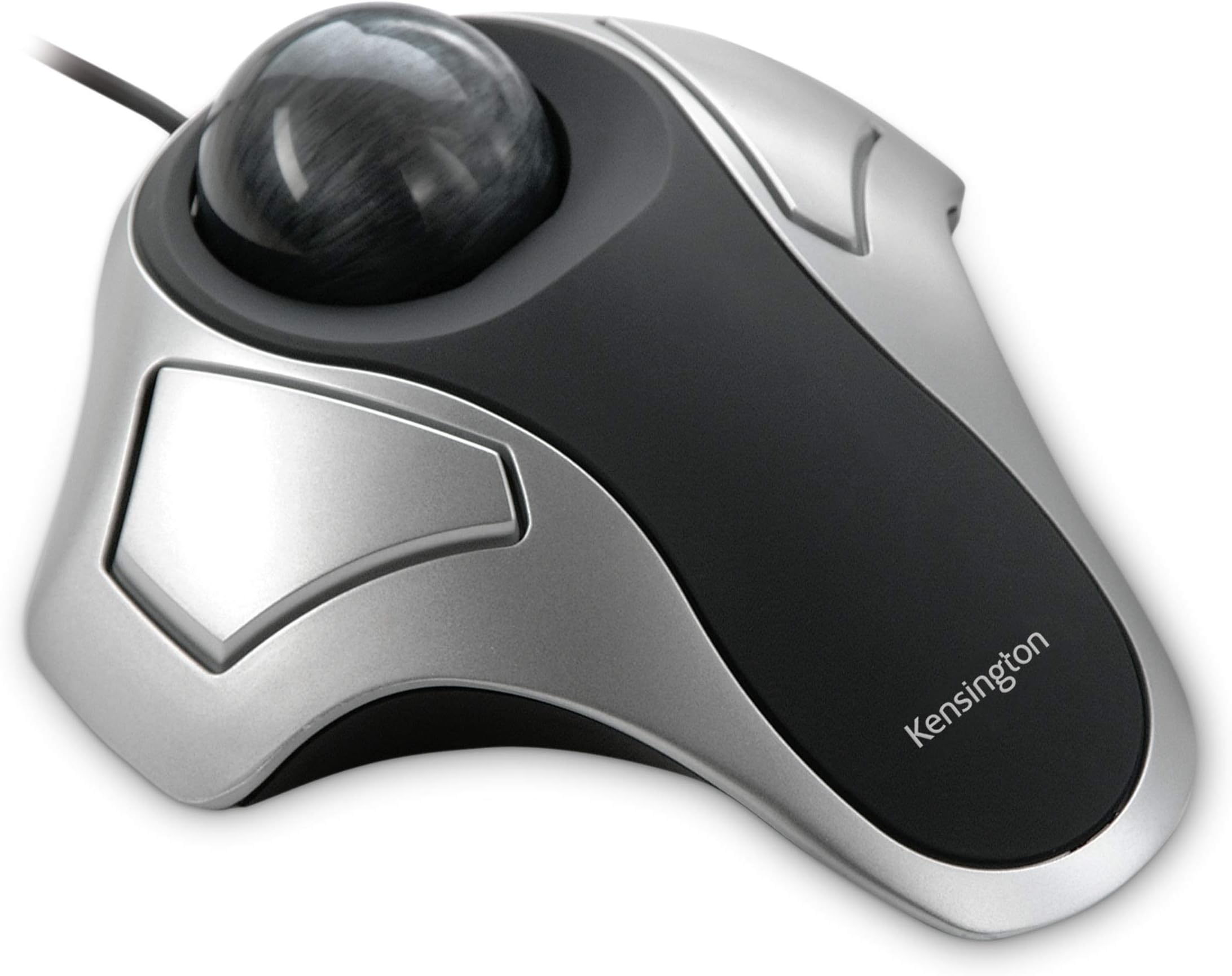
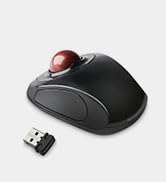
The Kensington Orbit Trackball Mouse (K64327F) combines advanced Diamond Eye optical tracking with an ergonomic, ambidextrous design that minimizes arm movement and desk space. Its dust-resistant build ensures low maintenance, while USB connectivity guarantees easy setup across Windows and Linux platforms. Ideal for professionals seeking precision and comfort in a sleek, compact form factor.










| ASIN | B000HEW0KW |
| Additional Features | Ergonomic Design |
| Antenna Location | Office |
| Are Batteries Included | No |
| Are Batteries Required | No |
| Brand | Kensington |
| Built-In Media | trackball; battery |
| Button Quantity | 2 |
| Color | Silver/Black |
| Compatible Devices | Personal Computer |
| Connectivity Technology | USB |
| Customer Reviews | 4.2 4.2 out of 5 stars (4,884) |
| EU Spare Part Availability Duration | 2 Years |
| Enclosure Material | Plastic |
| Global Trade Identification Number | 00085896643272 |
| Hand Orientation | Ambidextrous |
| Hardware Platform | PC |
| Item Dimensions L x W | 7.9"L x 6"W |
| Item Type Name | Kensington Orbit Trackball Mouse (K64327F) |
| Item Weight | 0.27 Kilograms |
| Manufacturer | Kensington |
| Model Name | K64327F |
| Model Number | 64327f |
| Movement Detection | Optical |
| Operating System | Windows Vista, Windows XP |
| Power Source | Corded Electric |
| Range | 5.0 meters |
| Style Name | finger operated |
| UPC | 085896643272 |
| Unit Count | 1.0 Count |
| Warranty Description | 2 year warranty (Only valid if purchased through Kensington Authorized Resellers) |
A**S
Better than the rest and works with Linux
Having used the Logitech trackball for years, but when it was time to replace Logitech's prices went too high. So, recently tried the Kensington with the Ring and found it to be too wide for most hands here...to the point of being uncomfortable and clumsy. Decided to take a chance on this one without the "ring" and what a difference! The width is just right and the ball moves ever so smoothly and quickly and stops easy too! It is being used on a Linux O/S and absolutely no problems. Highly recommend this mouse. For those who need to know the size width: The narrowest part where your hand lies across the top (to click either left or right side of mouse) is approx. 2.25 inches. Compared to the same brand with "the ring" which is approx. 3 full inches. Also the highest height of the ball on the "ring" model is 2.50 inches and on THIS model it is a half inch lower. SO you can see by these measurements this model is much more suitable for smaller hands, or hurting/stiff hands. Additionally, other reviewers stated that the trackball is loose and falls out...I too noticed that my trackball was not seated all the way in. I took it out and examined it and saw that there is a clear piece of plastic that was stuck on the ball and had rolled to the under side of the ball. It was hard to see because it was clear and had black writing on it and the ball is a very dark gray. I think this piece of plastic had some warning on it -- maybe to remove before use...but it was difficult to see. Now that that is removed the only way I can remove the ball from its place is to turn the mouse over and it gently falls out so that you clean/dust it off. It never just falls out or pops out...unless something is in the way. Its a great little mouse...thinking about getting another one!
J**S
I love this trackball!
The first thing that impressed me was the thick cardboard packaging. Super protective. Opened it up, was surprised that the ball was so loose. I had been used to ones that held the ball in, even if dropped. Plugged it in to my 2004 Lenovo computer, heard that sound, you know what I mean, acknowledging it. Put my hand on it, rolled the ball around, and nothing happened on the screen. No matter what I did it just didn't work at all. I was disappointed. In the evening I took it to the bedroom, plugged it in my 2014 Acer laptop on the off chance it might work, and whaddaya know?! It worked perfectly! I'm very, very happy with it! It will live with the laptop and my other trackball will stay with the computer. Other than the looseness of the ball, which I can live with, I love this trackball!
S**J
Easy to use, relieves strain
I’ve been using trackballs since the Mac Plus was released in the 1980s, so I have plenty of experience with them. I find them easier to use than mice, and though I use a trackpad on my MacBook, I get cramps in my thumb and the trackball is a good alternative. I use it full-time on my iMac. I prefer wired because I don’t want to worry about batteries running out of power when I need to use my computer, and, anyway, I keep the trackball close to the laptop or desktop so the cable is not an inconvenience—it makes it easy to connect. I’ve basically stuck to two major brands over the years: Kensington (this one) and the Logitech Trackman, which has been my preference. However, the latter is about six times the cost of this Kensington Orbit, and they are somewhat equivalent. As I haven’t seen the high-end competitor’s lately, I don’t know if they’ve changed it, but this version of the Orbit definitely feels lighter and perhaps flimsier than earlier versions. The ball kind of clicks; it is not 100% smooth. It also seems very sensitive, which can be good or bad. But the ergonomics of the unit fits my hand just fine, and it makes scrolling and pointing intuitive and easy. The OSes on my two Macs are very outdated and they allow me to use old apps, so I haven’t upgraded them. This trackball is completely plug and play with both, without needing to download Kensington’s utility/app. I use the mouse setting of system preferences to configure speed and buttons on this. Kensington has been around for many years and, overall, they make good-quality peripherals. Perhaps the price point on this accounts for what I perceive as the lightweight feel, and the question is, then, how long this will last. But, for now, it works well for me.
C**R
Great item
I love track balls. Can be used on computer tables with limited room. It sets in one place and your not having to chase it around the computer table.
A**M
Fits the hand well. Easy to set up. I have been using a well known marble mouse for years, but it appears to be obsolete now. Any on the secondary market are horrendously overpriced, so finding this as a replacement is great.
A**.
Le trackball Kensington Orbit Optical est un très bon trackball d'entrée de gamme, il peut se révéler un excellent choix pour qui veut découvrir à moindre coût le monde des trackballs, et le plaisir d'utiliser pareil périphérique. Les principales critiques que l'on entend au sujet des trackballs sont leur manque d'ergonomie, dépendamment que la boule soit centrale (pour une utilisation ambidextre), ou déportée (généralement dédiés aux droitiers) et l'absence de roulette. L'ergonomie est un facteur à prendre bien entendu en considération, mais celle-ci par définition est liée à la morphologie et aux attentes parfois très spécifiques de chacun, certains trouveront toujours ce trackball trop grand, d'autres trop petit, certains trouveront la boule trop petite, voire mal positionnée. Personnellement je trouve la taille de ce trackball plutôt modeste, il ne conviendra pas aux (très) grandes mains. Pour être objectif, je l'ai comparé au Kensington Slimblade, ainsi qu'au Logitech Trackman Marble... il est sensiblement plus petit que ces derniers. L'ergonomie étant quelque chose de très subjectif, ce sera à chacun de juger, mais après plusieurs heures d'utilisation intensive, je dois admettre que le profil choisi par Kensington n'est pas désagréable, il ne provoque aucune sensation désagréable ni de gêne particulière. Mais où est donc la roulette ? Je ne compte plus les remarques à ce sujet, certains n'hésitant pas à établir un lien direct entre l'absence de roulette et la possibilité d'effectuer un défilement (scrolling). Si il est vrai que la roulette est un confort indéniable pour effectuer un défilement, il ne faut pas perdre de vue qu'un trackball, par définition, permet d'effectuer nativement cette action, et ce au contraire d'une souris classique (sans roulette). En effet, avec un trackball, le défilement (scrolling) peut s'opérer très simplement en pointant la barre de défilement avec le clic gauche et, tout en maintenant le clic gauche enfoncé, vous utilisez la boule comme une énorme roulette... c'est silencieux, précis, bref... un vrai plaisir ! Vous pouvez même vous écarter de la barre de défilement tout en effectuant un "scrolling", attention toutefois de ne pas trop s'en écarter car au-delà de quelques centimètres la fonction de défilement s'interrompt. Il est important de préciser que Kensington propose, tout comme Logitech, un logiciel de contrôle pour ses périphériques, permettant, entre autres, de (re)programmer les boutons voire pour ce qui nous occupe, affecter une fonction particulière au clic simultané (clic gauche + clic droit). Il est donc très aisé d'affecter la fonction "clic du milieu" au clic simultané et de bénéficier dès lors d'un "scrolling" logiciel. Pour les personnes intéressées, vous devez télécharger le logiciel TrackballWorks 1.1.18 for Windows (32-bit,64-bit) sur le site du fabricant. Comme indiqué dans les instructions d'installation, le processus requiert les droits d'administrateur, pour ce faire, sous Windows 7, clic droit sur l'exécutable que vous aurez téléchargé et "Run as Administrator" (Exécuter en tant qu'Administrateur). Une fois installé, le logiciel demandera un redémarrage du système et proposera une interface en français. A toutes fins utiles j'ai posté une capture d'écran sur cette page. En résumé, je trouve que ce trackball mérite ses 5 étoiles car à mon sens : - il présente un excellent rapport qualité / prix - il permet, outre un "scrolling" natif, un "scrolling" logiciel grâce à TrackballWorks - il présente un "design" toujours d'actualité - il est compatible PS/2 - USB (adaptateur USB vers PS/2 fourni) - il dispose d'une longueur de câble appréciable (160 cm)
M**G
Orbital mouse great - Used one before hence using again.
K**E
Uso este dispositivo desde hace unos 6 años en régimen profesional en mi trabajo. Es el mejor track ball que he manejado y he comprado este como repuesto por si se deja de fabricar `porque Kesingstone está sacando nuevos modelos con mas funciones pero menos robustos. El producto lo he comprado reacondicionado con defectos en embalaje pero debo decir que el defecto ha sido el embalaje ligeramente abollado. Si trabajas con track balls de media precisión, no lo dudes es un producto inigrualable en calidad/precio.
Y**P
Objet permet à des personnes qui sont atteints du tremblement essentiel de pouvoir cliquer sur un ordinateur sans utiliser une souris trop compliqué
Trustpilot
3 weeks ago
1 month ago