Buy anything from 5,000+ international stores. One checkout price. No surprise fees. Join 2M+ shoppers on Desertcart.
Desertcart purchases this item on your behalf and handles shipping, customs, and support to Vanuatu.
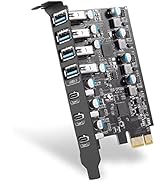
🚀 Supercharge your desktop with 7 blazing-fast USB ports — because speed waits for no one!
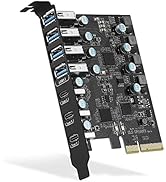
The FANBLACK PCIe to USB 3.2 Gen 2 expansion card delivers 7 external USB ports (4 Type-A, 3 Type-C) with a combined bandwidth of 20 Gbps. Designed for desktop PCs, it supports PCIe x4/x8/x16 slots and offers stable, driver-friendly compatibility across Windows, Mac, and Linux. Ideal for professionals needing fast, reliable connectivity for multiple high-speed USB devices without extra power cables.


| ASIN | B09ZKNJDNW |
| Best Sellers Rank | #9 in Internal USB Port Cards |
| Brand | FANBLACK |
| Compatible Devices | Dell 8950, HP, Lenovo P520, MacPro 4.1/5.1, Personal Computer |
| Customer Reviews | 4.0 4.0 out of 5 stars (528) |
| Hardware Interface | PCIE x 16, PCIE x 4, PCIE x 8 |
| Item Dimensions L x W x H | 3.43"L x 3.15"W x 0.71"H |
| Item Weight | 0.12 Kilograms |
| Manufacturer | FANBLACK |
| Mfr Part Number | FANBLACK-PCIE-USB32-20G-7P |
| Model Number | FANBLACK-PCIE-USB32-20G-7P |
| Operating System | Linux, Mac OS 10.8.2 and above, Windows 7/8/10/11 (32/64 bit) |
| Style Name | Classic |
| Warranty Description | 360 day worry-free warranty |
A**F
Plug and play, no fuss.
No issues. Worked great. Didn't do any driver installation, windows knew exactly how to use it!
F**.
I almost returned it***Update***
Great customer service!!! I was contacted by the seller and they refunded my money for all the problems I had. I really appreciated their efforts to make it right by me.. I wouldn't hesitate to buy from them again! I installed this card in my P.C and it didn't work. The instalation disc did NOTHING. I took it out and boxed it up and requested a return.. A few days later I did some snooping online and found a instalation program that sounded like it may work.. So I re installed it and downloaded the driver and it did the job. It works! But it was a huge pain in the butt.. And honestly.. If I didn't really need it...I would have sent it back out of spite. Be prepared to waste some serious time getting it to work
J**N
No good
It is recognized by Windows, and "works", as in I plug my HDD into it and it shows up in My Computer. But it won't maintain a connection. My HDD keeps constantly disappearing and reappearing. Large file transfers make it happen every 5 seconds. If the drive is idle, it will blip off and on about every 10 minutes. I've tried turning off all power saving features to no avail. It's just a bad card I guess.
J**R
Worth the money, easy to use
Works well, sometimes I get really low speeds, not sure why. There are plenty of USB ports on back, wish there was a way to get them easier to get to, tho. Fits computer well and drivers are automatically downloaded and I stalled. Very easy to connect to.
N**R
Plug and Play
No drivers needed for Windows 11. Plug and Play, fast connection
M**E
Works out of the box with Windows 11. Not flimsy.
No drivers needed. Windows 11. Installed, rebooted, and good to go. Everything I've plugged in any of the ports is instantly recognized and dear Windows 11 beeps to let me know. There are cheaper USB cards but these are current version USB, they're fast, and they work. My video card blocked the PCIe port so I installed an extender and this USB card worked! I bought two of these cards. They're not flimsy as others have said. At least mine aren't. The metal where the ports are is normal grade and thickness. I've worked with much more flimsy cards the last 40 years building PCs. You can see from the pics that the USB ports are a close fit, but in my case (literally), I carefully centered the card in the slots before securing the card. All USB cables I've plugged in fit no problem.
E**4
PCIe to USB 3.2 Gen 2 Card with 20 Gbps Bandwidth
I purchased this PCIe to USB 3.2 Gen 2 Card with 7 USB ports (4 USB Type-A and 3 USB Type-C) on December 31st, 2022, and I’ve had a mixed experience with it. Initial Setup: When I first installed the card on my Windows 10 system, it didn’t work right out of the box. I had to tinker with it quite a bit, and even then, it was a hit-or-miss situation. This was somewhat frustrating, as I was expecting plug-and-play functionality. However, after upgrading to Windows 11, the card performed much better, almost working perfectly without any additional setup. This was a relief and a significant improvement over the Windows 10 experience. Performance: Once I got it working, the performance was as advertised. The USB 3.2 Gen 2 speeds were impressive, with the card delivering the promised 20 Gbps bandwidth. This made file transfers and other data-intensive tasks much quicker and smoother. Build Quality and Design: The card’s design is decent, but there are a few concerns. The connectors can be a bit finicky, and over time, I noticed that they required cleaning to maintain a stable connection. Additionally, the card seems a bit delicate; if you’re not careful when plugging in or unplugging devices, it can cause the board to pull loose connections. This leads to the card becoming unresponsive, and the only solution is to remove and reinsert it into the PCIe slot. This is something to be mindful of, especially if you frequently swap out USB devices. Overall Verdict: This PCIe to USB 3.2 Gen 2 Card does the job, especially if you’re on Windows 11, but it’s not without its quirks. If you can handle a bit of maintenance and are careful with the connectors, it’s a solid addition to your desktop for expanding your USB ports. However, the issues I experienced on Windows 10 and the need for occasional cleaning and caution with the connectors are worth noting before purchasing.
R**H
Gives you enough USB ports, just be care with the drivers
Product works as intended, gives you plenty of USB ports to work with (seems really good for VR setups) for the price. If you have a modern windows install you can simply plug and play this card, the driver disc doesn't install very well per my experience and caused system instability. Using the Windows drivers made this work just fine so that's all anyone should need to do.
S**G
Works well, no driver installs necessary, but i found that sometimes if I remove a connected device from one of its ports, the whole card will error and give driver issues and won't work until pc restart.
F**L
Works good. Easy setup.
P**O
Ports are not aligned properly. If there is not enough clearance on the slot of the case , it won’t let you plug any USB.
J**D
It's a well made and well-priced little card, and it took longer to open my PC case than it did to install. I'd definitely recommend it to anyone looking to expand the number of USB ports they have.
し**ぽ
USB3Get1なのかな? SSD通信で最大500MB/sだったので3.1接続の様です。 ドライバーも3.1の表示でした。 ただ載っているチップのマークは3.2のものだったので、リマークの可能性もあります。 Windows標準ドライバーではボード上のハブ機能が正常に動作しないため使用できるポートに制限がありました。 玄人志向の同一チップを使用している製品ページよりドライバーをダウンロードして適応すると全てのポートが使用できました が、やはり3.1認識でした。 3.2のドライバーを無理やり当てようとしましたが動作しなかったのでそういうことなのでしょう
Trustpilot
1 month ago
4 days ago