🎥 Elevate your shoot with the ultimate 5.5" powerhouse monitor—never miss a frame or a moment!
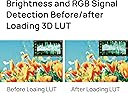
The Portkeys LH5P II is a 5.5-inch 2000nit brightness touchscreen camera field monitor featuring a rugged metal frame and tempered glass. It supports full HD 1920x1080 resolution and offers wired and wireless control compatibility with a wide range of professional cameras including Sony, Canon, Blackmagic, and Panasonic models. Advanced monitoring tools such as 3D LUT, false color, waveform, and X-Rite color calibration ensure precise image control. Unique multi-monitor wireless syncing allows simultaneous control of up to four monitors within 50 meters, making it ideal for collaborative productions. Lightweight yet durable, it’s designed for demanding professional environments.


| ASIN | B0B28Q59YC |
| Aspect Ratio | 16:9 - 1.78:1 |
| Aspect ratio | 16:9 - 1.78:1 |
| Best Sellers Rank | 40 in Camera Focusing Screens |
| Box Contents | LH5P II Monitor*1 |
| Brand | Portkeys |
| Brand Name | Portkeys |
| Colour | LH5P II |
| Contrast Ratio | 4:1 |
| Country of Origin | China |
| Customer Reviews | 4.2 out of 5 stars 58 Reviews |
| Display Technology | LED |
| Display Type | LED |
| Global Trade Identification Number | 05905873733602 |
| Hardware Connectivity | HDMI |
| Has Color Screen | Yes |
| Image Brightness | 2000 candela_per_square_meter |
| Image contrast ratio | 4:1 |
| Item height | 9 inches |
| Manufacturer | Portkeys |
| Maximum Display Resolution | 1920 x 1080 |
| Model Name | LH5P II |
| Model Number | LH |
| Native Resolution | 1920x1080 |
| Network Connectivity Technology | HDMI |
| Product Features | Touchscreen, 3D LUT, False Color, New Peaking, Waveform Function, Bluetooth Control |
| Product Warranty | 1 year |
| Resolution | FHD 1080p |
| Response Time | 5 Milliseconds |
| Screen Finish Type | Gloss |
| Screen Size | 5.5 Inches |
| Screen size | 5.5 Inches |
| Screen surface description | Gloss |
| Total HDMI Port | 1 |
| Total Video Out Ports | 1 |
| Viewing Angle | 178 Degrees |
Y**Y
Very Good
Light, Very Good Quality, you can control A lot cameras with this
A**S
Works great with the SOny FX3
Throughly impressed with this monitor. It's very easy to use, light weight and great value for money.
D**N
Perfect for BMPCC shoulder rigs
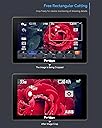
Some other models claim to have BT control of BMPCCs but in fact do not. This model was one of a few suggested by Portkeys support for my use case and does indeed work for this application. Compared to a BM5 III (not compatible with BMPCCs), the back shell of the LH5P II is lighter and more compact, lacking the heat dissipation fins and feeling more like plastic at first, but it's definitely metal. It accepts one FP-N battery and can be powered externally with the included D-tap cable, but external power will not charge the battery. In this case the battery serves only as a backup, e.g., when switching D-tap batteries the monitor will continue to operate without external power connected. A shame they couldn't add charging. There is one ¼"20 thread for mounting, but the display can be flipped in software so this mounting point can be anywhere with a magic arm. The physical buttons (normally on top) will move if flipped, and since the markings are not on the face of the monitor, it can be easy to hit the wrong one. I ended up sticking labels on the bezel on front of the screen. F1-4 can be programmed for most in-monitor features (of debatable usefulness for BMPCCs where in-camera peaking, false colour etc are more accurate) but also supports camera REC, giving a physical button accessible to the operator and a must for shoulder rigs. I mostly use this and Rectangle Crop to check focus. You can change the following BMPCC settings via the touch screen: •Codec/Resolution •Framerate •Shutter •Iris •ISO •WB •Tint •Start/Stop Record •Spot AF (with compatible lens) •Manual Focus (with compatible lens) •Manual Zoom (with compatible lens) •Auto Exposure You cannot change the ND filters. You can enter, navigate and exit playback mode, and see the camera's battery level alongside the monitor's. Red outlines appear when the camera is recording, although these seem less than reliable and often show recording when the camera is stopped, but I haven't noticed them showing not recording when the camera is speeding, so that's good. If using BT control, you sometimes have to fight with the monitor's OSD to get access to the camera controls instead. Some combination of taps and swipes usually works although I haven't figured out a reliable way to get what I want. Brightness is decent, not quite hitting the highs or lows of the BMPCC 6K Pro but certainly offering enough for most conditions. It is adjustable via the touchscreen. There is a built-in fan which can be controlled by the touch screen, although it remains to be seen if it will automatically ramp up if it is overheating. It features HDMI in and out so easy to link to a director monitor, and also a 3.5mm headphone jack with a separate volume control on the touch screen. Useful if you're taking audio from the camera's jack but also want to monitor at a decent level. It's a shame this is similar in price to the BM5 III which benefits from SDI in and out - to get SDI WITH BT control of BMPCCs requires spending over 2x the money. It's cheaper to just get a decimator if you need SDI. Overall, I think this is an essential bit of kit for anyone building a shoulder rig with BlackMagic Pocket Cinema Cameras, offering almost every control needed from a different position. If it had SDI it would be a steal, but lacking that it seems respectably priced.
V**A
Great monitor for a camera.
Great monitor for a camera. I gave it 4 stars only because the camera controls are not fully functional. I hope this will be fixed in future firmware. But overall everything is good.
M**C
Great addition to my camera set-up.
Item arrived as described and worked straight out of the box. I came well packaged with all accessories as described. Although early days yet, I am well pleased with this monitor, time will tell how it holds up.
T**R
*Updated* Review
After previously being sent a faulty item (a warehouse mistake from Amazon sending a returned item out 'as new'), which I gave a bad review for here. Portkeys replaced the monitor and reimbursed the shipping costs involved. At times it was challenging due an overseas postage complication but Portkeys maintained customer service throughout and I am happy with the result. Thank you for fixing the problem. Recommend.
F**H
Quality screen let down by poor software
This feels like a quality monitor with a solid metallic frame build. The screen is very bright (although no way to be sure it hits the 2200 nits it claims). The problem is the software. The UI is clunky at best. To access menus you either swipe up, down, left it right depending what you want to access, but only after you press the screen first. This action takes you out of full screen viewing mode, shrinking the display so the icons can appear. This is extremely annoying as it reduces the effective screen size to probably around 4-4.5". Other monitors if you want to enable/disable features you can just press the button and it's done. No loss of screen size, no need to go into an additional menu to activate (yes, some items you have to do this). You even have options in the menu for transparency but this makes no difference as there's no image behind the buttons. Going into the menus also does black out the screen for a fraction of a second. That annoyed me. I also came across a bug, a significant one. When you first turn on the monitor, when in picture settings you can alter things like brightness, contrast, sharpness. However, you'll only see these once. Once you start going through the menus, these options will never appear again and you'll need to reset the monitor. And no, it's not just a case of swiping a menu bar because they are hidden, no they literally aren't there. Overall in use, I did have some issues with sharpness - everything seemed a bit soft. I did try to correct this in the field but because of the picture settings bug, I couldn't access the right screen until I got home and reset the monitor. Using the camera control was okay for the A7S III, the main reason I bought it. The touch focus though the only mode I could get it in was touch tracking, regardless of the focus mode I was in. Not ideal in all situations. I've sent this monitor back. Maybe after a few more firmware updates it might be decent but right now, it's a tad annoying to use for any length of time.
L**S
Decent
Works decently, but too bulky, and for the price and functionalities offered, you'd better off go with an after-market Atmos Ninja V.
Trustpilot
4 days ago
2 weeks ago