Buy anything from 5,000+ international stores. One checkout price. No surprise fees. Join 2M+ shoppers on Desertcart.
Desertcart purchases this item on your behalf and handles shipping, customs, and support to Vanuatu.
🔐 Unlock convenience and control with every press!
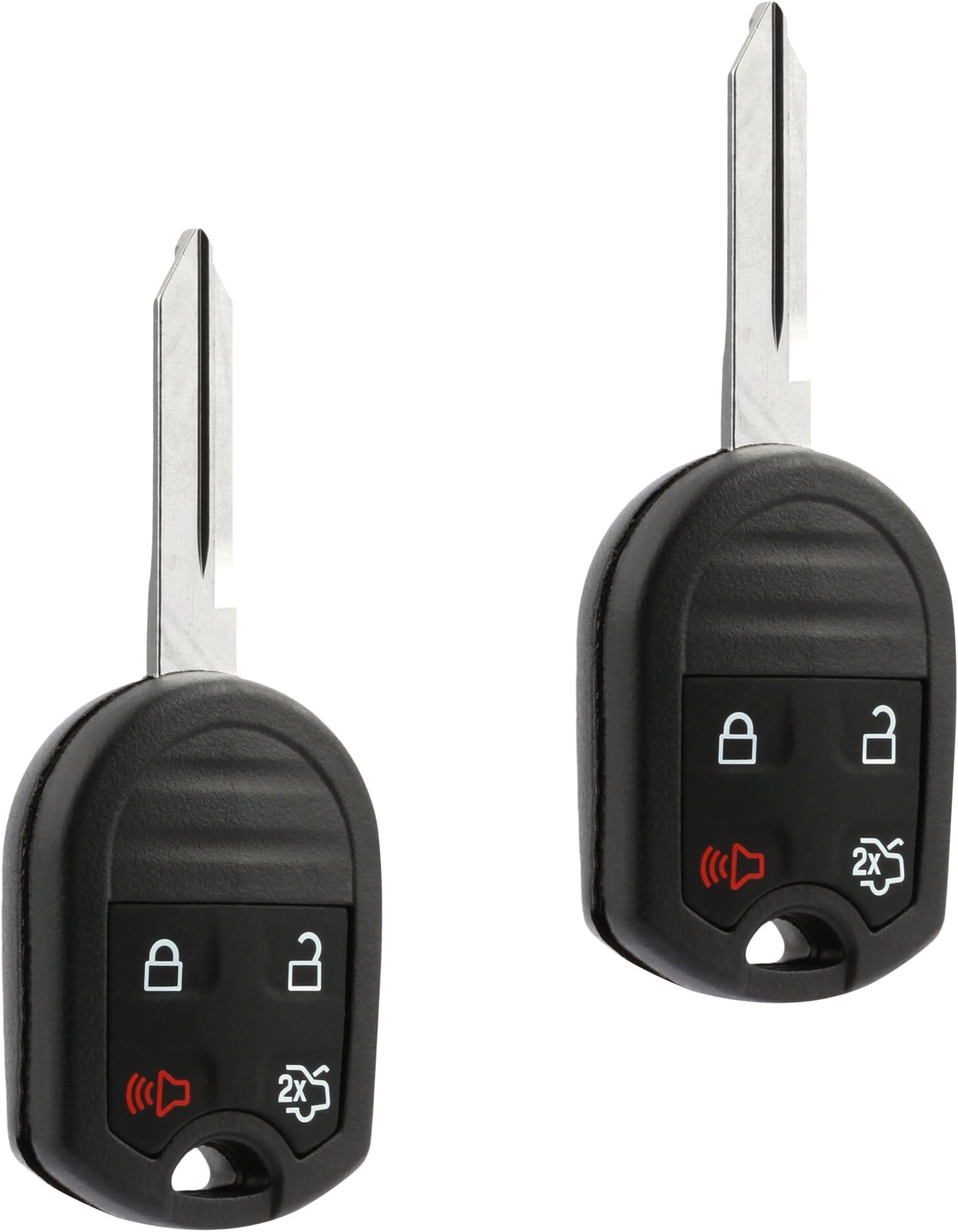
This 4-button key fob remote (CWTWB1U793) is a direct replacement for Ford, Lincoln, Mercury, and Mazda vehicles, guaranteed to program with two original keys. Featuring a complete electronic assembly with battery and durable plastic construction, it offers user-friendly, step-by-step programming instructions that save you costly dealership visits. Compact and lightweight, it delivers reliable keyless entry functionality while empowering you to take control of your vehicle security.


| ASIN | B06XS3KHBQ |
| Best Sellers Rank | #9,447 in Automotive ( See Top 100 in Automotive ) #33 in Keyless Entry Systems |
| Brand | USARemote |
| Brand Name | USARemote |
| Button Quantity | 4 |
| Color | 4-btn |
| Compatible with Vehicle Type | Car |
| Customer Reviews | 4.2 out of 5 stars 3,488 Reviews |
| Item Dimensions L x W | 1.25"L x 0.5"W |
| Item Weight | 1 Ounces |
| Manufacturer | USARemote |
| Material | Plastic |
| Material Type | Plastic |
| Number of Buttons | 4 |
| UPC | 688946484216 |
| Vehicle Service Type | Car |
R**E
Works great, but complicated to set up
Quite a savings if you live through the experience... :-) Here are some "key" points to help others out. This is for using these on a 2011 Ford 150 pickup truck, but I imagine they apply to many other fords. I needed to replace one key+fob that had stopped working (not the battery). It turns out the key has a security chip that was working, so just the fob had failed (would no longer open the truck doors). There are 3 parts to the adventure, and they can be done in any order. The new keys will only open the doors (manually) and start your vehicle after completing Part 1 and Part 2. The Key FOB works after Part 3 - so if you do Part 3 first, be aware the keys still will NOT start the vehicle. Part 1 = Cut the keys Part 2 = Program the security Part 3 = Program the FOB Note 1: You get 2 blank key+fobs with this order. They appear to match perfectly the originals. Part 1: Step 1. You will need to get the keys cut, this can be a hassle as some places will do it and others will not. They cut the keys - They do not program them for you. I ended up getting mine cut at Lowe's Hardware, even though they told me they are not supposed to do it. I love Lowes Hardware! Very helpful people. Note 2: There are two different components to program on each key+fob. The cut key itself WILL NOT WORK on the vehicle without programming the security chip - it turned on an automatic alarm when I first tried the cut key - Note the cut was fine, but I hadn't yet programmed the security chip. Part 2: Step 2. You need two working keys with working security chips to self-program a third key's security (as far as I was able to tell). Even though my key fob had stopped working, the key security chip was working so I had two working keys as far as security was concerned. I knew the security chip was still working because the key could still start my truck. Step 3. To program a third (and then a fourth) key security chip, I put the master key in and switched the car on (but did not start it). I then immediately did this with the second working key. I then placed the third new cut key in and when I switched the truck on the key security chip was programmed (or perhaps the truck learned the key's code, not sure). I repeated this for the fourth new key. (All of this is online in videos, I am telling it here so people know what to expect) Step 4. Once both new cut keys had their security programmed, they would open the doors (manually) and start the truck without setting off an alarm. Part 3: Step 5. The FOBs now have to be programmed. You place a working key into the ignition and switch the truck on then back off (again without starting the vehicle) quickly 8 times - on the 8th time leave the ignition ON. You will here the door locks operate - then push a button on the key fob you are programming and it should now work. I repeated this for the 4th (second new key) key as well. (Again, all of this is online in videos) Results: I now have 4 working keys (2 are new) and 3 working fob for a fraction of the cost of getting one through the dealership.
A**N
Works Great
Was able to get it Cut and Programmed at a local locksmith for $70 . Programming the Key Fob is very simple process anyone can do as long as you have 1 working Key, Lots of videos on YouTube. Overall very happy. 2013 F150
B**S
Instructions for 2014 Ford Taurus SEL AWD that worked.
There are two step to programing First the Key and then the Remote Functions. Start with the Key then the Remote. How to Program a 2014 Ford Taurus Ignition Fob Smart Chip Key Step by Step How to Program Instructions: Use these instructions if your Ford Taurus has the remote/key combo system. You must have two previously programmed keys and the new unprogrammed key readily accessible. If you only have one working key then you will have to have a Locksmithprogram a second key with special equipment or Buy a Programmer Here. 1. Insert the first previously programmed key into the ignition. 2. Switch the ignition from off to on. Keep the ignition on for at least three seconds, but no more than 10 seconds. 3. Switch the ignition off and remove the first programmed key from the ignition. 4. After three seconds but within 10 seconds of switching the ignition off, insert the second previously programmed key into the ignition. 5. Switch the ignition from off to on. Keep the ignition on for at least three seconds, but no more than 10 seconds. 6. Switch the ignition off and remove the second previously programmed key from the ignition. 7. After three seconds but within 10 seconds of switching the ignition off and removing the previously programmed key, insert the new unprogrammed key into the ignition. 8. Switch the ignition from off to on. Keep the ignition on for at least six seconds. 9. Remove the newly programmed key from the ignition. If the key has been successfully programmed it will start the engine and operate the remote entry system (if the new key is an integrated keyhead transmitter). If it was not programmed successfully, wait 10 seconds and repeat Steps 1 through 8. Use these instructions if your Ford Taurus has the smart key system. Note: You can program a maximum for four smart keys to your vehicle. You must have two previously programmed keys and the new unprogrammed key readily accessible. If you only have one working key then you will have to have a Locksmithprogram a second key with special equipment or Rent a Programmer Here. Ensure that the vehicle is off before beginning this procedure. Ensure that all doors are closed before beginning this procedure and that all doors remain closed throughout the procedure. Perform this procedure exactly as described below, and perform all steps within 30 seconds of starting the sequence. If any steps are performed out of sequence, stop and wait for at least one minute before starting again. Please read and understand the entire procedure before you begin. 1. Place the new unprogrammed smart key in the pocket inside of the center console with the buttons facing out and with key ring up. 2. Press the driver or passenger power door unlock control three times. 3. Press and release the brake pedal one time. 4. Press the driver or passenger power door lock control three times. 5. Press and release the brake pedal one time. The indicator on the START/STOP button should begin to rapidly flash, indicating the programming mode has been entered and two programmed smart keys have been detected in the vehicle. 6. Press the START/STOP button within one minute. A message will appear in the information display indicating that the new smart key was programmed. 7. Remove the smart key from the center console pocket and press the unlock button on the newly programmed smart key to exit programming mode. 8. Verify that the remote entry functions operate (press lock then unlock, making sure you end in unlock) and that the vehicle starts with new smart key. For Remote Functions (door lock/unlock/panic): Close all doors, open driver's door and press the car door unlock button Insert key, turn ignition OFF to RUN 8 times within 10 seconds Door locks will cycle to confirm programming mode Press any button on remote within 10 seconds - locks cycle to confirm Press any button on the next remote to program it. Better Instructions. Procedure A: This worked for My 2014 Taurus SEL 1.Close all doors, then open drivers door and press the Unlock button on driver’s door while it is open, insert key into ignition. 2.Turn ignition from OFF to RUN 8 times within 8 seconds, with the 8th time ending in RUN. Door locks will cycle to confirm programming mode. (if the door locks do not cycle, then it was done incorrectly. You must start over by removing key and beginning from step 1) (Off is the position where you can remove your key, RUN is the position just shy of starting your car.) 3.Within 10 seconds press any button on the first keyless remote to be programmed. Door locks will cycle to confirm programming. If you only have one remote then skip to step 5. 4.Within 10 seconds, press any button on the second keyless remote. Door locks will cycle again to confirm programming. Repeat step 4. for all other remotes. 5.Turn ignition to OFF. Locks will again cycle to indicate end of programming mode. *If this does not work try the procedure with the door closed. Procedure B: 1. Fasten seatbelt and close all doors 2. Turn the ignition from OFF to RUN 4 times within 3 seconds. 3. Turn the ignition OFF. The system will chime to confirm programming mode. 4. Within 10 seconds, press and hold any button on first keyless remote. The system will chime once to confirm programming. 5. Within 10 seconds, press and hold any button on second keyless remote. System will chime once to confirm programming. 6. Turn ignition to RUN to exit programming mode. Please note: All steps should be performed in fairly rapid succession. If you never get the initial chime or door lock cycle, that means the vehicle has never entered programming mode. You should remove key from ignition, open and close the door and start over.
S**P
Works with 2012 3.5 EcoBoost FX4… mostly
First and foremost: the keys work. A trip to my local Ace Hardware and within an hour they were starting the truck. I can see why a lot of people get confused in how to do this exactly. They try to explain the process, but somehow gets lost in translation. I’m not about to add more confusion to the pile. If you go slow, it’s actually fairly easy. Like others have said - and I can’t stress this enough - you MUST have two OEM keys (one master/one slave) in order to do this yourself. After reading/watching a few videos, and multiple attempts, I did get the “click-click” of the locks you want to hear. That’s the indicator it worked. The only problem I have is that remote start doesn’t work every time with the new keys. Maybe there’s more to program. At any rate, for a total of $20, I wouldn’t even hesitate to purchase again.
B**Y
Don't recommend these .. won't program
These are junk .. not able to program them, holding the chips from these side beside to a know good working chip. And the quality of these are horrible there's alot of differences .. that probably keep them from working correctly.. don't buy them look for ones that have the gold plated terminals on the chips and that have a manufacturer date from 2012 those will work..
V**N
They work perfectly for me
Ok I got these cut and programed surprisingly everything worked really well they are the exact same size as the factory key the buttons all work and it doesn't feel like a knock off at all. Ace hardware was able to program it and cut it. Honestly I saved 400 dollars by getting these.
S**E
Great Key Fob
Worked very will easy to get key cut and program to vehicle, but this depends on vehicle manufacturer programming
C**D
Remote Functions Don't Work After Programming
The key programs fine using Ford's IDS software and will start the truck, but the remote lock/unlock functions don't work even after trying a new battery. Update: Did some digging on these and found that there is a separate programming procedure that is done manually to give the key the ability to perform lock/unlock functions and now all is working as it should. This is different from the OE keys I've programmed in the past direct from Ford and there are no instructions included with the keys to tell you this. Below is a copied text of the instructions I used to perform this procedure. "To program the FOB buttons, you get in the vehicle and close all the doors. Then you open the drivers door and leave it open. Hit the unlock button on the drivers door while it is open. Now take your new key and put it in the ignition. Turn the key to on and back off 8 times quickly (do not start the vehicle). On the 8th time, leave the key in the on position and you will hear all of the door locks cycle. Then within 10 seconds, while the key is still in the ignition and in the on position, hit the lock button on the FOB. The door locks should cycle again which means it was programmed successfully. You can turn the key to the off position and it should be fully functional, including remote start!"
Trustpilot
3 days ago
2 weeks ago