Buy anything from 5,000+ international stores. One checkout price. No surprise fees. Join 2M+ shoppers on Desertcart.
Desertcart purchases this item on your behalf and handles shipping, customs, and support to Vanuatu.
🎮 Elevate your setup: The ultimate HDMI to DisplayPort adapter for pros who demand flawless visuals.
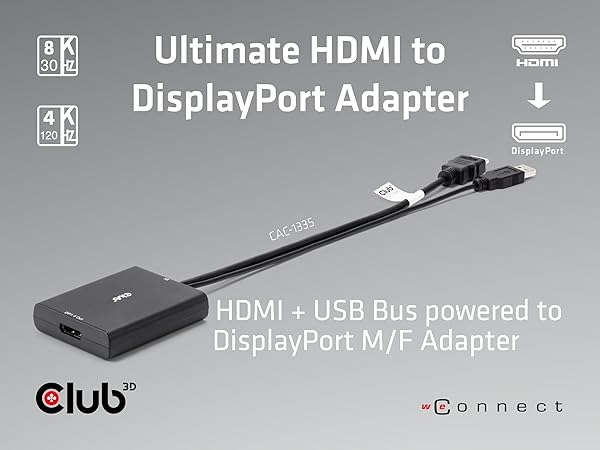
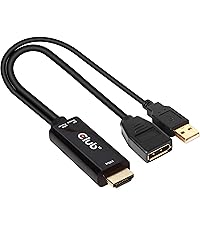
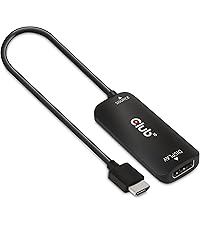
The Club 3D CAC-1335 is a premium active adapter cable converting HDMI 2.1 signals to DisplayPort 1.4, supporting ultra-high resolutions up to 4K at 120Hz and 8K at 30Hz. USB-powered and driver-free, it offers seamless compatibility with gaming consoles, PCs, and laptops, ensuring stable, high-quality video output for demanding professional and gaming environments. Certified and backed by a 2-year warranty, it’s the reliable choice for next-level display connectivity.


| ASIN | B0B8S7J225 |
| Best Sellers Rank | #103 in Computer DisplayPort Cables |
| Brand | Club 3D |
| Color | Black |
| Compatible Devices | Monitor, PC, Projector |
| Connector Type | Micro USB |
| Current Rating | 1.5 Amps |
| Customer Reviews | 4.0 out of 5 stars 355 Reviews |
| Finish | Hdmi,Projector |
| Input Voltage | 5 Volts |
| Item Dimensions | 2.83 x 1.18 x 0.47 inches |
| Item Weight | 0.2 Pounds |
| Item dimensions L x W x H | 2.83 x 1.18 x 0.47 inches |
| Manufacturer | Club 3D |
| Mfr Part Number | CAC-13335 |
| Model Number | CAC-1335 |
| Number of Items | 1 |
| Number of Ports | 3 |
| Package Quantity | 1 |
| Power Plug Type | No Plug |
| Smart Home Compatibility | Not Smart Home Compatible |
| Specific Uses For Product | Monitor,Projector |
| UPC | 841615102747 |
| Unit Count | 1.0 Count |
| Warranty Type | Limited |
S**N
Expensive, but works as intended, Got my HTC Vive Cosmos VR system working again!
Expensive why? Club 3D is a Dutch brand / company that makes high quality video and multimedia products. They use stringent manufacturing standards and though their factories are overseas, their products do promise what they are suppose to do and deliver as needed. I spent more on cheap cables trying to get my HTC Vive Cosmos VR system to work on my current HDMI gaming PC rig, then I would have had I just bought this cable in this cable first place. My PC video card has two HDMI ports and with this cable I am able to still use the monitor as needed but also use the VR headset from the second port with no issues. All data and transmissions work as intended with no issues. With VR systems and conversion cables it is a serious hit and miss. I've read many forums and ordered many cheap cables and either they flat out do not do what they claim or the video is blurry or downright grainy. I am no video expert and opted to purchase the Club 3D CAC-1335 HDMI 2.1 to DisplayPort 1.4 4K120Hz or 8K30Hz M/F Active Adapter and it allows me to do VR at 90hz as it should, and I can still use my gaming monitor at 1080p (my prefered choice) at 120hz with no issues. Spend a few extra bucks up front and get the right cable with less hassle and headaches.
N**S
Ignore the bad reviews! I got 1440p 120HZ!
Ok hear me out. I needed a solution for my capture card. My monitor only has 1 display port and 1 HDMI 1.4 port. The capture card I have only supports HDMI, the problem is getting 1440p and 120hz is not possible on HDMI 1.4. This adapter works perfectly. I was able to get 1440p and 120 hz(4k 60, and 1080p 120hz worked, but couldn't get 144hz). Just make sure you plug in the usb cable to your motherboard and not your monitor! you may have to downscale your resolution and frame-rate before plugging this in to get it to work, but after you set it up, it works fine and you don't have to mess with it ever again. The cable itself is capable of doing it that resolution and frame-rate.
N**C
1080p 60 SDR
Doesn’t work well with PS5 Pro and Apple Studio Display. Not even 4k60 Feels like fake advertising, I recently bought the SIIG HDMI 2.0 to DP 1.2 and that one works great (4k60) so I don't know how its possible this HDMI 2.1 to DP 1.4 doesn't work unless it's not actually to spec
J**R
If you have an Acer Nitro 5 don't try...
This dongle does not work with The Oculus Rift S + Acer Nitro 5 (i7 & RTX4050). My journey of hyper-fixating on data transfer conversions and power supplies and ports began with finding out the gaming laptop I have has a Thunderbolt connector and that is the best method of connecting a DP (Rift S) to a non-dp compatible machine, HOWEVER the connector goes through integrated graphics on Nitro models, so that's a nonstarter. After finding out my HDMI 2.1 port goes straight to the 4050 on my laptop I found out about powered hdmi to dp adapters, which I'm sure works well, HOWEVER within Metas software it would register it for a split second and then de-register it, I tried various configurations/troubleshooting measures, and nothing worked (even a powered usb hub I had on hand). So this dongle seems to work lovely (I didn't test it with anything else soz) but for the niche purposes of connecting a Rift S to a budget gaming laptop it didn't work. I want to chock it up to either the laptop or the Rift S being unsupported after hdmi 2.1 came out. Ah well, ig it's back to the desktop for my headset. This review isn't a reflection of the product more so a warning on anyone who needs to fulfill this niche purpose, since thorough info was sparse on the topic. 4/5 selfish didn't work stars lol.
M**T
Great potential ruined by inconsistent execution. Buy UpTab adapter instead...
When this product works, it works wonderfully, meets all promised specs, etc - 4k 60hz, great picture quality, no problem. I bought this so I could switch my monitor over from PC games to console (mostly switch). My monitor only allows 4k60hz via DisplayPort, not HDMI. One thing, for the life of me, I cannot understand is why this adapter is so touchy. Maybe it's just not very compatible with my monitor (Samsung 28" 4K U28E590D), but I read at least one other review complaining about flickering. If you keep this adapter, you will have to unplug and replug it at least once, probably 2 or 3 times daily. I was unplugging and replugged this device back into my HDMI switcher, but the following issues occurred without one as well, and I tried a myriad of different HDMI, Displayport and power cables: 1. The screen will "flicker" with artifacts to varying degrees 2. The screen will seemingly randomly "black out" for about a second. This may not sound like much, but it can ruin your game (made Rocksmith unnecessarily challenging for me). 3. Screen will have "static"-y artifacts, like if you were watching an old CRT television via antenna with a slightly bad signal. But it's pretty distracting for me. 3. If your laptop goes into sleep mode, and you don't turn off your monitor, it will flicker randomly - like BRIGHT WHITE at varying intervals. In the few times I was sleeping in my media room (where this was plugged in), it was bright and rapid enough to wake me up. Unplugging and re-plugging once or twice would seemingly "resync" the monitor and get rid of the issue(s) temporarily, and the biggest trigger for these issues seemed to be allowing my laptop to go to sleep while plugged into the monitor/adapter. When I bought this (twice - so it wasn't a defective unit), the issue took a while to start happening. This adapter also runs kinda warm. Not scalding bad but enough to make me wonder if it needs a heat sink or if it doesn't have enough bandwidth overhead to allow 4k 60hz and therefore has issues. Also when I bought this, it was the only product of its kind. Now there is the UpTab adapter, and so far these issues seem to be gone and it seems to be more value for the money, so this adapter will probably sit in a drawer forever unless it somehow works better with another device (I have no other DisplayPort devices). TL;DR - When it works, it works well, otherwise re-plug. If you can get the UpTab adapter, get that. If this is your only option, prepare for the issues.
B**R
Does 4K60 as advertised, and works with Oculus Rift S
This works fine at 4K 60Hz as advertised, and as other reviewers mentioned it does work with Oculus Rift S! One thing to keep in mind, though. If you are interested in this adapter for a desktop, then it's quite likely you've already used all of your Displayport outputs. In my case I run 3 Displayport monitors already, and I wanted to use my Rift in my free HDMI port. Make sure your video card can handle all the outputs at once! For example, my old GTX 1070 would NOT do four outputs at once, but RTX 2070 and up and RTX 30xx should be able to handle four. Check your spec! [Update 01/20/2021] My adapter unfortunately suffered a premature death after a couple of months, but warrant support from Club3D has been beyond fantastic. They quickly sent a replacement, and when FedEx managed to deliver it to the wrong address (a closed racetrack I think...), Club3D quickly sent another replacement. I don't think I've ever dealt with such friendly and helpful customer service. Hopefully the replacement will last longer, since it's the only adapter I've found so far that will work with my Oculus Rift. Most other adapters have periodic crashes just running one of my 4K monitors.
E**S
INFORMATION ABOUT ADAPTER AND COMPATIBILITY
I’m not so experienced with the latest tech. I bought a Samsung Odyssey G5 monitor; it was able to deliver 165Hz at max resolution only by DisplayPort. I bought the monitor for using with my Xbox Series S to play 120Hz and using it with my future Mac Mini M4. I was about to return the monitor until I found this adapter; before using the adapter, I was limited by HDMI to 100Hz; once I plugged in the adapter, it allowed me to use the full 165Hz. I don’t know so much about FreeSync, but if I turn it on, I can’t adjust the refresh rate as you can see in the video using my Xbox. I have to try with my Mac Mini when it arrives. If anyone could help me, I would appreciate it. For the adapter, it worked and has good quality. In not returning the monitor. It’s easy to use.
C**S
Does what its supposed to do
I have an odd use case, using it on the HDMI 2.0 output port of a TESmart HKS0401A2U kvm switch to connect to an older 4K monitor's display port to get 4K@60hz. It does work with the cheese grater and trash can Mac Pros I am using. The only thing is the signal sometimes freaks out when switching inputs, but I think thats more of a problem with the switch. I have another one of these switches that acts weird without any adapters or anything. Anyways, cycling through the inputs or power cycling the switch seems to get it working. If it works in this use case, I would expect it to work fine in normal scenarios. At the time of purchase it was the cheapest adapter of this type to claim 4K 60hz in the title without hiding it will only output 30Hz somewhere else on the page. I'm pretty happy with it, as it allowed me put off getting a new monitor to get 60Hz.
A**U
Works with Apple Studio Display
Works when trying to connect the Switch 2 to the Apple Studio Display. It’s easy to use/setup and it has quality materials. I unfortunately couldn't get sound playing on the monitor from the switch.
ス**カ
唯一
HDMIをDPで出力するには現状これしか選択肢がないのかな? そういう意味で唯一無二。 問題なく出力出来ているし画質もキレイだし、今のところ不満点はないです
L**R
Works great with my gear
This active adapter is working really well for me! It's connected to my M1 Mac Mini's HDMI port so that I can connect it to my TrendNet TK-240DP dual monitor KVM switch that only supports DisplayPort. The monitor connected to this Club3D adapter goes to sleep properly, unlike the other identical monitor connected with a passive USB type C adapter for DP alt-mode. (Sleep mode issues are common with DisplayPort...) When both monitors are sleeping properly (courtesy of the other computer on the KVM before flipping back to the Mac), the monitor on the Club3D adapter takes maybe two seconds longer to wake up, but that's really no big deal to me. In short: if you need a specialty adapter like this, then naturally there's a lot in the chain that could go wrong... but there's a good chance this adapter will come through for you. Well worth a shot!
A**L
This product didnt work
I had high hopes for this product as I needed it to work with my monitor but still the screen feels stretched out and the frame rate iam getting is only upto 60 at 4k … really disappointing
B**K
Excellent
With the help of this now i can run 120hz on my PS5 without the need of HDMI 2.1
Trustpilot
2 months ago
1 month ago