Buy anything from 5,000+ international stores. One checkout price. No surprise fees. Join 2M+ shoppers on Desertcart.
Desertcart purchases this item on your behalf and handles shipping, customs, and support to Vanuatu.
🖱️ Elevate your workflow with comfort and control—because your hand deserves the best!
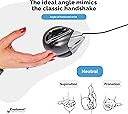
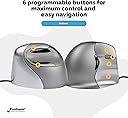
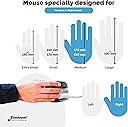
The Evoluent VerticalMouse 4 Right Regular is a medium/large ergonomic mouse designed to support your hand in a natural handshake position, reducing forearm strain. Featuring programmable buttons and adjustable pointer speed, it enhances productivity while being eco-friendly with 30% recycled materials. Compatible with Windows and Linux, it’s a smart upgrade for professionals seeking comfort and precision.


| Brand | Evoluent |
| Colour | Grey/Silver |
| Connectivity technology | USB |
| Movement detection technology | Laser |
| Number of buttons | 6 |
| Special feature | Ergonomic Design |
S**E
Best mouse yet!
I thought nothing could beat the old Evoluent Mouse 3, but now I have the 4 - and it's awesome. Everything from the slightly tweaked design to the purely visual back lit logo all scream quality. If you've ever suffered from hand, wrist or arm pain after mouse use, try this baby out. Even if you own one of the other upright mice (mouses??) out there - including other Evoluent models - This one delivers on all those little things you knew could improve the others: Better pinky support so now no part of the hand touches the mouse-mat, extra thumb button (as a gamer this was the clincher!), improved contact points between mouse and surface, and better, on the fly access to the mouse DPI settings is a god-send for Photoshopping. Even the driver software is just packed with tons of options. I seriously can't for the life of me understand why people use normal horizontal mice anymore with stuff like this out there. Pros: Good size for people with large hands (they offer a small size too, oh and left handers). 6 buttons make this a competitive gaming mouse. Comfortable from the word go. On the fly DPI settings. Nice Rubberized feel on the palm. Cons: Not the cheapest mouse out there.
R**K
Helps with pains caused by using a flat mouse
Bought this to see if it would help with pains in the back of my hand and wrist which I’d developed after prolonged use of a flat mouse. I can feel improvement and pain gradually going away now that my mouse hand is positioned more vertically. Very light touch required with the buttons and hand movement is minimised.
B**S
Very comfy
I had an earlier model at work supplied by our physiotherapist, and they let me have it when I retired. It finally gave up the ghost when it was about 10, so I decided to stick with Evoluent. It's very comfy and lots of features you can set up on the various buttons to meet you own needs. You have to be a bit careful with the buttons above and below the thumb rest as it's easy to deploy them so best not to use them for 'go back' unless you have a ready means of 'going forwards' again, and you could lose content. It's quite a chunky mouse, which I particularly like, as it supports your entire hand including the ball of the thumb.
O**R
Pretty good mouse, terrible Mac drivers
This is the second Evoluent mouse I`ve purchased. Used one for a couple months at work and then bought the second one for home. After a few years of pain in my right wrist finally this mouse does the job. It is pretty good for everyday use and keeps the arm in a relaxed position - much less stress and strain than other mice I`ve tried - Intellimouse 3.0, Logitech MX-1100. After the first day of using it carefully I noticed improvements - pain had minimized and wrist was still OK in the afternoon. After one week I noticed that pain still can reoccur if I get tired and start moving the mouse using wrist instead of whole hand it was designed. Wrist has to remain still and fixed. After one month I noticed that the joint between thumb and palm is hurting a little after I`ve spent hours leaning that place on top of mouse - the second problem when you get tired and start using the mouse in an easier but incorrect and non-ergonomic way. The good: *) It keeps palm in a vertical position thus relieving and almost eliminating pain in wrist *) It works via USB cable so is pretty lightweight and does not put too much stress on the wrist *) The residual on the outside of it can be easily cleaned and I find coating to be very good for everyday use. *) The driver utility is good for assigning custom actions to buttons - like "Ctrl+W", "Ctrl+Tab" and others. Drivers are very stable on Windows. *) nobody messes with my workstation at work - people get very confused when sitting in front of such fancy mouse and Microsoft Ergo 4000 keyboard with almost blank keys :) The bad: *) The driver often goes crazy on my Mac ( Macbook Air ~2010 year ), causing 100% CPU usage by "EvoluentAgent" and I can watch the temperature my Mac going all the way up till the boiling point (100*C, ~212*F) where it reboots and remains terribly hot. Otherwise the driver works good - except this overheating thing. It happens even when mouse is not plugged in. It should be fixed in order to use this mouse on Mac with customized buttons. Once "EvoluentAgent" is killed, everything goes good right away, the temperature drops. Uninstalled the Mac driver instantly after the second overheating to avoid any permanent damage. *) The button on top, right next to thumb gets pressed once in a while when grabbing the mouse. It should be more like "Logitech MX-1100"-style - a little smaller and harder to press. The same with the lowest button next to pinky - a little annoying while learning the correct way to grab a mouse. The neutral: *) Initially I was surprised to find out that the part next to pinky is actually the 3rd button. Didn`t expect that. It can be assigned a keystroke like "Ctrl+Tab" but it took a while to accept that this part is a button instead of a hard surface. Summing up the points I give this mouse 4 stars out of 5 - it is very good and almost eliminates pain in wrist when used correctly. This is the best ergonomic mouse I`ve tried. If you can cope with buggy Mac drivers and easy-to-click buttons then try a vertical mouse - for me it is very good.
D**.
Best mouse for Shoulder pain
This is my second Evoluent. My 1st one lasted over 10 years of daily use. Worth every penny.
T**O
Comfortable but sadly lacking
I used a VerticalMouse 2 for around 15 years. It is an absolute solid workhorse and still functions perfectly to this day. But one day I thought to myself, maybe I should see if technology has actually improved since the stone age, and I went out and bought some other mice. Back then a vertical mouse was very novel and I picked it up because of worstening wrist pain while using my PC. I can safely say it probably saved my wrist and I am very grateful for all the years I've been able to use a mouse and game without issue. The VM2 was around £100 iirc and I certainly got my money's worth, but I thought I'd check out the newer takes on the design. Unfortunately for some reason (patents?) the Evoluent is still the only vertical mouse that uses the three finger button design and after all this time I felt like I couldn't go without it. After trying two or three other brands which had their own problems (why are thumb buttons so hard to put somewhere I can press them??), I ended up back here. I tried the VMD but I sent it back, I think because of the material feel. I kept the VM4. Interestingly the small size is quite similar in looks and feel to the VM2, but it was too small for me. The 4 improves on the 2 - the lip at the bottom, the notched wheel, double thumb buttons, DPI adjustment (not that I use it). Most importantly the sensor is obviously much better tech. Now the bad. My precious extra thumb button ended up being bound to mouse wheel click, because the mouse wheel is so hard to press. On the VM2 I could easily move my finger down a little and click it from the side, but this one is much more stiff and requires hand tension to press. The rubbery coating of the 2 felt much nicer, although it did wear away and leave it feeling tacky. This one feels okay but the buttons easily get grimy. And my biggest complaint - the build quality. The buttons feel clicky and fragile. I used one VM4 for a year before the sensor started malfunctioning and hopping around. I exchanged under warranty through Amazon, and now after two months the plastic on the thumb rest has started creaking audibly when pressed. It's so disappointing for a product that once felt premium and was priced for it. I'm still rooting for Evoluent. I think they could make a great mouse and I would even pay more if it lasted as long as my old one. It's a device I use every single day and it's integral to me. I hope they can keep improving.
M**R
Excellent for RSI but need to persevere.
Like many other RSI sufferers, I spent a considerable amount of time looking into alternatives to the standard mouse. Although there are a lot of opinions out there, and different solutions that have worked for different people, I couldn't find a definitive answer, and in the end opted to give the Evoluent product a go. My first impressions were mixed, and for the first couple of weeks I was very concerned that I had made an expensive mistake. However, you have to remember that if you already suffer with RSI, then it is not going to disappear overnight! Also, you need to be very disciplined and ensure you hold this mouse as intended; it is all too easy to place your hand over it like a standard mouse. Make sure you use the downloadable software to customize the buttons; there are a lot of very good options. It can be particularly useful to program one of the buttons to act as a 'double click' which cuts down the number of clicks you need to do. Also, be sure to set the sensitivity as high as possible. It take a while to get used to, but really cuts down on the amount of movement you need. So, one month on? I am totally thrilled with this mouse, and my pain has pretty much gone. By week three, my pain was starting to subside and I was no longer requiring a daily dose of ibuprofen after a hard days computer work. I have gone from being in constant pain, to being virtually pain free. This mouse will not be for everyone. Crucially, you need to be sure that your mouse is the primary cause of your pain, and not other things, such as your keyboard, posture, desk etc. Typically, mouse pain is noticeable by pain in your lower arm and/or wrist. But as part of an ergonomic solution in the battle to prevent or treat RSI, I heartily recommend it.
P**2
Great tool
Working all day on a computer even with a wrist pad mouse it became painful At first had to get used to the buttons as you involve all fingers instead of one.Very comfortable, also you can personlize the buttons
N**R
It is very useful for healing wrist pain due to extended use of ...
It is very useful for healing wrist pain due to extended use of mouse.. I would recommend it to everyone using the mouse for long duration ..
T**G
Cómodo y fácil de manejar
Compré este ratón por un problema en la mano y la verdad es que me ha resultado de mucha utilidad. Tiene un manejo sencillo y te haces a él enseguida. Es cómodo y ágil y la posición de la mano es buena. Ha mejorado la posición del brazo y ha disminuido el dolor considerablemente. Estoy muy contenta con el producto.
D**4
Génial cette souris verticale
C'est ma seconde souris de ce modèle, la première commençait à manquer de précision après 4 années de service à temps plein (2011 à 2015). Soit une durée plus longue que les autres marque que j'ai eu avant. On prend vite l'habitude de ce type de souris et le double clic sert souvent. De plus, avec Win 7, Win 8 et Win 10, le clic droit est fréquent et les doigts sont bien positionnés. La lumière "bleue" peut plaire ou non, par contre, les témoins vert de réglage de précision sont intéressant pour certains logiciels (dessins notamment).
K**Y
This is quite possibly the best computer mouse money could buy
Not only is its higher angle than other vertical mice helpful in removing wrist strain, its well thought out comfort and usability make it a very productive device at that. In a few hours of usage, its fit feels natural. For those that gripe about the challenges of straining new muscles to position their pointer, they need to utilize more their fingertips and thumb, with its well sculpted cavity, for fine motion. We do that with pencils and pens (remember those inventions?) Anchoring your palm's side might save a lot of effort with small precise movements, with your wrist on a wrist rest too. And moving your arm for more coarse positioning in the "handshake" posture feels natural if not more so than flat mice. Optical, infrared sensing and 2600 DPI resolution should be high enough to satisfy many gamers, maybe not the hardcore twitch variety. But for desktop app use, sometimes dropping to 1800 and 1300 DPI (depending on screen size) with the pointer's acceleration sensitivity to the minimum (maximum threshold before accelerating) will help you improve slow speed accuracy. Browsing hyperlinks on a 2k screen is fine for me at 2600 DPI, but sometimes I need something lower for letter-precise aiming in editing text. The main buttons, including an ingenious middle button that's not forced to reside as the wheel, are considered to be a very light touch by a reviewer, but I measure left and right actuations at approximately 40 grams of force. I suppose knowing membrane switches can start down as soft as 25 gf should have taught me to take subjective anecdotes with a grain of salt. It feels as firm as many mouse buttons do. The clicky sounds are definitely pronounced. The wheel in between the left and middle button can be spun more quickly by operating it with the index and middle fingers. Tilt-to-move works like a charm and it's possible to move the mouse's body and not upset the screen blanker, thanks to an angled foot. Just follow the instructions on the insert. Although, it's not as reliable as a serious gaming mouse, which shouldn't even register 1/16000th inch of movement, for example. The highly mounted top thumb button (9 cm off the surface!) is easily struck if you're switching your hand from an unsplit keyboard on the left by touch for the first few days. So make sure it's not set to something that performs an irreversible action. It's the 'back' button by default and I have to watch out for it typing this review in a web browser. That's not an issue if you place your mouse in between split keyboard halves or in front of it. Before this review sounds like a shill, I am peeved this costs as much it does, and there are seldom sales nor used units available. And with reviews of low durability too, leaving me wondering if there are better values out there competing for Evoluent's mindshare and rank. And it costs more than many wired gaming mice which represent the pinnacle of performance, convenience and endurance, not that those should be the definitive benchmark for this market. But I'd have to conclude with so much product design executed well, we are getting what we pay for. And at least we get a gaming grade sensor that proves to be a very accurate tracker, even without a good gaming mouse pad. Hint: If you have to temporarily go left-handed, the thumb buttons can be programmed as left/right buttons and the mouse still operates comfortably, vertically and functionally.
A**D
Excellent ergonomics, solid gaming, but occasionally spins out
This replaced my previous mouse from the same company after it died. This version upgrades several things. Grip is even more comfortable, which I didn't expect. So it continues to keep away wrist pain for me. An extra button is fantastic. And the sensitivity level switch is more user friendly than before. I have only good things to say about the ergonomics and quality as an office mouse. If you want this for gaming, be aware that there's an adjustment period to a vertical mouse. But the number of buttons and customization software are excellent. I only have one gaming complaint. The mouse will spin out on very fast motions. So if you game with low sensitivity and make large fast motions from the shoulder, this may not be the mouse for you. For everyone else, it should be a great option. Oh, and for hand size, my fingertips extend past the buttons on the XL size. I have normal-ish tall person hands. This isn't a problem, since pressing against the front edge of the button works fine. But you might want to consider one size larger than you would expect.
Trustpilot
1 month ago
4 days ago