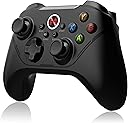
Level Up Your Game 🎮 - Where Precision Meets Performance!
The BEITONG Asura 2 Pro is a high-performance wireless game controller designed for PC and Android gaming. With advanced 2.4GHz connectivity, customizable buttons, and e-sport grade triggers, it offers gamers an unparalleled experience. The controller features a rechargeable 600mAh battery, ergonomic design, and dual vibration motors for immersive gameplay. Compatible with a wide range of devices, it’s the perfect choice for serious gamers looking to elevate their skills.
| Button Quantity | 1 |
| Additional Features | Wireless, Rumble, Ergonomic, Multiuse |
| Power Source | Battery Powered |
| Hardware Platform | PC |
| Controller Type | Gamepad |
| Connectivity Technology | 2.4Gh wireless,USB wired |
| Compatible Devices | PC, Windows, Android |
| Item Dimensions | 6.3 x 4.3 x 1.97 inches |
| Package Quantity | 1 |
| Color | Black |
H**N
WORKS GREAT WHEN IT IS CONNECTED
GREAT WHEN U PLAY SMOOTH CONTROLLER IN GAME BUT THE APP DOESNT PAIR UP WITH MY CONTROLLER VERSION ON PHONE APP. ISNT ON THE PHONE APP AT ALL AND THE COMPUTER DOWNLOAD APP DOESNT WORK EITHER. ALSO, IT DOES WORK WIRELESS WITH COMPUTER Desktop BUT WHEN U USE MOUSE WITH IT IT DOES DISSCONNECT THE CONTROLLER AND MESS UP YOUR GAME PLAY AND HAVE TO RUN ALL THE WAY OFF AND HOLD DOWN THE ICON BUTTON FOR LONG TIME TO RECONNECT THE DONGLE TO IT AGAIN IT STOPS WORKING RANDOMLY IF U CHOSE TO USE UR MOUSE WITH IT NOT ALL THE TIME
J**Y
Works perfectly
Can't beat the price great controller ergonomic I have used it on pc and Nintendo switch good battery life turbo button works great. This looks feels and performs like a top dollar controller.
M**A
Good for the price, does NOT output gyro as a detectable signal
Overall, for the price I paid ($10), I would say this is an outstanding value and feature-rich. Both the dongle and wired modes work great (I did not try Bluetooth). The buttons and sticks have a good feel, the vibration is very strong (though it can be adjusted), and there's no detectable lag. It’s plug-and-play with a good weight and feel.Customer service is very responsive to questions. I received two replies to follow-up emails within a 12-hour period. They were thorough and very friendly in their responses.The software was a bit hard to find (support helped me locate the download), but it is packed with features and doesn’t need to run constantly in the background. You essentially configure the controller, so you can set it up on one computer and then move it to another PC or console, with your changes traveling with the controller.However, there are two issues to note:The gyro is handled by the controller and mixed with joystick output (you can choose either joystick in the software). The gyro is NOT outputted as a separate signal that programs like Steam can use and configure on a game-by-game basis. This setup might work well if you want to force gyro functionality in a console game that doesn’t support it, as the controller handles the entire process. For PC, Steam, or Steam Deck, this is less ideal because the computer cannot detect or utilize the gyro output; it only recognizes joystick movement.I couldn’t get the triggers to perform beyond on/off; they are supposed to be "hall effect" (analog), but Steam and several games only registered them as pressed or not pressed. I admit I didn’t test this extensively or consult support about it, and I didn’t see any related settings in their software package.Overall, I think this is a solid option if you don’t need the gyro as a dedicated output and can risk the triggers *maybe* not supporting analog.
K**I
Great controller, perfect for Black Myth Wukong
Unbeatable value, well made, can be charged while gaming. Nice!
W**L
started as pug and play then stopped until software was downloaded with firmware patches
I was excited to see when I plugged the dongle in my pc (windows 11) that it instantly started working and allowed me to play a game.After rebooting my computer the controller would stop working as soon as the game started.The software has no instillation wizard so you have to extract the files and then open the application.Make sure you have the controller plugged in with a usb cable before opening the software and don't make the mistake I did of having another wired controller plugged in or it won't recognize the new controller.After the pain of getting it setup I really like the feel and functions of the controller.Making a button turbo is really easy and the extra M1 and M2 buttons on the back is nice to customize the controls to move a turbo in racing games or even a weapon switch for shooting games.
E**L
Uncomfortable
This was one of three game pads I purchased as a replacement for my Xbox One game pad. Of the three it is easily the worst from an ergonomic standpoint. The controller has roughly the same size and shape as my Xbox controller but deviates in some key ways that make it unusable for me.The first deviation is the slippery exterior. I have to grip the controller with a lot of force, which is going to fatigue my hands and cause problems in longer gaming sessions. The second deviation makes this issue worse, the shoulder bumpers are much taller than those on an Xbox game pad and lack the gentle taper on the outside edges that you find on Microsoft’s game pad. The taller button may increase shoulder button durability but it’s horrible for my 7.5 inch hands. The controller was so uncomfortable to hold I didn’t even attempt gameplay with it after removing it from the box.This seems like a well made product, but the discomfort means I’ll never know.
R**L
Just wish it was for Xbox too
Sadly I didn’t read it all at first but it work great for pc definitely recommend this one
C**D
Don't throw away manual!
I like the controller but please refer to other reviews about driver issues. You should plug in the controller and setup the controls before plugging in the wireless dongle. Also I threw away the manual without thinking and had to go through a process of finding out how to turn off things like the trigger button and turn off the controller manually (Back + B-button). Also note for games like genshin it will register as a PlayStation controller with a messed up button setup (buttons overwritten no matter how many times you set them up on the controller program), I forgot how I fixed it but if your controls are messed up then it'll be good to look into that issue first. Overall a good controller but tricky to get setup the first time so wouldn't recommend if you expect plug and play right out of the box.
Trustpilot
1 week ago
1 day ago