Buy anything from 5,000+ international stores. One checkout price. No surprise fees. Join 2M+ shoppers on Desertcart.
Desertcart purchases this item on your behalf and handles shipping, customs, and support to Vanuatu.
🚀 Upgrade your MacBook Pro’s heart with Sintech — speed, power, and future-proofing in one sleek adapter!
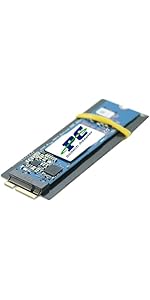
The Sintech NGFF M.2 NVMe SSD Adapter Card is a precision-engineered solution designed to upgrade 2013-2015 MacBook Pro models by enabling the use of high-performance M.2 NVMe SSDs. It supports a wide range of popular SSD brands and models, delivering up to triple the read/write speeds of original drives. With straightforward installation instructions and compatibility tailored for mid-2013 to 2015 MacBooks, this adapter revitalizes aging laptops by boosting speed, reliability, and battery efficiency, making it a cost-effective upgrade for professionals seeking enhanced performance without replacing their device.


| ASIN | B01CWWAENG |
| Best Sellers Rank | 36,859 in Computers & Accessories ( See Top 100 in Computers & Accessories ) 65 in Computer Memory Card Adapters |
| Brand | Sintech |
| Brand Name | Sintech |
| Colour | Black |
| Compatible Devices | Laptop |
| Compatible devices | Laptop |
| Connector Type | M.2 |
| Connector type | M.2 |
| Country of Origin | China |
| Customer Reviews | 4.4 out of 5 stars 2,804 Reviews |
| Finish type | Nvme |
| Item Weight | 0.01 Kilograms |
| Manufacturer | Sintech Electronic |
| Model Number | ST-NGFF2013 |
| Number of Items | 1 |
| Number of Ports | 1 |
| Package Quantity | 1 |
| Power Plug Type | No Plug |
| Product Finish Type | Nvme |
| Product Warranty | 6 Months |
| Specific Uses For Product | Laptop |
| Specific uses for product | Laptop |
| UPC | 701017254409 701017254492 |
| Unit Count | 1.0 Count |
| Warranty Type | Limited |
S**H
Allows for a huge upgrade at small cost
It came with clear instructions and was easy to install in my late 2015 Mb-Pro. I purchased a Samsung 1TB NVME 980 to install, I know it's a bit slower that the 970 Evo Plus but you'll be hitting the bandwidth limit of the MacBook way before you hit the limit of these SSD, it uses less power so the battery will last longer, it has better reliability and it was £10 cheaper. I also chose Samsung because I've had bad experiences with other manufactures of SSDs in the past and the original Mac drive was Samsung. I don't think the adapter actually has any electronics in it? I looks like it's just remapping the pins to the correct locations so drive compatibility will probably be the same across all adapters... but I could be wrong. If you click the SSD into the adapter properly and then into the MacBook with a bit of confidence, everything fits perfectly. I used the supplied Sintech screw to hold them in place, then I put the OEM screw with the OEM SSD and packed them into the box for safe keeping. I went down the route of making a Monterey bootable USB following Apples instructions, it was simple enough to do and worth doing before your new drive arrives. If your OEM SSD has actually died, hopefully you have a time machine backup or you'll have make the USB with another Mac or ask a friend. You will need a pentalobe screwdriver bit, I think it was P5. This will be included in an iFixit kit or similar, I think the SSD screw was a Torx? It looked like a P6 but neither of the pentalobe bits fitted so I used a T4. I hope Monterey will see me through for a few more years before Adobe drops support like they did for Catalina, this laptop still has a good spec with great performance so it would be a real shame if I was forced to move on.
S**A
Works brilliantly, the set up can vary (see instructions in main body of review)
Works brilliantly, though may take a few minutes to get working so it requires a small amount of patience. My write speed has tripled, my read speed had tripled, the laptop is noticeably more faster. If you are having problems installing please see the instructions I have listed below, there are a couple of extra steps required My MacBook Pro is a 13" mid-2014 retina, A1502 model. The NVMe SSD I have installed is a Samsung 970 Evo NVMe M.2 SSD - capacity of the drive is 1TB. Steps to install: 1) Create Time Machine back up of MacBook. For those that don't know Time Machine is free, it is made by Apple and comes pre-installed on your MacBook. 2) Install the drive with the adapter into the MacBook 3) Turn on MacBook, immediately after turning on press and hold 'Command/cmd' and the 'R' Key, this will enter the Apple Restore Partition 4) Enter disk utility to see if the drive is present, if it is present then click ERASE. Name the drive whatever you wish. Set the format as 'Mac OS Extended (Journaled) and the Scheme as GUID Partition Map. 5) Then exit out of Disk Utility (press the red button in the top left of the Window), Plug in your hard drive that you are using as your Time Machine and click the Restore Using Time Machine option. Install it to the Drive you named in Step 4. sit back and let it complete. Additional steps: 4a) for me the Disk Utility would not show the Drive, so what I had to do was shut down the MacBook. 4b) When the device has fully shut down press the Power button again, when you press the power button hold down the following Keys: 'Command/cmd' and 'Option (sometimes this is shared with the alt key as it is with mine)' and 'P' and 'R' 4c) Hold the 4 keys, you will here the MacBook chime, keep it held until it Chimes again and then release 4d) After then wait for the MacBook to boot up into the Recovery Partition and look in Disk Utility, you should see the drive in Disk Utility now. The laptop will reboot a few times before booting into the Recovery environment 4e) continue with steps 4 and 5as they are listed above the additional steps.
M**D
When prepared, works exactly as intended!
This review will be scored based on the product, but will include a note about how it's used. Overall the physical installation process was relatively seamless - upon installation, I believed it was too long and so took a microfile to the screw section in order to fit it, until I put the SSD in and the installation force of THAT pushed the Sintech adaptor even further into the socket than I was willing to go with the bendy-ness of the adaptor. This meant all my filing was pointless.....with a bit of effort and a lot of my Other Half's trust in me around her Macbook, I could've fitted it without mods and it would have worked. I used a Crucial P1, one of the SSDs on the list. Upon installation the SSD wasn't detected, even when using diskutil on Terminal. THIS IS HOW TO INSTALL: 1) USE A USB - Internet Recovery didn't like what I was doing one single bit 2) USE OFFICIAL APPLE - I tried using a .dmg from another website, and there was no luck at all. BEFORE installing, use your old install to update to the latest version, do a Time Machine backup, and then create USB installation media following Apples instructions! I spent hours troubleshooting, so hopefully this solves anyones issues before they have to re-dismantle their laptop. This was on a mid-2015 Macbook Pro 13". The screws you'll need are all 5-point star heads, I in particular used 1.2 and 1.5 and they seemed to do the job. Not official Apple, but worked nonetheless. KEEP THE SCREWS SEPARATE AND ORDERED - it's Apple after all, so they have specific holes to go back into!
N**E
Works perfectly,,,,
I used this adapter in my 2015 MacBook pro 15". Be careful when installing. If it's "bowed" and not flat, it is installed improperly or the screw is overtightened and it will fail. I paired this with a Sabrent Rocket 1TB NVME SSD TLC. I don't recommend the cheaper QLD drive as it's longevity rating is about 1/3 of the TLC version. I get 3200 MB/sec read and write speeds and with a simple kext installation, lower power usage and longer battery life. You will need the latest MacOS to ensure compatibility. I used Big Sur and put it on a bootable USB drive. You will need a bootable USB drive as the new SSD doesn't have a MacOS recovery partition. Install the SSD and boot the Mac from the USB drive. Install MacOS to the new internal SSD. The installer will create the recovery partition, boot partition and data partition on your new SSD... Now, just enjoy the lightning speed and expanded storage. You can also use the Sabrent Rocket 2 and 4TB SSDs as well.
J**B
Slightly the wrong shape
I was upgrading a MacBook Air Early 2014 model with this and a 250GB WD Blue SN550 NVMe; didn't want to pay for a premium Samsung Evo for a 6 year old machine, but didn't want to get the cheapest no name drive available so the WD seemed like a good middle ground. Overall it worked well once it was installed. The machine was running High Sierra and I booted to a Mojave USB stick, the drive was recognised in Disk Utility as an NVMe drive and there were no problems. I haven't encountered the dreaded wake from hibernation problem that seems to affect this generation of MacBook either. I am hoping that was a problem with older OS not knowing what an NVMe drive was, and fixed in later versions. I don't know if it's a placebo effect but the machine felt a bit quicker booting up and logging in, but that might be because it was a fresh install. The only problem I had with this is my adaptor seems to have a manufacturing error. The board needs to line up exactly so the semi circle at the top lines up with the screw hole/standoff on the logic board. Mine didn't line up very well and I have to lightly file this hole to make it slightly bigger so the screw could go through the SSD and mate with the thread. I would guess that the manufacturing tolerances are a bit too liberal for what is quite a tight fit. Overall though, I think this was a one off and even if it's a common problem, it is not a massive headache considering the money saved on not having to buy a 12+16 SSD.
S**O
Recommended
Did the job.
K**S
Easy to fit, some strange NVMe Errors after a few weeks
I installed this into my MBP 2015 with a Crucial P2 1Tb SSD, it worked fine and the speed was quite a lot faster than the native 256 Gb Apple SSD. After a few weeks I started to get some strange errors with a message saying my MBP was rebooted due to an issue with the 3rd party NVMe controller not responding. I have now taken out the 1Tb SSD and swapped back to the native Apple SSD, I will use the Crucial SSD in an external USB case instead. When searching online it seems this is a pretty common error... I'm not sure if it is an issue with the adapter/SSD or is a problem with the whole concept of swapping the SSD to a 3rd party one. Apart from this, the board was easy to install and seems good quality.
S**X
Not great
Made my Mac run hot and power itself off, when I changed this adapter the issue cleared
Trustpilot
2 weeks ago
2 weeks ago