Buy anything from 5,000+ international stores. One checkout price. No surprise fees. Join 2M+ shoppers on Desertcart.
Desertcart purchases this item on your behalf and handles shipping, customs, and support to Vanuatu.
♻️ Print smart, save big, and lead green.
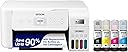
The Epson EcoTank ET-2803 is a wireless all-in-one inkjet printer featuring ultra-high 5760x1440 dpi resolution, cartridge-free refillable ink tanks that save up to 90% on ink costs, and versatile connectivity including AirPrint and Epson’s Smart Panel app. It offers fast printing speeds (10 ppm B&W, 5 ppm color), a built-in flatbed scanner and copier, and a 2-year limited warranty, making it an eco-conscious, cost-effective solution for professionals seeking reliable, high-quality printing without the hassle of cartridges.


| ASIN | B0BHXNP6B1 |
| Additional Printer Functions | Copy, Scan |
| B&W Pages per Minute | 10 ppm |
| Best Sellers Rank | #89 in Office Products ( See Top 100 in Office Products ) #1 in Ink Tank Printers |
| Brand | Epson |
| Built-In Media | EcoTank ET-2803 all-in-one, manual, CD-ROM for product setup, power cord, 1x bottle 522 Black (65 mL) and 1x bottle each 522 Cyan, Magenta, Yellow (65 mL) |
| Color | White |
| Color Depth | 24 bits_per_pixel |
| Color Pages per Minute | 5 ppm |
| Compatible Cartridge | T522 |
| Compatible Devices | Laptops |
| Connectivity Technology | USB, Wi-Fi |
| Control Method | App |
| Controller Type | Android |
| Customer Reviews | 4.1 out of 5 stars 20,168 Reviews |
| Display Type | LCD |
| Dual-sided printing | No |
| Duplex | Simplex |
| Hardware Interface | USB |
| Initial Page Print Time | 10 Seconds |
| Ink Color | Black, Cyan, Magenta, Yellow |
| Item Dimensions D x W x H | 22.8"D x 14.8"W x 10"H |
| Item Type Name | Inkjet Printer |
| Item Weight | 8.8 Pounds |
| Manufacturer | Epson |
| Maximum Copy Resolution Black and White | 600 dpi |
| Maximum Copy Resolution Color | 600 x 1200 dpi |
| Maximum Copy Speed Black and White | 10 ppm |
| Maximum Media Size | 8.5 x 14 inch |
| Maximum Print Resolution Black and White | 5760 x 1440 Dots Per Inch |
| Maximum Sheet Capacity | 100 |
| Maximum print Resolution Color | 5760 x 1440 Dots Per Inch |
| Model Name | EcoTank ET-2803 |
| Model Number | C11CJ66203 |
| Model Series | ET |
| Number of Ethernet Ports | 1 |
| Number of Trays | 1 |
| Other Special Features of the Product | Refillable Ink Tank, Scanning |
| Output sheet capacity | 100 |
| Paper Size | 4" x 6", 5" x 7", A6, Half Letter, Letter, A4, Executive, Legal, User definable (from 2.2" x 3.4" to 8.5" x 47.2") |
| Power Consumption | 12 Watts |
| Print media | Paper (plain) |
| Printer Connectivity Type | USB, Wi-Fi |
| Printer Output Type | Color |
| Printer Type | Inkjet |
| Printing Technology | Inkjet |
| Processor Count | 1 |
| Resolution | 5760 x 1440 dots_per_inch |
| Scanner Type | Flatbed |
| Special Feature | Refillable Ink Tank, Scanning |
| Specific Uses For Product | Home, School, Office |
| Total Usb Ports | 1 |
| UPC | 010343957909 |
| Warranty Description | 1-year limited warranty |
| Warranty Type | Limited |
| Wattage | 12 watts |
S**R
Almost a year after purchase and this printer has not let me down!
I wanted to wait to write a review on this printer to see how it held up over time. Happy to report, after almost a year, it is still working perfectly! I was very nervous about purchasing a printer since it was my first time having to shop for one and almost every printer I looked at had something negative to say about the product. After extensive research, I decided to take a leap with the Epson EcoTank 2800. I was looking for a printer to use for recreational use. Something with decent print quality and longevity as well as something on a reasonable budget. I normally print full pages of color and have been using it regularly for around a year and I have about half of the ink that came with the printer left. Safe to say, the ink lasts a while. The quality may not be the top of the line quality you can get with a more expensive printer, but for the price and just everyday use, the quality is satisfactory. It was easy to set up and walked you through the instructions to connect to devices and configure it. The screen is a little small but if you can overlook that, it really is a nice printer. I have used regular printer paper, card stock, and sticker paper with this printer and I try to load only a few sheets at a time to avoid a jam but I haven't had any issues with it so far. Overall, I am extremely happy with my purchase. It can be extremely difficult to find a decent printer and some reviews can be misleading or leave you with questions on if the product is for you. If you are looking for something for printing everyday with decent quality and ink consumption that won't cost you a fortune, this printer is definitely worth taking a chance on!
L**E
WOW! This printer has been VERY impressive thus far *UPDATE*
My old printer broke (sooner than I would have liked) so I did A LOT of research before deciding to buy this Epson EcoTank printer for home office use. This is my honest review of it this far and I will definitely update my review if I run into any issues. So far, this printer has been pretty impressive (I've been using it for about a month). The price was pretty average for a printer... but I personally think all printers are overpriced so it was a bit more than I would have liked to spend. It is smaller and more lightweight than I was expecting which is a plus because it takes up less desk space than my previous HP printer. It is very easy to set up, comes with step-by-step easy instructions and guided instructions through the app. It only took me about 10 minutes (Mostly just waiting for the printer to initialize on its own). It is very easy and surprisingly satisfying to fill the ink tank. I like the idea that this ink might last longer than traditional cartridges and won't have as much plastic waste that went along with my old HP Inkjet. I have printed plain black and white documents as well as photos. I print all my photos at home, which is most of the printing that I do, so quality was important to me. The photos came out with pretty good quality! No ink smudges or off colors, colors are bright/vivid, and it is easy to modify what paper you're using with automatic prompts on the printer. Now for the negatives and the reason I'm giving this 4 stars... app to printer connection issues. This was a big issue with my old printer as well. I'm pretty tech savvy and I just have no idea why this is still always an issue for me. There is an extra Epson app that you are supposed to download for printing. Sometimes it can find my printer, sometimes it can't. Sometimes it gives me printer errors or won't let me print documents. And now every time I go to print something it says the paper being used doesn't match the paper settings so I have to bypass that error message (even though it does match in settings and the app, and this happens for both regular paper and photo paper). I've turned everything off and back on again, but the issues with consistent connection and error messages are still an issue. Usually with some fiddling around, I can get the documents/pictures to print but sometimes it feels like I'm jumping through unnecessary hoops. I'm still working out the kinks so if I find some magic solution I'll update my review. Considering this is an issue with most home printers I've used, it's not a deal breaker. All in all, if you are looking for a new home printer, I would definitely recommend this one. The quality has been great for me and I am pleased with my purchase (so far). Hope this helps! *UPDATE*: I have now printed HUNDREDS of photos, they are all excellent quality, and my ink tanks are still mostly full. This is WAY better than my HP printer as far as ink longevity. Changing my review to 5 stars just based on how long this ink lasts. User interface is still a tad annoying but so worth it regardless.
H**G
My Epson printer is total junk!
I have had many printers over the years. I started with Canon dot matrix printers, and then ink jet printers. In the old days, and ink cartridge contained all the colors, so if red was out, you tossed away the rest of yellow and blue too. They were pricey and wasting ink wasn't something I was OK with. I would pull ink cartridges from dumpsters outside office supplies stores, take them home and draw the ink from them to fill my cartridges with. Then Epson came up with a cartridge for each color and black . That's when I switched to Epson and have used them ever since. I did have an HP in there when I got such a deal I couldn't pass it by, but after several years it died and I switched to Artisan printers. I still have an old 810 that is finicky and I don't want to have to coax it just to print a few pages. I got a WorkForce printer ,used it several times after I got it, and then it sat idle for 5 years or so. I moved recently and decided to set up the WorkForce printer. The new ink cartridges were practically new, but sat for 5 years maybe, so the nozzles and print head needed cleaning, I expected this. It uses mass amounts of ink to do this so then I was out of ink. I ordered new cartridges, and back to cleaning when they were inside. I never got anything to print, plus, the new paper I ordered was as glossy and slippery as photo paper, and the rollers couldn't grip it. I gave up and ordered this printer as a replacement. Setup went OK until I put paper in, then the rollers were slipping and I got jam messages, even though nothing was inside. I pulled the paper and let it finish the initial process. Then I put paper in when it wanted to align the print head. It fed paper OK for now, so I guess maybe I didn't get hosed on this Epson as I did buying the WorkForce Epson. UPDATE November 1st 2025 This is a frustrating printer!!!! I'm using WIFI network to connect the printer to my laptop computer. I like to be able to print or scan from anywhere in the house. If you purchase this frustrating Epson printer, you now have a ball and chain around your leg. You can't print a simple document without some kind of error code popping up and requiring that go look at the minuscule little screen and try to figure out what button you must press to get the document printed. If I have to be right next to the printer, I might as well use a wired connection. I am disabled and it's a real inconvenience for me to have to go to the printer and squint at the tiny screen to try to figure out why it's been ten minutes of my time and I still haven't gotten my 1 page document in my hand. High speed printing is not high speed when you can't get a printed page without having to make several trips back and forth to the printer. I set the default paper to the standard plain white letter paper, only to find it wants to scan to photo paper, so it just sits there like a block of cement and nothing gets done. I had an Epson Artisan 810 that I really liked, except for the automatic feeder quit working so you had to stand there and feed each sheet to be scanned by hand. I didn't want a sheet feeder on the printer because they break down and the you're feeding by hand anyway. I just hate printing anything at all now because of this printer. I wasted several hours one day trying to print documents that I downloaded and needed a physical copy to present in person for a project I'm doing. Normally I would send a PDF file, and let someone else bother printing if that was necessary. After years of purchasing Epson printers, this is absolutely the last Epson I have spent my money on. Never ever again. The first clue should have been when the quick start guide suggested using a smart phone to set up the printer. I'm not going to work from my 5 x 7 phone screen when I can instead use a 15 inch laptop screen, and keyboard. It's simply a stupid idea. Sorry, but no more Epson for me ever!!!! Update: 4/10/26 This is absolutely the most useless and frustrating Epson printer that I have ever ever owned. I cannot see good close up I need reading glasses to read. The digital screen on this printer is minuscule it's like a postage stamp size absolutely worthless. I have to carry a magnifying glass over to the f****** printer so that I can see what that little miniscule screen has to say on it. The most frustrating thing is every time I want to print something which is rare I don't print things every day the printer is not available is the message I always get I go over there by the printer I turn it off I turn it back on, that should clear out any crap that's on it so it's ready to print right? No you would be dead wrong! Instead you get a stupid little mini School screen and wants to be set on copy mode. I don't want to copy anything I don't want to scan anything I just want the damn thing ready to print. Anyway you come back to your your phone and you want to print and a printer still not available. I literally destroyed my phone I was that pissed off. I'm too old to be frustrated like that all the time. At 75 years of age I have had my share of printers over the years starting with the original dot matrix ones. Absolutely none of them were as difficult to use as this stupid printer I got now from Epson. When you want to print something you should be able to send it to the printer and it should print. You should not require a phone app to set the damn thing up! One thing I'll say, it's pretty good on ink because you can't make the damn thing print when you want it to !!!!!!!
S**D
Premium Print Quality Meets Economic Design
I am very impressed with the manufacturer quality of this printer. It feels durable and well-engineered. The print quality is equally excellent; colors are vibrant and text is sharp, easily meeting the standards I need for both documents and photos. Moving away from cartridges is a huge win. The ink lasts incredibly long, and the refill process is clean and simple. The only thing I miss is a USB port for printing directly from external storage. My old HP printer had this feature, and it was extremely useful for printing files quickly without a computer. I wish this Epson model included that same convenience. Final Verdict A high-quality, reliable printer that produces great results. If you don't mind the lack of a direct USB drive slot, it’s an outstanding choice for home use.
S**T
Printing is great, wifi is a problem (I figured out how to make it work!)
I was on the fence about buying this printer because most of the 1 star reviews all said the same thing... "The Wifi would not work" So I followed the instructions, Turned on the print, downloaded the IOS app, connected to the printer via Bluetooth, installed the ink, initialized the printheads. While that was going on, the app asked me to setup the wifi. a List of SSID's came up and I selected the one I wanted. I put in the password and it connected and the icon on the printer turned blue. I have a Unifi setup and I could see that the printer connected to access point #3 @ 2.4ghz and got an ip address. I locked the IP address to the printer. (For my instructions to work for you, you need to make a reservation or lock the ipaddress that your DHCP server provided to the printer. ) If you don't do this, you will get a different address every time you turn the printer on and the computer and app will not be able to find the printer. When the initialization was complete, the app on my phone said it could not connect to the printer. I decided to try to connect to a computer and come back to the phone app. I downloaded the software package from Epson and ran it. When it went to connect to the printer it could not find it and brings up a list of troubleshooting steps that are not likely to do anything. There are videos about this problem and they are all useless. I am an IT professional with 26 years of experience. I am not going to unplug the printer and wait five minutes, I am not going to re-boot my router, I have a Unifi network environment with over 150 devices connected... (I have great wifi coverage, I am not moving my printer anywhere) My network works just fine, this printer is the issue! So at this point, I know that the printer IS connected to my wifi and it got an IP address. This is not a wifi problem as everyone seems to think it is. It is an issue with the Epson software. I decided to try to install it via the windows printer installer. I selected install via TCP/IP and put the ipaddress that my Unifi system provided to the printer. Windows found the printer and since the Epson app had already installed the drivers... just asked me what drivers I wanted to use. The ET-2800 showed up on the right hand side of the screen. I selected it, it installed and I was able to try a test print. It worked fine. I can print from my computer to the printer via the network. Next was the phone app. The phone app has the option to find the printer via the IP address. I put the IP address in and it found the printer. The phone app works now too. So, It took me some time to get this working, it should not have taken any time at all if the software worked correctly. The printer is really nice, it is a shame that the software is so bad when it comes to connecting to the printer. So if you decide to buy one of these printers, save yourself the headache and just install using the ip address, it is quick and easy that way and it just works. I would have just purchased an HP printer, but I did not want to deal with all the issues of their subscription ink service. I feel like the cost of ink makes this printer worth the hassle of getting it to work.
H**.
Handles Photo-Quality Prints, Versatile Connectivity
I've had this printer for a whole year now. I was on a severe budget, looking for a photo-quality printer that didn't require Wifi in this digital age- because I quite frankly can't afford my own Wifi connection. My rink-a-dink laptop had to be set up with the software at my library, and an extra cord purchased. All that said, I mostly print from my phone, because the software app is a bit easier to ensure that I get the highest quality setting. Laptop loves to be a snot about it. The blutooth feature, or "wifi direct", has a way about it, and as soon as you figure out what it wants, it gives minimal problems. It functions exactly as if a printer had wifi on it, believe it or not. What sold me on this model was the ability to do all of that, and adjust for different situations, seeing as other brands DEMAND constant wifi connectivity (lookin' at BROTHER, maybe Canon, too), and the long lasting ink tanks- I've printed hundreds of pages, and being a gothic/horror artist, at least a good part of the time, black is the only color even half gone. What horrified me the most about printer-shoping dropping a lot of money (hundred plus is a lot over here, man) and not getting the prints to look like my work. Well, fear not. The attached pictures are why I made this review, to hopefully ease the anxiety of others. I make digital paintings, and use high DPI for high quality, and also the cutest micro-stickers you've ever seen. Prints come out clear, even if they can sit in the tip of my finger. Yes, there are probably better printers. Maybe they're faster, and have even better connectivity, and have more bells and whistles. I specifically did not want to pay for those things, so, I'm very happy there's options. It's not perfect, no, because every now and then, I get what I call a "special edition", where my printer has decided to multi-color barf out the last third of the page. One time it randomly printed in black and white. Well, that's no big deal, my stuff tends to look great in monochrome. Every now and then I get a low quality print; things just look a bit fuzzy. I'm not happy about that, but, you clean the heads, and print something simple and toony, and it has never done it twice in a row. Alignment has been off only one time, and I put the printer away after every session. It occurs to me that people pay good amounts of money for printers that do that sort of thing anyway, so... Printers gonna printer, no matter where you try to hide. Overall, I'm happy and relieved. I hope it lasts me a good long time. (Streetratt on Kofi, by the way.🖤 )
K**C
Great product!
This is a nice printer for home use. It was easy to set up. I like the size. It prints pretty fast. The ink is easy to refill. The print quality is very good. The price was good. I would highly recommend this product.
K**R
Great for sublimation
⭐️⭐️⭐️⭐️⭐️ — Fantastic Sublimation Conversion! I converted my Epson EcoTank ET‑2800 into a sublimation printer, and I’ve been genuinely impressed with how well it performs. The setup was straightforward, the ink tanks made the conversion super easy, and the print quality has been consistently sharp and vibrant. Colors come out bright and clean, and the details transfer beautifully onto mugs, shirts, and keychains. For a budget‑friendly machine, it handles sublimation projects way better than I expected. It’s quiet, reliable, and hasn’t given me any clogging issues so far. I also love that it uses so little ink — I’ve done multiple projects and the tanks barely look touched. If you’re looking to get into sublimation without spending a fortune, the ET‑2800 is a fantastic choice once converted. It’s been a great addition to my craft setup and has already paid for itself
Trustpilot
1 month ago
1 month ago