Buy anything from 5,000+ international stores. One checkout price. No surprise fees. Join 2M+ shoppers on Desertcart.
Desertcart purchases this item on your behalf and handles shipping, customs, and support to Vanuatu.
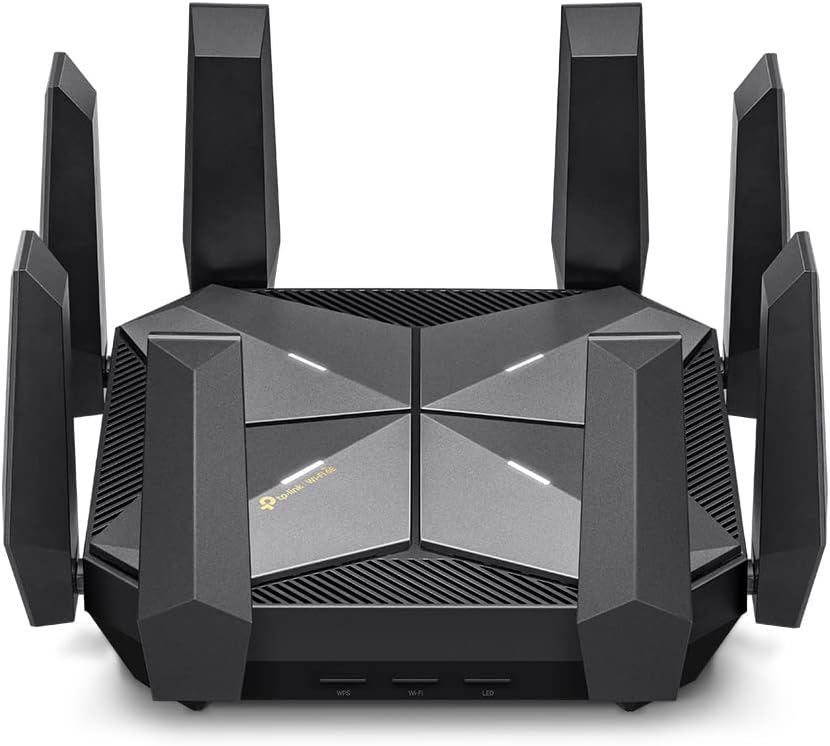
🚀 Elevate Your Network Game with the Archer AXE300 – Speed, Power, and Coverage Unleashed!
The TP-Link Archer AXE300 is a cutting-edge Quad-Band WiFi 6E router delivering unprecedented speeds up to 15.6 Gbps, powered by a robust quad-core CPU and equipped with dual 10Gbps WAN/LAN ports. Featuring 8 high-gain antennas for expansive coverage and advanced security with VPN support, it’s designed for demanding professionals, gamers, and smart homes seeking ultra-reliable, high-speed connectivity.


| ASIN | B0BCWBCY34 |
| Antenna Location | Business, Gaming, Home |
| Antenna Type | Fixed |
| Best Sellers Rank | #54,328 in Computers ( See Top 100 in Computers ) #894 in Routers |
| Brand | TP-Link |
| Built-In Media | 1 x Archer AXE300 Router, 1 x Power Adapter, 1 x Quick Installation Guide, 1 x RJ45 Ethernet Cable |
| Color | Black |
| Compatible Devices | Personal Computer |
| Connectivity Protocol | Wi-Fi, Ethernet, USB |
| Connectivity Technology | Ethernet, USB, Wi-Fi |
| Control Method | App |
| Controller Type | App Control |
| Coverage | Standard Router Coverage |
| Customer Reviews | 4.1 4.1 out of 5 stars (342) |
| Data Transfer Rate | 16000 Megabits Per Second |
| Frequency | 6 GHz |
| Frequency Band Class | Quad-Band |
| Global Trade Identification Number | 00840030708039 |
| Has Internet Connectivity | Yes |
| Has Security Updates | Yes |
| Is Modem Compatible | No |
| Item Dimensions L x W x H | 23.2L x 23.2W x 6.8H centimeters |
| Item Type Name | WiFi 6E Router |
| Item Weight | 3.37 Pounds |
| LAN Port Bandwidth | 1.6 Gbps |
| Manufacturer | TP-Link |
| Maximum Upstream Data Transfer Rate | 10000 Megabits Per Second |
| Mfr Part Number | Archer AXE300 |
| Model Name | Archer AXE300 |
| Model Number | Archer AXE300 |
| Number of Antennas | 8 |
| Number of Ports | 7 |
| Operating System | TP-Link Customized Linux |
| Other Special Features of the Product | Access Point Mode, Guest Mode, QoS |
| Router Firewall Security Level | High |
| Router Network Type | Quad-Band |
| Security Protocol | WPA2-PSK |
| UPC | 840030708039 |
| Wi-Fi Generation | Wi-Fi 6E |
| Wireless Compability | 802.11ac, 802.11ax, 802.11b, 802.11g, 802.11n |
K**L
amazing router!
No disconnections, more Wifi distance, penetrates through concrete in close distance
P**.
I don't have a super complex network but heavy enough that I needed more cpu power than provided by my ISP. I have a 3gbps connection and run a small 10gb network of a 10gb switch. Transfer speeds are optimal and it hasn't gone down on heavy load of data transfers. This occurred with my ISP modem router all the time when I would run data transfer over the 10gbps data port. Wifi surprisingly handles my smart home of over 50 devices with a breeze. Will update should anything change but so far, i'm very satisfied
C**M
Es un equipo nuevo, que actualiza a otros modelos como el AX11000 que es un router similar de la misma marca. Es muy facil de configurar, muy sencillo e intuitivo. Es prácticamente un equipo para uso continuo y de batalla. La potenchai de todas sus bandas es extraordinaria, rompe muros y es muy estable. Lo unico malo que le encontré, es que a diferencia de su modelo predecesor, en esta version cobran extra por antivirus online, control parental y otras funciones. Cuando en su predecesor estaba incluido sin costo.
M**S
Good: 2.5gbe, 10gbe, fiber connections allow you to use the full potential of your internet provider and your network almost(10gbe is more like 6gbe but I don't have enough devices to absolutely need 10gbe) Wifi coverage is absolutely outstanding out of the box and even better when you tweak a few channel widths and channels in the very simple (for me) setup. I can cover a dull 2500sqft home with full high speed wifi with a single device. Not even my Asus Rapture ax11000 could come close. In the main areas where the router is located most wifi devices connect up to 1.4G. I can pull 800mbs from the back deck 900 on the front porch, 1g in a far bathroom and 500mbs in the farthest room/corner of the house. Connected Clients. This is where the Axe300 shines. I've tried several routers and setups to easily alleviate my main issue with most home routers and mesh. Regardless of what anyone says, most routers start to act up to almost shut down once you get in the 40 device range. I have a very connected home and since I lease I can't go running ethenet drops everywhere and don't care to invest in a mocca and think even the best powerline adapters are not the greatest. I currently have 63 IOT type wifi 2.4 devices on my network, 8 sonos speakers in a mixed ethernet/wifi setup, multiple IP cams, 2 wifi door locks, a wifi doorbell, 4 phones on wifi, 2 3k tvs on wifi, 2 4k tvs on ethernet,1 ps5 on wifi, 1 ps5 on ethernet, a Nas on 10g ethernet, up to 3 macbook pros on ethernet, sometimes an android tablet or two on wifi and I can still pull the numbers listed above when I try to stress everything I can and run and control everything I can. This router just keeps chugging. 2.4 wifi is the best I have had since the old days of great 2.4 only aps/routers, openwrt, ddwrt, boosted signal strength, etc. Even with all the IOT devices I have never seen less than a 65mbs connection to one of them or not been able to pull 60 to 70mbs down from my 2.4 wifi iot/guest band and maintain the FULL upload of my provider (super drops in upload with lots of WIFI iot is usually rhe first sign of your router not being able to handle the connections, then usually ping next and then jitter..) Bad: To me it's ugly. Like I stepped on a spider and it's dead upside down. Ymmv. It's clunky, definitely not pretty or sleek. Web interface just works but I'm a DD-WRT, tomato, openwrt, unifi, managed poe switch kind of guy and miss some of the customizations/features even the Omada or even dare I say an Asus router sometimes gives you. To me the tether app sucks. It works perfectly but you cannot see connected device connection speeds, rssi or even the rudimentary cpu utilization and ram usage you can with the web app. Would be nice is you could "properly" use smart connect for all 4 radios. You can work around this though easily. There are a lot of mesh devices (I won't even need any of them) that are not compatable yet with their mesh system. All those are little nags. The only thing I really do not like about this router is no SQM support for buffer bloat. I don't have buffer bloat issues but without more detailed controls on the router settings and/or SQM some customers may not see the full potential a router of this capability/cost can do. Overall for all in one router/ap for lots amd lots of connected devices plus full access to 10gbe, 2.4gbe, your over 1g provider connection I do not think you can find a better one. Even the new BE routers that are wifi 7 from TPLINK (they were the first to make them) have less 2.4 wifi capability and until something totally changes with cheap wifi IOT, 2.4 wifi is going to be where it is at foe the interim.
T**4
Tons of CPU/Ram, 10GB ports, 2.5 GB ports, LACP support ( combine multiple ports to one super high speed logical port) excellent range through the house and back yard. Future proof!! Best router I have ever owned. Highly recommend.
K**A
Now before I begin mind you I am an IT Professional, so my point of view may be different than someone that may not have my background. I thought my last TP-Link router (Archer 6000) was the best router I ever had but this one blows that one out the wazoo!! I have read some reviews and while most are fantastic. I also read some negative reviews and it comes down to perspective. For most IPSs they require you to provide the routers MAC Address and not the LAN which most users tend to confuse and then they put a negative review saying it doesn’t work. And some IPSs have their own MAC and IP they provide in order to get internet to your home and this router can more than allow you to do those things. If you provide the routers MAC ADD then they have to burn that into their config so that the routers can get an IP address. You also have to go into ADV Settings/Internet and make sure to select the right LAN port since this has 2 10GB ports with a combo SFP Fiber port and a 2.5GB port so the right one needs to be selected save the config and then THATS where you plug your Ethernet cable coming from the modem. That is another mistake people make with this router. I think it should be noted that you may need to have some sort of background in networking or someone that can come and help you config this router. This isn’t a Walmart special router plug and play you have to set some parameters on the config to make this work. Then it’s a must to restart the router at times to apply the config and restart the ISPs node so it can refresh and everything is happy time after that. I ran multiple speed tests and get anywhere from 1020-1033 mbps consistent. It also has WPA3+WPA2 for WiFi which is great considering most older devices cannot do WPA3 so that helps a lot cheaper routers can’t do that for the most part. This is QUAD band amazing, one 2.4, 2 5G and with 6G I am ready for the next devices and WiFi upgrades coming later this year. My home is about 4200 sq feet and this can more than cover up to 6000 sq feet. My home is cinder block and concrete bunker style and I have no problem with reaching my sons room which is all the way in the back tucked in the corner which he hardly got great service but not with this one. I have at least 150/200 feet wifi perimeter around the house and backyard and then some. If you know what you are doing and require more power, vlan segmenting, IOT segmenting, and amazing speeds and LAN/WAN, VPN services and firewall and NAS solutions this is the router for you!!!
Trustpilot
3 weeks ago
2 months ago