Buy anything from 5,000+ international stores. One checkout price. No surprise fees. Join 2M+ shoppers on Desertcart.
Desertcart purchases this item on your behalf and handles shipping, customs, and support to Vanuatu.
๐ Elevate your storage game with speed, safety, and style!
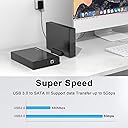
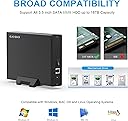
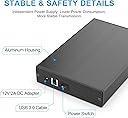
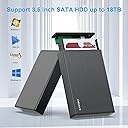
The GODO USB 3.0 to 3.5 Inch Hard Drive Enclosure is a premium aluminum alloy external dock designed for 3.5" SATA HDDs and SSDs up to 18TB. Featuring USB 3.0 with UASP for blazing 5Gbps transfer speeds, an independent power supply with multi-layer protection, and a sleek vertical stand, it offers stable, safe, and efficient data access across Windows, Mac, and Linux platforms. Perfect for professionals repurposing high-capacity drives or expanding desktop storage with plug-and-play ease.


| ASIN | B0B9MVWFRG |
| Best Sellers Rank | #14 in Enclosures |
| Brand | GODO |
| Built-In Media | 3.5" GODO Hard Drive Enclosure x1, Plastic stand x1, Power Adapter 12V 2A x1, Screws+Screwdriver x1, USB 3.0 A=B Cable x1 |
| Color | Black |
| Compatible Devices | Desktop PC, Laptop, Television |
| Connectivity Technology | USB |
| Customer Reviews | 4.5 out of 5 stars 1,220 Reviews |
| Data Transfer Rate | 5 Gigabits Per Second |
| Enclosure Material | Metal |
| Hard Disk Form Factor | 3.5 Inches |
| Hardware Interface | USB 1.1, USB 2.0, USB 3.0 |
| Hardware Platform | Windows MAC OS Linux |
| Item Dimensions L x W x H | 7.26"L x 4.72"W x 1.24"H |
| Item Weight | 0.58 Kilograms |
| Manufacturer | GODO |
| Material | Metal |
| Memory Storage Capacity | 18 TB |
| Mfr Part Number | 3.5" SATA Enclosure-Black |
| Model Number | 3.5" SATA Enclosure-Black |
| Product Dimensions | 7.26"L x 4.72"W x 1.24"H |
| Supported Devices Quantity | 1 |
| Unit Count | 1.0 Count |
| Warranty Description | 1 Year |
N**N
Lasted 2 and a half years
Amazon says I bought this in December 2023. That was a long time ago. 2 years and 5 months and some change. It just died 2 days ago. It's $16 and it should last at least that long. Sometimes these things die on you. I'm going to try another brand, but looking back at how long this one lasted, and looking at the price, I have nothing bad to say about it. Four screws, super easy to install, and I set it up next to my Mac and basically forgot about it. It collected dust and still ran like a champ. I do not leave a lot of reviews, and thought about leaving a bad one. I did not think I had it that long! I guess as long as I've had this Mac, since my last computer had room to host it internally. My new computer is just a little bigger than the drive this was bought for, so I needed an enclosure. For almost 2 and a half years it did well. And on top of that, I have a spare power adapter and cable for the next one. They seem to take the same. It might even be the same chip inside. I hope the new one lasts as long as this one did. I thought about giving it four stars, because I still have to order a new part and I'm out the use of my drive until it arrives. But I cannot think of a legitimate reason to fault this device. It earned its five stars. The only issue I have is that it uses an uncommon data plug. These days it should be USB-C, but it's not, it's USB-B (you still get USB 3 speeds, it's just a different shape). See pictures above (all the way up, I'm not adding any). They suggest I mention compatibility... It's largely down to the drive. I bought this because my external WD drive wouldn't work with my Mac. This does. The drive is NTFS and not the enclosure's problem. I used a $10 app to make my Mac able to write to the drive inside. The enclosure compatibility can be found above the reviews.
G**S
UPDATED: First Impression - Almost Perfect
I have purchased many USB 3.5 external cases over the years, but this one is probably the best. I like the aluminum case, it has a manual on/off switch and not those button kind, only took 2 screws to secure the drive inside the case, and even came with a small screwdriver and extra screws. Very nicely done. This has a LED light, but it is in the backside of the drive - I would have preferred a light on the front of the case. But, I can live with that LED on the back. The owner's manual stated max 18TB, but the box was labeled 20TB max. I am assuming the box is more up to date than the manual. Everything has worked fine out of the box. Assuming this case does not fail, I will be ordering more of these in the future as my home media center expands. UPDATE: I bought the black enclosure. I noticed that Amazon has comingled the reviews and ratings of a number of different models of this GODO brand enclosure as evidenced by having the exact same number of reviews and ratings on 2 or more models in the GODO line. I think each enclosure model should have separate ratings and reviews. There are differences between the various models, and it serves nobody any good to read reviews and ratings on these GODO enclosures not knowing which specific model they are interested in buying. UPDATE 2025-08-29: Purchased this enclosure for future upgrades, specifically to support 18TB drives as listed on Amazon. The unit I received is labeled 2024 and rated for 12TB maxโno indication of an updated spec or sticker reflecting 18TB compatibility. Amazon sent a replacement, but it was identical. I donโt currently have an 18TB HDD to verify actual capacity, so compatibility remains uncertain. Still a solid enclosure overall, but disappointed that the listing doesnโt match the product labeling. I've used these enclosures before and rated them highlyโthey're reliable. Just wish the spec labeling kept pace with the listing.
G**U
Revive Your Old SATA drives with the USB 3.0 HDD Enclosure that is Plug & Play
Godo USB 3.0 External HDD Enclosure arrived in secure, well-cushioned packaging. Constructed from aluminum alloy, it offers improved heat dissipation but also provides a sleek, minimalistic design that's easy to handleโeven for first-time users. Installation: 1) Attach the two plastic side rails to your 3.5" SATA HDD. 2) Remove the rear panel of the enclosure, slide the drive in carefully, aligning the SATA interface with the enclosureโs PCB. 3) Pull the drive forward until the connectors are snugly seated, then reattach the front panel. 4) Secure both ends with the included screws for a firm, rattle-free fit. The enclosure includes both a 12V power adapter and a USB 3.0 Type-A to Type-B high-speed data cable, ensuring stable power delivery and fast transfer under optimal conditions. To access your files: Connect the USB cable and power on the enclosure. Your system should detect the full drive capacity immediately. If you're seeing only partial capacity (common with drives over 2TB): a) Log in as an Administrator. b) Open Disk Management. c) Right-click the drive's label (left-side column), and select "Convert to GPT" (GUID Partition Table). d) Once converted, the full capacity will be recognized and accessible. Overall this enclosure is a cost-effective, efficient way to repurpose high-capacity SATA drives (2TB and above). Whether you're backing up data, transferring large files, or bringing an old drive back to life,this USB 3.0 enclosure delivers reliable performance and exceptional value.
N**N
Great devices for a an affordable price.
Easy to assemble. Works with large capacity drives. Has a switch on the unit so you know the power is off and the drive isn't spinning before you start unplugging things. Only design plaint I have is that the light is on the back of the device and its not easy to see depending on where you set it. Otherwise, for the price, it's great device and I recommend it if you need to turn an old drive into an external.
P**P
Good affordable enclosure
After building an ITX PC I could no longer use my 3.5 inch hard drives. So I was looking for an affordable enclosure that wouldn't break the bank. The construction of this unit is sturdy, it's metal, it was very easy to put together. I added thermal pads to my hard drive to increase contact with the case for better cooling since there's no fan. My temperatures are 42c. This adds longevity and reduces failure. I'll probably pick up the two bay unit if they have one for my other drives.
W**M
Excellent hard drive enclosure for USB connection.
This enclosure is excellent. Easy to assemble and very good quality aluminum. The hard drive fits snugly and is held in place. I had previously purchased a similar case but the hard drive was not held securely in place inside the enclosure and even worse it was shipped with a European style plug, so it was useless in North America. This one came with a standard US plug. I also like that it has an On-Off switch and a blue LED to let you know it is running and it can stand vertical or lay flat. I'm glad I found this brand.
J**K
easy buy for a hard drive
Worked fine. Put the old drive in the new case and connected without any issues.
G**C
It works
Took a HDD out of my old computer that power supply crashed. Works perfectly. Transferred files once I found the right USB port on new computer and which user files to search. All my photos and then some. So far it's an excellent product
H**R
USB cable is way too short
Intended to use as a permanently connected enclosure for backups, but included USB cable is way too short and does not reach my PC which is hanging from under the desk. Will keep it and still use as a monthly backup tool, but will need to connect and disconnect to the front of the PC each time. Be aware of this important limitation.
Trustpilot
2 months ago
1 month ago