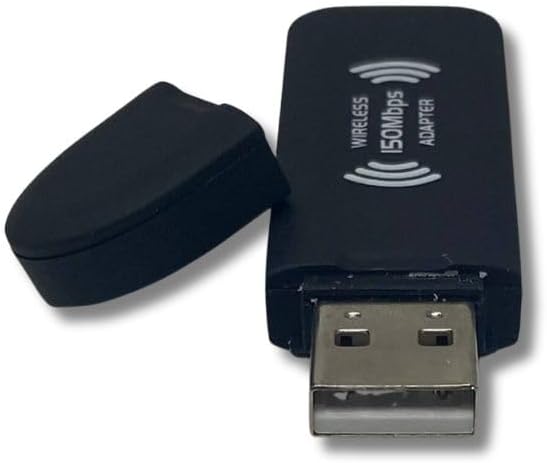


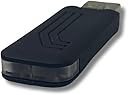
HUMAX Compatible WiFi Dongle WHY0005
Product ID: 49577068
Details
- BrandHUMAX
- ColourBlack
- Compatible Operating System FamilyWindows
- Compatible devicesDesktop
- Data link protocolIEEE 802.11
- Hardware interfaceMemory Stick
Desertcart purchases this item on your behalf and handles shipping, customs, and support to Vanuatu.
Free delivery and returns on eligible orders. Buy HUMAX Compatible WiFi Dongle WHY0005 at desertcart UK. Review: Worked pefectly and instantly with Humax HDR Fox T2 - but you might need sandpaper! - I didn't have high expectations that this would work as we don't have a WiFi expander and the Humax is buried in with a lot of other equipment. However, it worked first time and hasn't failed once since. No need to setup - just enter the WiFi details into the Humax. However, the dongle is quite large and wide, and even though I picked an HDMI cable with the smallest connector, I still had to sandpaper the connector down on one side so that I could use the rear USB connector. This was fine but bear it in mind. Review: Works for me! - I have had problems getting my oldish Freesat 1000s box to connect via an ethernet cable because i use mobile broadband instead of fibre however, this was very easy, i simply connected this stick into the front usb slot and turned my hub off at the mains and then back on again, within a couple of minutes i could see my hub showing up on the network connections settings and after entering my wifi password i was connected. Now i can get the usual catch-up services along with Youtube and Netflix if i subscribe but it's great if you miss a programme. I took a punt on this item in reality but glad i did!
| ASIN | B01B4YQQK8 |
| Best Sellers Rank | 27,535 in Computers & Accessories ( See Top 100 in Computers & Accessories ) 257 in USB Computer Network Adapters |
| Brand Name | HUMAX |
| Color | Black |
| Compatible Devices | Desktop |
| Compatible Operating System Family | Windows |
| Customer Reviews | 3.9 3.9 out of 5 stars (633) |
| Data Link Protocol | IEEE 802.11 Wireless Standard |
| Hardware Interface | Memory Stick, USB |
| Manufacturer | Humax |
| Manufacturer Part Number | DONGLE_HMAX |
| Minimum Required Operating System Version | Windows 10 |
| Model Number | DONGLE_HMAX |
P**S
Worked pefectly and instantly with Humax HDR Fox T2 - but you might need sandpaper!
I didn't have high expectations that this would work as we don't have a WiFi expander and the Humax is buried in with a lot of other equipment. However, it worked first time and hasn't failed once since. No need to setup - just enter the WiFi details into the Humax. However, the dongle is quite large and wide, and even though I picked an HDMI cable with the smallest connector, I still had to sandpaper the connector down on one side so that I could use the rear USB connector. This was fine but bear it in mind.
P**K
Works for me!
I have had problems getting my oldish Freesat 1000s box to connect via an ethernet cable because i use mobile broadband instead of fibre however, this was very easy, i simply connected this stick into the front usb slot and turned my hub off at the mains and then back on again, within a couple of minutes i could see my hub showing up on the network connections settings and after entering my wifi password i was connected. Now i can get the usual catch-up services along with Youtube and Netflix if i subscribe but it's great if you miss a programme. I took a punt on this item in reality but glad i did!
K**R
Seems to work.
This came quickly, was as described, a good seller, would have given five stars but for the fact that there were no instructions. Yes, we could see we were meant to stick it into the USB port in the Humax, but we struggled to get it installed and working. Not all of us are good with technology!
C**E
Does not work with my HB-1000S
I have had the same experience as others. My Freesat box is in the same room as my BT Home Hub router and there is a straight line of sight from one to the other (no corners or bends), so distance should not be a problem. The dongle found the wifi signal, but the strength was weaker than I would have expected. I entered my password (ordinary letters and numbers, nothing special) and pressed “Continue”. It then tried, and failed, to connect. Multiple times. I tried all three networks on offer and entered the appropriate passwords again and again and again. I tried again the next day, but it still refused to connect. Each time a message appears saying that something has gone wrong. I gave up eventually and bought an Ethernet connector and some more Ethernet cable and coupled the two cables together. This time it connected immediately and automatically to the internet and I didn’t even have to put in a password. The dongle is going back for a refund.
J**R
HUMAX WIFI DONGLE
This item arrived quickly, it was quite easy to set up, but I was disappointed that after about a week it just fell apart it had to be taped back together to be able to use it, although upto now it is still working
N**E
An unexpected little GEM
I have a HUMAX HDR1000S Box , i actually bought it to record which was great, but thinking thinking it had WiFi as a connection to on demand etc. I found i had made a mistake and i was told i needed to connect it with an Ethernet connection to my router, which in my case means a 20 meter wire (just not happening). I watched a couple of YouTube videos and reviews for help and found this little Dongle may be what i needed. However , i did see that some reviews said that the password may not work as they are to long and not accepted on the dongle. so was a little skeptical In my case this dongle was a GEM , I plugged it in the front of the box, at first it only came up with about 5 WiFi connections and none of them mine, then after about 3 minutes mine appeared ( so be a little patient). I then put in my 12 digit KEY ( containing small & large letter plus number) and it connected immediately. It then gave me access to NETFLIX ( i pay a sub), and every on demand available. For just over £11 it was amazing, absolutely transformed the usage of my Humax box. Don`t hesitate if you have the same box as mine ( cant say for others though ) Some reviewer say that the dongle has fallen apart, but once its in the box i dont see any reason to handle it again so i hope it will stay that way - perfect.
A**R
Worked with no issues with Humax HB1000S and our long unusual password
Bought for our Humax Freesat HB1000S, acknowledged the leaflet enclosed mentioning, possible, issues with long and unusual password characters etc. Plugged in and within a few moments detected our Wi-Fi router, selected our connection type with the device (2G 65Mbps) and named router (we live in a flat, therefore pickup multiple other people's connections,so selecting the correct router - ie yours- is paramount) entered our long and unusual password, that was it. Connected first time and after testing over a couple of weeks, works flawlessly with no buffering or lag on all catch-up services. Simply put, does what it says on the tin. Will obviously continue to test/use and see if there are any issues that crop up. Anyway, happy days without a long LAN cable.
A**R
Worked immediately
Was tearing my hair out as the ethernet cable port into my Humax Fressat had just stopped working inexplicably ! Hours of forum scanning to find the solution - NONE apart from some which required a Phd in nuclear physics. Looked like I would have to buy a new Humax at about £200 !! This little gizmo saved my bacon - put it into the back of the Humax and after about 30 seconds (and password obviously) worked like a dream. Highly recommend - very simple, no forum geekery required !
M**E
fonctionne parfaitement et est simple à mettre en place.
C**R
Habe den Stick gestern an meinen Humax Fox HD Twin angeschlossen. Funktioniert einwandfrei..Sehr gute Verbindung. Das blaue Blinklicht habe ich noch nicht wegbekommen. Er zeigt direkt die verfûgbaren Verbindungen an.Dann nur noch Passwort eingeben. Hatte einen Zettel dazubekommen was man alles machen muss wenn es nicht geht. Es ging aber sofort. Man muss halt beim Paswort auf ok klicken damit sich das digitale Klavier öffnet.Hätte nicht gedacht das es so einfach geht und dann noch für den Preis.Warum das blaue Blinklicht ist mir ein Rätsel? Ansonsten Daumen hoch.
R**F
perfekt ! fungerade som det ska
C**I
Acquistato per un decoder Humax Tivumax Recorder HDR 1001S, su cui Il wifi funzionava con un dongle Ralink che era arrivato a corredo di una IPCam. A decoder in stand-by, ho sostituito tra loro i due dongle. Accendendo il decoder, il Wifi è risultato connesso e provato con tivulink ha funzionato. Non è neanche stato necessario reimmettere la password per il Wifi. Il decoder non si è accorto del cambio del dongle, in effetti la password la chiede il decoder e il chipset è il ralink RT3070 come nel dongle precedente. Il dongle è arrivato con un utile foglietto di istruzioni che riporto : Should you have any issues in setting up your dongle please contact us support at tvtech dot eu. Below is also a list of troubleshooting steps for you to try . 1. Using an internet cable connected directly to your box from your router , upgrade the boxes software to the latest version 2. On some boxes we have found the special characters ('['-./l like the ones typed to the left can sometimes cause connection issues , please try use a password with these characters to see if this solves the connection issue, something with just number and letters , 3. Spaces in the password seem to cause issues on Humax boxes also 4. There have been some reports of issues on some routers where the password is 12 /13 characters long, changing to 10 has solved the issues for most people. 5. If ITV Player or BBC player is not playing whilst connected to the Wifi , please check that they work whilst wired in directly via an Ethernet / network cable Non posso pronunciarmi per la durata, sono soddisfatto.
M**S
Bon connection.
Trustpilot
2 weeks ago
5 days ago