Buy anything from 5,000+ international stores. One checkout price. No surprise fees. Join 2M+ shoppers on Desertcart.
Desertcart purchases this item on your behalf and handles shipping, customs, and support to Vanuatu.
🎯 Master your workspace with precision and style — the SlimBlade difference.
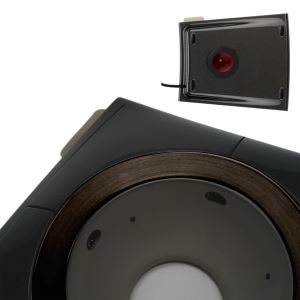
The Kensington SlimBlade Mouse is a wired ergonomic trackball designed for PC, Mac, and Windows users seeking precision and comfort. Featuring a large 55mm laser-tracked ball and a 360° scroll ring, it minimizes wrist movement and desk space usage. Its ambidextrous design and customizable buttons via KensingtonWorks software enhance productivity, while plug-and-play USB connectivity ensures hassle-free setup. Trusted by professionals worldwide, it’s the ultimate upgrade for efficient, stylish control.


| ASIN | B001MTE32Y |
| Antenna Location | Office |
| Are Batteries Included? | No |
| Are Batteries Required | No |
| Battery Average Life | 12 months |
| Best Sellers Rank | 2,606 in Computers & Accessories ( See Top 100 in Computers & Accessories ) 1 in Trackballs 5,036 in PlayStation Legacy Systems |
| Box Contents | USB |
| Brand | Kensington |
| Brand Name | Kensington |
| Button Quantity | 4 |
| Colour | Red |
| Compatible Devices | Personal Computer |
| Connectivity technology | USB |
| Customer Reviews | 4.4 out of 5 stars 1,942 Reviews |
| Enclosure Material | Plastic |
| Global Trade Identification Number | 00085896723271, 05050914713317 |
| Hand Orientation | Ambidextrous |
| Hardware Platform | Personal Computer |
| Item Dimensions L x W | 15.2L x 12.7W centimetres |
| Item Type Name | Kensington SlimBlade Mouse® - Wired Ergonomic Trackball Mouse, Compatible with Windows & macOS - Ruby Red (K72327EU) |
| Item Weight | 318 g |
| Manufacturer | Kensington |
| Manufacturer Part Number | K72327US |
| Model Name | SlimBlade™ K72327EU Trackball |
| Model Number | K72327EU |
| Movement Detection | Trackball |
| Movement detection technology | Trackball |
| Network Connectivity Technology | USB |
| Number of Batteries | 1 AAA batteries required. |
| Number of buttons | 4 |
| Operating System | Microsoft Windows Vista / XP^Mac OS X |
| Pattern | Single |
| Power Source | Corded Electric |
| Product Features | Movement detection technology:Trackball |
| Product Finish Type | Glowing |
| Product Warranty | 1 year |
| Range | 150 centimeters |
| Special feature | Movement detection technology:Trackball |
| Style Name | SlimBlade |
| Theme | trackball |
| UPC | 809385660935 097009492066 100177260228 085896645887 763615904803 638458744988 640206607070 807030490470 031112194004 872182664895 800187705022 803982758279 029521830347 031112582351 662919001648 823019652431 804993501564 666667458037 809098923051 012304048473 102930735899 095009492062 085896723271 096009492069 724627170587 641438718763 809185809343 858967232718 640026224976 074437854154 8067920398… |
| Unit Count | 1.0 count |
H**T
Quality device, well worth a look for mouse-related RSI/Tendonitis sufferers
I've been suffering from mouse-related elbow tendonitis since late last year, so I have been through various pointing devices trying to find one that will not keep damaging the tendons. Finally, with this trackball, I have found a solution ... not just in helping with the tendonitis, but also in feeling easy and natural to use. As a hardened mouse user, I was initially wedded to the idea that I needed to find a better mouse. So I tried various "ergonomic" alternatives, but I realised that my problem came from the left-right pivoting of the elbow, and not from the angle of my wrist or the stress of pressing the buttons. In fact the "ergonomic" mice I tried made things worse, since being wireless they added the weight of a battery to the mass I was pushing around. One or two small batteries doesn't sound like much, but it's all extra load on a problem joint/tendon. Next, I went for a Logitech M570 trackball. I found steering with my thumb clunky, and the trackball was not pixel-accurate; it jerks by several pixels when you move it, rather than rolling smoothly. Cleaning and lubricating helps but does not completely solve the jerkiness (in fairness it's fine for general desktop use, just not for pixel-perfect control). The final drawback is that the M570 is right-handed device; I used it for a period with my left hand in order to allow time for my right elbow to heal, but it's not designed for this at all. I also tried a Wacom tablet, but again moving the stylus put stress (if less than with a mouse) on the damaged elbow. Then a few weeks ago, I happened to see one of the large Kensington trackballs (it was in a producer's intro to the Battlestar Galactica box set; he was sitting in front of an editing system with a Kensington Expert trackball front and centre). As soon as I saw it, I instinctively felt it was the kind of thing I needed. I searched for "Trackball with large ball" and soon identified it as a Kensington device; a SlimBlade soon arrived and now, a few weeks later, my elbow is not troubling me at all and I'm as comfortable using this, as I used to be with a mouse. The large ball has a definite feel of "heft", running smoothly and allowing pixel-perfect placement. So for me it has been worth every penny, even allowing for the rather high price. I have spent more than that price on trying other solutions that didn't work for me. The initially-released software was rightly criticised but the latest version is fine, allowing each button to be programmed with a different function, as well as being able to detect when the top pair or bottom pair of buttons are pressed simultaneously, giving six functions overall. The "twist ball to scroll" feature feels completely natural, and is the main feature that sets the SlimBlade apart from the slightly cheaper Expert. But I'm sure that an Expert with its physical scroll ring would do just as well, and it offers the benefit of coming with a wrist rest ... however I don't personally feel that the SlimBlade needs a wrist rest because of the way it slopes gently down to the desk -- and it would be easy enough to improvise or purchase one if needed. ----- Updates following a few more weeks of use: LUBRICATION: lanolin is apparently what Kensington uses for lubrication at manufacture, and is thus perfect for re-lubricating the ball if necessary. I just moisturised my fingertips with a tiny amount of solid, 100% pure anhydrous lanolin, and then used the ball for a few seconds, and a day later it is still gliding like new. GAMING: I got around to playing a first-person shooter with the trackball, and am happy to report that it works for me just as well as a mouse. Equivalent control, but no more running out of mouse-pad! The only disadvantage is that your index finger is naturally used to steer the ball, so you may need to map a different control to fire weapons etc. But overall, FPS gaming is at least as enjoyable for me with this, as it was with a mouse.
K**K
The Kensington Slimblade is the only trackball I use
So I bought the Slimblade trackball way back in 2014 and I still use it to this day on my custom built Windows 10 64-bit computer. The only software you need to install is the Kensington TrackballWorks 1.3.1 and with that I'd suggest a few changes, such as changing direction in which you spin the ball to scroll and adding the "drag" function to one of the buttons. You can customise how you use the trackball in various other programs, and even add more functions to "dual-clicking". Honestly I like to keep my usage simple and easy so I have tried them but have stuck to the basics. So why a trackball? I like the slim, almost minimalist design. It's a sleek, almost timeless design and yet it's also very functional. You don't need a large desktop area nor a mousepad either, which is good in keeping my desktop clean and small. Some things can be improved though, perhaps the material paint around the trackball, or the "loudness" of the click, I'll mention this later on. The other main issue was wrist pain, I used to play a lot of games and do a lot of video editing which involved constant dragging which caused my right wrist to hurt. Along with a few other changes, such as posture, changing my computer chair and getting rid of the mouse, my wrist has not been in pain from using the trackball. I can still play games with no problems, perhaps better than before. I love how effortless it is to scroll through a webpage, it's a small, perhaps under appreciated thing. Maybe a certain gaming mouse has a free turning, weighted scroll wheel that helps alleviate the constant action of flicking your middle finger, but with the slimblade you're actually scrolling at an angle which reduces more stress from your finger, it's hard to describe but the feeling is different and better. If there is one thing, I wish they would update the model, maybe work out a few new colour schemes that would reinvigorate their product line. I have a few nitpicks though, a slight QC/design issue I have is with the chrome ring paint chipping just by the left and right click pad (especially if you have long finger nails) and how it sometimes doesn't register your scrolling due to dust surrounding the trackball sensors. That part is easily cleaned and rectified though. Overall, while it might seem pricey, I haven't come across any trackball alternatives that rivals the Slimblade in quality and design. I'm still using it after all these years.
C**E
Almost the perfect trackball.
I started using a trackball a few weeks ago, it does take some getting used to if you've been using a mouse but they are a lot more comfortable and more precise once you've adapted. Having started off with a cheaper model to see if I'd like the ball, I decided to upgrade to the Slimblade. This thing looks gorgeous, the large ball has a nice weight to it and rolls nice and smoothly. The four buttons are well-positioned, and scrolling by twisting the ball works really well, you can also do this with one finger by running it around the chrome ring and rotating the ball which make scrolling without moving the cursor a piece of cake. The slim profile also means that it is comfortable to use without a wrist rest. Don't worry about the bad reviews criticising the lack of customisation for the buttons, this has now been addressed and if you download the TrackballWorks software from Kensington you can customise all four buttons. It's not all good though. The trackball rocks ever so slightly on a desktop, I fixed this by putting a couple of squares of masking tape over one of the feet but you should not have to do this. The other thing is that it emits a faint squeal constantly. You can only hear it if the room is pretty much silent, but it is quite annoying. The buttons also click very loudly, but I'm hoping that this may quieten down with use. It's not perfect, but it's very comfortable and pleasant to use so I'm happy with it overall.
K**N
Brilliant for Power Users... Especially photographers & Mac users!!
I had my doubts about this mouse, not least from it's odd looks it. I researched online for user reviews and apart from the odd youtube video nothing showed it in detail and in use, especially on a Mac. I have used this everyday for over a month and can honestly say it's the best mouse I have ever used. You don't get all the multi gestures like the magic mouse but I had one of those and my wrist started to ache after only 10 minutes use so just was not worth the pain. The Slimblade is quite big but ironically it saves user space as once you have located the best position on your desk you don't have to move it as its a rollerball. It has a large rollerball in the centre which acts as the way to move the pointer but if you twist it it can scroll up and down through webpages etc. It has 4 programable buttons, they are very large, surrounding the ball. You need to download the plugin for mac and then this allows you to assign certain tasks such as dashboard, spotlight search etc. The click on the mouse is very loud and a little annoying at first. It's a shame they did not dampen them. If its just you on your own it's no big deal but in a large, quiet office I could see this becoming an issue. This rollerball really comes alive when using Adobe Photoshop or Lightroom. You can resize brushes etc with a simple rotation of the ball, much quicker. It's not all perfect. It can rock on a flat surface, ever so slightly and when I first started using it the ball squeaked as I moved it but after a few days it disappeared, so must have needed bedding in and now I can fly around the screen with only the slightest of touches from my fingertips! Overall, this is a great mouse and anyone who uses a computer all day long will be grateful of the good ergonomics this offers and the relief from RSI type strain on the hand and wrist.
A**R
SlimBlade vs 2 Button Scroll Ring vs 2 Button Wireless
This is a comparison of the slimblade (4 button 'ultra thin' as amazon calls it), the 2 button scroll ring and the 2 button wireless - I have all three! I also use trackballs because I have a problem with my wrists and suffer chronic pain in them, so the focus is really on how I find them from that point of view. I've been using trackballs for about 6 years, I started having real problems with normal mice and first tried sideways mice, including a monster than cradled my entire wrist, before trying trackballs and finding they made a significant improvement to my daily pain levels. The scroll ring was my first and is now 6 years old, with 8 hours daily use for about 3 years and has been used probably 5-20 hours a week since, I then got the wireless and have been using it 8 hours a day for the last 3 years. The slimblade I only bought 2 weeks ago and have been trying it out but am returning it for reasons discussed below. The two I've had a while are both still in perfectly good condition, no signs of wearing out or any damage at all. The 2 button scroll ring version is the worst of the ones I've had, the shape is awful and it's the most painful for me to use - the scroll ring itself is great, but the actual mouse bends my wrist uncomfortably and I find my wrist hurts more than usual if I have to use this for long periods. The buttons are slightly harder to press than the wireless version but it's not significant. Going from a mouse it was great, but returning to it from the wireless version I can see how much more comfortable the wireless version is - although the scroll ring is much better than the touch scroll. The slimblade is next on the preference scale - the ball on this is the best and I love the scrolling, this would be my favourite if it weren't for a painful problem I have with it - the buttons are just too hard to press! Especially the lower buttons which includes the left click. Most people probably wouldn't find it a problem but having wrist problems already it's stiff enough that it starts becoming painful on your thumb when you're clicking it thousands of times a day. The giant ball does make this the best for control and the extra buttons are helpful, although having small hands I do have to reach for them. The twist to scroll thing works really well and I love it. It's not especially ergonomic but the giant ball is a joy to use and it's a shame it's let down by such awful buttons. I'm returning this mouse after 2 weeks because I've got a significant increase in my wrist pain and exciting new pains shooting up my thumb. The wireless 2 button one is very small, I don't actually like this very much but it's the most comfortable to use, unfortunately the scrolling is genuinely awful, it needs a scroll ring or rotating ball like the slimblade instead. The main issue with the scroll is it's a touch sensor right in the most comfortable place to rest your fingers so it's incredibly easy to randomly start scrolling while you're trying to move the ball meaning things are occasionally jumping around all over the place. The smaller ball also makes it a bit harder to control compared to the slimblade but it's much easier to actually press the buttons, they are effortless, I think the angle of the button at the thumb works better too. The shape is rather nice if a little small, it's comfortable and at the right angle so your fingers sort of fall on top of the ball with no effort on your part, it could do with being a little bigger for me and my tiny hands and I imagine anyone with average or large hands would find it very much on the small side - at least if you're looking for an ergonomic fit.
R**N
Great Trackball! Easy to use
I've never owned a trackball before. I have gone through thousands of different mice trying to find one that would not give me pains in my hand and wrist as I spend at minimum 8 hours a day for work on a computer. So I thought I would give a trackball a go. I went for the wired Slim blade as it appeared to have the largest base and ball. I am not disappointed. It is surprisingly easy to use and I in no way feel like returning to using a mouse. The ball is large enough that navigation across three screens is very easy, I don't crash into my keyboard anymore as only the ball moves, and not the whole thing like a mouse. All the buttons are programmable (using win7) through the software downloaded from kensington website. You can even program an action to a combo press of the top and button two buttons. Which is a total of 6 custom functions. Very handy for multi media. The built in twist of the ball instead of a mouse wheel is fantastic. Not sure how much this will help the repetitive strain pains in the hand and wrist, but so far the change is helping and I love using it more than the mouse. UPDATE: This trackball has only gotten better after a week of use. The trackball out of the box, had a little friction and you couldn't just spin it. It has now loosened up and feels like it is just sitting on a cushion of air. This makes navigation and design work even quicker. Love it.
G**.
Love my Slimblade
I got the Slimblade Trackball for my office, to be used alongside a TypeMatrix keyboard and a Func MS-3 mouse. It took a little while to get used to, but what a brilliant tool! Arm movements are no longer necessary, which means less pain in the neck and shoulders. Letting the ball glide by itself also makes travelling long distances on the screen much easier, which is ideal for a dual-monitor set up. And while scrolling is a little disconcerting at first, I now vastly prefer it to the scroll-ring on my coworker's Expert trackball. Although not as advanced as they could be, the drivers let you configure your Slimblade pretty much any way you like. I'm especially a fan of the shortcuts you can assign to any button or button combination. I configured mine to close the current tab/window when I press the two top buttons and it's just a joy to use for my daily browsing. I still keep my mouse around, mostly for Photoshop and other similar programs, but prefer using my Slimblade for 80% of what I do on a computer. If Kensington ever gets around to updating this product, here are the only areas of improvement I can think of: - Heavier base plate (ideally made out of metal) to prevent the trackball from moving around during intensive use. - Improved drivers. Most notably, I would like to have a way to manage several trackballs (ideally I would like to have a trackball on each side of my keyboard which would mirror each other: eg. the bottom left button of the trackball on the right would be the same as the bottom right button of the trackball on the left).
I**R
Goodbye RSI
I started using trackballs when RSI made mousing impossible for me - I work in IT development so I had to do something. My previous Kensington Expert mouse wore out, so I replaced it with this, and it's just as good and works just as well. Very comfortable, smooth ball action and easy to reach buttons. The only criticisms are that it was a bit pricey, and the buttons are a little noisy. REVIEW UPDATE after 7 years... I got this in 2012 and it's still working perfectly and I still don't have RSI. I've used this every day at work for since I got it and would never go back. The ball has a nice weight and momentum so you can throw the cursor around very intuitively,I find it easier than a mouse. The buttons are still very loud and clicky though.
L**S
Fantástico!!!
Mouse Fantástico! Já tinha um, só que a versão Pró, Sem Fio, e esta versão é exatamente igual mas com fio!!!
J**N
Nicht billig, aber preiswert!
Nach weit über zehn Jahren habe ich mich jetzt schweren Herzens von meiner Logitech Marble Mouse verabschiedet. Ich habe täglich durchnittlich ca. acht Stunden damit gearbeitet und kann damit wohl als eingefleischter Trackball-User gelten. Über die Gründe für den Wechsel können Sie in meiner Rezension über die Marble Mouse lesen. Nun also SlimBlade. Schon beim Auspacken merkt man, dass man hier einen echten Brocken vor sich hat - und zwar im positiven Sinn. Das Gerät liegt breit und schwer, aber dennoch sehr flach auf dem Tisch. Es ist nicht leicht zu verschieben. Der Ball ist groß und massiv, dabei aber spielerisch leicht zu bedienen. Da ich große Hände habe, komme ich an alle vier Tasten problemlos heran. Die Rückmeldung beim Klicken ist genau richtig, das Geräusch dabei noch etwas gewöhnungsbedürftig (irgendwie "billig"). Die aufzuwendende Kraft beim Betätigen der Tasten liegt so, dass man sie nicht aus Versehen drücken kann, aber auch nicht zu kräftig drücken muss - also gut ausgewogen. Und dann natürlich das Highlight beim SlimBlade: Die Scroll-Funktion. Ich kam auf Anhieb mit ihr zurecht und habe mich tatsächlich gefragt, warum noch niemand anderes auf diese einfache aber geniale Idee gekommen ist. Der Ball muss lediglich um seine senkrechte Achse gedreht werden. Dabei hört man ein leises Klicken aus dem Trackball, das vermutlich mit einem kleinen Piezo-Element erzeugt wird. Die Technik beim Drehen muss dann jeder für sich herausfinden. Man kann mit einem Finger entlang des Ringes fahren; das funktioniert sehr gut und verschiebt auch den Cursor kaum. Man kann die Drehachse mit dem Zeigefinger fixieren und dann mit dem Mittelfinger drehen; das funktioniert auch recht gut, verschiebt aber den Cursor leicher. Letzte Möglichkeit: Man greift den Ball mit drei Fingern wie einen Drehknopf; dazu muss man aber die gesamte Handposition verändern. Da ich ihn gerade erst neu bekommen habe, arbeite ich mich in diese Techniken noch ein, benutze aber überwiegend Methode 2. Das gesamte Arbeiten geht damit wunderbar von der Hand - ich musste mich aber auch nicht sehr umstellen, da ich Trackbälle gewohnt bin. Die Taste links oben macht bei mir den Doppelklick, die rechts oben setzt den Browser eine Seite zurück, beide zusammen machen den Mittelklick, und die beiden unteren Tasten öffnen gemeinsam ein Explorer-Fenster. So geht produktives Arbeiten! Wunderbar bedienbar ist auch die Software "TrackballWorks", die aus diesem Trackball erst das perfekte Gerät macht, das ich gesucht hatte. Damit sind drei der vier Tasten frei belegbar, und zusätzlich auch noch zwei Kombinationen. Ich habe also sechs verschieden Funktionen, von denen ich fünf frei zuweisen kann. Zusätzlich gibt es noch Funktionen wie "langsamer Zeiger" für besonders genaues Positionieren (frei wählbare Zusatztaste auf der Tastatur, z.B. Strg, Alt oder Shift), oder "einachsige Bewegung", die den Cursor nur in X- oder Y-Richtung laufen lässt. Auch die Scrollrichtung des Balls lässt sich umkehren (vermutlich für Linkshänder). Erwähnte ich schon, dass das Teil auch noch richtig klasse aussieht? Für mich ist der SlimBlade der bis jetzt beste Trackball, den ich jemals hatte (und ich hatte einige). In Sachen Design, Ergonomie und Funktionalität macht ihm so schnell keiner etwas vor. Deshalb gibt es von mir, trotz des wahrhaft schmerzhaften Preises, fünf Sterne und eine klare Kaufempfehlung. NACHTRAG nach zwei jahren Benutzung: Mittlerweile haben sich leider die Gummifüße völlig zu einer matschigen Substanz aus ekligem Kleber und wabbeligem Gummi gewandelt. Ich habe alles entfernt und flächig ein Stück Antidröhnmatte auf die Unterseite geklebt. Jetzt funktioniert wieder alles, wie es soll und der Schreibtisch bleibt auch sauber. Auf meine 5-Sterne-Bewertung hat das keinen Einfluss – die bleibt uneingeschränkt bestehen. NACHTRAG nach fünf Jahren Benutzung: Ich bin immer noch begeistert von dem Trackball. Er funktioniert tadellos und hat sich auch optisch nicht verschlechtert. Die Antidröhnmatte hat sich bewährt. NACHTRAG nach zehn Jahren: Der Trackball funktioniert noch immer einwandfrei wie am ersten Tag – bei täglicher mehrstündiger Nutzung. Das nenne ich preis-wert.
V**O
Muy funcional
Llegó muy bien protegido, se sienten de buena calidad los materiales y poder configurar los botones hace muy práctico trabajar con el, lo recomiendo mucho
B**N
FInalement le modèle deux fois moins cher est le meilleur !
La particularité de mon commentaire tient au fait que j'ai testé deux des modèles proposés ici : d'abord la Kensington Orbit avec molette (modèle bleu à +/- 45 euros) et la Kensington Slimblade (modèle gris à +/- 95 euros, soit plus du double). J'avais acheté la première le 12 juin 2014 (soit il y a 5 ans) et la dernière il y a quelques jours suite à la mort de l'Orbit il y a un ou deux mois, toutes sur Amazon. La question qui vous taraude est la suivante : quelle est la meilleure ? Eh bien je vais vous laisser un peu mariner en commençant par parler de trackball en général. Au départ, j'avais acheté l'Orbit simplement par goût des gadgets (tout en me persuadant de la rationalité de mon achats avec les arguments habituels) et léger anticonformisme un peu superficiel, je ne vais donc pas vous faire tout un baratin sur l'intérêt médical, blabla. je ne m'en suis jamais soucié et j'allais très bien avec une souris. J'avais peut-être eu un problème sur une souris à cette époque mais je ne m'en souviens plus (ce que je sais c'est qu'une souris gamer à 90 euros que j'avais achetée était morte en 2 semaines mais c'était bien avant je crois). Malgré la légèreté de mon achat, je me suis finalement laissé surprendre puisque je n'utilise plus de souris au travail (soit la quasi totalité de mon temps d'ordinateur) alors que je pensais garder ce que je voyais comme un gadget pour de rares sessions. Pourquoi ? Parce que ce qui se dit sur les trackballs est vrai : ça change la vie. Déjà, la boule est rapide et précise, plus besoin de balayer une grande surface ou de mettre son pointeur à une vitesse trop élevée pour balayer l'écran à fond. Bouger est d'ailleurs un plaisir et pour moi qui aime toujours jouer avec des objets avec mes mains, je peux m'amuser à sortir la boule ou à la faire rouler. Mais au delà du pointeur, je dirais que le point positif majeur de ces trackballs, c'est le défilement tout simplement ultra rapide et reposant (surtout sur la Orbit). Sur ce point, la trackball change la vie. En sus, je n'ai eu quasiment aucun temps d'adaptation (ce qui n'est pas le cas de tout le monde d'ailleurs, certains sont en souffrance dessus), en fait bouger la boule n'est pas spécialement contre-intuitif mais cela dépend sans doute des personnes. En résumé : je pense que l'expérience trackball est supérieure à celle de la souris mais je ne dirais pas non plus que c'est un achat nécessaire. Passer à la souris ne m'embête pas plus que ça, selon moi les deux mondes se valent surtout poru de la bureautique standard. Le plaisir est plus dans la modalité et la différence, à moins que vous ayez des problèmes particuliers, une mauvaise surface ou peu d'espace. Passons maintenant aux deux modèles en particulier, et à celle que je préfère. Eh bien, au risque de vous surprendre et ça me fait mal de l'admettre mais je préfère le modèle Orbit qui est plus de deux fois moins cher. Pourquoi ? Comme vous le voyez sur les photos, ce modèle se manipule enveloppé comme sur une souris classique. Ayant des mains de taille 7-7,5, cette prise avec la boule medium est moins fatigante que celle sur la Slimblade qui est inclinée. De plus, la bague de défilement est juste parfaite sur l'Orbit bien qu'un peu cheap à voir. En fait, la Slimblade a selon moi quelques défauts potentiellement graves : - la disposition des touches fait que je clique souvent accidentellement à gauche. De moins en moins mais quand même. Sur l'Orbit, les touches tombent parfaitement devant les doigts vu qu'il y en a deux comme sur une souris. De plus, le défilement de la Slimblade demande de davantage bouger ses doigts alors que sur l'Orbit je pouvais défiler avec le petit doigt. Du coup, j'ai un peu mal au poignet en fin de journée...dommage vu que c'était justement ce que la trackball est censé éviter. EN résumé, je travaillais beaucoup plus vite avec l'Orbit je trouve et elle se fondait vraiment dans ma main, peut-être que ça viendra avec la SLimblade ? Si non, je rachèterai une Orbit. A la lecture de tout ceci, vous allez me demander : "mais pourquoi ne pas avoir racheté une Orbit si elle était si bien ?". D'une part, j'avoue avoir voulu tester le modèle premium par curiosité et par envie de changement. D'autre part, plus pragmatiquement, il ne faut pas oublier que mon Orbit s'est cassée. En effet, le clic droit est usé et double clique souvent alors que je clique une fois voire ne répond pas. Il y a un ou deux ans, j'avais réglé le problème en la démontant et en nettoyant un peu, cette fois ça n'a pas marché. Et c'était à prévoir sachant que l'Orbit est aussi efficace qu'elle n'est "cheap". En effet, le corps de cette trackball fait creux et les touches sont des bouts de plastique vides lévitant en l'air, reposant sur les vrais interrupteurs via une fine couche de plastique. Du coup, la souris craque un peu tout comme la molette a le feeling de faible qualité (même si il tourne bien quand même). AInsi, même si 5 ans d'utilisation 7 à 8 heures par jours 5j/7 est un bilan honorable, j'avoue que je culpabilise toujours un peu de jeter des produits. Ce n'est pas une histoire d'argent, ça m'aurait coûté moins cher d'acheter une seconde Orbit mais de principe. Du coup, j'espère que la Slimblade tiendra davantage. En résumé, je mets tout de même 5 à ces deux trackballs qui font le job malgré de menus défauts. La durabilité de l'Orbit reste correcte vu l'utilisation et le prix même si en vrai je mettrais plutôt 4,5/5. En tous cas, si je devais vous conseiller un modèle par défaut, ce serait celui là, la différence de prix de la Slimblade n'ayant pas de vraie justification pratique à mon sens à moins que vous ayez vraiment besoin de quatre boutons (difficiles à utiliser en sus si vous avez des petites mains comme moi) et d'une plus grosse boule. Quant à la trackball en général, elle est à réserver aux curieux à moins que vous en ayez une utilisation spécifique ou peu d'espace. En effet, bien que présentant des avantages par rapport à la souris, elle ne la dépasse pas à mon avis. Ce sont deux approches différentes qui se valent, le choix de l'une oud e l'autre m'est indifférent en pratique. EDIT : après m'être habitué, je n'ai finalement plus de problèmes sur la Slimblade. Cependant, elle est légèrement plsu fatigante bien que plus précise et plus fluide. Si vous visez uniquement les fonctionnalités de base, l'Orbit est un bon choix mais si vous voulez juste un plus bel objet, la Slimblade est mieux. Disons que ça ne vaut peut-être pas deux fois le prix.
P**C
Makes you look forward to Mondays
Quick and easy setup. Just take it out of the box. Plug it in. Download Kensington Trackball Works and you're set. EARLY IMPRESSIONS: Coming from having owned the best of the best mice and trackballs from Logitech such as my current Marble Trackball, the M570 (which possibly contributed me the De Quervane syndrome I have now) and the Anywhere Mouse, not to mention scores of other mice and trackballs over the years include the 1990s version of the Kengington Expert Mouse -- I was, at most, expecting to marginally impressed by the Kensington Slimblade Trackball. But it took me only 15 minutes of acclimating and fine tuning the settings that I realized that this is a vast step up from my Marble Mouse. I'll have more to see in an updated review, but for now, here's few quick impression 5 star ratings, 5 being best: ***** Buttons: Excellent feel and "just right." In fact, were it not for the fact that some people mentioned the issue of having to press the buttons harder than they would expected, I never would have given this issue a second thought. The click pressure is about what I'd expect and has been a non-issue for me. I suspect that some people have this problem because the are pressing the keys to close to the hinge. But where my thumb and fingers naturally tend to fall are the areas that are farthest distance from hinges. ***** Scrolling: One of the best innovations since Xerox PARC invented the mouse. Honestly, even after all the glowing reviews in Amazon, I wasn't expecting it to be this natural, not to menion -- fun. Try it and you may never want to go back to a scroll wheel. ***** Ease of use and precision. Pointing and click is what you'd expect from a $99 trackball. Using a bigger ball than is the case on my Logitech Marble Mouse, does improve precision. This is especially the case because I am right handed, but need to use my left hand for this trackball. Many times when using my previous trackball, the Logitech Marble, I'd aim to put the mouse arrow on top of a small screen object (such as a line on my DropMind Mindmap) and found it difficult. So far, I'm finding myself about perform the same surgical actions more easily with the Kensington. ***** Smoothness of the ball. Initially, I found that would you do a rapid twist when scrolling, there's some kind of weird slight scraping vibration. The sound went away after a few days after natural oils from my fingers lubed the ball sufficiently. ***** TrackBallWorks Software. Works find and allows me to control all the buttons and chordings. So I was able to switch the traditional mouse click buttons to left-handed mode, use the top buttons for back and forward with browsing the Internet, refresh with bottom chord, and launch volume controls with upper chord. This is way more than what I could do with my Logitech Marble Mouse. **** Construction. ON THE PLUS SIDE, it's a beautiful, gleaming piece of modern art on my desk. ON THE NEGATIVE SIDE: The should have engineered the click buttons so that needed pressure to click is the same no matter were you click. While click-pressure has not been a problem for me in general, there are occasions where I click different areas of the button and it's unexpectedly harder than my finger expects. AS FOR THE BALL: My ball has dropped onto my hardwood floor about six times since I got this thing. Each time, I'm wondering if I dented or scratched it. I really wish they had fingered out a way to hold it in there. Conclusion: The days and weeks will tell. But for now, this is a candidate for being the best mouse/trackball input device I've ever used. UPDATE 9/18/2013 Well, I've come to the conclusion that this is the best mouse/trackball input device I've ever used. It beats all trackballs I've ever used. PLUS, it beats all mice I've ever used. That's a major shift because until this point, I've never had a trackball that has been as accurate, precise and easy to use as a good mouse. This Kensington Slimblade finally does it. It totally trounces Logitech and I've deleted all Logitech drivers from my main computer. I am amazed that it's not at or near the top of the charts. Well, for sure, in opinion, it deserves to be there. UPDATE 10/16/2013 Still going strong. No complaints. The one unfortunate thing is that many people might be scared off by the early reviews which reported problems with the the TrackBallWorks driver. That problem has long been fixed and it's been smooth sailing for me and many other users. If you're looking for the greatest trackball in the world and an alternative to the Logitech Marble Trackball (which I also own), this is worth a try.
Trustpilot
3 weeks ago
3 days ago