Buy anything from 5,000+ international stores. One checkout price. No surprise fees. Join 2M+ shoppers on Desertcart.
Desertcart purchases this item on your behalf and handles shipping, customs, and support to Vanuatu.
💧 Cool your core, light your lore.
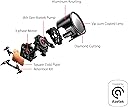
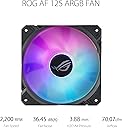
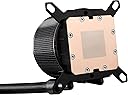
The ASUS ROG RYUO III 240 ARGB is a high-performance all-in-one liquid CPU cooler featuring the latest 8th Gen Asetek pump for superior cooling efficiency, customizable Anime Matrix™ LED display for unique visual flair, and premium ROG ARGB fans that balance powerful airflow with quiet operation. Designed for broad CPU socket compatibility and crafted with premium materials, it’s the perfect fusion of performance and style for RGB enthusiasts and serious gamers.











| ASIN | B0BTRXVCRV |
| Best Sellers Rank | 169,559 in Computers & Accessories ( See Top 100 in Computers & Accessories ) 1,507 in Fans for Laptops |
| Brand | ASUS |
| Compatible Devices | Desktop, Server |
| Cooling Method | Liquid and Fan |
| Customer Reviews | 4.6 4.6 out of 5 stars (623) |
| Included Components | ROG RYUO III 240 ARGB |
| Item Dimensions L x W x H | 36L x 31.2W x 16.9H centimetres |
| Item Type Name | All-In-One Liquid CPU Cooler |
| Item Weight | 200 Grams |
| Manufacturer | ASUS |
| Manufacturer Part Number | 90RC00J1-M0AAY0 |
| Material | Aluminum |
| Max Rotational Speed | 1200 RPM |
| Model Number | ROG RYUO III 240 ARGB |
| Noise Level | 36.45 Decibels |
| Number of Items | 1 |
| Power Connector Type | 3-Pin |
| UPC | 195553927628 |
| Unit Count | 1.0 count |
| Voltage | 12 Volts |
| Wattage | 3 watts |
M**U
Not worth it
I bought this aio because it is ROG Strix and will match all my setup and also because the price was really attractive … well nope first it is connected using USB means you will have light even when PC is off unless you cut the usb power (means no charging port when pc off) then in less than a month fan started to flicker… this is really crap and quite noisy finally… don’t buy it, it not worth it…
A**O
Enfria bien mazizo el R7 5700X3D Por el espacio de mi gabinete este es ideal, pero no me arrepiento
J**H
Beast of an aio efficient cooling. Temps don’t go beyond 45 to 47 degrees during gaming.
M**S
Pretty good for the price.keeps pc cool.
A**S
Excelente enfriamiento ! A pesar de que mi gabinete es un poco restrictivo me bajó 10-15c con respecto a mi anterior enfriamiento un LC240 de la misma marca que llegaba hasta los 70-75c en un 5800x
G**U
This is a great AIO cooler. I have this on an unlocked 12th gen i9 processor running at a solid 5.2 GHz no issues. Swapped thermal paste for Noctua non-conductive. Fans are really quiet, pump is basically inaudible compared to the fans even running consistently at 100%. I have overclocked and ran in to memory issues before the CPU ever reached any sort of alarming point. I love the aesthetic of the cooler block. The circle with glass looks like a camera lens so it feels very retro futuristic. Pros across the board! ...except one... The lighting effects. Asus' Armoury Crate software is only ok when it finally works. I had to uninstall and reinstall all the Asus software a few times in a very specific order before I eventually got everything working (mostly issues with audio drivers and RGB for ram modules interfering). Took sifting through many reddit posts and forum complaints. I have all effects off for the most part except a VU meter on the anime matrix screen that responds to computer audio which was really cool, but be aware it doesn't support super high resolution audio outputs and the motherboard driver apparently messed things up... even though I have an Asus motherboard... so you'd think they would test basic compatibility within their own products... apparently not? Built-in lighting patterns are really cheesy and you basically end up with a very specific aesthetic or nothing. Luckily it looks really good without the matrix screen doing anything, so I am not going to knock off any stars. Oh yeah, and the default pattern or animation you set is what displays on the matrix screen when the system is powered off... so unless you disable the USB lead entirely in BIIOS at power-off state, it'll always be showing something stupid even if you don't want it to. The RGB on the fans is also not super accurate... whites are always leaning more blue/purple than even some cheap LED strips you can get. If you keep it on a specific color, just be prepared to tweak the tint on the fans a bit.
Trustpilot
2 months ago
5 days ago