We remain fully operational. Our teams are working around the clock to ensure your deliveries continue safely.

DOWNLOAD THE APP


Copyright © 2025 Desertcart Holdings Limited
DOWNLOAD THE APP


Buy anything from 5,000+ international stores. One checkout price. No surprise fees. Join 2M+ shoppers on Desertcart.
Desertcart purchases this item on your behalf and handles shipping, customs, and support to Vanuatu.
🚀 Elevate your Raspberry Pi projects with a touchscreen that keeps you ahead of the curve!
The Wisecoco 7 Inch Touchscreen Monitor is a premium HD IPS display designed for Raspberry Pi and compatible devices, featuring a sharp 1024x600 resolution, ultra-responsive 3-5ms capacitive multi-touch, and a wide 178° viewing angle. Its plug-and-play HDMI connectivity requires no drivers, making it perfect for professionals and makers seeking a portable, vibrant, and versatile secondary screen with a sleek, lightweight form factor.


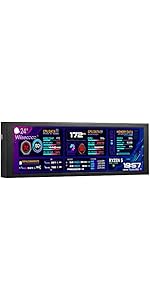
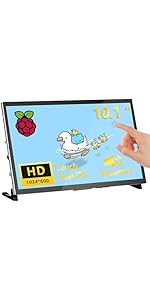


| ASIN | B0BRMWMK6X |
| Additional Features | Portable |
| Aspect Ratio | 16:9 |
| Best Sellers Rank | #169,416 in Electronics ( See Top 100 in Electronics ) #3,530 in Computer Monitors |
| Brand | wisecoco |
| Brightness | 500 Candela |
| Built-In Media | HDMI Port |
| Color | Black |
| Compatible Devices | Raspberry Pi, Computer |
| Connectivity Technology | HDMI |
| Contrast Ratio | 700:1 |
| Customer Reviews | 4.1 4.1 out of 5 stars (82) |
| Display Resolution Maximum | 1024 x 600 |
| Display Technology | LCD |
| Display Type | LCD |
| Hardware Connectivity | HDMI, Micro USB 2.0 Type B |
| Has Color Screen | Yes |
| Is Electric | No |
| Item Dimensions D x W x H | 0.5"D x 6.5"W x 4.8"H |
| Item Weight | 8.32 ounces |
| Manufacturer | wisecoco |
| Model Name | R070WS01T |
| Model Number | R070WS01T |
| Mounting Type | Desk Mount/Wall Mount/Panel Mount |
| Native Resolution | 1024x600 |
| Number of Component Outputs | 1 |
| Refresh Rate | 60 Hz |
| Resolution | HD |
| Response Time | 3 Milliseconds |
| Screen Finish | Glossy |
| Screen Size | 7 Inches |
| Shape | Rectangular |
| Specific Uses For Product | Business, Desktop, Gaming |
| Total Number of HDMI Ports | 1 |
| UPC | 602581769354 |
| Viewing Angle | 178 Degrees |
| Warranty Description | 1 year replacement warranty |
| Warranty Type | 1 Year Manufacturer Warranty |
A**R
very good side screen for widgets!
I wanted this for my widgets so I could see the time, temperature, etc., with a full screen program on the main monitor. works perfectly!
B**N
Good value, just some quirks with easy fixes
First of all the display actually looks quite decent to me, and the touch does work quite well. For the price I feel like you get a heck of a lot of display. I'm sure its great for projects if you're into that with its many mounting holes both on the sides and back. I totally understand its a project monitor so a stand is more of an afterthought, but the legs really could be just a little better. They're slightly different sized for a little wobble (Which I fixed with the included rubber pads thankfully). The nuts to secure the legs aren't too terribly hard with a small pair of pliers. The screws only fit the outside frame and can't mount to the screw holes on the back (because of the exposed caps on the board), which limit the angle you're able to display the monitor. If you the reader are able to get a housing 3D printed that would be ideal. Here's some issues I encountered and the fixes: -Touch not working: It must be plugged into the port labeled "5V + TOUCH", and it needs a quality power source. Some USB ports on a cheaper USB hub I had couldn't deliver enough power to run the touch capability. Try plugging it into a different power source. -Touch interacts with a different monitor on a multi-monitor setup Windows 10: Go to Control Panel, upper right corner switch to "Large Icons" click on "Tablet PC Settings" and click "Setup".
V**B
This is the one folks.
Not sure why the other people are giving this screen a hard time. Used ChatGPT to troubleshoot. This screen is clear, responsive, and works right out of the box. Using a Raspberry Pi 5, and no issues to report. The only complaint with it, is you can not control the screen brightness through the Raspberry pi OS natively. I believe this because of the way the OS works. Using it for a night stand planner, and I wanted it to auto dim with a light sensor, as well as two buttons on the main screen. After troubleshooting it, I needed to buy a "USB Switch and Multiplexer" to tap into the GPIO. It was 8 bucks, totaling to $41 for the screen and what I need.
M**A
The monitor may be OK but The feet don't fit
Can't speak about the quality of the monitor itself yet because I have not used it. However just frustrated with the fact that it comes with feet as pictured but no instructions on how to put the feet on. The screws are included with the package don't seem to be long enough to mount the feet in any workable fashion no matter how you put the feet on the Monitor. So far disappointed in this product because it's like others on the Amazon site but I chose it because it had the feet. update: After posting this Review WiseCoco Reached out to me and directed me to a video on Amazon's website showing me the procedure for installing the feet. After viewing the video I was able to get the feet installed with little difficulty. The bolt is just barely long enough to go through into the feet to reach the nut that it screws the bolt could be a little longer. Have not yet had an opportunity view the monitor because the project isn't quite ready yet. Will update at that point.
J**N
Great value, works with pc
Needed a little touchscreen to monitor a desktop pc that just backs up my office computers. This was a plug and play solution, allowing me to dispense with the keyboard/mouse/and monitor. The picture quality is great, the mounting holes made it easy to attach to the case. The colors look better than in my poor photo, viewing angles are fine.
T**B
Is what it is
Does what I wanted
B**!
Would be 5 starts if I could get the touch screen to work!
Great little monitor! I set it up with my pi 4 4gb model and I’m using it with a program called “solar assistant” which is a touch screen capable program made for the pi.. I bought this monitor so I could keep it next to my solar inverter and have full acsess and data/details of my entire solar setup and for that it’s working great! The only thing that’s not working is the touch screen so I’ve had to use a wireless mouse. I’m not sure why! I either got a bad screen or I’m doing something wrong. I have the Micro USB plugged into the “touch screen” power port but I’m currently powering the screen from a USB power bank.. i don’t see why the power bank could be causing this issue? I thought maybe it’s the cord I’m using so I will try and different cord and report back. As for the screen.. The screen is very well made, had a nice feel to it and is thicker than I thought which is a good thing as it’s less fragile than I thought:. The brightness is plenty (this is something I worried about as there is no brightness control) but trust me.. it’s plenty bright. I have only used it with my Pi 4 so far but the quality of the screen feels very good and it’s vibrant and easy to see in the sun or under bright lights. Overall I would buy this screen again for the $32 I paid for it. I just wish I could get the touch screen working. The only CON: I wish this particular screen had a power switch because as far as I can tell there is no stand by mode.. so if you leave it on for too long with the same image displayed your prolly gonna burn the image into the monitor: it woulda been nice to have a small switch to flip just the screen off when you know your not gonna be using it for an extended period of time.. then just flipping it on when you come back to it leaving your pi/or computer powered on. In my case my pi needs to stay powered as it needs to log data from the program I run so this is a bummer for me. Aside from those 2 things this is a 5/5 screen for the money! PS. Look online for 3d printed screen cases.. I found mine on thingyverse and after some slight modifications it fit perfect!
E**C
Works great
I bought two of these and tried it on three different power supplies with two different raspberry pis (3A+). At first it didn’t work because I had switched out my SD card from a rasp pi 4 to a 3A+. I didn’t think about there being software issues that would affect the display. Once I put new SD cards in the 3A+s, it worked great
A**R
No brightness adjustment using DDC/CI. Touch control, not very responsive.
T**N
Super Bild, funktioniert mit Pi4b, Odroid N, Touch läuft ohne Probleme
M**I
Display und Touch funktionieren gut. Füße sind grenzwertig. Die Positionierung des Raspberry an der Rückseite könnte deutlich besser sein.
Trustpilot
2 months ago
1 week ago