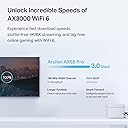
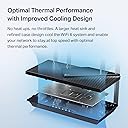
🚀 Elevate Your Home Network to Pro-Level Speeds & Security
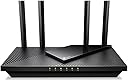
The TP-Link Archer AX55 Pro is a cutting-edge WiFi 6 router featuring dual-band AX3000 speeds, a 2.5 Gbps multi-gigabit port, and four high-performance antennas with Beamforming for expansive coverage. It supports MU-MIMO and OFDMA for efficient multi-device connectivity, includes robust WPA3 security and VPN capabilities, and integrates seamlessly with Alexa for smart home control. Ideal for professionals and tech-savvy millennials seeking fast, reliable, and secure home internet.


| ASIN | B0BTD7V93F |
| Antenna Location | Home |
| Antenna Type | Fixed |
| Best Sellers Rank | #146 in Computers ( See Top 100 in Computers ) #2 in Routers |
| Brand | TP-Link |
| Built-In Media | Power Adapter, Quick Installation Guide, RJ45 Ethernet Cable, Wi-Fi Router Archer AX55 Pro |
| Color | black |
| Compatible Devices | Amazon Echo devices |
| Compatible devices | Amazon Echo devices |
| Connectivity Protocol | Wi-Fi |
| Connectivity Technology | Wi-Fi (802.11ax, 802.11ac, 802.11b, 802.11g, 802.11n), Ethernet, USB |
| Control Method | App |
| Controller Type | App Control |
| Coverage | Boosted coverage throughout a house |
| Customer Reviews | 4.3 out of 5 stars 1,136 Reviews |
| Data Transfer Rate | 2976 Megabits Per Second |
| Frequency | 5.0 |
| Frequency Band Class | Dual-Band |
| Frequency band class | Dual-Band |
| Global Trade Identification Number | 00840030706806 |
| Has Internet Connectivity | Yes |
| Has Security Updates | Yes |
| Is Modem Compatible | No |
| Item Dimensions L x W x H | 26.1L x 13.5W x 4.1H centimeters |
| Item Type Name | WiFi 6 Router |
| Item Weight | 1.2 Pounds |
| LAN Port Bandwidth | 2500 Mbps |
| Manufacturer | TP-Link |
| Maximum Upstream Data Transfer Rate | 2500 Megabits Per Second |
| Mfr Part Number | Archer AX55 Pro |
| Model Name | Archer AX55 Pro |
| Model Number | Archer AX55 Pro |
| Model name | Archer AX55 Pro |
| Number of Antennas | 4 |
| Number of Items | 1 |
| Number of Ports | 5 |
| Operating System | TP-Link OS |
| Other Special Features of the Product | WPS |
| Router Firewall Security Level | basic |
| Router Network Type | Wireless |
| Security Protocol | WPA3 |
| Special features | WPS |
| UPC | 840030706806 |
| Unit Count | 1 Count |
| Voltage | 12 Volts |
| Wi-Fi Generation | Wi-Fi 6 |
| Wireless Compability | 802.11ac, 802.11ax, 802.11b, 802.11g, 802.11n |
| Wireless communication standard | 802.11ac, 802.11ax, 802.11b, 802.11g, 802.11n |
V**F
Good
One
C**J
Good
Really Good Router Good Price as well
S**N
Outstanding Value and Flawless Performance for High-Speed Internet
Our company recently decided to tighten expenses and look for ways to cut costs. As part of that, we switched internet providers to lock in a fantastic deal on a 1.2 Gbps high-speed plan. However, my old router simply couldn't handle those kinds of multi-gigabit speeds. I went on a search for an affordable, wireless router that could maximize our new plan without breaking the bank, and that is exactly when I found the TP-Link Archer AX55 Pro (AX3000).This router has been an absolute game-changer. Setup & Ports The setup process was incredibly fast and easy. It features 2.5 Gbps ports, which means it easily handles our 1.2 Gbps provider speeds with room to spare. Right out of the box, I was able to plug my company computer and my personal computer directly into the back of the router for a rock-solid, ultra-fast wired connection. Wireless PerformanceWhile our main computers are plugged in, the rest of my house runs entirely on Wi-Fi. We have a heavy load of connected devices—including multiple smart TVs, security cameras, and a complete home security system. This router handles the heavy traffic flawlessly. There is zero lag, no dropped signals, and everything operates seamlessly at peak performance. Verdict If you are upgrading to a high-speed internet plan and need a reliable, easy-to-use, and budget-friendly router that can handle both heavy wired use and tons of smart home Wi-Fi devices, you should heavily consider this router. This TP-Link router delivers premium performance at a great price point. Highly recommended!
ع**ي
راىع انصح بع
ممتاز جدا
G**S
Steady , no observed connection timeouts 3m now
Steady , good performance , supports multiple VPN providers , including ProtonVPN
N**D
تغطية مساحات كبيرة
افضل راوتر جرّبته
A**U
Solved years of Wi-Fi issues in under an hour!
I’m writing this initial review after 24 hours of using this router, and I couldn't be happier. I finally decided to send back my rental router from Spectrum and replace it with this TP-Link unit. For years, I put up with terrible Wi-Fi performance, constant buffering, and random dropouts. I knew the overall service coming into the house was fine because my hardwired PCs consistently got over 400 Mbps—the issue was purely the rental router. Coverage in My Home: For context, I live in a 2-story, ~2,100 sq. ft. home. We have a strict "no Wi-Fi upstairs" rule for healthy living, so my primary goal was rock-solid coverage throughout the entire ground floor. It has a spacious, spread-out layout (living room, office, dining room, main bedroom, large kitchen, playroom, and mudroom), and this single router covers the whole 1st floor effortlessly with strong signal quality in every room. Setup Tip: The price was great, and setup was straightforward. However, I highly recommend using the mobile app only for the initial basic setup, then switching to the web interface on a hardwired computer for fine-tuning. Adjusting Wi-Fi settings on a device connected via that same Wi-Fi can cause connection hiccups while the router applies changes. Being hardwired makes tweaking settings seamless. The Results: After months of video buffering on my Fire Stick and Roku, dropping to pixelated streams, and doing daily router restarts, everything is fixed. Streams immediately hit crisp 4K and stay there. Zero buffering, zero dropouts, and zero headaches. Why It Works Better: ISP routers lock you into simplified settings. Spectrum forces a combined 2.4 GHz/5 GHz connection with no option to manually set channels or channel widths. The TP-Link interface puts total control back in your hands: Separate 2.4 GHz and 5 GHz SSIDs Full control over channel selection and channel widths for both bands Advanced features like VPN support, Mesh, guest networks, and a USB port for network storage (which I plan to use soon) If your main goal is to eliminate poor Wi-Fi coverage and take control of your home network, this router completely delivers. Highly recommended!
Trustpilot
2 weeks ago
1 day ago