Buy anything from 5,000+ international stores. One checkout price. No surprise fees. Join 2M+ shoppers on Desertcart.
Desertcart purchases this item on your behalf and handles shipping, customs, and support to Vanuatu.
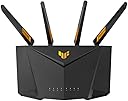
๐ Dominate your digital domain with ASUS TUF AX6000 โ speed, security, and coverage that never quit!
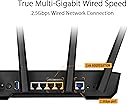
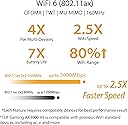
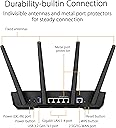
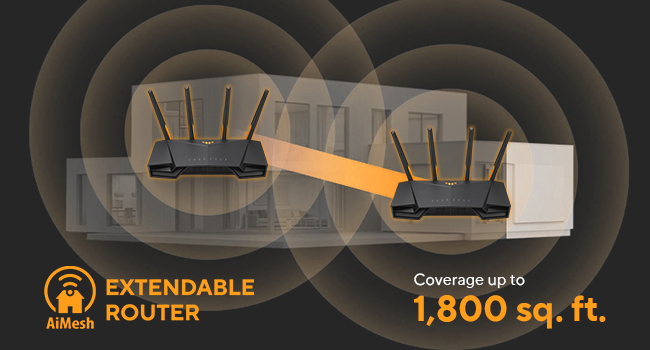
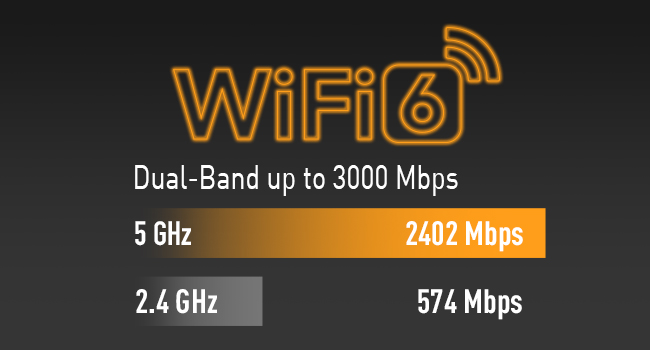
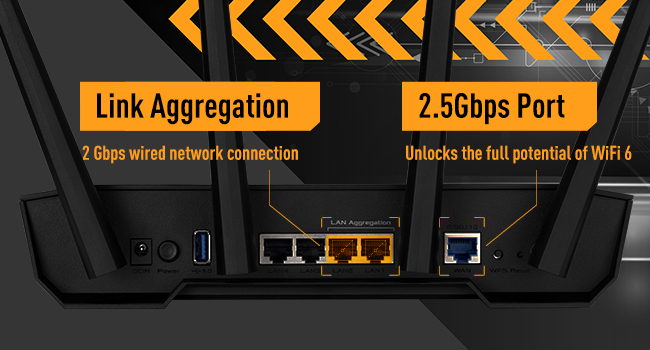
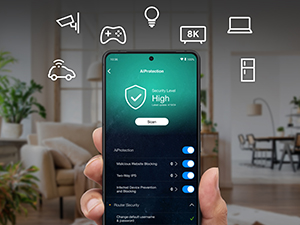
The ASUS TUF Gaming AX6000 is a powerhouse WiFi 6 router delivering ultra-fast 6000 Mbps dual-band wireless speeds, dual 2.5G Ethernet ports for high-throughput wired connections, and advanced AiMesh support for seamless whole-home coverage. Designed for gamers and professionals, it features subscription-free network security, Instant Guard VPN, and a dedicated Mobile Game Mode to prioritize gaming traffic. Its robust quad-core CPU ensures smooth performance even under heavy loads, making it an ideal upgrade for demanding home and office networks.


| ASIN | B0B3NCPLY2 |
| Antenna Location | Gaming |
| Antenna Type | Fixed |
| Best Sellers Rank | 10,486 in Computers & Accessories ( See Top 100 in Computers & Accessories ) 82 in Routers |
| Box Contents | AX3000 router, set up guide |
| Brand | ASUS |
| Brand Name | ASUS |
| Colour | black |
| Compatible Devices | ASUS AiMesh Device |
| Compatible devices | ASUS AiMesh Device |
| Connectivity Protocol | Wi-Fi 6 |
| Connectivity Technology | Ethernet, Wi-Fi |
| Control Method | App |
| Controller Type | Push Button |
| Coverage | Home/Office |
| Customer Reviews | 4.0 out of 5 stars 182 Reviews |
| Data Transfer Rate | 3000 Megabits Per Second |
| Frequency | 160 MHz |
| Frequency Band Class | Dual-Band |
| Frequency band class | Dual-Band |
| Is Modem Compatible | No |
| Item Dimensions L x W x H | 26.5L x 17.8W x 18.6H centimetres |
| LAN Port Bandwidth | 1000 Mbps |
| Manufacturer | ASUS |
| Manufacturer Part Number | 90IG0790-MU9B00 |
| Maximum Upstream Data Transfer Rate | 3000 Megabits Per Second |
| Model Name | 90IG0790 |
| Model Number | 90IG0790-MU9B00 |
| Model name | 90IG0790 |
| Number of Antennas | 4 |
| Number of Ports | 4 |
| Operating System | ASUSWRT |
| Other Special Features of the Product | Internet Security, QoS |
| Security Protocol | WPS |
| Special feature | Internet Security, QoS |
| Wi-Fi Generation | Wi-Fi 6 |
| Wireless Compability | 802.11ax |
| Wireless communication standard | 802.11ax |
M**E
Excellent router at a good price
This is my first ASUS router. I have only used Netgear routers until now (I have about 5 previous ones now unused and gathering dust. I did a lot of research (wasted days) before selecting ASUS. I understand technology very well, with decades of experience; hence have the ability to understand most technical features and aspects. ***** Summary: I like this router very much; it is better than some other brands which cost more than 2-3 times the price. I highly recommend it. I will never be going back to my previous brand mentioned above. ***** The Good: ** No marketing gimmicks; no pushy tactics to buy monthly subscription, and subscription is NOT required. ** Setup with app, or by using the web interface. ASUS does not push their mobile app like other companies; although it has a good app (as an advanced user, I do not use the app) ** Price is excellent; you get a fast CPU and hardware. Connection speeds are good. ** Signal / connectivity at 2.4Ghz and 5Ghz bands is very stable (if using just one router make sure to turn OFF the Roaming Assistant setting in options: (under Advanced Settings) Wireless --> Professional (tab on top) --> set Roaming Assistant = Disable; then you must click Apply yellow button at the bottom of page, to save your setting. Change this setting in BOTH 2.4Ghz and 5Ghz (under Band setting on top of page, and save both) ** Physical construction - very good ** Uses open source base software (a good thing) ** Comes with multiple plugs for UK and Europe (in UK) ** Has LEDs for main functions, so that you can check things at a glance ** For non-technical users, it offers very simple, quick setup ** For people who understand networking or want to learn about networking or are true experts in the inner workings of WiFi standards and TCP/IP protocols, there are an enormous number of advanced settings, far more than most domestic and even SOHO routers. ***** The Bad: I have found nothing bad. ***** Of course everything can be improved. ** Provide a detailed PDF version of the manual (although searching on Google for settings - if needed at all - will work). ** Some options for filtering outbound traffic (e.g. if you have children) should be grouped under one section - NOT separate; and for each option (e.g. URL filtering, MAC filtering, IP filtering, etc) a setting of time/day setting for each item should be offered. So, I should be able to say - e.g. block this URL(s)/IP/MAC, from Mon - Fri, from 9pm to 7am, and Sat/Sun from 10pm to 8am. (VERY important and needed by smart parents!) ** For settings where one needs to enter a MAC address, ASUS needs to offer a drop-down for MAC address, where when clicked, the drop-down must show a list of all devices currently connected, and also connected in the past (separately grouped), AND next to each MAC address it should also show Host Name and IP Address. This will make it easy for users to add filters; no need to remember/note MAC addresses. Make it more point-and-click. ** There should be a setting for DHCP - expire a specific IP/device lease. ** There should be a setting for DHCP lease period. ** In-bound traffic dropped packets should be logged with more clarity. Add more (common) details to log files. ** There should be a setting for exporting log file. ** How about option for emailing an alert message, when a rule is triggered? (e.g. errors, problems, attack detected, etc) As I mentioned, it is a great router (I of course desire options which most people will never need, but are very easy for ASUS to add; which will make the router even more attractive for advanced users who have children (that is a BIG market!) My suggestions require only the software/firmware to be enhanced.
F**R
Great Router. Use the latest Firmware to avoid issues though!
REVIEW I recently upgraded to Virgin Media's 1Gig package so I decided to upgrade my Router. I always use my Virgin Hubs in Modem mode as I've always found their inbuilt Wi-Fi somewhat lacking. I was supplied a new Hub 5 Router from Virgin which has a 2.5Gbps port so I wanted to take advantage of that by buying a new router with a 2.5Gbps Wan port. I was originally going to buy an ASUS RT-AX86U 5700 but (1) it was a bit pricey at ยฃ240.00 and (2) I don't really need a lot of Wi-Fi bandwidth as most of my hardware is connected via ethernet. I noticed the AX-3000 v2 had not long been released and had the requisite specifications so I thought I'd try it out. Having used it, I have to say that for my purposes it is excellent value for money. I took advantage of the Lan Link Aggregation feature of the AX-3000 v2 by combining Ports 1 & 2 connected to my to my Netgear Multi-Gig Switch. Now the PC's I have with 5g and 10g NIC's regularly get 1140Mbps download speeds. If you can't take advantage of the link Aggregation feature as I do, then you can expect 950Mbps download speeds from devices connected via the 1g Lan Ports. For those more interested in the The Wi-Fi performance, both the 5G and 2.4G signal is excellent. With my previous TP-Link router I was lucky to get 40Mbps downloads in my kitchen which is the furthest point from the router. With the AX-3000 v2 I'm getting 180-200Mbps downloads, 45Mbps Uploads. In closer proximity I'm achieving 450Mbps + downloads and 52Mbps uploads. At around ยฃ100.00, this router offers excellent features and lets me get full performance and value from my Virgin 1Gig service. I can't recommend it highly enough.
S**Y
Range Sucks; Quality-of-Service Broken. Do Not Buy.
This router sucks. Plain and simple. Let me explain: first, the actual wireless range is worse than my Virgin Media Hub. My phone intermittently disconnects in rooms in which it didnโt previously prior to installation. Second, the quality-of-service feature does not work at all. When enabled, it will completely stop downloading or uploading packets. To fix it, you need to factory reset the router. This was a big reason for buying this router, and it just doesnโt work. Waste of money.
M**E
Excellent, did the job and replaced a powerline adaptor.
Picked this up during the prime sale as had been having issues with the powerline adaptor going from our house to our cabin at the bottom of the garden. Instead placed this in the kitchen (about halfway between the cabin and the main router) and bam, problem sorted. Was previously getting 2mbps up/down on the powerline, now getting 40, outstanding, the streaming from the cabin now works much quicker and has upscaled the quality to fit the faster connection. Setup was very easy with the app, seems the desktop web interface and the app have slightly different options to each other in different places which is a little confusing however with a little bit of poking about I was able to get those items in the cabin to only connect to the new node. The firmware on ASUS routers is all open-source, this means anyone can look at how it all works, ruling out any information gathering that might be going on behind your back with other solutions, working in IT myself this was of utmost importance to me. Don't be put off by the gamer-ness of the routers, they're solid, easy to use, and reliable, even if they do look like somebody has chopped off a bit of a transformer and stuck a router in it.
G**W
Solid add on to a mesh network
This router was used as an extra node for an Asus Mesh network. It was very simple to add because I used hard line cable between each node. Up and running with 5 minutes from unboxing and haven't had a single issue since. Specification list is correct - it's big and relatively cheap.
F**D
The best addition to your internet connection
If like me you upgraded to BT's 1Gbps full fibre to the home, with a new fibre optic cable installed from the pole to your house and expected amazing wifi speeds, then you WILL be disappointed! Along with the upgrade you also have to switch to the digital phone line, but that's going off topic. So, with the new upgraded internet connection of 1gig down and 110Mbps up, I was expecting a wifi connection of more than 400-500Mbps. How I was sadly disappointed and after a pointless call to BT, they said I should be happy to get 200-300Mbps from their smart hub through a 5Ghz connection. Sorry this makes no sense to me to settle for this rubbish speed when you have 1Gbps download speed. .....And then I did my research and bought this Asus TUF Gaming AX3000 V2 didn't I ! Who's winning now? I am the first person who had wifi 6 within my vicinity of wifi range from my house and not having interference with 2.5Ghz and the now becoming more congested 5Ghz. Wifi 6 is a game changer with this router, you get an app or can use a web gui to adjust settings and get lots of stats on your connection. You can block certain devices at certain times (kids, wink wink), and have parental controls. It's funny how the companies market such controls, as if it's something new and only with said company, can you get these benefits, but doing a little research you have all the control and more on your smartphone without having to sign up to said companies. You are able to even control speeds of devices from draining your bandwidth, or you can setup a guest wifi network. Friends coming home always asking for your wifi network password, well you can now put them on a slow speed network to not congest up your devices like Amazon Fire TV or Chromecast and not get interrupted when streaming etc. Remember friends only need to be able to typically get messages on whatsapp or maybe a few instagram videos, which would be plenty. If you have a xmas party at home and everyone wants to connect to your network, and you also want to watch the Harry Potter on streaming, then you don't want to run into buffering mid film, so having the ability to limit the bandwidth on certain devices if you don't have a fast connection can be very helpful. If you are a gamer, you can route traffic to your specific device to reduce lag times. See Asus' website for more details on the things you can do with this router. How is the wifi speed you say? Well I am using a Samsung galaxy S22 Ultra and with wifi 6 supported, the wifi icon changes to display a '6' in the wifi icon, if you didn't already know that you are on wifi 6, and makes you feel that bit more smug about yourself. LOL. Average download speed ranges from 350 - 850Mbps and i get the full whack upload speed of 110Mbps every time unless you have a poor connection by being further away from the router. This is the average over a long period of time of testing at different times in the evenings at peak times. The lowest was ever was 350Mbps but it's more closer to 500Mbps. Please note, the wifi connection varies due to many external factors but the ethernet connection is where you will get consistent maximum speeds of your connection. in my case, i get 932Mbps through ethernet and max wifi 6 speeds tops at around 800-880Mbps. Also note, the older the equipment gets, the signal deteriorates because it's constantly on 24/7/365 and degrades in quality. If you are suffering from crap internet speeds, check the wifi signals using a wifi scanner app to see how many other neighbours wifi is using the same radio frequency as your connection to help decide if you should upgrade. There are ways to change the wifi channel number to help create some distance between yours and other peoples wifi but if you aren't technically minded, this will bamboozle your mind. But if you are here reading about this Asus TUF Gaming AX3000, then i assume you know why you are here and you know what you are doing and looking for. So if you have a fast connection and the wifi hub that came from the supplier, ie, BT doesn't do you justice for what you a paying your hard earned money for and you want a the wifi icon with a '6' in it, then buy this Asus TUF Gaming AX3000!
D**N
Relatively cheap for the feature that offers
I have returned this one because mostly when used in combination with a VPN server the up/down speeds were not stable enough to keep 900mbps optical fiber but I guess if you do not use VPN server feature it does offer high wifi speeds and features. The main reason I purchased it was the wireguard VPN firmware. If you want an affordable router that does all this go for it.
J**8
Solid performer
Bought to replace my old ASUS RT AC-66U, 9 years old and starting to show errors, this new one is very good, with Wi-Fi 6. I'm not too keen on the gold font in the web interface (pandering to the gaming fraternity), but the interface is similar to my old one. It has some quite good anti-spam, anti-hacking and anti-malicious website protection, updated by Trend Micro, and a 2.5Gbps WAN connection (if you can get it). The Wi-Fi range seems a bit better. Altogether, worth the money.
Trustpilot
3 weeks ago
2 months ago