Buy anything from 5,000+ international stores. One checkout price. No surprise fees. Join 2M+ shoppers on Desertcart.
Desertcart purchases this item on your behalf and handles shipping, customs, and support to Vanuatu.
โก Upgrade your connection, secure your world.
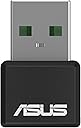
The ASUS AX1800 Dual Band WiFi 6 USB Adapter (USB-AX55 Nano) transforms any compatible PC or laptop into a WiFi 6 powerhouse, delivering up to 2.4Gbps on the 5GHz band with advanced OFDMA and MU-MIMO technologies. Its compact design fits discreetly into USB ports, while WPA3 security ensures robust protection. Compatible with Windows and Linux, itโs the perfect plug-and-play solution for professionals demanding fast, reliable, and secure wireless connectivity.


| ASIN | B0BQ1DLLCM |
| Best Sellers Rank | #68 in USB Computer Network Adapters |
| Brand | ASUS |
| Built-In Media | Quick Start Guide, USB-AX55 Nano Dual-band Wireless AX1800 Adapter, Warranty Card |
| Color | BLACK |
| Compatible Devices | Desktop, Laptop |
| Compatible Operating System Family | Linux, Windows |
| Customer Reviews | 4.1 out of 5 stars 458 Reviews |
| Data Link Protocol | USB |
| Data Transfer Rate | 1800 Megabits Per Second |
| Hardware Interface | USB |
| Item Dimensions L x W x H | 1"L x 0.63"W x 0.35"H |
| Item Type Name | Router |
| Item Weight | 0.01 Pounds |
| Manufacturer | ASUS |
| Mfr Part Number | USB-AX55 Nano |
| Minimum Required Operating System Version | Ubuntu 22.04 Jammy Jellyfish, Windows 11 |
| Model Number | USB-AX55 Nano |
| Product Dimensions | 1"L x 0.63"W x 0.35"H |
| UPC | 195553760751 |
| Unit Count | 1.0 Count |
| Warranty Description | 3 years warranty |
L**S
Works Perfectly
Like a few other comments pointed out, I don't understand the negative reviews this has received. It does run a little warm, but beyond that it works flawlessly. First, be sure you understand the ports on your computer and the limitations of older hardware. If you plug this into a older USB port, you will be limited on speed. It works just fine on the USB 3 port I use. Second is to be sure to use the Asus driver, not Windows; though I will say Win10's generic AX driver did a decent job before I upgraded to the Asus. You can generally tell the difference between USB 1.0, 2.0, and 3.0 by color alone. While the size and shape may be identical, the key is to look at the color of the plastic inside the device. The USB 1.0 features a white plastic color, while USB 2.0 is black, and the USB 3.0 is blue. USB 1.0 only had a data transfer speed of 12 Mbs, but was later sped up to 480 Mbs. USB 2.0. 3.0 and 3.1 have since improved upon this speed by bringing it up to 5 Gbs and 10 Gbs, respectively. Note you will never reach those max speeds on any USB device as it is benchmark values, not real world. Also regarding data transfer, the USB 2.0 and older models are only capable of processing data in a single direction at a time, but newer 3.0 and 3.1 models allow for data transfer in both directions. This means that data can be sent and received simultaneously. The speeds above are shared totals, not each direction at the same time To understand more Google for yourself about USB and the difference between Mbs/MBs and Gbs/GBs. In sum, this product connects to my WiFi 6, and is just as fast as my other WiFi 6 clients on the network from similar distances. I plan to get another one.
H**C
Significant savings not having to trouble-shoot wireless issue
Wireless would not function. diagnostics couldn't identify specific problem. Plugged in the adapter and was back in business!
N**O
Compact installation
Works Great. Nuff Said!
L**9
Don't waste your money or time!
I bought this and it worked LIGHTENING fast!!!....for about 3 days. Then...all of a sudden it barely works. It constantly drops signal and must reconnect. It's slower than my old adapter and NEVER exceeds 1.5mbs download. Yes, the drivers are updated and everything else is working. I plugged in my old adapter to test it...and yup...even my older one is faster. FAIL.
N**O
Good solution for non-nerds
Comes with drivers. After installing the latest drivers, my laptop would not shut down correctly; eventually the laptop blue-screened in Win 10. The device runs hot. A second sample worked well, no problems, good speed. It is rather expensive. I finally went with an Intel AX210 NGW, an internal M.2 card that replaces the card in a laptop. The internal card makes use of the laptop antennas, which should provide better range and stability than the small Asus antenna. For those who are averse to opening up their computer, the Asus would be a reasonable solution if you get a working one.
J**R
Excellent
Excellent
K**T
way better than stock wifi connection speed
I put this in a usb3 port on my older Lenovo laptop and got upwards of 2mbps connection speeds to my new Wifi6 Velop system. The built in unit wasn't too fast but this made a noticeable difference especially when doing VPN and RDP to remote work computers.
T**U
Underwhelming and hard to install
I got this dongle to connect to my Wifi 6 network. It did not even see that network. And that was after me spending half an hour trying to get it to work. The computers (Windows 10 and 11) did not find the drivers automatically, and even the manufacturer's drivers did not want to install properly. I had to manually find the drivers in Device Manager, which is not something a casual computer user would be able to do. Even after I managed to get it working the performance was middling in comparison to what my laptop could do with its built-in Wifi. But that's to be expected from this form factor. But since it was so hard to install and it didn't even support Wifi 6, I'll be returning this disappointed...
T**Z
Top Produkt
Sehr gutes Produkt !!!
S**B
Work ok, but not better then internal intel wifi on laptop
I bought it as hoped it might work better if the Wi-Fi adapter is further from the laptop case (where all USB3, and power interference are). It did help HUGELY with Bluetooth, so that was a motivation. Unfortunately, it did not help at all. Seeing the same download speed. And way worse upload speed. According to speedtest.com: ethernet: 500M in, 500M out internal intel wifi: 200M in, 200M out this asus nano: 200M in, 50M out
Trustpilot
2 weeks ago
3 weeks ago