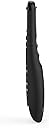
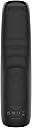
🎯 Master your media universe with SofaBaton U2 — control redefined, convenience amplified!
The SofaBaton U2 Universal Remote consolidates up to 15 remotes into one ergonomic device featuring backlit buttons, an upgraded scroll wheel, and a 35-foot enhanced infrared range. With app-based smart setup, customizable macros supporting up to 10 commands per button, and compatibility with over 500,000 devices across 6,000 brands, it offers professional-grade control for smart TVs, soundbars, Blu-ray players, and more. Its raise-to-wake OLED display and Bluetooth connectivity elevate usability, making it the ultimate all-in-one remote for the modern connected home.


| ASIN | B0BYYHRR27 |
| Additional Features | Digital Display, Ergonomic, Lightweight, Pre Programmed, Universal |
| Battery Type | battery_type_aa |
| Best Sellers Rank | #19,435 in Electronics ( See Top 100 in Electronics ) #872 in Remote Controls (Electronics) |
| Brand | SofaBaton |
| Color | Black |
| Compatible Devices | DVD/Blu-ray Player, Home Theater, Set Top Box, Stereo System, Television |
| Connectivity Technology | Bluetooth, Infrared |
| Controller Type | Android App, iOS App |
| Customer Reviews | 3.6 out of 5 stars 728 Reviews |
| Item Dimensions L x W x H | 8"L x 2"W x 1"H |
| Manufacturer | SofaBaton |
| Max Number of Supported Devices | 15 |
| Maximum Number of Supported Devices | 15 |
| Maximum Range | 35 Feet |
| Mfr Part Number | U2 |
| Model Name | SofaBaton U2 Universal Remote |
| Model Number | U2 |
| Number of Batteries | 2 AA batteries required. |
| Special Feature | Digital Display, Ergonomic, Lightweight, Pre Programmed , Universal |
| UPC | 795063906689 |
J**S
Super Easy Setup
The remote itself has all the buttons you would expect on a universal remote, and delivers signals without any trouble, even to devices that are not your typical A/V components. It has a scroll wheel to change between any number of devices (I have not reached a limit yet), and, while there is a known issue with certain batches of these remotes where the wheel does not work as expected (it's a very noticeable control issue when it happens), the company is very quick to respond to and correct the issue. You can even submit the report directly through the app. Speaking of the app, it is amazingly easy to use. Initial setup is a simple pair of the remote (the app walks you through this), and then adding a new device is as easy as searching a database by brand and model #. For advanced needs, you can modify any of the buttons in a device profile, and can learn any (or all) buttons directly from existing remotes. In addition, you can reassign buttons on one profile using functions from another profile. So if you want your media player to control your TV power, just reassign it! Same goes for audio pass-through. You don't need to choose a specific device for all audio control, just reassign the buttons to what volume up/down/mute/etc. you want. (Pro tip: You can't reassign buttons from a bluetooth profile to an IR one--HOWEVER, you *can* learn buttons from a bluetooth remote into an IR profile) The remote even has macros, although I have not used that functionality yet, so I can't speak to how it behaves, although I suspect it is also a very well-designed feature, based on the rest of the remote. Very well done, SofaBaton, you have made a long-term customer for all of my remote needs.
C**R
Good universal remote with excellent support
Good for replacing all your existing remotes. Also good for replacing my failing and discontinued Harmony remote. Amazingly fast support via email or chat via website or within the phone app. My first U2 had a freeze up problem. Support immediately sent me a replacement. Pro: • 80% of my devices were already in their database and it was easy to learn from my remotes that were not in the database. • Most common remote keys including a numeric keypad. • Scroll wheel for quick switching between remotes. • Easy to create remotes that combine keys from multiple other remotes (activities) so that you can control all parts of a home theater with one remote. Examples would be to watch TV or watch Roku. You download a second copy of the main remote for the activity then reassign some of the keys on the activity remote from the other remote functions. Example: For watch TV, download another copy of the cable set-top box remote then assign the volume keys from the TV remote to the activity remote. Now you have a single remote that controls the set-top for channel selection and the TV for volume control. You create macro commands to sequentially turn on the set-top box and the TV and another macro to sequentially turn off all parts of your home theater. • Phone app makes programming the remote fairly simple. Con: • Instructions are very limited and only cover adding your existing remotes. It takes some trial & error to learn creating combined (activity) remotes. • No way to back-up or save the remote configuration. • Phone app needs to be killed, by ejecting it from recent apps, and restarted sometimes to fix strange behavior. • You should manually write down how you have assigned buttons on combined remotes before you forget. • In order to combine buttons from a remote that was learned from an original remote, you may have to create a single step macro. In some cases learned buttons cannot be reassigned to an activity remote but can be assigned to a macro.
M**T
Useless without app access
This remote does nothing without their app. The app won’t load with a yahoo mail account, a proton mail account, or my particular gmail account. Several attempts at tech support were not useful beyond issuing a full refund for my purchase price. Support takes 5-12 hours for a response, in spite of being told 2-4 hours for their response time. I had to cancel the free trial for their app because my week ran out and never had a chance to even find out if it is compatible with my equipment. I’m still awaiting the conclusion of this comedy because I refused to give up trying to get an account set up. If and when that happens, I’ll edit my review. For now, I’m 48 hours since their last reply. The moral of this story is, I got fully refunded on this remote and I still feel like it was overpriced. I absolutely cannot recommend this remote under any conditions, unless you simply lack human connection and a 12 hour time gap with someone who doesn’t understand you. In which case a random chat website would serve you better. Buy at your own risk after reading this. Update: Once the remote gets access to the app it actually works well. Subjecting yourself to the to daunting task of syncing everything together is nothing short of monumental. I live in a tech forward household and this was at best frustrating. Other remotes by a famous peripheral manufacturing company were (and still are) exponentially better. I like the button layout on this remote. I like the backlit buttons. I dislike the setup process, the app itself and the lack of model support for the list on the menu. I’m not sure if not having my exact model of television caused my frozen screen glitches or not, but I had to do a factory reset on my tv and I haven’t used the remote since. I just grossly overpaid for a new old replacement remote and am back to a harmonious relationship with my devices. I’ll keep this remote as an emergency backup just in case, but I don’t like all the drama of the login/setup process. Add the glitch to the mix and I’m unsure if my webOS update caused it or the remote but I’m not gambling on adding all those accounts back in. I do see how people like this, I’m just not in the crowd because of my hassle, but if you get straight into the login, this would be a much different story. Don’t forget to actually read this EULA as well.
P**N
Very flexible, easy setup, controls all my devices
I had a Logitech Harmony remote, but that one died and the product line was terminated. I did look at Sofabaton a few years ago, but their library did not have all my devices. I saw a positive review from channels I trust, and it was on sale, so I tried again. Today the library of devices is extensive, and the setup was easy. Then came the hard one: my Kodi/Raspberry Pi streamer. No Kodi was listed, but there was a Bluetooth keyboard. Since Kodi has tons of keyboard shortcuts, I tried it. How Bluetooth switches between setup and device control was confusing at first, but once you trust that Sofabaton does it right and you accept to let it go.. it works. I was impressed. The arrow keys worked right away, so I knew success was in my reach. I quickly understood how to remap the keys, a really easy process with minor quirks. I did not originally plan to use Bluetooth, but I am now glad it is there. I also tried the learning mode, and was confused at first. After you realize when to use the Sofabaton or when to use the app, it goes well, is quick and easy. Once I understood how the setup worked, I went for max comfort: how to make the sound level +/- keys always control my AVR (not the selected device) and how to make selection of input really simple. The smart phone app is _really_ good. Even while the Sofabaton features are not as advanced as the Harmony, I was able to achieve a more satisfying result with less effort. You have to repeat some setup for each devices, but you don't have to commit to hours of programming training like you needed to setup the Harmony. The Sofabaton is an impressive combination of simple and flexible. In the end you can do what you want thanks to a very user friendly interface. Some comments refer to Bluetooth not working well. It worked perfectly at first, then I found that it may take one or two touch before it reconnects. A bit annoying but not a huge deal for me. I feel that Sofabaton could improve the product usability by not disconnecting so early on inactivity.. That might be necessary to save battery usage? Last but not least, I no longer get the remote desynchronized on sequences commands (multiple devices) like regularly happened with the Harmony (the Logitech process for resynchronizing is a badly designed, lengthy morasse!). Overall I highly recommend this device. Sofabaton is a Chinese company: this might be a turn off to some. It is still worth it nonetheless.
S**2
50 dollar holler, Ain’t hollering anymore.
UPDATED REVIEW: SCROLL DOWN A BIT—- :-( “Fancy feature packed universal remote at an amazing value!! Setup is soooooo easy via smart phone and the pre loaded remotes codes are handy. Learning capabilities are the easiest I have ever used, with that it works my fireplace too!!! WOW! This remote is GREAT! $50 dollar holler!! The over priced Logitech remotes will just fade into the abyss because the SofaBaton came to slay the day!! Super easy to use. Only draw back is the keys are not backlit (easy fix cough cough!) and it doesn’t work with the wonky PS3 remote, not a big deal I only really use that as a Blu-Ray player anyhow. With the learning capabilities it can even work my weird RV dvd radio combo! RV People this is the remote for you!! Did I mention it is only $50!!! Even my pessimistic spouse loves it!! Do yourself a favor and stop laying 3+ remotes beside you at all times.” NEW UPDATE EDIT!!!!! 2/26/2025 So yea I loved the remote when I first got it. But TWO remotes later (first replaced with company) I had the same issues with the second one that I did with the first. Biggest issue: the scrolling roller faults. Did that on BOTH remotes. And it eats Batteries!! Like the Cookie Monster -Om Nom Nom! Could I have gotten a 3rd remote? Probably, as the replacement lasted LESS THAN A YEAR —same as the original remote. But do I want to go through that replacement process again and reprogram a new remote- and it FAIL less than a year later?! NO, NO I DO NOT! Fool me once, shame on you. Fool me twice, shame on me. Fool we thrice- yea I am not doing that! Two strikes and you are out. In addition to the scrolling bar, the programming for my weird RV Westinghouse Roku TV never worked well on either remote- not to mention the Apple TV was so glitchy on both, but I do applaud Sofa Baton for putting Bluetooth on this value universal remote in the first place. Albeit it did not work well- ever. So in my next search for a universal remote I came across a GE cheap remote that does have backlit buttons ANNNND it is rechargeable. So far it has worked most of lmy devices including the Roku tv and Apple TV (Apple TV needs a line of sight for IR operation-one downside) You wanna know how much this backlit recharging remote from GE costs?? $18.00!!! Does it work the RV fireplace, NO. But I guess for that one device I can have another remote hanging around. The GE remote is Not Learning, but it does include weird codes for obscure electronics and at $18 with button backlights and rechargeable battery, it is a good replacement for a 2 and a 1/2 times the price remote that crushed my dreams of full remote integration. Maybe the $200 sofa baton is the supreme device, but I spent $300 on a remote that did do all smart home things for a while- and I waited one year for delivery on and then it was outmoded/not supported 3 years after I funded it on a kickstarter campaign- so i don’t have a lot of trust for the online app managed remotes anymore. One that need updates. So here I am representing a good old fashioned GE remote you can buy in a Walmart. But hey it works- and that is the point of a universal remote in the first place.
G**R
A just OK replacement for Harmony
Despite mixed reviews, I went with this remote because my Logitech Harmony remotes are wearing out. My setup includes a TV, separate AV receiver, Bluray player, Roku, and some OTA programming. As other reviewers noted, programming this remote is more challenging than the Haromony. While I was able to customize keys and create macros, it’s more complicated than the Harmony. I had to resort to YT videos for a couple of actions. While you can backup the remote keys, the app says macros aren’t backed up, so that’s a major drawback. Overall, the build quality seems just OK. The keys are loud, and sometimes, a press does nothing, and sometimes, one button press results in two actions on the device it’s controlling. Others have commented the scroll wheel doesn’t hold up. After a few weeks, it’s too soon to tell. Since acquiring this remote, my Blu-Ray player has mysteriously turned on a couple of times, but that could be from one of the dying Harmony remotes. Strange, though, as that’s never happened before. Pros: It had codes for all my devices It’s programmable Once programmed, it performed the requested actions Cons: Difficult to program Fewer dedicated keys and less screen options Buttons are loud and unpredictable – sometimes a press has no action, and sometimes multiple App doesn’t backup macro actions
L**P
Great U2 compact universal remote controller
Got it 2 weeks ago to replace all my remotes, especially for a LG HU85LA projector, Denon AVR-S770H and an old Daewoo DVD plyer in an AV system. Initial learning: The models of my Denon and Daewoo remotes were not in the DB list. I had to let them learn each button that I needed. Most learnings you have to long press and hold the original remote, but some buttons just need a quick click to learn. If failed to learn, repeat and it will be good. Found this tricks from their FAQ on the web. Sent feed back to add these 2 devices to database. Support told to try closer models if not listed exactly. That works too. MACRO: After initial learn for all these 3 remotes, I added MACRO (one key has many commands for different devices) to streamline the process, e.g. to turn on Projector, to turn on AVR, to set correct HDMI port, to select correct AVR input and sound effect. Attached pics to show some power key MARCOs. Projector takes 5-10 seconds to start up and taking commands after that. So in the MACRO setting, just need to add long sleep, max to 10sec. Only inconvenience is that when to use the MACRO key that has long sleep timer for next commands, you need to hold the remote steady and aim to the devices for whatever the sleep time need to let all commands taking effect. If just one quick click and put away the remote, some later commands in the MACRO will not be taken by devices as the remote is still sending commands. Also, to deal with the HDMI auto power/ARC to turn on other devices that compatible with HDMI-CEC, you do not need to add extra power on key in the macro as CEC will take care of powering up for you. Learned that added individual power in MACRO on will actually turn off the power as CSC already turned power on for you. If a device does not have HDMI-CEC, you do need to add power on on MACRO. One click to a MACRO key will do all magics to turn on power for all devices that required, change the HDMI input port for a device, setup correct the sound effect selection, etc. One click to turn them off once done. Making sure to level set all device at their powered off stage before use MACRO. Otherwise MACRO will so its thing but mess up the power on/off if a device was on before. No big deal, I just setup a key only doing power control in case you need to change individual device power. These sleeping requirements and HDMI-CEC tricks are not related to the remote itself but rather the original devices requirements. After played around it and get used to it, the setup is so simple and worked very reliably every time. All in all, this is a great smart universal remove controller that replaces all my remotes and added MACRO save my time to manage devices. Highly recommended.
J**D
Very difficult to set up
Update: Sofabaton corrected the database download for my device. After re-setting up, the remose seems to be working much better. Changed to 4 stars. ------------- At $60, infinitely more reasonable than $350 for Logitech Myharmony. But be prepared for frustration. Big issue #1... their customer support is not good. The only way to communicate with them is via chat. And their response time was three days and not particularly more helpful than what I could get online. Second, I got this remote to control my Vizio TV and Samsung soundbar with a single remote. You can set it up in a couple of ways, one of which is through a "database download" for your devices. I downloaded the button setup for my Samsung soundbar, and that worked as expected. However, the download for my Vizio TV definitely did not. It seemed to download the button setup as designed, but none of the buttons worked. So on to Plan B, which is to manually teach Sofabaton each button one by one. But...for each button, the setup "failed" up to 20 times until finally successful. Besides button setup, the only other major issue I have is that there is significant delay in the response time for the buttons. If you are scrolling down a menu on your device, you need to press the button for each down-move - you can't just hold the button down. And you need to hit the button very slowly. I often need to hit a button twice before it actually sends the signal to the device. Worth $60? Probably, but barely.
S**A
Best universal remote control
Excellent product.
K**R
Ücretini hak etmiyor Söylendiği gibi değil.
Bluetooth özelliği de var diye aldım ancak tanınmış bir kaç cihaz dışında cihaz tanımıyor. Diğer kızıl ötesi ile de cihazı tam tutturamazsan işlemiyor. Cihazlar arası geçiş için kullanılan tekerlek daha 2. ayda atlamaya ve teklemeye başladı kesinlikle bu paralara alınacak cihaz değil. Cok daha ucuz olan ONE For All kumanda var bundn çok daha iyi. Hiç tavsiye etmiyorum. Tek yıldız bile fazla.
S**L
Has great potential, but scroll wheel needs to go
This remote works really well with the multiple devices I have (TV, AV Receiver, Blu Ray Player, Firestick). You're also able to configure macros for multiple devices which is very useful. The negatives: The buttons are a bit "clicky" and the main method of switching devices is a scroll wheel, which in less than a year is no longer working properly. This Amazon purchase unfortunately isn't covered in Sofabatons 1 year warranty, so beware.
Trustpilot
2 days ago
1 month ago