Buy anything from 5,000+ international stores. One checkout price. No surprise fees. Join 2M+ shoppers on Desertcart.
Desertcart purchases this item on your behalf and handles shipping, customs, and support to Vanuatu.
๐ Stay sharp, stay connected, stay ahead with Amcrest ProHD!
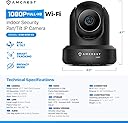
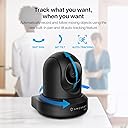
The Amcrest ProHD 1080P WiFi Indoor Pan/Tilt Security Camera delivers professional-grade surveillance with full HD 1080p video at 30fps, advanced night vision up to 32 feet, and a wide 90ยฐ viewing angle. Featuring remote pan and tilt, two-way audio, smart motion alerts, and versatile storage options including secure cloud backup, this UL-listed camera ensures reliable, encrypted wireless security for your home or office. Compatible with Alexa and multiple platforms, it offers seamless mobile access and robust firmware support backed by a 1-year US warranty.


| ASIN | B0145OQTPG |
| Alert Type | Motion Only |
| Antenna Location | Indoor Security |
| Batteries are Required | No |
| Best Sellers Rank | 78,433 in Electronics & Photo ( See Top 100 in Electronics & Photo ) 890 in Dome Cameras |
| Brand | Amcrest |
| Colour | Black |
| Compatible Devices | Smartphone |
| Connectivity Protocol | Ethernet |
| Connectivity technology | Wireless |
| Control Method | Voice |
| Controller Type | Amazon Alexa |
| Customer Reviews | 3.7 out of 5 stars 14,106 Reviews |
| Effective Video Resolution | 1080 Pixels |
| Field Of View | 360 Degrees |
| Form Factor | Dome |
| Frame Rate | 30 frames_per_second |
| Global Trade Identification Number | 00859888005535 |
| Included Components | 1080p Wi-fi Ip Pan/tilt 2-way Camera With Cloud Recording (black) |
| Indoor Outdoor Usage | Indoor |
| Indoor/Outdoor usage | Indoor |
| Item Dimensions | 20.3 x 30.5 x 25.4 centimetres |
| Item Type Name | FCM-IP2M-841B |
| Item Weight | 0.5 Pounds |
| Light Source | Infrared |
| Manufacturer | AMCREST |
| Model Name | Amcrest 2MP WiFi Security Camera |
| Model Number | IP2M-841B |
| Model name | Amcrest 2MP WiFi Security Camera |
| Mount Type | Ceiling Mount |
| Network Connectivity Technology | Wireless |
| Night Vision | Night Color |
| Night Vision Range | 32 Feet |
| Number of Channels | 2 |
| Number of Items | 1 |
| Other Special Features of the Product | Image Sensor, Motion Sensor, Night Vision, Portable |
| Photo Sensor Technology | CMOS |
| Power source | Corded Electric |
| Rear Webcam Resolution | 2 MP |
| Recommended uses for product | Indoor Security |
| Room Type | Office |
| Special feature | Image Sensor, Motion Sensor, Night Vision, Portable |
| UPC | 659424885887 661094063489 859888005535 659424885115 798068901307 647971367208 601420008104 662187376387 |
| Unit Count | 1.0 count |
| Usage | Surveillance |
| Video Capture Format | ASF |
| Video Capture Resolution | 1080p, Security System with Motion Detection, Nightvision |
| Viewing Angle | 90 Degrees |
| Voltage | 5 Volts |
| Waterproof Rating | IP67 |
| Wattage | 7.5 watts |
| Wireless Technology Type | Wi-Fi |
| Zoom Type | Digital Zoom |
A**B
Highly recommend, excellent piece of kit!
I killed my Foscam FI8918W last week, plugged it into a 12V power supply (stupid mistake I know). I had it running on my Synology NAS, reliably, for over 5 years. Choosing a replacement camera was surprisingly difficult. I wanted reasonable quality, reasonable price, excellent reliability, compatibility with my Synology NAS and good motion detection. I couldnโt care less about panning provided the cameraโs angle of coverage was wide enough. After researching cameras for hours, and reading every imaginable review, I was set on the Foscam C1 as a good compromise between quality and price. Foscam after all had proven very reliable all these years. The picture quality was never great but it worked perfectly with my Synology NAS with minimal setup. I was, however, slightly annoyed that the Foscam C1 could only achieve 23 fps and not 25 fps in 720p. I mean, weโre in 2016, technology is ahead of this. I was also concerned with Foscamโs night-vision footage I saw on Youtube - subjects moving in the dark generally appeared blurry. Then I saw Amcrest. Never heard of the brand but they were in Synologyโs list of compatible cameras. The first search I did on Amazon returned this Amcrest ProHD. It was above my budget given that Iโm going to plug it in and forget about it for the next 5 years. But I was immediately sold on โ30 fps in FullHDโ. As a hobbyist photographer (I own a Sony a7ii) 30 fps in 1080p indicates to me that a) the sensorโs ISO sensitivity is good enough to achieve this frame rate and b) the CPU is powerful enough to process this frame rate. Turns out, the sensor is a Sony! So frustrated with not finding anything suitable below ยฃ60, I gave in on budget and ordered this camera. Couple of days later, received the camera, installed it, all I can say is... WOW! The quality!! And wow, wow, the responsiveness! And the speed, and basically, wow everything! It is definitely an upgrade from my beloved Foscam. It blows it away in picture quality, sharpness, speed, and whilst I donโt use panning, panning is incredibly responsive, and the image remains sharp as the camera pans. My 5 year old Foscam was clearly built in the dark ages! Setup wasnโt difficult, definitely slightly technical. I donโt access the camera from outside my home and have no intention of doing so, nor do I want an Amcrest account. I use the camera as a security measure to protect a few sentimental paintings, so I have a simple setup: Camera > Synology NAS. Here are the steps I used, which could help others: 1) Plugged in the camera to the network and power supply, let it boot up 2) Did not install any software, simply located the cameraโs IP (assigned by DHCP on my router, looking at the connected devices on the routerโs config page) and logged into the camera via Internet Explorer (the video plugin for Firefox -my preferred browser- did not work) 3) Changed first time admin password 4) Went straight to upgrade the cameraโs firmware (which you download from Amcrestโs website) โ security measure as the firmware dated back to Jan2016. 5) Once that was done, configured the camera to connect to my wireless network (left it as DHCP) 6) Configured my router to always assign a fixed IP address to my camera on wireless 7) Unplugged the wired LAN 8) Disabled functionality not needed (P2P, Mulitcast, UPNP - I donโt need the camera opening up ports on my router) 9) Created a new user in the camera settings for Synology to use - I could have used the admin account, but am being security conscious 10) Changed ALL default ports on the camera settings (HTTP, HTTPS, TCP, UDP etc.) to custom ones. I might have rebooted at this point to log on to the camera using the right port i.e. [...] 11) In Synologyโs surveillance station, I chose the Amcrest camera from the list. I did have a few problems at first, Surveillance Station would not connect to the camera. Turns out I was specifying the wrong port, which is NOT the TCP or UDP ones configured on the camera, but the HTTP port (which is port 80 standard out of the box) Anyway, once all the values were entered, tada! Synology detected the camera and I was back in business. I configured the motion detection on the Camera and ensured Synology used the Cameraโs motion detection to keep CPU load down on my small DS211. The great thing is, the video quality in Full HD, using H264 compression, variable bit rate with a quality of 4/5, at 30fps, takes up slightly less HDD space than my old 640x480 Foscam MJPEG at 15fps!! Roughly 15~20Mb per minute. Now time will tell as to whether it will reliably maintain a connection to my wireless network, record all motion with minimal false alarms, etc. but this camera is definitely a serious piece of kit! And all I can say is that the quality is incredible, coming from an old Foscam camera, I would seriously recommend. Maybe all cameras are this good these days, this one definitely doesn't disappoint!
S**.
Superb piece of kit, very functional and high quality.
I bought this to keep an eye on the house when away - the write up was good and so were the reviews. It arrived in a high quality box which is always a good sign and I was not disappointed when I finally got it out. The construction is solid with a rubbery feel to the body giving the impression of quality. Within the box are the unit, power adaptor, instructions, CAT5 cable and a CD-ROM. The instructions are very clear and follow a step by step approach to setting up the unit and registering for the free cloud, required to store captured video (or you can use a micro ad card). I plugged my unit in and followed the instructions to connect to my home network. Sadly it did not connect to my wifi by itself so I had to use the second method with the cable. Downloaded the app onto my computer and there was the camera unit. From there it was very simple to join the wireless network and other settlements nags I wanted. I downloaded the apps onto my tablet, set up the camera where I wanted it and switched on. Within minutes I had the view on my tablet and delighted ed to see it is sharp as the winner of a sharp thing contest in Sharpsville. Superb quality. The camera can be moved from the app too and it is very smooth. I was expecting it to jerk but it didn't. Motion detection is very sensitive and this triggers the event to be recorded on the cloud where you can access it from another app. I have tried the apps away from home and the camera is still responsive and very clear. So my first week of use has left me feeling very positive about this device. It is high quality, good instructions and cloud website, and very easy to operate. I recommend it to anybody else who wants to keep an eye on something from a distance.
B**N
Delivers the functionality I bought it for with quality but does have a couple of slight niggles ..............
Having tried unsuccessfully with a number of different IP Cameras to get the email alerting upon motion detection working to no avail decided to pay a little more than I have to date for this device. Am I glad I did - absolutely !!................. Its not without its little niggles though but I am sure with more playing I will work it out. Pros :- Simple basic setup, viewing the camera within 2 mins No need for port forwarding or router changes to view from outside your own network Excellent quality picture Feature rich browser/web interface Excellent build quality Very professional camera Motion sensitivity settings by area (ie can have high sensitivity on a door for example and very low on the wall next to the door if like me you suffer from sunlight reflection from outside setting off the sensors. Full remote control over 3/4G and wifi Zoom capability Cons: There is an issue with the IE and Chrome plug in for the web browser access. This is due to it being based on NAPI which is deemed prone to exploits hence Microsoft and Google have dropped support. Firefox works fine, its just is you dont want to use Firefox you will have an issue viewing the camera via a browser. Amcrest need to update to a new plugin for IE and Chrome support (hence dropping a star above). Not managed to get images saved to the app yet upon alarm, have succeeded with video recording and image by email but for some reason not with stills to the app. I think this is me though not finding the correct option in the many settings for this device. I bought this camera to alert me with a clear image by email should movement be sensed and this camera delivers that with excellent quality. This device is also capable of much much more which I am just finding my way around - I would buy again ! Review Update - 15 June 2016. Having used this camera for 3 months successfully camera decided to no longer send alerts when connected via wifi which it had done for 3 months. Tried everything, upgraded firmware, reset factory defaults to no avail. Plugged in to RJ45 and worked immediately. Returned camera to Amazon for refund which they did without issue. now unsure what to do about a replacement.
M**E
Excellent quality HD IP Camera, a few small niggles
I've used a number of other IP Cameras from Hikvision, EasyIP, Foscam etc. The Amcrest is similar in a number of ways, but I would say the build quality, and certainly the packaging, are above the norm. The Manual is much clearer (and more comprehensive) than other models I've used, and the setup is easy - if you follow the appstore app to configure the WiFi ... it worked for me - with other models you have to connect an ethernet cable, set a local IP - its all hassle. The Amcrest allows you to simply connect with their mobile phone app and then modify the settings to connect to your local WiFi AP. Thereafter you can use a regular browser or IP Camera app of choice. I use Robert Chou's IP Cam Pro for Android and iOS - it has profiles specifically for this camera and worked straight away. The quality of the image is excellent - better than the 720p camera, as its an HD (at 1080P). The JPG snapshots taken when motion detect occurs, and the video, are all high quality. There is a slight restriction in which browsers can be used to modify the settings and configure external storage (it does not support Chrome yet), but that was not big deal to me as it was a one off event. I used it to save images and video on motion detect, to my local NAS. It supports NFS or FTP file transfer as well as a local SD card. The only slight irritation is the DAV file format used for video. It's a common format if you are saving to a DVR, but it's pretty useless otherwise and different to every other camera I have used - this camera should be able to save a regular MP4 that can be viewed immediately on a mobile phone or laptop without downloading yet another client or file converter. Apart from that, the camera is a welcome addition to my collection. EDIT Feb 2016: Current firmware 2.420.AC99.116.R (dated 2016-01-06) does allow for long passwords, so a great fix on that one!
S**S
Good webcam if ONLY viewing using your local home network
Good webcam if ONLY viewing using your local home network, however an absolute nightmare when using their app with P2P setup when you're not at home! Basically, Using the Amcrest ViewPro app (on both an iPad & iPhone iOS9.3.1), P2P Setup easily & successfully set this up however after 2 days, failed to connect message. Have deleted the app and reinstalled, rebooted the WebCam and Home Router which made no difference. Created an Amcrest account, repeated the above and worked again however another 2 days gone by - failed to connect again. Powered off the webcam yesterday evening when I returned home, left for 15mins and powered back on, then automatically everything worked perfectly, however 12-15 hours later the same issue again, Failed to connect !! Back home again, repeated the power off/on process again, up and running again. Have only owned the camera for less than a week so am a little disappointed. I can't continue with an unreliable (& expensive) Webcam. Amcrest support response: send back the device and get another one! Update: replacement web cam has exactly same issue. Requested for a refund based on the webcam not fit for purpose. Amcrest have obliged with no hassle, I just wished their webcam worked! Disappointed 0stars
A**1
Really disappointed - I had high expectations
Urgh.. The hardware looks and feels of decent quality. And to be quite honest the picture itself is actually quite satisfactory. It's clear and has good colour/light balance. The night vision isn't stunning but it exceeded my expectations. What lets it down on a mass scale is the software, without a doubt. The iOS App is literally horrendous. I've had it 2 days and I've factory reset it twice so I can re-set and get it to work. It either stops picking my camera up, and after much deliberation and fixing that every now and then locks me out etc. I haven't even got as far to fiddle with the (Complex and unclear) Settings available such as motion detection. I'm actually really disappointed. I had high expectations for this product. And quite frankly it's utterly useless if I'm away from the camera and it needs to be re-set and re-added for me to even stream video from it? - I can't really trust it. I even noticed 2 or 3 spelling mistakes in the app... I mean come on? Their advertisements and web documentation look on point but practicality is a joke. If I get stuck again I'm going to consider contacting them but honestly I can see myself actually returning this... Mac OSX Software - Looks better but again it seems far too overcomplicated for someone who might not be technologically in tune.. And there is also about 5 types of software? Why not just spend the time to put it all into a one user friendly interface anyone can pick up and use. Seriously - What a shame
A**N
AMCREST PTZ CCTV cameras, THEY DO IT ALL.
Note, this review is for the INDOOR AMCREST CCTV camera. In short: If you want QUALITY, a brilliant picture, 1001 configuration options, this is the camera for you. For the last year i have been running two of these cameras. This in addition to a large number of other professional and semi professional CCTV cameras here at our animal sanctuary. I think we have about 15 cameras installed here, so I feel i can give you, the reader, an unbiased opinion. Also note: All my reviews are for fully paid for units. (Amazon Verified Purchase). I have never done a "freebie" or discounted review. I say what I mean and am not beholden to any supplier. Having gotten that out of the way, here goes. For me, what sets these Amcrest cameras apart is the picture quality. In my opinion this is due to the choice of the sensor used, which is a Sony one. Those Sony sensors are just about unbeatable. We see the same excellent quality in our professional SUNBA PTZ dome cameras, and small wonder as Sunba also uses the Sony sensors too. When I noticed that the ProHD had come on a Amazon Lightning deal I instantly ordered one, this was money well spend ! Camera comes very well packaged and with nicely printed instructions in the form of a "Quick Start Guide". It deals comprehensively with the various ways in which you can effect the setup of the camera. I really like a PRINTED guide and that on high quality card stock, and not printed on glorified toilet paper. The set-up guide is comprehensive and gives step by step instructions on the various ways in which you can bring the camera on-line. Once set up and on-line you are able to use the numerous configuration options. And when i say numerous, that is exactly what I mean. If I wanted to cover them all, You'd be reading all day. But I will mention one outstanding option. All these CCTV cams have a on-board firmware, or for you techies out there, Micro Code. When the manufacurer wants to correct a bug, or give you additional features, the firmware must be updated. I recently did this for our existing two units and as God is my witness, what a super easy process it was ! Trust me on this... as after many years of firmware updates on all manner of equipment i know what an utter pain this can turn into. Not so here... easy as Pie. Well done AMCREST ! I urge you to do this step as your camera might have been manufactured several months before your purchase date. Do install a micro sd card of say 64GB so that you can store what the camera captures. As I said.... you can configure these units in a 1001 ways, motion detection... , email you, and many more options are at yr beck and call. Apologies for not going into details here, it would make this review way too long. With an onboard SD card, you can spool back and see exactly what your camera captured. IN SUMMARY: I can recommend these cams without any reservations. I most certainly would not have bought a third one if I had been unhappy with any aspect of their performance. No... they do not walk the dog or make you a fresh cuppa, but for the rest ? They do it all, watch you belongings, watch your Pets and GIVE YOU PEACE OF MIND. (no price on that). Albert. PS: Apologies... bloody amazon always turns my photos sideways !!!
R**B
Superb video quality
This came packed in an incredibly strong box which would protect against the most severe handling by carriers worldwide, and also well boxed by Amazon for the final leg. The camera is quite attractive and relatively compact, similar to most others of this type, and the quick start guide which gives setup details for the various different ways of viewing (app, desktop, P2P, cloud or web) is quite detailed but is very clear and is written in perfect English, although I admit I peeked at some online review videos before trying to set up the camera. It took me many attempts to connect to my wi-fi via the Amcrest Pro app, and eventually I had to connect via an Ethernet cable (provided), which was successful after a couple of attempts. After disconnecting the cable the camera was still connected to my wi-fi, and turning off my mobile phone wi-fi connection also left me still able to see via 3G on my Samsung Galaxy S3, so the procedure eventually was totally successful. I admit I am no expert in wi-fi things, but I do not understand why my initial efforts were telling me that I had a 5Mhz connection (which I do not) or incorrect password. Anyway it was worth all the effort in the end, as the visual quality is excellent, as is the pan and tilt capability, and I found it easy to set up to view from a laptop. The adjustable stand which is provided is easy to fit and allows perfect placement and fixture. There is a vast array of adjustments and controls available to users more experienced than me, but for my purposes of keeping an eye on my cats the main controls and presets are more than enough and give superb performance compared with the last similar camera I had. Despite my initial difficulties, I highly recommend this item and would buy again if needed. The item was provided at a discounted price on promise of my giving an honest review.
Trustpilot
3 days ago
2 weeks ago