Buy anything from 5,000+ international stores. One checkout price. No surprise fees. Join 2M+ shoppers on Desertcart.
Desertcart purchases this item on your behalf and handles shipping, customs, and support to Vanuatu.
🌈 Elevate your workspace with color-rich 4K brilliance — don’t just see it, live it!
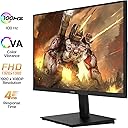
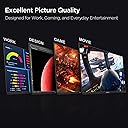
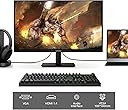
The KOORUI 27 Inch 4K Monitor features a stunning UHD 3840x2160 IPS display with 99% sRGB and 95% DCI-P3 color gamut coverage, delivering 1.07 billion vibrant colors. Designed for professionals and entertainment enthusiasts alike, it offers flicker-free, low blue light technology for eye comfort, plus Adaptive Sync FreeSync and G-Sync support for smooth visuals. Connectivity includes DisplayPort and dual HDMI ports, with ergonomic tilt and VESA mount options for versatile setups.


| ASIN | B0C38FJ6HY |
| Adaptive Sync | FreeSync |
| Additional Features | Blue Light Filter, Built-In Speakers, Flicker-Free, Frameless, Tilt Adjustment, Wall Mountable |
| Aspect Ratio | 16:9 |
| Best Sellers Rank | #15,529 in Electronics ( See Top 100 in Electronics ) #417 in Computer Monitors |
| Brand | KOORUI |
| Brightness | 250 |
| Built-In Media | HDMI cable x1, Monitor x1, User Manual x1 |
| Color | Black |
| Compatible Devices | Speaker |
| Connectivity Technology | HDMI |
| Contrast Ratio | 4000:1 |
| Customer Reviews | 4.3 out of 5 stars 3,966 Reviews |
| Display Resolution Maximum | 1920 x 1080 |
| Display Technology | LCD |
| Display Type | LCD |
| Hardware Connectivity | HDMI, VGA |
| Has Color Screen | Yes |
| Image Contrast Ratio | 4000:1 |
| Item Dimensions D x W x H | 7.12"D x 19.48"W x 15.51"H |
| Manufacturer | KOORUI |
| Model Name | E2212F |
| Model Number | 22N1 |
| Mounting Type | Desk Mount |
| Native Resolution | 1920x1800 |
| Picture Quality Enhancement Technology | Eye Care |
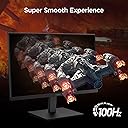
| Refresh Rate | 100 Hz |
| Resolution | FHD 1080p |
| Response Time | 4 Milliseconds |
| Screen Finish | Matte |
| Screen Size | 21.5 Inches |
| Screen Surface Description | Matte |
| Shape | rectangular prism |
| Specific Uses For Product | Business |
| Total Number of HDMI Ports | 1 |
| UPC | 738060953263 |
| Unit Count | 1.0 Count |
| Viewing Angle | 178 Degrees |
| Voltage | 12 Volts |
| Warranty Description | 3-year warranty service (display screen is backed for 1 year and other accessories for 3 years |
| Warranty Type | Limited Warranty |
A**B
It REALLY is a 4K monitor.
Today I set up my dual KOORUI 27" model N07 monitors. I was somewhat worried by multiple reviewers reporting that this model isn't really a 4K screen. So while I don't usually write reviews, I'm here to assure you the N07 is in fact a 4K screen with resolution of 3840x2160 and refresh rate of 60hz. And I know why some people got this wrong. When I unplugged my old 1920x1080 monitors and tried to use the same HDMI cables, Windows identified the monitor as having a 1920x1080 native resolution. But my cables were very old. I plugged both my new monitors in using DisplayPort cables and they were instantly reporting 3840x2160. My monitors did not come with DP cables, just new HDMI cables. But my office had extra DP cables laying around. If you're still having trouble getting 4K on one of these, be wary of adapters, such as DP-to-HDMI, DVI-to-HDMI, etc. Also try shorter or newer cables. You CAN get 4K out of HDMI cables, but remember that HDMI has been around since 2002 and that standard has gone through many versions with new capabilities over the years. As for reviewing the other aspect of these monitors... they look great to me! Neither of mine had dead or stuck pixels. the colors look good and image is sharp. I'm not a professional monitor reviewer, but these seem like perfectly good office monitors for a fantastic price compared to big brand names. I took a chance on some of their smaller screens several months back and was blown away at the quality and low price. I'm glad this higher end model hasn't let me down! UPDATE: My original review was written 10/13/2023 and now it's 5/16/2025. I have never had a single issue with these monitors in the 1 year 7 months I've been using them. In fact I stumbled across my own review after looking to purchase a 3rd matching one... because a triple-monitor setup with these bad boys would be awesome! By the way, I use them on a dual-monitor desk mount. I love that they have VESA mounting holes so they can be used on wall or desk arms/mounts.
K**M
27E3Q YES, YOU SHOULD BUY IT
I ordered a monitor from Sceptre and received the wrong model. This led me to make a somewhat angry purchase but man did it pay off. Jumping the gun on a 1440p IPS display was so worth it. I am pleased, satisfied, and left wanting nothing more. Pros and cons below. PROS: - Really bright display. This is such a game changer when you constantly deal with dim gaming displays. Typically on a budget monitor you get 250cd/m2 but here you get 400cd/m2!!! The brightness is perfect for gaming, day to day use, brightly lit rooms, etc. - Super Colorful Display: The colors on this screen pop like I've never seen. Everything is perfectly saturated. Nothing seems out of the ordinary. Everything you watch, read, play, will be enjoyed thoroughly guaranteed. - Whites are actually WHITE: As you can see in one of the images I attached, My other monitor (HP 25x) provides yellowish whites while the 27E3Q provides a very natural and expected white. - Not a single dead pixel on my unit! - No annoying branding. One simple and almost invisible "KOORUI" in the center of the frame on the bottom. No extended pieces of plastic either. Just a rectangular unit as you would expect. Unlike the HP 25x which has an annoying chunk of plastic that extends out. This is more nitpicky obviously but it still counts! - OSD (On Screen Display) is very easy to use. Its quick, to the point, no frills or gimmicks, and easy to read. - Really nice stand! Although I used my own dual monitor mount, the stand is high quality, heavy duty, with tons of adjustability. (Rotate, side to side, height) CONS: - From the research I've done, if you leave the overdrive off you won't have a problem but, with it turned on you do experience some ghosting I believe. Haven't tested it myself but this is what I've heard. Not worried about it, I leave it off and thoroughly enjoy gaming. - In all honesty, the only possible thing I can think of (and this is a real nitpick imo) is the edges of the display border. They could be a HAIR thinner. My HP 25x has a slightly thinner border (not the bezel/plastic frame). This monitor would have benefited greatly from a thinner border but I wouldn't worry about it. With all of the benefits (AFFORDABILITY) a border shouldn't even be close to a deal breaker. Overall, amazing monitor. I will be purchasing another one soon!
A**.
Great bang for buck
Great display for the price, everything works as described. Setup was easy and tool-less. Runs my PS5 and PC at 120Hz+ easily. Colors may be a little inaccurate for professional work but for a casual user like me watching movies and playing games, it's great. Again, for this price: height adjust, good screen, great resolution (unique at 24"), and the amount of ports. Would buy again.
M**N
Great monitor (with very minor nitpicks)
I got two of these to be the "wingmen" for a 27" Dell U2719 I've had for some years. I wanted a triple monitor setup with the Dell centered, but I have a small desk, so larger monitors were going to overhang the desk sides and cause problems. These Koorui monitors are possibly the narrowest 21.5" monitor you can buy. I can report that these are more than adequate, and raise that to fantastic given the price! Comparing them to a Dell Ultrasharp is hardly fair, but they're so close for day-to-day office productivity that I really don't notice. Another bonus is the PPI of 21.5" FHD to 27" WQHD is nearly identical. If you understood that, then you know why I think it's great. 😉 So, the nitpicks: - kinda crappy blackpoint; would not recommend for movies or production graphics work - the VESA mount area is flat at the bottom holes, and curved at the top ones; this means you will have to shim with spacers (I used three nylon washers at each of the top holes) if your VESA mount needs zero pressure to rotate correctly - while these have speakers, they're an afterthought: you get what you pay for here Overall, a superb value for adding some real estate, and a totally acceptable main monitor if you are on a tight budget.
D**Z
An actually good off-brand monitor!
Koorui doesn't have the same recognition as a big brand like LG or Samsung. However, the monitor seems to be the genuine article here. Physically it feels sturdy and well-built. It is easy to put together and set up, plus it comes with both an HDMI and a DP cable. The monitor controls forgo that annoying "nipple" button a lot of modern monitors use and goes with the tried and true row of buttons. When you bring up the monitor controls, it is easy to read and navigate the options. Software-wise, it just runs off the generic PnP monitor driver. There's no specialized driver or ICC profiles to add, but what you can (and should do) is use your GPU's software to adjust settings. For me it is through the Nvidia Settings panel. Raedon's equivalent probably works the same way. Tweaking the settings is responsive and with just a few minutes time you'll have your games and videos cooking perfect. You want HDR? This does HDR (and does it beautifully). You want Freesync? It does that and is compatible with Nvidia's N-sync software. You want a high refresh rate? It can push up to 240MHz under the right settings. In conclusion, it is surprisingly well made! Good HDR, High refresh rates, all the options you want for 2k resolutions, etc. The only down side is it doesn't have it's own dedicated driver or color profiles, so you do need to tweak the settings, but I don't see it as necessarily bad since your GPU's software should be able to handle that job. All in all, I am impressed with this one.
S**N
Missing a VERY important "feature" (that I thought was industry standard)
Pros: Picture quality is good Price Easy to set up Stand is pretty robust (even though I don't use it) It comes with 4 spacers so you can use your own VESA mount Cons: Backlight bleed is pretty bad The power button/menu selector is in a very awkward position. Putting it on the back was such a bad idea Third section for the REALLY bad con Backlight does not shut off when screen is blanked. This is the first LCD monitor I have ever owned in 20 years that does not do this. WHY? The workaround is that there is an auto power off option in the menu that shuts the monitor off 1 minute after there is no signal. For starters, it doesn't work. The backlight still stays on. Secondly, by doing this it causes the PC to now detect no monitor there, causing ALL sorts of unwanted desktop window rearrangement. WHY is this a thing in 2026? I docked 3 stars JUST FOR THIS. Update: This monitor is a usability disaster. On top of that, it randomly dims, or wave oversaturates colors (looking awful). Terrible monitor, don't buy.
J**N
Affordable 4K HDR monitor for Mac
I was originally going to grab another 4K monitor around this price with similar specifications and decided to give this brand a try. I'm replacing a 4K De*l monitor that has served me well--- but is not HDR capable. That old monitor cost twice as much in 2017. It's really lightweight plasticky, but overall I'm impressed. It's good out of the box with the default settings. Do turn off "Allow wall paper tinting in windows" in Mac OS to keep video playback from brightening and darkening. It is as good as the old panel and the HDR display on YouTube and Final Cut Pro is good enough for what I need. The provided stand only provides tilt adjustment. I decided to mount the panel on a vesa ergotron arm. I really like the understated design. I really hated the old De*l logo in front of my face. The Koorui logo is much more tasteful. Well worth the money! I hope in the future that manufacturers can bring 5K panel at an affordable price point.
O**A
👍
Se ve muy bien tiene buena calidad
G**I
Ottimo aquisto
Parto dal presupposto che non cercavo un monitor da grandi pretese, ed in passato ho utilizzato monitor semplici da ufficio. Questo monitor é ottimo nelle sue frequenze, ottimo menù intuitivo anche se con limitate impostazioni, ottimo per avere aggiunte come freesync e HDR, ottimo pannello IPS, con impostazioni che riescono ad avere buoni colori e buoni contrasti, semplicemente ottimo per il prezzo (pagato €120). Ho apprezzato anche come all’abbassare della nitidezza, venga aggiunto una sorta di filtro di aberrazione cromatica, e non semplicemente la sfocatura dei pixels, questo rende più godibile la visione di film a bassa risoluzione. Consigliato
B**0
Incroyable pour un écran full HD
La livraison a été impeccable sans problème, l'écran fonctionne très bien avec de belle couleur.
E**N
Great price
Perfect dual monitor for work. Great graphics, connects easily, transportable, and great price
P**S
Étonnant
Après avoir entendu bon nombre de louanges sur cette marque, j'ai décidé de passer à la QHD avec cet écran. Et quelle belle surprise. Les réglages par défaut de colorimétrie sont vraiment bons, il y a une multitude de réglages pour améliorer selon vos goûts, et la qualité générale est au rdv. Pour 170€, Il n'y a pas mieux. Un achat judicieux
J**.
Top
Merci beaucoup, mon fils en est content
Trustpilot
1 month ago
3 weeks ago