Buy anything from 5,000+ international stores. One checkout price. No surprise fees. Join 2M+ shoppers on Desertcart.
Desertcart purchases this item on your behalf and handles shipping, customs, and support to Vanuatu.
🖥️ Elevate Your Workspace, Command Your Day!
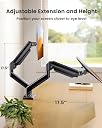
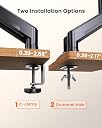
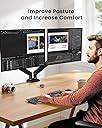
The ErGear Dual Monitor Stand supports two monitors up to 32 inches and 22 lbs each, featuring full ergonomic adjustability including height, tilt, swivel, and rotation. Built with durable steel and tested for 20,000 cycles, it offers reliable, smooth positioning. Installation is versatile with C-clamp or grommet options, designed for wooden desks. Perfect for professionals seeking a sleek, space-saving, and highly customizable dual-monitor setup.


| ASIN | B0C7KQ7MX8 |
| Best Sellers Rank | #2 in Computer Monitor Arms |
| Brand | ErGear |
| Color | Black |
| Compatible Devices | Monitor |
| Customer Reviews | 4.5 out of 5 stars 9,305 Reviews |
| Enclosure Material | Metal |
| Item Weight | 8.9 Pounds |
| Manufacturer | Ergear |
| Material | Metal |
| Maximum Tilt Angle | 90 Degrees |
| Maximum-Supported Screen Size | 32 Inches |
| Mfr Part Number | EGDS15B-US |
| Minimum-Supported Screen Size | 32 Inches |
| Model Number | EGDS15B |
| Mounting Type | C-Clamp & Grommet Base |
| Movement Type | Tilt, Swivel , Rotate, Height adjustment |
| Warranty Description | 2 |
G**E
27" monitor mounted easily
I ended up getting 2 of these monitor arms for the different desks in our office, and I am happy with both of them. The arms are super easy to assemble and adjust to the tension one desires. The arms hold the position where one sets them too, and the gas pistons make it super easy to use. Each arm has a channel on the bottom that allows the wiring to be ran through and hidden, yet remaining accessible if needed. The mounting clamps hold securely and there is no wiggle whatsoever, and it is nice to have a strong feeling monitor mount. It is lightweight and compact so it doesn't feel clunky on the desk. Highly adjustable left to right, up and down, and the screen forward and backward tilt. The price is really good for the overall value and quality of the product. Just make sure to order the right mounting arm depending on the size of your monitor, and you will be fine. Nice quality and feel, and the aesthetics are great too.
N**A
Get this one!
I got this dual monitor arm for my home office, and it’s been a total game changer. Having a dual monitor setup makes multitasking so much easier, especially for photo and video editing. Setup was incredibly quick (under 5 minutes), and it feels very secure once mounted. I really like how stable it is and how easy it is to adjust the height and angle. It also helped clear up a lot of desk space since I no longer need bulky monitor stands. Simple design, but it works perfectly. Highly recommend for both single and dual monitor setups. Great value for the price!
J**S
Pretty great product
Stand works great and as expected. I have a 32” monitor on one and a 26” ultra wide in the vertical position on the other. I’ve had them for a few months and they’ve held tension perfectly. Usually, I find these spring tension arms to become loose after a few months and you just tighten them back up, these are still stiff like when I first set them up, and I move them around quite often. The monitors can rotate 360 degrees and tilt up and down almost 90 degrees each way. The clamp is sturdy so you will feel comfortable making sure it’s tight on the desk. I do plan on drilling a hole to mount the desk to mount it without a clamp and will update my review when I do so. It comes with the hardware to do either mounting options. They're made entirely of metal except for the plastic cable trays that clip along the bottom of the arms. The entire build is well worth the cost and gives me more space on my desk and helps my workflow when editing photos or editing video.
Y**U
Pretty good product
Assembly of the actual stand is easy, mounting to a monitor is not because of industrial design fluff. Gotta make the side you DON'T see look "sleek" and "smooth" and "organic" and "integrated" because...reasons. While this is on the manufacturer(s) of the monitor itself, what semi-modern monitor uses 100x100 VESA anyway? The included long screws are too long. Even using the plastic spacers they'll bottom out with a 2mm gap; add washers and it's a lever arm and not solid or confidence-inspiring. I used a die grinder to remove the excess material closer to 75x75 and used the included short screws, perfect. So either include 25mm screws instead of the 30mm (but then the spacers would be too long), or just update the mount plate to 75x75 only, and throw 100x100 "compatibility" into the dustbin of history where absolutely no one will miss it. Arm does move/adjust smoothly and is holding a 34" widescreen where I left it 2 days ago, so it IS a great product once it's properly fitted.
E**E
Great monitor arm stand.
Very happy with this product. It's sturdy and easy to install. Love the tilt and swivel feature. The fittings for the stand are very well made. I suggest this for the quality and the price.
T**F
Easy to set up & works great
It was super easy to get set up, came with all the hardware ypu need to install multiple ways. Holds my monitor securely and is still easy to move around. The adjustments are easy to access and have plenty of variation. Great purchase, such a reasonable price.
A**D
good monitor mount
simple enough to set up, very sturdy and allows for different levels of tightness. can move it a lot but it stays stable wherever its moved. moving it higher and tilting it down has helped my posture a lot too.
E**A
Gets the job done. Just barely.
It holds up my monitor, but just barely, and without any confidence or finesse. I had to move on from my previous arm mounts, the HUANUO. Those claimed to hold up to a 30 inch monitor and support 20 pounds. When I upgraded to a Samsung Odyssey Neo G8, it could no longer perform its duties. The gas shock was up to task, but the final adjustment piece that tilts it up or down was a hard down. Queue this piece of hardware! 22 pounds is more than 20, and 32 is more than 30. This time I'm not even technically out of spec. The clamping force seems more than adequate to hold this to my desk. I will, at this point, basically walk you through how I feel about this mount, based on the order of installation instructions. The way it goes together means that you will have to pull your desk out to maneuver the clamp in place before snugging it back up to the wall, a point in the HUANO's favor since it had a clever leveraging mechanism that lets you hang it with your desk still against the wall. The way cords route through the arms close to the base means that you have to route them before you put the swivel arm on the base. This is because it has a screw at the front and back to secure the cover, and the angle/height are such that you cannot fit a screwdriver into the bottom one after you mount it. While not impossible to do with it installed, it would involve a right-angle screwdriver. They provide one of those, but the screwdriver bit of it is on the long shaft, and you would need it on the short shaft to get to that screw. The way the swivel arms mount on the base is less than ideal as well. The arm slips onto a robust metal hub, and you tighten a screw that pushes against a plastic tab that makes it harder or easier to move. The location for this screw faces the wall. So you must turn the arm at an extreme angle to make it tighter or looser. Not a big deal, but noticeable. Top arms go on smoothly, cable routing is simple and easy. No complaints about this section. Mounting the monitor. The instructions are to mount the plate to the monitor, and then slide the plate onto the holder and secure it with the screw. I did this for neither of my monitors, although I tried it for my second. My big monitor went smoothly by mounting the bracket ahead of time and just forcing the arm down into position while my monitor rested on my desk. I tried this for my second bracket, but it was much harder to do with the monitor in a vertical orientation. So then I tried to do it the way the instructions wanted. I would have been able to do so, but my monitor has the mounting location set into the back of the monitor. This means that you can't mount it flush and then slide it on because you don't have clearance. So I tried to use the spacers. The spacers aren't spacious enough and the screws bottomed before snugging. While I'm not saying that solution wouldn't have technically worked, I instead reverted back to mounting the bracket first. This time I laid my monitor flat on the desk, reduced the tension in the shock greatly, and placed it into position that way. At the end when it's complete and setup? It works. It will hold the G8. But just barely. The G8 uses an adapter to go from the monitor mounting points to VESA 100. This adapter sticks out quite a bit from the monitor, which means the weight is further away from the mounting point. Getting the tilt adjustment to hold involved a bigger allen wrench and cranking it further than it seems like it was meant to go. It groaned, but it held. It wants to dip if you mess with it, so I crank it again. Will it one day totally fail on me and point my monitor at my desk? Maybe. But it works on day 1, so that's a start.
B**E
Ok
Parfait
A**E
Très facile
Très bon produit je recommence facile à installer
E**E
Simplifies desktop
This has been brilliant, does not look bad as many others would.
R**M
i definitely would buy it again for any monitor i get
it works really good
M**A
Estabilidad total y libertad de movimiento para tu escritorio 🖥️🏗️
Este soporte de ErGear es la actualización definitiva para cualquier espacio de trabajo. Lo primero que impresiona es su fácil montaje; el sistema VESA sin herramientas y su diseño de instalación rápida permiten tenerlo listo en pocos minutos sin complicaciones. Es una estructura robusta y profesional que transmite confianza desde el primer momento. ✅🔧 Lo mejor viene una vez instalado: tras ajustar los seguros y la tensión de los muelles de gas, los monitores se pueden mover con una suavidad increíble. Puedes regular la altura, profundidad y rotación sin ningún esfuerzo, permitiendo cambiar la posición de la pantalla según lo que estés haciendo. Lo más destacable es su firmeza; a diferencia de otros soportes más endebles, este no tiembla ni vibra mientras escribes o trabajas, manteniendo la imagen siempre estable. 🧊💪 Además, la gestión de cables integrada ayuda a despejar la mesa, ganando un espacio valioso y dando un aspecto mucho más limpio al escritorio. Es compatible con pantallas de hasta 32 pulgadas y 9 kg, cumpliendo de sobra con lo que promete. Por su construcción sólida y la precisión de sus movimientos, se lleva las cinco estrellas. ¡Una inversión excelente en ergonomía y comodidad! 🌟👌
Trustpilot
3 days ago
3 weeks ago