

🚀 Triple your screens, triple your productivity!
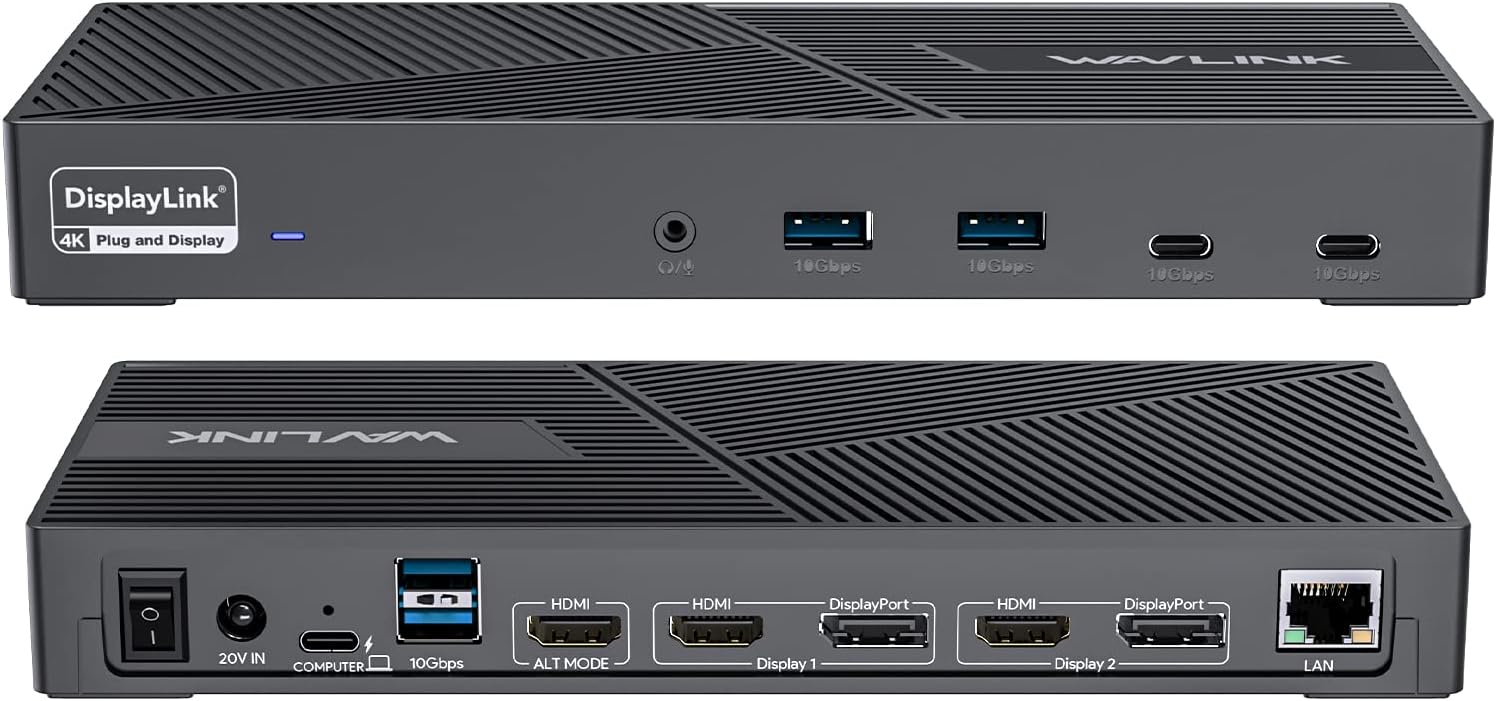
The WAVLINK DisplayLink Docking Station is a powerhouse productivity tool designed for professionals craving expansive multi-monitor setups. Supporting three 4K@60Hz displays, it delivers seamless visuals while charging your laptop at up to 100W. With 6 USB Gen2 ports, gigabit Ethernet, and broad OS compatibility—including optimized support for MacBook Neo—this dock transforms any workspace into a high-efficiency command center. Ideal for multitasking millennials who demand speed, style, and versatility in one sleek, jet-black hub.


| ASIN | B0BNNCXR6J |
| Brand | WAVLINK |
| Color | Jet Black |
| Compatible Devices | Apple M1/M2 and Intel Macs (with macOS 10.14 or later) /Microsoft Surface line/HP Spectre x360 series, /Dell XPS 13 & XPS 15 / Latitude, Lenovo Thinkpad T series. Latitute 7280/ Latitude 5310 2-in-1; Precision 7730/7750; Laptop 5590, HP Spectre Laptop 13-af001TU/ Spectre x360 13t/ Spectre folio/ Specter x369; Elitebook 840 G5 series/ Elitebook X2/ Elitebook x360 1030 G3/ Elitebook 745 G6/ Eliteboo… |
| Customer Reviews | 3.7 3.7 out of 5 stars (164) |
| Hardware Interface | 3.5mm Audio, DisplayPort, Ethernet, HDMI, USB 3.1 Type C, USB 3.2 Gen 2 |
| Item Weight | 18 Ounces |
| Manufacturer | WAVLINK |
| Mfr Part Number | WL-UG69PD25PRO-US |
| Model Number | WL-UG69PD25PRO-US |
| Number of Ports | 13 |
| Total Number of HDMI Ports | 3 |
| Total Usb Ports | 6 |
| Wattage | 100 |
A**R
If you are cool with updating your own drivers, you have found the PERFECT dock for PC and Mac. Everything this dock says it can do, it does. 4K at 60hz. Up to 4 mirrored or extended screens, if you include the laptop monitor itself. 10gb per USB port. Audio, speakers and mic. And it runs smoothly. I have two computers. A Lenovo Thinkpad (PC) laptop and a MacBook. The PC didn’t require a driver. It was genuinely plug-and-play. But the MacBook did require the driver. I plugged it in and it didn’t work. (Actually, let me specify that. The other aspects of the dock worked, like the audio and USB ports. Just the screens didn’t work.) The problem isn’t the dock. The problem is macOS. Mac is notorious for having compatibility issues. In order to have a dock that works well with both PC and Mac, you have to rely on a third-party driver (DisplayLink) to make it run. That being said, here is why I’m giving the dock 5 stars: Wavlink tells you upfront you will probably need to install a driver. The manual for the dock specifically tells you to install the driver AND tells you where to find it. The website it takes you to is very self-explanatory and the install is easy. It took me less than five minutes to find and install the driver. As a further note, when I upgraded to macOS Sonoma, I did have to download and install a new driver also provided on their website. AGAIN, THIS IS NOT WAVLINK’S FAULT. THIS IS APPLE’S FAULT. THIS DOCK IS BUILT ON DISPLAYLINK, A DRIVER WHICH IS NOT PROPRIETARY TO MACBOOKS. MAC WILL NOT AUTOMATICALLY UPGRADE THIS DRIVER FOR YOU. THIS IS WHAT YOU ARE SIGNING UP FOR. In conclusion, I love this dock. It does everything it says it can do and I’m not bothered by updating my own drivers. ***UPDATE - 18 months later*** Still works exactly the same as the day I bought it. Have not had to update the driver in over a year. Still 5 stars. Going to buy a second one for my office at work.
V**G
I have only had this docking station for a couple of days but love it so far. I have a M2 macbook air that only has the ability to use 1 external monitor. This docking station allows for a total of 3 external monitors. The first monitor needs to use HDMI. The 2nd and 3rd monitors can use either display port or HDMI. The power cable, the cable from macbook to dock, and the ports for all the monitors are all in the back. The front has a headphone jack, 2 usb ports, and 2 usbc ports. The ports are useful for charging anything that you need. In my case, the keyboard, the mouse, the ti-84 calculator, ipad, and anything else that uses those chargers. One thing that I did not know until now is that you no longer have to charge macbook when using this dock because when the macbook is hooked up to the dock, it actually charges the macbook (bonus). I was originally going to give it 4 stars because every time i shut down the macbook and restarted it, I had to go to applications, display link, and open it up before the 2nd monitor would show up. I was messing around with the settings and there is a setting that allows you to automatically have it open up upon startup. Anyways, it does everything you would expect and that they advertise. I have only had it for 2 days now so I can't comment on long term use, but it's great so far. 3 month update. The docking station is just ok after having it for 3 months. When I turn the macbook on, sometimes it does not recognize that docking station, most of the time it does. When it comes to charging the macbook when it's plugged in, it's weird. It first started and stayed at 100%, but now it shows it's charging but at 93%. It will actually go down to 80%, but then start actually charging again. It's weird. The last thing that I'm not happy about is when you have multiple monitors hooked up, the first additional monitor you have will work perfectly fine and smooth, but the 2nd monitor lags when you move your mouse on it. For example, if you are browsing a web page and scrolling, you can clearly see how it lags. If I knew all of this before I bought my macbook air, I would have just bought the macbook pro and not had the issue with needing a docking station with displaylink technology. This will do the job as I only have about 8 more months left of school and I will finish, but there are probably better products out there.
M**D
Easy to set up. Download the driver. Plus everything up. Bam 3 more screens. Excellent product thus far. I hope it lasts a long time.
A**.
I could not recommend this unit. Although it will allow you to have 3 monitors, it randomly blanks out. It started to blank out altogether at the same time. Now, it slowly blanks out on one monitor.......then the next.......and then onto the next.........when it eventually comes back up, whatever you were previously working on ends up on only 1 monitor. Contacted support numerous times and they take their time getting back to you. Their emails include a support tool, which collects data and supposedly installs the latest version for display link or something like that. I've done this several times. Once they've figured out there is no resolve, they pass you onto someone else and you have to start over from the beginning, as if you've never contacted them. It's a pain having this unit and even more of a pain dealing with tech support. I'd steer clear of this unit. Also, when looking up files, everything is really delayed. Overall, this dock has great options however, it's not worth the hassle.
J**N
Works perfectly. I like that it has 2 display port portals.
Trustpilot
1 month ago
1 day ago