Buy anything from 5,000+ international stores. One checkout price. No surprise fees. Join 2M+ shoppers on Desertcart.
Desertcart purchases this item on your behalf and handles shipping, customs, and support to Vanuatu.
🎧 Elevate your soundscape—stream smarter, listen richer, and never miss a beat!
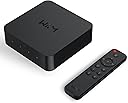
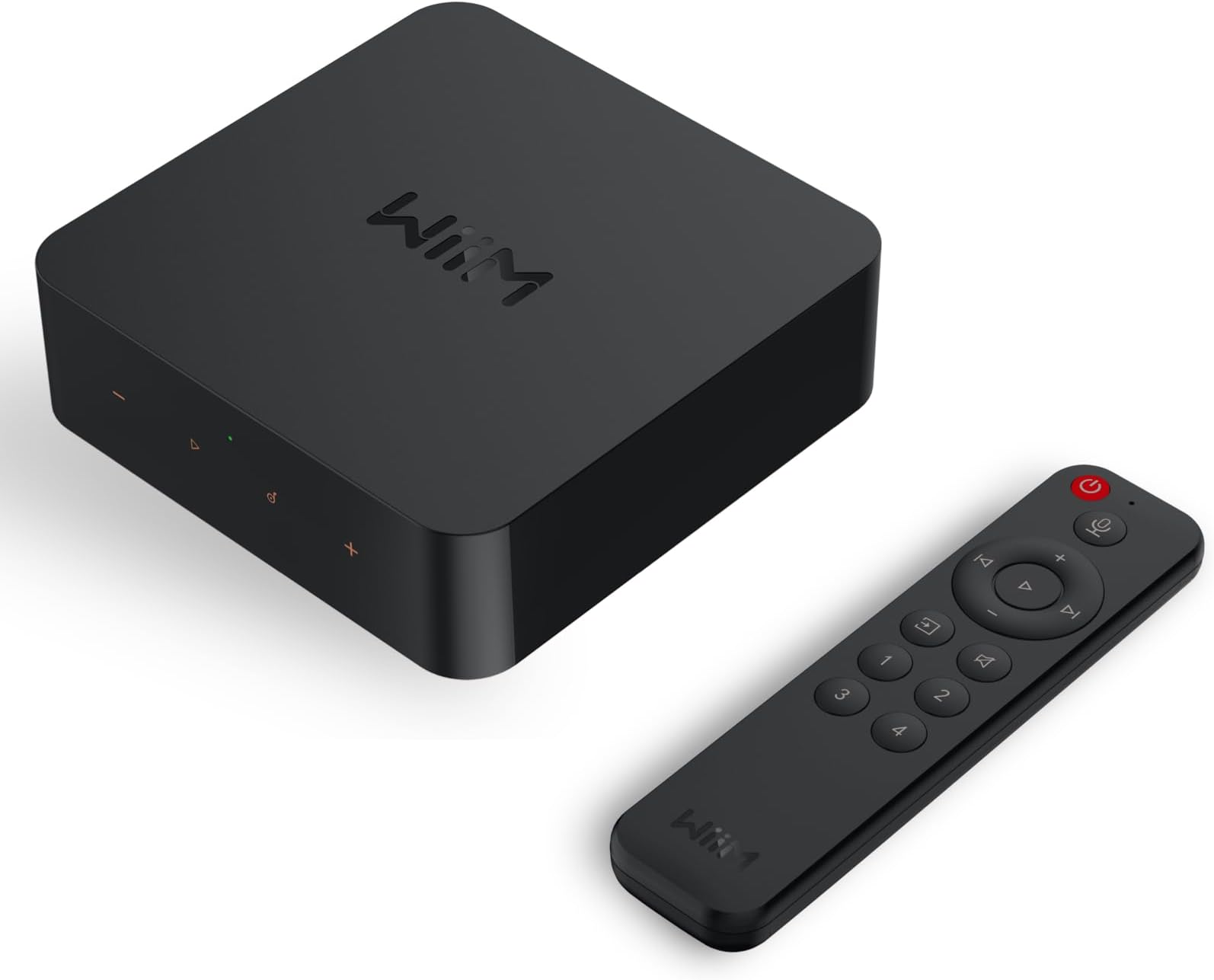
The WiiM Pro Plus is a cutting-edge AirPlay 2 and Google Cast audio receiver featuring a premium AKM DAC for high-resolution 24-bit/192kHz streaming. It supports multiroom playback across various smart speakers and offers seamless voice control via Alexa, Siri, and Google Assistant. Designed for audiophiles and vintage audio lovers alike, it integrates analog and digital inputs, enabling effortless streaming from Spotify, TIDAL, Amazon Music, and more, transforming any stereo system into a modern, high-fidelity wireless hub.


| ASIN | B0CC2HWC7N |
| Best Sellers Rank | #1,193 in Electronics ( See Top 100 in Electronics ) #3 in Wireless Audio Receivers & Adapters |
| Brand | WiiM |
| Built-In Media | Digital Optical Audio Toslink Cable x1, RCA to RCA stereo cable x1, USB Power Adapter x1, USB Type-C Cable x1, User Guide x1 |
| Color | black |
| Compatible Devices | Speaker, DAC, Amplifier, Mobile phone, Tablet, HomePod, Apple TV, Echo, Google Home |
| Connectivity Technology | Bluetooth, Ethernet, Wi-Fi |
| Connector Type | USB Type-C, RCA, SPDIF (TOSLINK), COAX, ETHERNET |
| Controller Type | Google Assistant, Amazon Alexa, App Control |
| Customer Reviews | 4.4 out of 5 stars 6,145 Reviews |
| External Testing Certification | ANATEL: 077462414664 / Modelo: ASR003 |
| Item Dimensions L x W x H | 5.5"L x 5.5"W x 1.6"H |
| Item Weight | 14.1 Ounces |
| Manufacturer | Linkplay Technology Inc. |
| Memory Storage Capacity | 512 MB |
| Mfr Part Number | ASR003 |
| Model Name | WiiM Pro Plus |
| Model Number | ASR003 |
| Other Special Features of the Product | Spotify Connect, Works with Alexa, Google Voice and Siri, AirPlay 2, Google Cast Audio, TIDAL Connect, Qobuz Connect, Roon Ready, NAS, DLNA, Home Media Server |
| Special Feature | Spotify Connect, Works with Alexa, Google Voice and Siri, AirPlay 2, Google Cast Audio, TIDAL Connect, Qobuz Connect, Roon Ready, NAS, DLNA, Home Media Server Special Feature Spotify Connect, Works with Alexa, Google Voice and Siri, AirPlay 2, Google Cast Audio, TIDAL Connect, Qobuz Connect, Roon Ready, NAS, DLNA, Home Media Server See more |
| Supported Internet Services | Amazon Music, BBC Radio, Calm Radio, Deezer, iHeartRadio, Napster, Pandora, Qobuz, Radio Paradise, SoundCloud, SoundMachine, TIDAL, TuneIn, vTuner Supported Internet Services Amazon Music, BBC Radio, Calm Radio, Deezer, iHeartRadio, Napster, Pandora, Qobuz, Radio Paradise, SoundCloud, SoundMachine, TIDAL, TuneIn, vTuner See more |
| UPC | 602581806073 |
| Warranty Description | 1 Year Warranty |
G**G
This Little Box Made Music a Bigger Part of Our Life Again
I have an external hard drive with all my CDs recorded to it — over 11,000 songs — and while it was great to get the discs off the shelves, actually accessing the music was never as easy as I wanted. The WiiM Pro Plus completely changed that. Now I can get to my entire collection instantly, wirelessly, and without digging through anything. Honestly, it’s easier than when the CDs were on shelves in a different room than the system. We also have a multi‑room setup with a speaker selector box feeding speakers in the kitchen, living room, dining room, and on our deck. That system hasn’t gotten much use in the past few years, but the WiiM has brought the whole thing back to life. It’s made it so simple to play high‑quality music throughout the house that we’re using it all the time now. It’s genuinely enhanced our daily life to have great sound available whenever we want it. Setup wasn’t hard, but I did use AI to walk me through it. The first AI app I tried sent me down some unhelpful rabbit holes, but switching to a different one (Gemini) got me on track. A couple of tips to save you time: 1. Make sure everything is on the same network. Your computer, the device running the WiiM app, and the WiiM unit itself all need to be connected to the same network. I have a mesh system and a separate wireless router offering different networks, so it was easy to accidentally connect things to different ones. Once everything was on the same network, things went much smoother. 2. Don’t try to connect directly to your external hard drive or wherever your recorded music is. The first AI had me do that, and while it technically worked, the interface was awful. Gemini suggested using an app called Serviio, and that made a huge difference. With Serviio, the interface became clean, organized, and easy to navigate. Once I had that set up, I was able to use Amazon Music through the WiiM app, and I also connected it to Alexa so I can control playback by voice. I added my Spotify account too. I’m not sure why some reviewers say Spotify doesn’t work — you just open Spotify and tell it to play through the WiiM by playing a song and selecting the WiiM device at the bottom of the screen. Works great and seems pretty straightforward to me, but maybe some people don’t like that method. I haven't tried all the other built-in apps but the ones I have tried have been easy to use and sound great. There are a couple of small quirks. For example, if your phone has been off for a while, the WiiM app sometimes gets stuck showing a song that already played. But the music keeps going, and it only takes a second to “wake” the app so it shows the current track. The important part: the sound quality is excellent. The DAC in this thing is no joke. It feels great to finally access all my old CDs so easily and hear them sound this good. A lot of them are not available on Spotify or Amazon and it's great to have access to them so easily again! I’m giving the WiiM Pro Plus 5 stars, and I’m already thinking about buying another one for my family room system.
V**D
Amazing streamer - how I hooked up a turntable in a multiroom setup with two WiiM Pros
I love the WiiM Pro. Until I got the WiiM, I was sitting on the sidelines with streaming, other than having a Spotify account for playing music in the car or on my iPhone when I'm on the go. It seemed too complicated and expensive to me to buy any complicated streaming hardware for my home system. This year I decided to look again at the home streaming options to see if I should get onboard. I read about the WiiM Pro and decided to try it. I'm glad I did. When combined with a high-rez music streaming service, it's amazing how good streaming music can sound, and the cost barrier to entry is now incredibly low with the WiiM Mini and Pro. Assuming you already have some kind of music system, that's all you need (along with a streaming service). I got the Pro over the Mini because of the extra inputs and outputs, and especially the wired Ethernet cable option. I don't have a whole lot to add to other reviews, but in my review I want to explain how I hooked up my turntable to one WiiM Pro so I could broadcast that signal to my other WiiM Pro in a different room using WiiM's multiroom functionality. I have a ton of old records that aren't on any streaming service and I thought it would be nice to be able to listen to them in different rooms, since I only have one turntable. Buying two WiiMs made this possible! I connect my turntable to a vintage stereo preamp with a phono stage in the conventional way through the preamp's phono inputs. My preamp has "tape out" output jacks and I run a stereo RCA interconnect cable from the preamp "tape out" into the WiiM Pro's "line in" RCA inputs. The setup would be similar if you have an integrated amplifier (preamplifier + amplifier combined in one component) or a receiver. For that WiiM Pro, in the WiiM Home app, set the "audio input source" to "Line in". (Remember to set it back to WiFi or Ethernet when want to switch back to streaming from a music service). Play a record, and on your preamp set the "source" to phono. If your preamp has "tape out" outputs like mine (it might also be called something like "record out") then the preamp will send the music signal into the WiiM. You want to use the preamp's "tape out" outputs and not the "line out" outputs that you would send into an amplifier. This is because the "tape out" occurs after the phono equalization stage in the circuit, but before any volume, tone or balance controls; it's basically the pure unprocessed music signal. Next, in the WiiM Home app, follow the instructions in the online manual to configure multiroom audio. The included paper manual in my box was very basic and didn't explain this. As of my writing this review (Feb 2023) the way to do this is in the WiiM Home app (iOS) is to first make sure you have both WiiM's already setup. Next, start with the WiiM that's connected to your turntable. In the "device" setup area, you should see both your WiiMs. Tap the WiiM that's connected to your turntable to select it then press the nearby "link" icon (looks like two connected chain links) for that WiiM. This open a little chooser where you can see the other connected WiiM's in your network. Press the checkmark next to the other WiiM(s) that you want to play the same signal being broadcast from the first WiiM. Now go listen to your music. A few more notes and details: * With a setup like this you can plug any source, not just a turntable, into a WiiM (via a preamp or possibly directly) and play it on your other WiiM. For example, a CD player. FM tuner. Cassettes. Your beloved 8-track tapes. R2R tapes. Maybe a 78 rpm turntable? * In my configuration, playing a record, sending the signal through a ADC, into the first WiiM, streaming it over AirPlay 2 (I think that's how it goes?) into the other WiiM, and then decoding it back through the DAC in the other WiiM (or your own external DAC) is undoubtedly losing resolution compared to playing that same record through an all analog system. But it still sounds pretty darn good. I haven't compared playing a record this way vs playing the same album via a streaming service (like TIDAL, Amazon Music, etc.) but I would guess they are fairly similar in resolution and quality. If that album is in HD (like 24/92 or higher) on the streaming service, the steamed album might beat the vinyl album once it's downsampled over AirPlay. But my old albums are either not on a streaming service or if they are, they are probably in 16/44.1 or lower so it may be a wash. * One benefit of multi-room audio is to be able to play the same song in multiple systems and be able to go room to room and hear the same song seamlessly. With my configuration, I wasn't able to play the record in my main system (turntable -> preamp -> amp -> speakers), while also broadcasting it to the other WiiM, without unacceptable latency. The downstream WiiM was around 1 second behind my analog system. If you think about it, the main system is playing the signal instantaneously while the other WiiM is getting a slightly delayed broadcast. So I'm not criticizing WiiM for this, there is nothing they can do about it. By contrast, if you use both WiiM's to stream music as receivers, they are able to stay in sync because both WiiM's can "work together" to sync the music, but not when one of the two systems it not even playing through the WiiM. If the systems are close enough that you can hear the speakers from both systems at the same time, then it will be unlistenable because of the delay. But if they are far apart then you might be OK. * Earlier in this review I wrote that I am outputting my stereo preamp directly into the WiiM. Later, I placed an external analog-to-digital converter (ADC, not to be confused with a DAC which does the reverse) between the preamp and the WiiM. I ran an interconnect from the preamp "tape out" into the ADC, then connect the ADC from its digital SPDIF (optical) output into the WiiM's SPDIF input, and in the WiiM Home app, I changed the "audio input source" to SPDIF. This is purely optional but I'm putting it out there as an option for anyone who has a ADC. * I haven't done any critical listening to see if my external ADC is better than the WiiM's own internal ADC but If I get around to that, I may update my review. My ADC is a cheap Hdiwousp $17 device I got on Amazon.com which claims to convert to digital up to 96 kHz. I can't confirm that. * Finally, I left this out of my review above, but before I got the WiiM, I bought a Bluesound Node. I regret that. The WiiM is just as good. The only advantage the Node has is the HDMI input and subwoofer output which personally I'm not using. Maybe the Node app is better. The DAC in the Node might be better but I have an external DAC anyway. But you pay $450 more for the Node. I am selling my used Node on an online auction site now.
G**S
If I could leave a 6-star review, I would
The Wiim Pro Plus is my second Wiim device and they are both among the best audio purchases I've ever made. You simply cannot get more bang for the buck than what you get with these network streamers. Up until this weekend, I used a Wiim Mini. It's a FANTASTIC bargain and really, it's all you need if you can use its optical digital output paired with a decent DAC. I *loathe* streaming music in general and find that fidgeting with computers to play sound is an extremely frustrating affair: apps lock up, systems need to be rebooted, Siri and Alexa play the wrong stuff, songs are just *missing* from albums. For an old, album-oriented guy like me, it's super frustrating that I can't just walk up to the player, insert a disc, and press the "play" button anymore. But I'm an idiot and I sold all of my CDs so... But the Wiim is rock solid. I've never had to reboot it. It works without question with my phone using Tidal Connect and Spotify. It probably does a bunch of other stuff too (NO Apple, surprisingly) that I don't need; for instance, I could probably yank back some of that out-of-print music I have sitting in my personal cloud drive and use a DLNA server here in the house. It sounds *superb* playing lossless audio, but most of all I just don't have to mess with it. Ever. I can't stress how important that is. Wiim makes a quality product. So why the upgrade? I upgraded my amplifier from Yamaha's entry level to one of their flagship models, and it doesn't have a DAC. Therefore, I could have chosen to keep the Wiim Mini and buy one more little box to convert digital signal to analog, or I could just drop less than $200 and get an upgraded streamer and a VERY high quality DAC all-in-one. Plus it has a digital optical input, so I can link my TV through a SPDIF cable, and *boom*. High quality audio for movies. Even though I'm a two channel guy. My new amplifier makes my turntable sound sublime, and the new Wiim Pro Plus handles everything digital. I couldn't be more pleased. If you have a modern amplifier with digital innards, get the Wiim Mini. You don't need more! If you're like me, and you prefer old school audio gear with as few bolt-ons as possible, but you're looking for something you can stream audio through, get the Wiim Pro Plus. You'll be hard pressed to find anything that outperforms it, even at the $700-800 price point. Dollar-for-feature, this thing is bulletproof.
J**.
Great Device
I connected with Ethernet and Optical to my DAC. I'm using the WIIM in a desktop set up. The sound is great. It was easy to set up and was working in a very short time. The only reason I did not give a five-star rating is because the PC app does not work very well. I couldn't load some of my services. That said, the PC app is still in Beta. I would and do recommend this streamer to anyone looking for an affordable means to stream music.
R**Y
FANTASTIC network streamer!!
Absolute game changer for those of us with older analog equipment, but want to stream from a music streaming platform like Tidal. The sound quality (especially coming from Tidal) is phenomenal using Tidal Connect over WiFi. Network streaming is just better all around than bluetooth. So easy to set up and use right out of the box. RCA out from WiiM to RCA in on older receiver/amp. Wish I had something like this years ago. I'd give it 6 stars if I could. Build quality is very nice. You can use the integrated EQ if you want to fine tune to your ear, but I don't use it. I love to hear music the way the artist intended. If you need a solution for using older analog equipment with modern streaming services, you simply cannot go wrong with this product. I know that there are some really good bluetooth streaming devices out there, but they won't do you any good if you are using an iPhone or iPad as your streaming device as Apple has capped the music output over bluetooth to AAC which is compressed. If you want to listen to true lossless quality like FLAC or ALAC on Apple devices, then network streaming is where it's at.
K**R
Feature rich streamer with an above-average DAC and a solid sound quality
Using the WiiM Pro Plus as a primary sound source in an office environment. I'm using the WiiM Home App or alternatively the Tidal Connect link using Tidal's app. The WiiM unfolds MQA on Tidal for a perceptibly clearer and more dynamic sound. The WiiM Pro Plus sits on a shelf above my dedicated headphone amplifier -- a Schist Ragnarok -- and plays music through a set of Audeze LCD-2 headphones that I've had for years. I'm using my iPad as a control device (either the WiiM Home app or Tidal app) while I do actual work on my iMac. I've only had this for a couple of days, so I don't have anything to say about reliabiiity or long-term listening fatigue. I CAN say that I'm finding the sound quality much better than I feared. My primary listening system uses very high-quality audiophile gear that I've painstakingly acquired to achieve great sound. The DAC alone is more than 10 times more expensive than the WiiM, and my electrostatic speakers are over $10,000 these days. So I'm used to good sound. That said, the WiiM Pro Plus is a simply OUTSTANDING deal. I'm not doing any critical listening, but I'm quite happy with my new office music partner. Setup was trivial, although the instructions were either too simple or too complex. The only quick-setup guide was for the hand-held remote, and that's sending me to a device menu buried in the user interface. The full 40-page manual can be downloaded, and poking around will reveal the performance, hook-up, and features that are quite impressive (10-band equalizer, for instance, or the ability to sync multiple units together for whole-house sound, as examples). For my super-simple office application it was major overkill. I use Roon at home, and Tidal. The WiiM Home App works mostly intuitively, although there are a lot of features and capabilities that might be important to those who like to play with their food rather than just eat it. There are a lot of ways to use this streamer, including as a simple streamer into a DAC of your choice if you don't like the built-in upgraded AKC DAC that is the "Plus" part of the WiiM Pro Plus package. At the moment this is not "Roon-Ready" but the previous experience with the WiiM Pro model suggests that it should become RAAT certified in a couple months or so. The WiiM shows up on my Roon app as a Squeezebox Lite unit, which is better-sounding than Chromecast or Airplay. I've tried mine with 3 different control maps: 1) the WiiM App, which you need to run at least occasionally to keep track of over-the-air updates (I've had 3 so far and I've had it less than a week). 2) Tidal Connect let's you cast your phone Tidal through the WiiM where it will connect to your account and run the highest bit-rate supported, depending on what your Tidal plan supports. I'm using the top plan and the high-res + MQA sound quality is best so far. 3) You can run it as a Roon end point player, although not yet certified. When it does get certified, that is likely to be the best-sounding option, giving you the most control of your music. The WiiM app purportedly lets you play your own music if you have it online in your network someplace. I tried linking one of my music folders and it kinda worked, but got very draggy and slow. It's like teaching a dog to dance... it's amazing it can do that, much less do it well. Overall I'm very pleased with my purchase, the great development team behind it and the terrific value it represents in terms of sound quality and capabilities at this price point. Highly recommended.
D**E
Does what it's supposed to do! Very easy to set up & use!
**UPDATE #2 (2025) - Still super happy with my WiiM Pro. So much so that I just purchased a WiiM Pro Plus to replace the original WiiM Pro, which I've just relocated to another room where it's plugged into a Fosi ZD3 via the Coax port. Reasons for getting a Pro Plus this time around is that I wanted the well-regarded AKM DAC, as it the Pro plugs directly into a 20+ year old Sony receiver via line-out. The regular Pro's lesser DAC is now taking an extended vacation as it's digital stream being decoded by the ESS 9038Q2M on the Fosi pre-amp. Will I hear a difference between the Pro and Pro Plus as channeled through the Sony? Probably not with any of my usual source material. But given that I'm still very happy with my original WiiM Pro after a full year using it to stream tunes (PC -> WiiM via Airplay2 (TuneBlade)) daily in my home office, I thought I'd give the Pro Plus with the AKM and included remote, a chance to impress me further. **UPDATE #1 (2024) So, one super cool feature that the manufacturer added to the Wiim is Room Correction. My Wiim had been boxed up for a few months during & after a move. First, I want to note that it was really easy to reconfigure it for my new home wireless network via the Wiim phone app WITHOUT having to RESET the Wiim itself. I just had to hold the 'play' button on the Wiim until it blinked while I was holding my phone nearby and then I was able to update the Wiim's wireless network info to get it back online. Room correction worked as expected, which is to say the same way it works on other home AV receivers I've owned/used. This is a really cool feature to be added to the Wiim for free as part of a free firmware update. Thank you, Wiim! I should also note that in the 14 months I've owned my Wiim, minus the 4 months it was stashed in a moving box, it's worked fantastically. I mostly use it to stream music via Airplay to a 22 year old Sony AV 5.1 receiver powering a small bookshelf speaker/subwoofer setup. I do occasionally use the built in media player and it works well too - no problems. Wiim updates apply seamlessly, and it's been 100% reliable. Very happy with this purchase and would recommend to anyone thinking about getting one. ORIGINAL REVIEW Got this to replace a Bluetooth receiver that I had plugged into my 20+ year old Sony STR-DE845 AV receiver. The BT receiver works great, but it has a couple limitations: 1 - One is that it when it's powered up, it automatically pairs with whichever device it was last paired with. Because I normally stream to it using an iPad, I can only stream using my iPhone if I go to the iPad and unpair it from the BT receiver, and then I have to the same thing with the phone when I want to use the iPad to stream again. I've been living with this for 4 years, so it's not unworkable, but that I have other streaming targets at home that don't require this has raised the bar a bit as far as my expectations go. 2 - The BT receiver supports AptX and LDAC over Bluetooth, but since I am only streaming from Apple wireless devices I can only do AAC over Bluetooth since Apple doesn't support AptX or LDAC (and probably never will). The quality of AAC over Bluetooth is pretty good, but it's not CD-level quality playback which is what you get with a WiFi streaming protocol like Apple Airplay. The ability to play CD quality music streams from my iPad or my iPhone was the main reason for my purchase, and the WiiM Pro does this perfectly as an Airplay 2 receiver. Also, re: Airplay I figure that the protocol spec & implementation for Airplay isn't likely to change (there may be enhancements, but the existing spec should remain the same), so Airplay should always be available for streaming music to the Sony receiver. And that brings me to another great feature of the WiiM Pro, which is its ability to act as a standalone network streamer with native support for several streaming music services including Amazon Music, which is what I use. Initially, I thought I might find the WiiM's software UI (as installed on my iPhone & iPad) to be less than polished, but so far the software seems to work well. The biggest advantage to using the native streaming apps on the WiiM is that the stream quality can be much higher than 'just' CD quality that Airplay 2 supports (16-bit/44.1kHz - Amazon Music HD supports up to 24-bit/96kHz for some tracks, IIRC). The WiiM Pro app seems to work fine for streaming Amazon Music, and the menu looks the same as the one I use for streaming Amazon Music to to some modern Yamaha AV receivers MusicMatch app. Overall, this seems like a good device. The only open question is whether and how well WiiM will support it with necessary fixes/updates when needed!
J**H
Review of WiiM Mini, Pro, and Vibelink Amp
Review of WiiM Mini, Pro, and Vibelink Amp WiiM is a new addition to the list of companies offering hardware streaming components. Up until recently, the pricing made using a dedicate streamer not cost-effective for me. WiiM changed all of that with their offerings of high quality streamers at decent prices which are far below their competitors. After reading reviews about their offerings, I purchased a WiiM mini to try out in our living room. Found it very easy to set up using their free app for IOS and Android (Note, a HUGE plus that their Android app does NOT require google play services as I am running a de-googled phone and tablet). Liked that it had optical out so I could take advantage of my Topping DAC (which was superior to the one in the Mini, though that one is fine for most people). Loved being able to stream low res (Pandora), high res (Amazon) and ultra high res (Qobuz) from one device using their well thought out and very useful app. WiiM Mini: Pros: price, decent DAC, Optical output, seamless connection to main streaming services. Cons: no support for Squeezelite (for connection to local ripped music using LMS (Lyrion Music Server)). The lack of Squeezelite support on the Mini was not a deal breaker in the location where I had it installed (living room) as the streaming options more than took care of our music requirements there. But my office / family room was another matter. I have hundreds of ripped CDs (to FLAC) on my LMS server and up until then, had been using a Raspberry Pi 4 running moOde audio player as the Squeezelite end point to connect to LMS.This has worked well but I was hoping to find a single solution for streaming and using my local audio on LMS. The WiiM Pro, the Mini's big brother, looked to be the solution I was looking for. Since I would be using a Topping DAC, I didn't feel the need to spring for the Pro Plus (which has a better DAC). I purchased the WiiM Pro and as with the Mini, set up was a breeze. I enabled Squeezelite from the setting and it immediately found and connected to my LMS server. I then had access to streaming and my LMS music collection form within the WiiM app. Very sweet! And even better, I love the material skin that was created for the old/outdated LMS interface and can control the playing of my local music from there (which I prefer) or use the WiiM app. Both work flawlessly. WiiM Pro: Pros: price, decent DAC, optical and RCA analog inputs, optical, coax, RCA analog outputs. Gigabit Ethernet as well as WiFi. Cons: None Time went by and then I saw that WiiM released an amp called the Vibelink. Read a number of reviews including those on Audio Science Review, and all praised the build, specs and capabilities of this $300 amp. I thought my current receivers/amps (Yamaha) were decent but the Vibelink sure was enticing. It checked all the boxes of what I needed: Inputs: Optical, Coax, RCA. Superior DAC, Analog pass-thru w/o ADC processing. Banana plug speaker connectors. Not a lot of extras in the box that impacted the sound quality. I bit the bullet and placed an order. Installation was easy and the WiiM app detected it and downloaded/installed the firmware update. Connected my turntable (RCA input), CD player (optical digital in) and WiiM Pro (digital coax in). Turned it on and WOW. I thought my Yamaha receiver was decent so didn't expect to hear much or any difference. Was I wrong. Sound was much fuller and clearer. It had more "presence and clarity" is how I think I would describe it. Connected to Qobuz and streamed some jazz and rock @ 24/96 and it sounded incredible. Streamed some typical HD rock from Amazon 16/44.1 and it too sounded excellent. Played a CD and it was clearer than I had ever heard before. Spun up a jazz LP, and wow, could not believe how clean and clear an old Vinyl album could sound. Even low res Pandora streaming sounded good (though no where near HD or UHD streaming from Qobuz). I knew right away this was money well spent. WiiM Vibelink Amp Pros: Amazing sound, banana speaker connectors, digital and analog inputs, 12v trigger for auto-on when WiiM Pro streamer starts streaming music. 60 min standby / off when music stops. Cons: No remote so to adjust your volume you use the streaming app and/or manually adjust on the Amp. Not a big deal to me but this may be an issue for some if their amp is in a cabinet or not easily accessible. ditto for the power button on the back (though that does make the front much cleaner and elegant looking). I hope this review is helpful. I'm really impressed with the WiiM products I've used so far.
Trustpilot
2 weeks ago
2 weeks ago