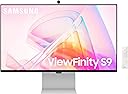
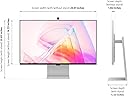
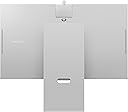
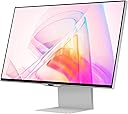
🚀 Elevate your workspace with 5K brilliance and smart power moves!
The Samsung 27" ViewFinity S9 Series monitor delivers a premium 5K resolution with 218 PPI and 99% DCI-P3 color accuracy, featuring Thunderbolt 4 for seamless Mac compatibility. Its matte display with Intelligent Eye Care reduces eye strain, while Smart Calibration via smartphone ensures perfect color tuning. Designed with a sleek metal frame and ergonomic adjustments, it also integrates a 4K SlimFit camera, Smart TV apps, and a built-in Gaming Hub, making it a versatile powerhouse for professionals who demand both productivity and entertainment in one elegant package.


| ASIN | B0CB71BY87 |
| Adaptive Sync | FreeSync |
| Additional Features | Auto Source Switch+, Eye Care, Flicker-Free, Game Mode, Virtual AIM Point |
| Aspect Ratio | 16:9 |
| Best Sellers Rank | #134,091 in Electronics ( See Top 100 in Electronics ) #2,923 in Computer Monitors |
| Brand | Samsung |
| Brightness | 600 Candela |
| Built-In Media | Camera, Power Cable, Remote Control, Thunderbolt 4 Cable |
| Camera Description | 4K SlimFit |
| Color | Black |
| Color Gamut | 1.0 |
| Compatible Devices | Desktop, Laptop |
| Connectivity Technology | USB |
| Contrast Ratio | 1,000:1 |
| Customer Reviews | 3.0 out of 5 stars 223 Reviews |
| Display Resolution Maximum | 5120 x 2880 Pixels |
| Display Technology | LCD |
| Display Type | LCD |
| Hardware Connectivity | Mini-DisplayPort, Thunderbolt |
| Has Color Screen | Yes |
| Image Contrast Ratio | 1,000:1 |
| Item Dimensions D x W x H | 5.3"D x 24.1"W x 20.9"H |
| Item Weight | 16.3 Pounds |
| Manufacturer | Samsung |
| Model Name | E1SAMS27C900PANRB |
| Model Number | E1SAMS27C900PANRB |
| Mounting Type | Wall Mount |
| Native Resolution | 5120x2880 |
| Number of Component Outputs | 2 |
| Picture Quality Enhancement Technology | DCI-P3 Color Saturation, Factory Calibrated Color Accuracy |
| Refresh Rate | 60 Hz |
| Resolution | 5K |
| Response Time | 5 Milliseconds |
| Screen Finish | Matte |
| Screen Size | 27 Inches |
| Screen Surface Description | Matte |
| Shape | Flat |
| Specific Uses For Product | Personal |
| Total Thunderbolt Ports | 1 |
| Total USB 3.0 Ports | 3 |
| Total Usb Ports | 3 |
| UPC | 887276759999 |
| Viewing Angle | 178 Degrees |
| Voltage | 110 Volts |
| Warranty Description | 1-Year Manufacturer Warranty |
| Warranty Type | 1 Year Manufacturer Warranty |
T**S
It's a TV, not a computer monitor
I wouldn't recommend this product because it's not a monitor. It's a TV with monitor capabilities. If you want complex software which is prone to glitches and breaking instead of a reliable computer monitor, then this product is the right option for you. I bought this thinking this would be an alternative to the expensive Apple Studio Display, but I was wrong. I thought Samsung would make great display technology, and they did, but they messed it up with horrible software. Be warned! I've owned this monitor for over a year (bought in January 2025), and it went from unpleasant to infuriating. It started with the minor annoyance of needing to use a remote just to use it as a monitor. The remote is a TV remote and the entire software is designed around this media experience, which I don't want. I just want a monitor with a great display and performance. I don't want a remote with my monitor to switch to my computer or interface with settings and what not. It was annoying, but I lived with it. Then, today, the monitor USB-C port just stopped working. No more signal. My Macbook Pro no longer detects it as a device and there is no way for me to troubleshoot or fix it. I'm navigating the countless options and navigation in this software just to figure out where the basic USB-C input management is. Nowhere to be found. So, I called Samsung's phone number, and of course an AI agent or teleprompt lead me nowhere. Good luck getting support from Samsung I guess. This product is unreliable and overly complicated. I would not recommend unless you want to deal with headaches. It's trying to do to much. Why would my computer display need WiFi connection? I suppose for AirPlay, but then it's a TV, not a monitor display... Netflix? Really? I don't want it. I just want to connect my computer devices to it and let the computers be the software. Guess what Samsung, I can watch Netflix on my computer that is connected to the monitor. It's just dumb, and overcomplicates the product which lead to some possible software update or something that borked it, and now I can't even use it as a monitor...
J**F
WOW. Very high quality display for less than Apple.
I got this monitor to bolster my home office setup. I am running a MacBook Pro with a Sonnet Echo 20 docking station. I wanted a monitor that would support daisy chaining in the future however, so that meant thunderbolt compatibility or USB connectivity. I found this monitor with Thunderbolt 4 support and 5k resolution instead of "just" 4k. I've always had good experiences with Samsung displays, TV's and monitors. Anyway, the closest competition I could find really were the Apple displays themselves, which, while VERY nice are just hugely more expensive. I didn't want to spend that kind of $$ right now. The monitor arrived and literally took 5 minutes to fully assemble. I set it up and it went thru an initial configuration process that was easy and step by step. The included remote feels nice and not cheap as well. Bottome line, this display is fantastic. Everything is easy on the eyes and the picture is so sharp and detailed. I was also impressed with and surprised by the built in speakers the monitor has. I feed my computer audit through some Apple HomePod speakers so won't be using the built in speakers but during the initial setup, audit played thru those speakers and was nice and clear, with surprising range and bass for "built in" speakers on a monitor. Overall, I'm very happy with this monitor and if I do add the second monitor soon, I'm pretty much certain I'll be getting another of these to link up!
L**X
Nice screen, annoying quirks
Be aware that if you buy this "open-box, excellent condition" you will likely not receive the webcam. I did get the remote though--which is CRITICAL for using this monitor unlike other monitors. Some annoying quirks--controlling brightness is a real pain in the behind. Macs can control non-apple monitors' brightness with software tools like Monitor Control....but NOT THIS ONE. I can't explain why, as I've used 4 other monitors whose brightness controlled over DDC but this S9 will not respond. So your best bet is to use the automatic brightness control, which helps. But when you first use your machine in the morning the monitor will wake up to FULL daylight-by-the window brightness and I have to look away or leave the area for about 90 seconds for the monitor to realize and dial it down. Otherwise, it is good at reading the room's brightness through a sensor on the bottom beneath the "chin." The remote may be nice to have for watching tv on the built-in operating system but I don't let the monitor connect to my wifi. But I keep the remote on my desk to tweak brightness now and then, and THAT IS FRUSTRATING because even after firmware updates, the monitor's menu interface is SLUGGISH and moves between pages like a burner android phone from 2018. So because I got this monitor at 55% off by using open-box I didn't get the webcam, and the controls for even basic brightness are annoying beyond what I read and expected. I am keeping it because 5K screens are rare but work fantastically with Mac, and this monitor's screen panel is absolutely great. It's just quirky to control and my purchase experience is marred by missing accessories. I considered sending it back to exchange but I suspect I'd likely get a replacement without a webcam again so I gave up on that. Good luck. If I could have gotten an Studio Display open-box with the same savings, I definitely would have preferred that.
B**N
A 16-month Old Piece of Trash (ORIGINALLY: Less Expensive Than Apple Studio Display; A Few Quirks)
UPDATE: After using this monitor for 16 months, it's not an expensive piece of trash. It refuses to turn on and, of course, it is 4 months beyond the warranty. Buy something else! ORIGINAL: I bought this on sale at Amazon for less than half the cost of the Apple Studio monitor. Some reviews say this isn't as good as the Apple monitor, but I'm not a graphic artist or a pro-level video/photo editor, so this has been great for me. At full 5K resolution (5120x2880), text is sharp and I can read it, but it's more comfortable at 3360x1890. The stand, while a bit cheap looking, is height-adjustable. It has a matte screen; that's an additional cost for the Apple monitor. I had no trouble connecting this with my Mac Mini. I haven't used the camera. It's not integrated with the monitor but attaches magnetically. It looks and feels a bit cheap. My only real complaint after using the monitor for a week is that I can't control brightness with the Mac keyboard, but that's a minor thing. Overall, I'm very pleased.
A**A
Their frustration is your good value
I was half expecting to have to return it after reading all the horror stories but went for it anyway due to the value of it being at least half as expensive as other 5k monitors. For people who are just using this as a computer monitor you will need to waste some time with the setup. When plugged into a mac the 'allow display' option pops up for a split second before disappearing. If you can quickly click enter it will pair. That took a good half hour to figure out. Once connected you'll want to calibrate the colors. This is very straightforward if you have a samsung phone (and the smartthings app). The screen looks much better after calibration. From there you can fiddle with the settings to have the monitor automatically wake when an input is plugged in and automatically detect the input. Once it's all setup it actually works flawlessly. All the people complaining about the difficult (or impossibility) of setup are the reason you get it at a steep discount. I have exactly one stuck pixel and that part is not ideal but it's only visible on an all black screen and I half expect / hope it will get unstuck with time. Considering the price, the screen is very nice. I have an Apple Studio as well and they are close enough in quality to call them comparable.
N**N
Great panel; very flaky overall experience
I love the high DPI display for dramatically cheaper than the Apple Studio Display, but I can't really recommend it. I actually wish I'd sprung for another Studio Display instead. * maybe once a month, when I wake up my computer, this display defaults to some crazy low resolution. No software change, settings-on-the-monitor change, unplugging and replugging thunderbolt, or even soft-rebooting the monitor fixes it. Only unplugging the monitor completely resolves it. * one time it just straight up wouldn't see the Thunderbolt connection at all until I hard rebooted it. * the settings that you access with the buttons on the back is slooooow, even to do something simple like changing the input device. * the speakers are total garbage. I don't have high expectations for display speakers, but these are basically unusable. * setting up the display requires a Samsung account (?) and internet access (!!!). Maybe there's a way around that, but I didn't find it. I was able to disable network access after setting it up. In fairness, on the plus side * it does have a mini Display Port input, not just Thunderbolt, which makes it much easier to plug in some other device. * it's matte, if you prefer that. I think I don't, but I know a lot of people do. * you could get two of these for the price of an Apple Stuiod Display.
J**N
Samsung monitor, awful customer service, terrible unit, quality control.
Overall, the monitor worked poorly with Mac. I had an M3 MacBook Pro, and M1 Mac mini that I connected it to. Neither of them worked well with the connections. It would wake up randomly and go to a count down screen for one minute that was very bright. Also, there is an issue with connecting devices with the USB-C in the back and I had to send it back for warranty. I should’ve just returned it. The warranty takes Forever with Samsung. I don’t think I’ll buy a Samsung again for any product line if I can help it. The money saved was not worth it. They’ve had it for a month, finally said they couldn’t fix it, and they were gonna procure a new one, and then after a few weeks they said they didn’t have one. I will never use Samsung warranty again. I did like how the monitor looked while I was actively using it so I thought I would try and go through the warranty. Big mistake. If you’re buying a 5K monitor, this one is really not worth the money that you save. It’s also filled with Samsung‘s bloatware that their smart TVs are filled with, so it makes no sense to the user that they would install that junk on a work oriented monitor. Switching inputs is difficult as well if you have multiple devices connected. Sometimes the other devices inputs disappear from the UI. So you have to completely power off and power on the monitor to switch devices sometimes. Overall, a big mistake ordering this, if you’re looking to save some money from the Apple studio monitor I would look at some of the other alternative such as Ben Q now has a 5K, or Asus has one as well.
T**.
Amazing Monitor for the Money
I did not experience any of these negative experiences from other reviewers. I'm on my 2nd Samsung 5K monitor, connected to my MacBook Pro M3 Max. First, I installed the firmware update (took about 20-25 minutes). Setting up was pretty intuitive. I agree I wasn't interested in Samsung's OS/Apps but it was easy just to toggle through. I set the picture mode to graphics. It's bright, text is super sharp and no issues with waking up from sleep. I really like the matte finish. For 50% off, and significantly cheaper than the Apple Studio Display, this monitor is 8/10 for me.
A**Y
Useless and obnoxious OS, 0.5 amps USB-C and jumping panel
I tried this monitor because my 10yo Apple thunderbolt display was showing its age. The panel itself is not that bad if you forget about the nonsense samsung OS that you have to endure everytime you need to adjust brightness ( I don't need your games or streaming platform I just want to display stuff from my computer ). My biggest pain point i that I have an ipad pro that I use as a 3rd screen and an audio interface plugged to the monitor's usb-c inputs and I spent a whole day wondering why I couldn't get them to work at the same time , only to realize that the USB-C ports of that thing can only deliver .5 amps this is wild for a display that is being praised as an apple studio display alternative. I am returning it and I just ordered the Apple studio display. If like me you're using a mac and expect a certain level of quality don't waste your time. Update : added a slo-mo video of part of the panel jumping 1 pixel up regularly. Turning the display off and back on fixed it but COME ON
M**X
Vertical use not great
I purchased two of these monitors and while good (resolution, colour and response time). Took too long to configure and lots of issue when you have to configure 2 monitors. The remote are not exclusive and each time you use the remote, sometimes 1 monitor responds and sometimes both respond. It was a nightmare. I love the availability of multiple usb-c ports which can help reduce the load on your docking station but I ended up not using these ports at all. Switching from monitor to TV mode not particularly useful for me and I ended up using it as just monitors. It worked better than most monitors I have seen but surely not so great. I am using both monitors vertical positioning and camera use was quite impossible. Lots of apps just do not work well when you need to rotate camera. Image comes vertical and everyone kept asking what is wrong.
A**R
Regret buying
I bought this monitor five months ago, because I thought it would be better for my eyesight than my previous 2k monitor. I got it at a discounted price, but even so I think I should have bought a 4k monitor from LG or another brand. (1) You can access settings from a button in the back, but the menus are not good, LG for instance do better. (2) This monitor works with the Samsung TV software. It doesn't have a TV receiver but you can connect to the internet and watch Netflix, Prime, Tubi, ..., by entering your credentials, or watch Samsung free channels. I have little interest in that, but I still have to use the Samsung on-screen software (using the remote) to make the monitor connect to my computer. It is not possible to do otherwise, and it's a pain to have to navigate the menus. 3. I connect this monitor either to a desktop computer running Linux, or to a MacBook Air M1. In either case the sleep mode does not work correctly with the monitor. To put the Mac to sleep it seems I have to disconnect the monitor from the computer, otherwise the Mac does not go to sleep (it just locks the screen). Maybe there is a combination of settings on the Mac and monitor that would make this work, but after five months I have not found it. No other monitor I have used has that problem. On Linux the monitor sometimes does not wake up from sleep, and I have to unplug and then replug the power cord from the back of the monitor to make it show what the computer is sending; sometimes I have to go into the Samsung TV settings as well. (3) Colours look great, but for ordinary text/spreadsheet/internet browsing my eyes cannot tell that this monitor is any better than my 4k LG, that cost quite a bit less money. Moreover, the Samsung 5k has an approx one inch wide grayish area along the vertical bezel on each side, that you see even if staring perpendicularly to the screen. On the internet I read that this is common on this type of monitors (IPS). But on the Samsung it is quite evident, and the grayish area widens as you move away from the sides (changing the viewing angle from left ot right or vice versa). In order to minimize the gray I have to be at least three feet from the monitor (too far for office work). I try not to think about it, but it is very noticeable every time the background is pale and uniform, for instance when using spreadsheets, text docs, ... My LG has the same but to a much lesser degree, I think I had never noticed it before buying the Samsung. I needed a third monitor for another desk, so (foolishly you will say) I got the Samsung 4k LS27CM801UNXZA, which is a VA panel (the 5k is an IPS). The price was heavily discounted, so I am not complaining too much, though it does have the same Samsung TV interface. The 4k has a lot less gray on the edges, and in the end for office work it is just as good as the 5k. It is well known that VA panels have worse viewing angles, this is true here but it never affects my work, it just means that video content has to be viewed more or less directly facing the monitor. Many claim that IPS panels have better colour reproduction than VA panels. For what I use the monitors for, office work and occasional TV/video watching, I see little difference. Linux struggles more with the 5k than with the 4k monitors, at least with the kernel I am using (6.1). I have noticed that the remotes provided with the Samsungs (which you MUST use with them) actually work with either Samsung monitor. So if I press something on one remote it will affect both monitors, unless I move away form one and very close to the other. On the plus side, all three (Samsung 5k, Samsung 4k VA, LG 4k) have matte displays, and my eyes feel better using them than my previous 2k monitors. The 'slimfit' camera is useful, since I did not have one before, but it is not the best. Same for speakers, useful but not very good. Brightness and contrast ratios are great. I went to the Apple store the other day and had a look at the outrageously expensive Mac Studio. Some very light grayish patches were visible but not near the edges (on a pure white background), I would say the viewing angles were better on the Mac, but not sure that colours are better than on the Samsung. Would I buy the Samsung 5k again? Definitely not. I seriously considered sending it back. Maybe the 4k VA at the price I bought it (CAD 500, about USD 360). Have a look at the LGs.
S**N
Ultra-Mega sharp but cheap hardware
Never saw an ultra-sharp like that on an external monitor. Very impressive, it's just perfect. But the hardware is very cheap for a $1300+ monitor. After 1 month, the USB-C hub starts to make loud electric noise when I plug an USB-C cable (thunderbolt or not). The plastic case seems to be so weak. Everything seems to move inside when I touch cable. Very disappointed about that. The smart tv is useless for me and very annoying when you don't need it.
A**O
Beautiful 5K display but disappointing longevity
I purchased the Samsung ViewFinity S9 5K 27 inch monitor in October 2023. When it works, it is genuinely stunning. The 5K resolution is incredibly sharp, text clarity is excellent, and it pairs beautifully with macOS. The design looks premium and modern, and the built in smart features such as YouTube and streaming apps are a nice bonus. However, after about 2 years and 4 months of normal home office use, the lower portion of the screen developed horizontal flickering lines. There was no physical damage, no impact, and no misuse. The issue appears even when using the built in smart apps with no external devices connected, which strongly suggests a panel or internal hardware problem rather than a cable or computer issue. For a premium 5K monitor in this price range, I expected much better durability. This is positioned as a high end productivity monitor. Experiencing what appears to be panel failure just outside the standard warranty period is frustrating and disappointing. Pros Stunning 5K resolution and sharp text Excellent color reproduction Premium design Smart TV features built in Cons Expensive Reliability concerns after two years If you are considering this monitor, I strongly recommend purchasing extended warranty coverage. When it works, it is excellent. However, longevity is now a concern for me.
Trustpilot
2 weeks ago
1 month ago