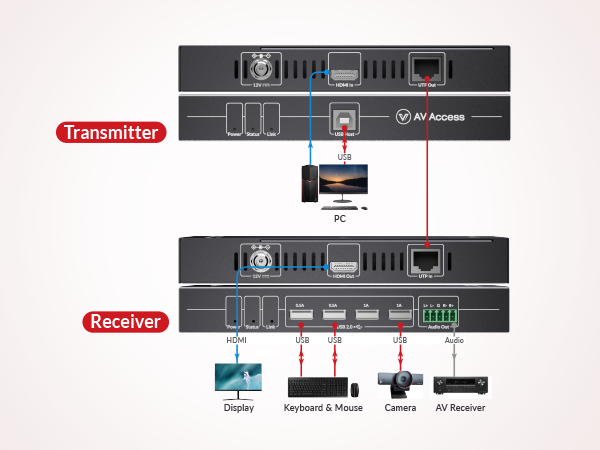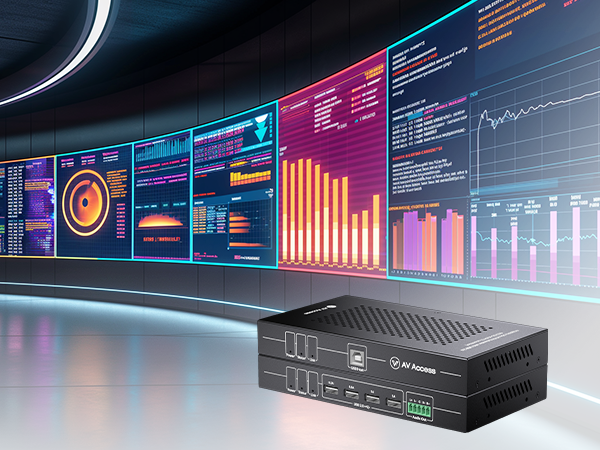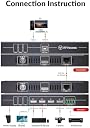


Product description New 4K HDMI KVM Extender with Zero Latency Extends 4K@60Hz HDMI and USB 2.0 signals up to 164ft/50m over a single Cat cable, with zero loss or delay. Plug & Play Works with different operating systems, like Windows 10/8/7/XP, Mac OS and Linux. No driver is required; just plug and play. One-Way PoC Function The 4K HDMI transmitter can be powered by the receiver via a Cat cable, so only one power supply is needed at the receiver side to power both units. Zero Latency Transmits 4K@60Hz 4:4:4 visually lossless HDMI signal up to 164ft over a single Cat 5e/6/6a/7 cable, with zero loss or delay. 4K@60Hz HDMI 2.0 & HDCP 2.2 compliant. Support up to 4K@60Hz 4:4:4. School Server Room Servers/PCs are normally stored in the server center of a school so that the IT staff can easily manage them at one place. 4KEX50-KVM helps connect the server room and a multi-media classroom, teachers can easily control it through the keyboard, mouse and projector/monitor. Enterprise Data Center The 4K KVM extender plays an indispensable role for employees to have remote access from their workstations and they work in a better environment as the bulk of heat and noise is placed away. 4K UHD & Zero Latency This 4K HDMI KVM extender is HDMI 2.0 and HDCP 2.2 compliant. It allows you to extend up to 4K@60Hz 4:4:4 (2560&1440@144Hz/120Hz/60Hz, 1080P@240Hz/165Hz/144Hz/120Hz/60Hz) visually lossless HDMI signal over a single Cat 5e/6/6a/7 cable, with zero latency. Effortless USB Signal Extension Designed with 4x USB 2.0 peripheral port on the receiver, up to 480Mbps totally, this 4K HDMI balun allows you to extend mouse, keyboard, printer, scanner or other USB 2.0 devices up to 164ft/50m . Two of the USB ports support 1A higher current output, so you can easily connect high-power USB devices, such as USB camera or USB hard disk . HDMI Audio Extraction in Meeting Rooms This 4K KVM extender can work flawlessly with AV Access eShare series presentation systems in a large meeting room for efficient presentation and collaboration. Built with a 5-pin phoenix audio de-embedding port on the receiver, it allows you to extend the presentation system’s HDMI/USB signals and extract HDMI audio to an audio system as well. Now all attendees in the room can hear everything clearly. KVM EXTENDER Model: 4KEX50-KVM Model: 4KEX100-KVM Model: 4KIP100-KVM Model: 4KEX70-USB Model: HDEX80-KVM Model: HDEX60-DM Model: 4KEX100-KVM-H2 Review: Not compatible with switches/routers - This item does not work over network, it requires a direct connection, which doesn't work for what I need. I'm only giving a negative review because nowhere was it obvious that it didn't work with switches, I only realized after I looked this device up my model number and discovered it. I'm only giving 2 stars because technically they never said it worked with a network, but still very misleading and shady. Review: Does not support refresh rates above 60Hz - The network KVM does not support refresh rates above 60Hz. I bought the network KVM to connect to my gaming PC which was located in another room. The USB ports on the receiver module worked without any issues. When I adjusted the display output settings to 1080p 144 Hz, I would get no signal until my PC switched back to 1080p 60Hz.


| ASIN | B0C1C14GZD |
| Actuator Type | extender |
| Best Sellers Rank | #2,254 in KVM Switches |
| Brand | v AV Access |
| Brand Name | v AV Access |
| Circuit Type | 2-way |
| Connectivity Protocol | Hdmi |
| Connector Type | The Product Uses a Combination of Hdmi Type a and Usb B Connectors, Which Are Plug-in Connectors. This is More Specific Description the Rather Than Interfaces They Support. Connector Type The Product Uses a Combination of Hdmi Type a and Usb B Connectors, Which Are Plug-in Connectors. This is More Specific Description the Rather Than Interfaces They Support. See more |
| Contact Type | Normally Open |
| Control Method | Remote |
| Customer Reviews | 3.3 out of 5 stars 5 Reviews |
| International Protection Rating | IP54 |
| Item Dimensions | 13 x 8 x 3 inches |
| Manufacturer | AV ACCESS |
| Material Type | Polycarbonate |
| Model | 4KEX50-KVM |
| Mounting Type | Plug-In Mount |
| Number of Items | 1 |
| Number of Positions | 5 |
| Operation Mode | ON-NONE-ON |
| Part Number | 4KEX50-KVM |
| Specification Met | Hdcp2.2 |
| Switch Type | Solid-state |
| Terminal | Solder |
| Unit Count | 1.0 Count |
U**2
Not compatible with switches/routers
This item does not work over network, it requires a direct connection, which doesn't work for what I need. I'm only giving a negative review because nowhere was it obvious that it didn't work with switches, I only realized after I looked this device up my model number and discovered it. I'm only giving 2 stars because technically they never said it worked with a network, but still very misleading and shady.
T**E
Does not support refresh rates above 60Hz
The network KVM does not support refresh rates above 60Hz. I bought the network KVM to connect to my gaming PC which was located in another room. The USB ports on the receiver module worked without any issues. When I adjusted the display output settings to 1080p 144 Hz, I would get no signal until my PC switched back to 1080p 60Hz.
J**R
Excellent Performance and Reliable
I don't usually leave reviews, but decided to for this product because it's a minefield knowing which KVMs are suitable for low latency applications. This one is excellent, as long as you have a dedicated run of Cat6 cable, isolated from the rest of your network. I use it to access my desktop at the other side of the house from my TV in the living room. This includes streaming, gaming and web browsing. It works well with wireless periperals (xbox controller, mouse, keyboard) and is very responsive. The PC can be woken from sleep by tapping a key on the keyboard in the living room. 1080p @ 60htz works well. I've used 4k @ 30htz too and it's good. The distance between the PC and the TV is about 30m and I'm getting no percievable lag - gaming feels exactly like it does on a monitor plugged directly into the PC (I'm not a competitive gamer though). Have found it to be very reliable - if it doesn't work it's usually been an issue with the PC being shut down or windows not liking different scren resolutions on monitor vs TV. Highly recommend.
Trustpilot
1 month ago
4 days ago