Buy anything from 5,000+ international stores. One checkout price. No surprise fees. Join 2M+ shoppers on Desertcart.
Desertcart purchases this item on your behalf and handles shipping, customs, and support to Vanuatu.
💻 Illuminate your workspace, protect your eyes, and upgrade your desk vibe!
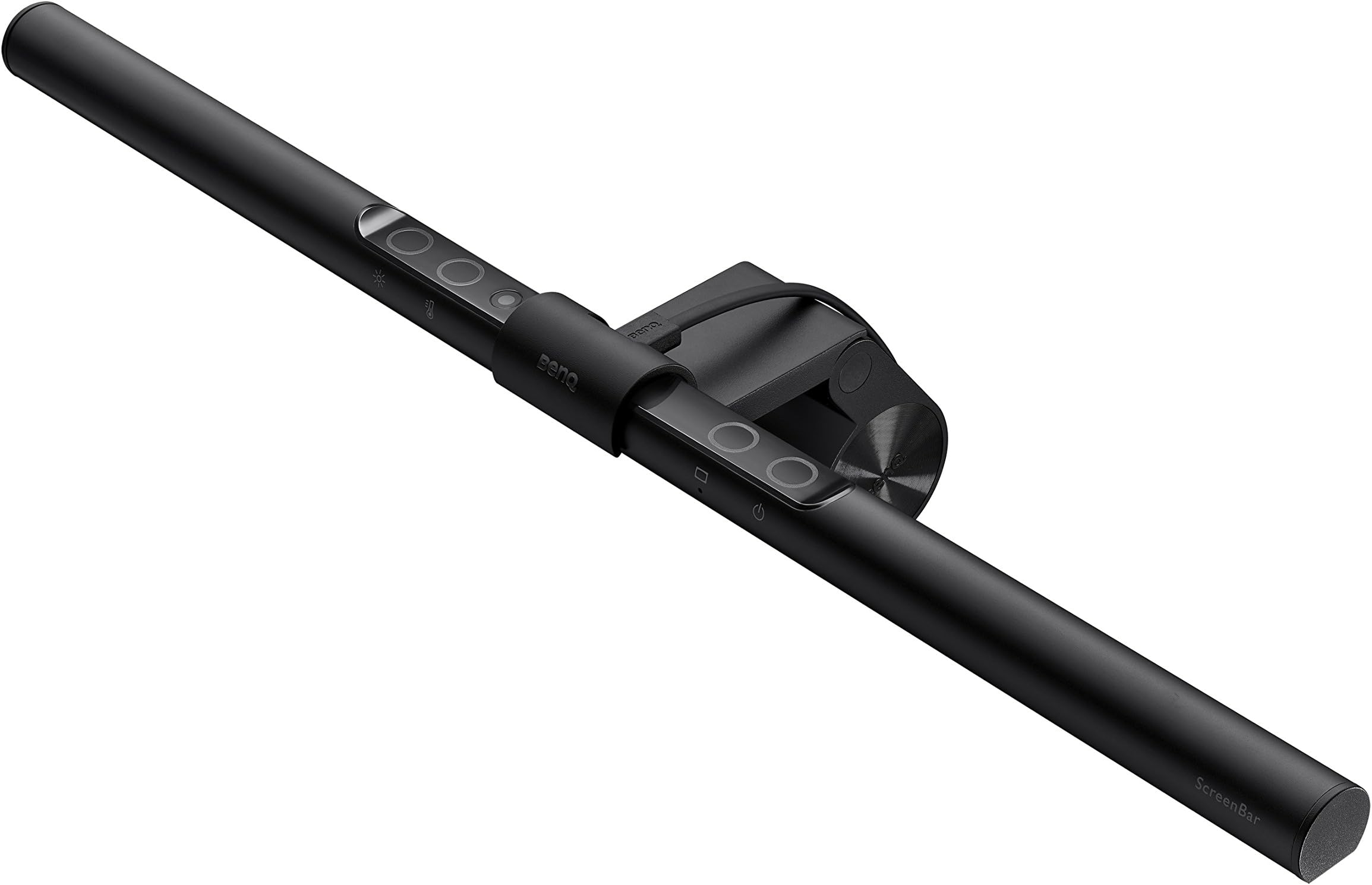
The BenQ ScreenBar is a premium USB-powered LED monitor light bar designed to reduce eye strain with flicker-free, anti-blue light technology and a high CRI>95 for natural colors. It features a patented clamp that fits most monitors (0.4"-1.2" thick), including ultrawide and curved screens, saving desk space. Its asymmetrical beam prevents screen glare, while a built-in light sensor auto-adjusts brightness based on ambient light. Users can also manually control brightness and color temperature (2700K-6500K) via touch controls. Durable and stylish, it’s ideal for professionals seeking ergonomic, customizable lighting for long hours at the screen.


| ASIN | B076VNFZJG |
| Additional Features | Adjustable Color Temperature, Color Changing, Dimmable |
| Base Material | Aluminum |
| Best Sellers Rank | #37 in USB Reading Lamps |
| Brand Name | BenQ |
| Bulb Base | E26 Medium |
| Bulb Shape Size | B10 |
| Color | Black |
| Connectivity Protocol | Usb |
| Connectivity Technology | USB |
| Control Method | Touch |
| Controller Type | touch |
| Customer Reviews | 4.7 4.7 out of 5 stars (5,375) |
| Efficiency | Highly Efficient |
| Finish Types | Matte |
| Included Components | Clip x1, Power Cable, ScreenBar x1 |
| Indoor Outdoor Usage | Indoor |
| Installation Type | Tabletop |
| Is Electric | Yes |
| Is Product Cordless | No |
| Is Waterproof | False |
| Item Dimensions D x W x H | 3.54"D x 17.72"W x 3.62"H |
| Item Type Name | BenQ ScreenBar Monitor Light, LED Computer Monitor Lamp, Auto-Dimming, Hue Adjustment Features, E-Reading USB Powered Lamp for Desk/Gaming/ Home/ Office, Complements with backlight/RGB Setups(Black) |
| Item Weight | 800 Grams |
| Lamp Type | Desk Lamp |
| Light Source Type | LED |
| Lighting Method | Adjustable |
| Manufacturer | BenQ |
| Manufacturer Warranty Description | 1 year. |
| Material Type | Aluminum |
| Model Number | ScreenBar |
| Mounting Type | Tabletop |
| Number of Items | 1 |
| Number of Light Sources | 1 |
| Number of Pieces | 1 |
| Power Source | Corded Electric |
| Recommended Uses For Product | Gaming, Reading, Movie, Work from Home, Home Office, Room Decor, Desk Decor, Aesthetic |
| Room Type | Gaming, Reading, Movie, Work from Home, Home Office, Room Decor, Desk Decor, Aesthetic |
| Shade Color | Black |
| Shade Height | 4 Inches |
| Shade Material | Aluminum |
| Shape | Asymmetrical |
| Specific Uses For Product | Gaming, Reading, Movie, Work from Home, Home Office, Room Decor, Desk Decor, Aesthetic |
| Style Name | ScreenBar |
| Switch Type | Touch |
| UPC | 840046036331 |
| Unit Count | 1.0 Count |
| Voltage | 5 Volts (DC) |
| Water Resistance Level | Not Water Resistant |
| Wattage | 5 watts |
V**T
I wanted desperately to hate this
TL;DR Premium monitor light bar at a premium price. Would recommend if budget is not a huge concern Like the title states, I really desperately wanted to hate the BenQ Screenbar so that I would have an excuse to return it. At a steep $100 price point, it was hard to justify the purchase in the first place, but I ended up enjoying it much more than I expected. This review will mostly be a comparison to the TORCHSTAR Computer Monitor Light and I will be posting a similar review on that product as well. A bit of background: I've always used/preferred task lighting when it comes to working at my desk and doing work on my computer. Up until about a week ago an architect style lamp from Ikea was filling the bill, but then I upgraded to a monitor stand for more desk real estate and now my my monitors are too high for that style lamp. After doing some research, I came across the BenQ Screenbar and similar styled lamps (i.e. TORCHSTAR Computer Monitor Light)--shopping around and reading reviews I narrowed it down to those 2 (thanks especially to Ken Y). I went ahead and purchased both from Amazon and after some light use decided to keep the BenQ Screenbar. At the time of purchase, the BenQ light was $99.00 and the TORCHSTAR $57.99 ($77.99 with a $20 off coupon) before tax. I've included photos to show the "differences" between the 2 lights--for all pictures the lights are at maximum brightness and maximum "warmth" or "coolness". All Photos are also captured at the same exposure settings with the same white balance for consistency. PROS: -Brighter (not sure if the LEDs themselves actually get brighter or there are just more, but this was a big reason I chose it) -Larger illumination area (about 3.5" longer than the TORCHSTAR) -Auto LED is green and milder (hurts my eye less than the sharp blue) -Clamp feels sturdier -Controls feel much more responsive and intuitive (sometimes I felt like I wasn't sure if the torchstar was working but I always knew if the BenQ was. Also with the Torchstar the brightness or color ALWAYS alternated between touches making it kind of difficult to reach exactly the right settings) -Flat cable USB feels more premium CONS: -Hefty price tag for a fancy USB LED strip -There's no diffuser over the LEDs (this may be a choice as diffused light scatters more but it hurts if you accidentally look into the LEDs and the diffuser wasn't too noticeable on the TORCHSTAR) -Noticeable flicker when dimming (slight pro though because on the torchstar sometimes I can't tell if it's working) -Auto mode doesn't disable if you tap it again (it does on the TORCHSTAR) -Torchstar came with an allen key to adjust the clamp tightness (I think the BenQ has a similar access panel but no key) SIMILARITIES: -Both work fairly well with curved monitors. (I use a Samsung CF398 27" as my primary display and a CF390 24" as my secondary) -Both have directed LED strips to minimize glare on the monitors (some of the chinese knockoffs aren't built well and create a ton of glare) -They honestly both just work well At the end of the day, I can kind of recommend both light bars, but I just personally preferred the BenQ more and am willing to pay the premium for it. My complaints with the TORCHSTAR are mostly minor and especially if you don't change the settings much won't even be very noticeable. I will continue to update this review with usage as well as try to answer any questions that might come up. Please click the helpful button if you find my reviews helpful
I**S
One of the best lights you can have for a desk
The BenQ ScreenBar is a stylish, effective solution for improved desk lighting and reduced eye strain. A bit pricey, but the high-quality lighting and design justify the cost for those who spend long hours at their desk. Simple to install with a clamp that attaches to your monitor, and the touch controls make adjusting brightness and color temperature a breeze.
B**N
Great table light! Pick the Plus version versus the standard one
What I like about the ScreenBarPlus: 1. Space-saving top clamp design compared to other traditional tabletop lights. 2. Easy installation. It fits almost all morgen monitor types. Rest it on the top of your monitor, plug in the usb cable and you are ready to go. 3. Ease of use. A true plug and play device. The control dial is dummy-proof. 4. Design. It's a great product with both aesthetics and function. The projection angle prevents light from emitting directly onto the screen and eyes. I have a bad habit of arc my back and lean forward towards the screen. You can setup the monitor/light at the right height so that the light covers a specific zone, if my posture is out of the place, the light can shine directly towards my eyes... the hidden benefit is the light becomes a posture remidnder! ScreenBar vs ScreenBarPlus It's all about the user experience really. If you just want to spend $100 for an awesome looking, space-saving light, don't really care about all the other functions or share the work space -> go get your regular ScreenBar, plug in and forget about it. Note: the automatic adjustment on the standard version only works when booting up or by pressing the auto touchbutton. After numerous attempts by shooting different light source at the auto sensor, it never "automatically" adjust the color or the brightness to neither the temperature nor the brightness extreme ends.And trust me, you won't want to change the temperature or brightness regularly. It just takes too much guess ok the 15 stage color temperature or brightness. However, if you share your workstation like my wife and I, we want more, constant adjustability. I like cooler color and she prefers warmer. Why not. We like the auto function but find us constantly changing the color temperature and brightness. The auto function just doesn’t cut it for usz this having the physical dial included in the ScreenBar Plus version is a MUST and makes it soooo much more convenient than the inductive buttons on the standard version. Plus, with only $20 bucks more, we think it’s a lot more you can get out of this package than just another beautiful and expensive light... did I just say it's cheaper to pay more? I am slowly loosing my mind over this COVID-19 WFH. It was a struggle for us to pick which one to go with and the above is our verdic. Hope it will help you make up your decisions too! Be safe
S**M
It’s a useful addition to add task lighting to any workspace. My ceiling light is a strong harsh bright cold white light which is too much for day time or working into the night. In the evenings and morning the screenbar is on ambient mode which has soft lighting which is enough to read and write notes on the desk with indirect daylight from a window. If I need to write more at night I do turn up the brightness. Additional indirect light sources in a room is still helpful. I do find the ambient mode switch useful. The switches are easy to access. It mounts easily. I think the Plus model with additional desk controller is nice but really not necessary. Be really, really nice to have a proximity sensor in future though. Moved the existing desk lamp to another room to reclaim even more desk space.
S**S
Das Screenbar Light ist eine LED Lampe die über den Bildschirm gesteckt wird. Sie vebreitet ein sehr augenfreundliches indirektes Licht und ist insbesondere im Winter eine große Hilfe!
河**丸
某ゲーム実況系のYouTuberさんが紹介されていて、気になったので即検索。 いろんなレビューサイトのコメントを確認したうえで購入しました。 事前にGOOD/BADを確認、承知の上で購入しましたので、当商品に対する目新しいBAD評価は個人的にはほぼありません。他の方が書かれているように、明度など「いまどのレベルの明るさなのか」は確かに分かりにくいですが、私の使用環境では一度セッティングしてからは自動調光に任せっきりで、いじることがほとんどないため全く問題なしです。 また、手元で明るさ・色温度を調整できるデバイスが付属された上位グレードもありますが、私のように自動調光に任せるなど、それほど強いこだわりのない方には、そういったデバイスはオミットした本機で十分だと思います。 これ一本で随分と作業が捗るようになったと感じています。 主張しすぎない控えめなデザインもいいですね。 amazonではいろんなジャンルから様々な商品を購入してきましたが、この商品のコスパは随一と感じていて非常に満足しています。
A**O
El mejor accesorio que he comprado últimamente! La lampara simplemente funciona a la perfección. El ángulo que tiene no refleja en los ojos ni en la superficie de la pantalla del monitor. Tiene diferentes calibraciones de tipo de luz (fría a cálida). Pensé que iba a necesitar mover de lugar la webcam que tenia sobre el monitor, sin embargo se acomodó muy bien encima de la barra de la lámpara. Puede considerarse que el precio es alto para una lampara pero la ergonomía y la comodidad de no tener un espacio dedicado para una lampara lo vale completamente. Altamente recomendable.
A**O
Been using this for a while now and BenQ never disappoint me.
Trustpilot
3 weeks ago
3 days ago