Desertcart purchases this item on your behalf and handles shipping, customs, and support to Vanuatu.
🚀 Unlock Multi-Gig Speeds & Wi-Fi 7 Power — Stay Ahead, Stay Connected!
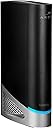
The ARRIS SURFboard G54 is a cutting-edge cable modem router combo featuring DOCSIS 3.1 and Wi-Fi 7 quad-band technology, delivering up to 18 Gbps speeds and coverage up to 5,000 sq ft. Equipped with four 1-Gigabit and one ultra-fast 10-Gigabit Ethernet port, it supports major ISPs like Comcast Xfinity, Cox, and Spectrum. Designed for professionals demanding ultra-reliable, high-speed internet, it also helps save on rental fees by owning your modem.


| ASIN | B0CF7L4D4N |
| Best Sellers Rank | #193 in Computers & Accessories ( See Top 100 in Computers & Accessories ) #6 in Modem Router Combos |
| Brand | ARRIS |
| Built-In Media | ARRIS SURFboard G54 Cable Modem, Power Supply, and Quick-Start guide |
| Color | Black |
| Compatible Devices | Gaming Console, Personal Computer, Printer, Security Camera, Smart Television, Smart Thermostat, Smartphone, Tablet Compatible Devices Gaming Console, Personal Computer, Printer, Security Camera, Smart Television, Smart Thermostat, Smartphone, Tablet See more |
| Connectivity Technology | Wi-Fi |
| Customer Reviews | 3.7 out of 5 stars 260 Reviews |
| Data Transfer Rate | 18 Gigabits Per Second |
| Internet Service Provider | Cox, Spectrum, Xfinity |
| Internet service provider | Cox, Spectrum, Xfinity |
| Item Dimensions L x W x H | 4.65"L x 10"W x 12.44"H |
| Item Weight | 3.1 Pounds |
| Manufacturer | CommScope |
| Maximum Downstream Data Transfer Rate | 10000 Megabits Per Second |
| Maximum Upstream Data Transfer Rate | 10 Gigabits Per Second |
| Mfr Part Number | G54 |
| Model Number | G54 |
| Modem Type | Cable |
| Number of Ethernet Ports | 4 |
| Number of Ports | 5 |
| Product Dimensions | 4.65"L x 10"W x 12.44"H |
| UPC | 850030172204 |
| Unit Count | 1.0 Count |
| Warranty Description | 1 year manufacturer |
W**I
Great Router/Modem combo, highly recommended.
Very happy to get the G54, easy to get set up with Cox, This router/modem combo literally doubled my download and upload speeds!
R**N
G54 buyer beware
I was looking for a multi gig modem/router combo since upgrading my internet. Had zero issues before buying this combo and I just wanted to be able to take advantage of our new speeds in our home. This has to be one of the most garbage modem router combos I’ve owned. WiFi range= trash. Some days it barely extends 10ft Ethernet connection= frequent disconnections. Interrupts gaming and video calls every 30minutes. After updating firmware and using for a few months this thing is total junk and a huge waste of a consumers time and money. I shouldn’t have to deep dive into how to fix my internet after one month of ownership and outside the return window. Buyer beware on the G54
S**Y
Solid connection
The previous three modems we've owned have been made by Arris, and very solid and reliable. So my expectations for the G54 were very high, especially considering that the cost is one of the most expensive on the market for a combo modem wifi router. It is very easy to hook up, with a power cord, incoming comm cable, and then whatever you decide to add for direct connections. The automation within this hardware is the most advanced that we've experienced. This will auto reset, and do a number of different steps (many which are beyond my comprehension) to ensure the connection is solid and to maintain accessibility. In testing the other wifi signals in our area, there is no interference or competing signals at the WiFi 7 range. Even for the lower ranges, the G54 is excellent about placing our signal in low use channel. All that to say, I've enjoyed this device for the last several months, and now feel like it was worth the cost since we've had excellent coverage ever since the initial connection was established (and sorted out with our provider).
R**.
Cannot recommend
I can’t really recommend this to anyone. I’ve now had it for six months and I wish I’d bought differently Setup was relatively easy and the app and device interface are typical and average for the industry. Activation required a call to my Internet provider because of the modem and router being integrated. It also means that you can’t self update firmware, which is frustrating. It’s also proven stable for the most part (complete outages have all been on the network end). However! Two big problems. I’m in a heavily congested area (condo life) and the range is abysmal. Like 100 feet as the crow flies and signal quality drops precipitously. This could be worked around in some sense. But the real backbreaker for me is the firmware controlling the WLAN’s quad band routing. With 36 devices ranging from home control (lights, sensors, etc) to whole home audio streaming (Sonos and Roon) and computers ranging from 2018 to 2026 models the intranet routing is terrible. The problem is the quality of the WLAN and its inability to let devices on the same SSID see one another if they are on different bands. That is, an Apple TV connected via WiFi often fails to see a server connected via Ethernet to the router. An Apple Mac mini connected via Ethernet cannot see a Google Nest. I constantly get errors and disconnects referring to “make sure XX is in the same network”. They are. Same SSID. Full access to internet. Just cannot see one another. No reboots, resets, or changes to configuration seem to resolve this. The only difference is one device is connected via 5GHz and the others via say 2.4 or Ethernet. If you have a relatively simple and consistent WiFi needs (eg; all devices run on WiFi 5 or 6) you are likely fine. But in my mixed device world this thing just does not work.
P**Y
Always connect 6 Ghz for fastest speed.
Was able to setup the modem without any issues. However for someone who is not tech savvy the setup may not be easy. Also the modem configuration has a option "Split Mode" which splits all the frequencies. This is super important feature as I was migrating from an older modem. So someone who is not tech savvy might have difficulties. The phone app is average and is not that useful. However once setup I am very happy with the speed, which is why I bought the modem. A important thing to notice when I selected the 6 Ghz frequency that is when I got the fastest download speed on speedtest. For 5 Ghz and 2.4 Ghz the speeds were slower. 5 Ghz speed was around 450 Mbps and for 2.4 Ghz it was around 300 Mbps. So to get the fastest speed device must be connected to 6 Ghz channel. I might need to add an booster as 6 Ghz signal is weak, but it gives the desired speed.
C**R
ARRIS (G54) it’s a beast
Excellent machine after I set it up with my Internet provider, I logged in with and admin and password I went in to the system Bridge Mode and Enable it That turn turn off the Wi-Fi sitting on there because so I can run my TP-Link Deco 7 Pro BE63 Tri-Band WiFi 7 BE10000 Whole Home Mesh System - 6-Stream 10 Gbps, 4x2.5G Ports Wired Backhaul, 4X Smart Internal Antennas, VPN, HomeShield, Free Expert Support (3-Pack)
D**.
Great so far. Faster speeds than I am used to.
Set-up new modem went well with Xfinity app. Set-up was easy with Arris App. Got computers going quickly. Usual attaching all other online accessories went well. Just remembering all of the different set-up instructions for all of my cameras, Ring doorbells etc. It is just the normal things you go through with changing out a modem / router. Everything seems to be running well. Much faster than my old modem / router. Very satisfied so far.
M**C
Factory Foul-Up
I purchased this G-54 router combo in October 2025, and it was pronounced dead by the Arris Support Team in early April 2026. The Arris Support Team couldn't get it up and running, so being warrantied, they replaced it with what appeared to be a new/unused one with a quick start guide like the defective one. After making all the connections and calling the cable internet provider to get it activated, the replacement wouldn't work. As it turned out, the sticker attached to the quick start guide which contained the SSID number, Password, serial number and MAC ID didn't belong to the replacement I was sent. The true default settings were on the sticker attached to the bottom of the G-54 and didn't even remotely match those on the supplied quick start guide, making me have to call the internet provider back to have them correct information entered on their end. Just a heads up: Compare the quick start sticker information against the sticker on the bottom of the device before to try to activate through your cable provider unless you don't mind a major delay and headache.
Trustpilot
1 week ago
2 weeks ago