Buy anything from 5,000+ international stores. One checkout price. No surprise fees. Join 2M+ shoppers on Desertcart.
Desertcart purchases this item on your behalf and handles shipping, customs, and support to Vanuatu.
๐ฅ๏ธ Elevate your workspace, triple your impact!
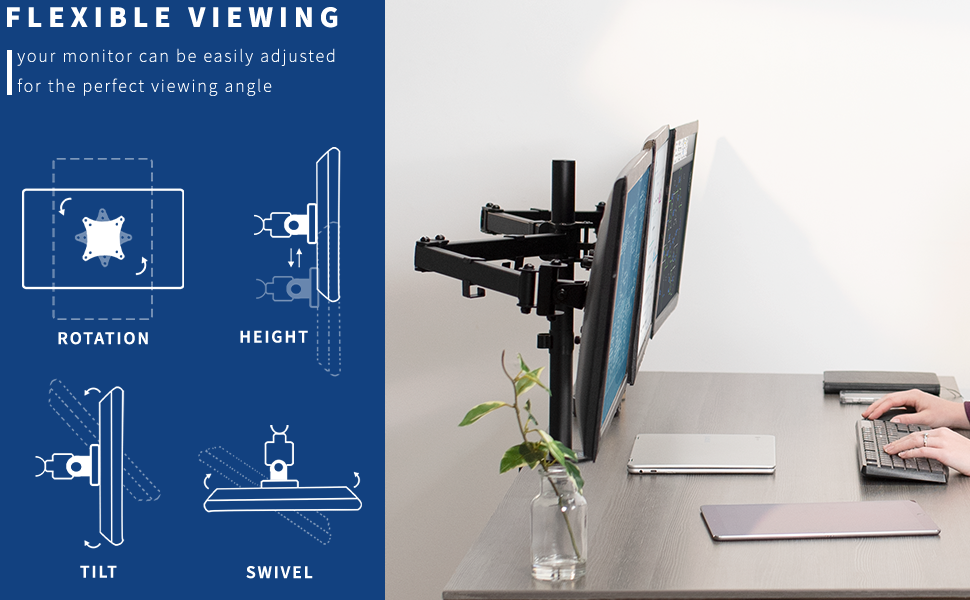
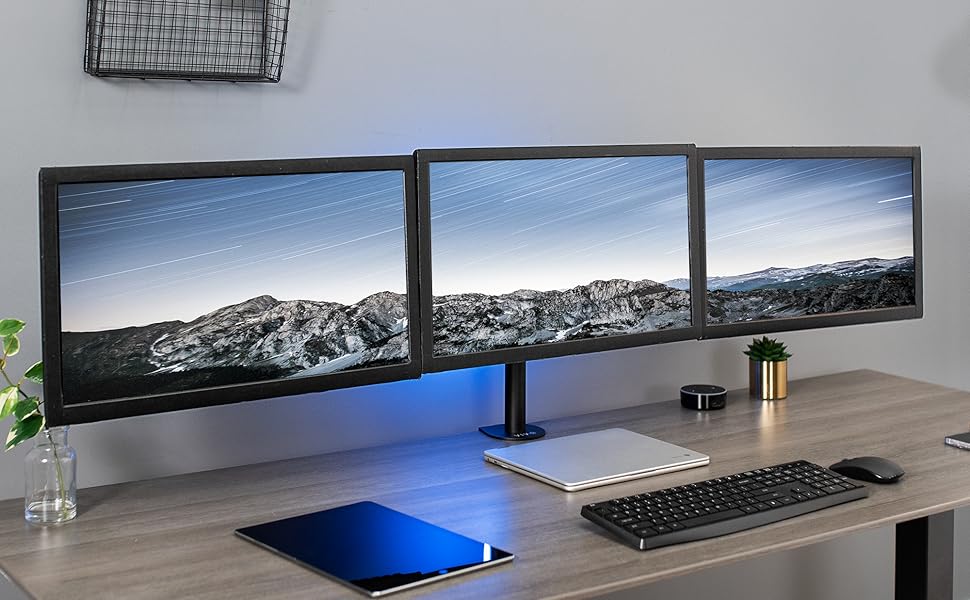
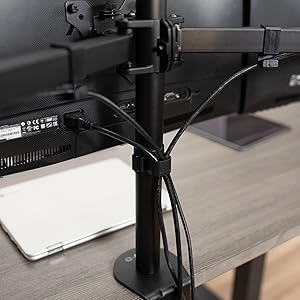
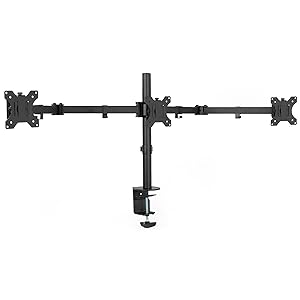
The VIVO Triple Monitor Adjustable Desk Mount supports up to three 24-inch monitors, offering full articulation with 360ยฐ rotation, ยฑ45ยฐ tilt, and height adjustments. Its heavy-duty alloy steel construction features a secure C-clamp or grommet mount for desks up to 3.25" thick, with integrated cable management to keep your setup sleek and organized. Designed for easy installation with detachable VESA plates and included hardware, itโs the ultimate upgrade for professionals craving a clean, efficient multi-screen workspace.


| ASIN | B078K23CFF |
| Best Sellers Rank | #746 in Computer Monitor Arms |
| Brand | VIVO |
| Color | Black |
| Compatible Devices | Monitor |
| Customer Reviews | 4.3 out of 5 stars 1,240 Reviews |
| Enclosure Material | Alloy Steel |
| Manufacturer | VIVO |
| Material | Alloy Steel |
| Maximum Tilt Angle | 45 Degrees |
| Maximum-Supported Screen Size | 24 Inches |
| Minimum-Supported Screen Size | 13 Inches |
| Mounting Type | Tabletop Mount |
| Movement Type | Articulating , Rotate, Swivel , Tilt |
| UPC | 818538020946 |
| Warranty Description | 3 Year Warranty |
K**E
Great item, but cursed set up!
Not long ago I was displeased with my sub-optimal two monitor set up and decided I would grace my room with a curved screen monitor and two side monitors on the vertical display (my room isn't huge). I came across this lovely monitor bracket with adjustable arms and three brackets! Low and behold my dreams would come true, I would simply need to click order, and wait some days for the majesty of three monitors to come to me! The product arrived on July 14th, and I was excited as can be to set it up and make my gaming and college education reach the newest of heights! But then something dastardly and devious happened. See, like a fool, I didn't consider the horrible design of samsung display stands on my curved screen which I had already opened and set on my desk. And so, when I read the instructions telling me how simple it is to remove the base from the monitor I didn't expect the unholy nightmare that would come next. As I attempted to remove the base from my monitor I slowly began to realize that only two people could possibly remove the stand. Superman, and his retarded cousin Bizzaro. And so I strained and struggled and toiled and tumbled at the task at hand, ignoring how superfluous the whole ordeal was in pursuit of my perfect monitor set up that I'd dreamed about for all of seven days. That's when it happened. At some point during my straining, I felt a mighty churning in the pit of my stomach! My intestines roared as fury sloshed about their strained passages, rushing like a wind whipped river carving through an ancient valley as the epitome of all things wrong and evil in this world rushed for my anus. I quickly noticed this and ran upstairs to my bathroom and evacuated the demons swiftly and effectively, and using holy paper I removed any trace of them from my ravaged rear end which had been raucously reverberate throughout the entire travesty. Ah, but I had some relief, and thought I could go back to working on the monitors. Unfortunately for me, when I flushed, that bastard Baphomet wouldn't return to his hell hole and began to spew the brown mud waters of the underworld back up at me. I looked on in horror! The plunger! Where was the plunger!? It was nowhere to be seen as I'd now come to the realization that I was left defenseless in this fierce encounter against a ferocious foe! I had only one choice... I ran to the kitchen, arming myself only with some rubber gloves, and wrapping my arms in clingwrap-- that oughta keep the brown mud waters off of my flesh, I believed. How naive... When I returned to the toilet, I rammed my fist down the mouth of the beast to dislodge him and send him into the depths of Tartarus, but it was to no avail... He proved too mighty for my hand alone! What's worse is that I splashed my arm with mud waters from top to bottom, and had to retreat and cleanse myself in God's baptismal pool. What could I do? In the end, despite being reticent to do so, I called my mother, "Where, for the love of God, where is the plunger!?" I demanded to know! And she told me where to find it. In the black chasm known to me as the basement. I rushed downstairs and looked. Yet the plunger was stuck beneath some garbage my father hoarded! I pulled and pulled and pulled, and like Arthur with the holy sword Caliburn, I drew the plunger from the trash, and raced to save my land! When I returned to the toilet, I stabbed the beast with the Excaliplunge, and with a single thrust he was vanquished. I watched as the muddy sea became clear once again. The trial was over, and with it, I was able to gain the wisdom to remove the monitor stand simply by smacking it once or twice. In the end the product is really cool. It sits on my desk well, and it isn't too heavy, even with three monitors attached. I definitely recommend everyone who needs vesa brackets buy this monitor.
J**R
WITH ADJUSTMENTS, it gets level and works well
The biggest thing mentioned in many of the reviews is that by default the three monitors aren't level. The side monitors "droop" and quite noticeably. Many of the reviews mention that the center monitor has an adjustment (the vertical screw directly in front of the main pole). However not many reviews mention that the side arms ALSO have the same vertical adjustment option. So after: 1) Adjusting the center monitor down as far as possible 2) Adjusting the side monitors UP as far as possible NOW the three monitors are pretty close to level. Also, quick math tip - you can't have rectangular monitors, tilt the monitors down and still have the monitors be flush. Unfortunately the math for that doesn't work out (the tops can be flush, but the bottoms will be angled away from each other and not flush). So my tip would be to not angle the monitors down, but instead vertically adjust the height to where you want it.
F**E
Pretty good - Fix for droopy side monitor!
I don't have it all set up, but this is for my racing simulator. I'm using three 24" Dell monitors. They seem like the right size for this stand. I saw in other reviews that one side monitor was drooping. Mine had that too. The left side monitor was quite a bit lower than the center and right side. Even with the center adjusted all the way down and the left adjusted all the way up, they still weren't level. I figured out the problem. Look at the center bracket on the droopy side. The bracket that the two parts of the arm attach to. There's a small gap on the top. That gap makes the second arm droop. The solution is to turn that bracket over so the gap is at the bottom. It's welded with the gap in there, so it doesn't go away when you flip it over. I hope that makes sense. It was hard to get a pic. I know it's blurry, but this is mine after the "fix". The bolt on the outside of that bracket was impossible to get apart on mine. I even tried putting the allen wrench in a pair of vice grips. But it wouldn't budge. So I removed it at the post mount and turned the whole thing over. I'll post another picture when I have everything set up, but I'm confidant that will take care of the problem. The outside arm now goes noticeable up. With the weight of the monitor pulling down, I'm sure the adjustment will be enough to make them level. Other than that, it's really sturdy. Surprisingly so for the price. If this simple modification is all it takes to make it work, it's worth it for the price difference.
M**W
Excellent, updated design allows you to adjust monitor height
I have used the dual arms in the past, decided to get the triple mount. I have one 24" monitor and two 22" monitors, all work perfectly. Also they have added an option to adjust the height of the monitors so they are not uneven like in the old versions some of the reviews complained about. The clamp is very strong, I have it on a pretty lightweight desk and it is very sturdy. It was a bit finnicky to adjust, but overall it works really nicely. Would definitely recommend for the price.
B**.
Perfect for the Price
This isnโt a super fancy stand, but to hold three monitors in place it does a fantastic job. My main concern while picking out a stand was how flush against the wall I could get it. The arms were just barely too long for my setup (two 24โ portrait and a 27โ in the middle), but the inch I had to stand off my desk from the wall is hardly an issue. Iโm surprised how sturdy the whole thing is. Very minimal shake even when I move the desk. One of the arms hung slightly lower than the other, but the monitor height is adjustable so with a little tweaking I was able to get everything to align nicely. My only complaint is the cable clip on the main pole is definitely not big enough for 3 power and 3 video cables. I only was able to fit the three power cables in the clip, and the video cables got velcroed to the bundle.
G**G
Avoid... Cannot handle the stated weight capacity and sags really badly!
I bought this a few years ago and I was just coming back to update my review as the metal mount finally SNAPPED! Given the problems and current price, I DO NOT recommend this model. This model used to be about 2/3 the price and was the cheapest one available. With that in mind some of the below may be forgivable. But with this priced equal to competing products which appear to be designed better, I'd DEFINITELY avoid this one. The metal is very flimsy and the brackets have a LOT of give (loose tolerances)... This causes a LARGE amount of monitor sagging on the sides. It's supposed to be rated at 15.4 lbs. per monitor... My monitors are only 7.95lbs each and the arms SAG REALLY badly (yes all the connections have been tightened and double checked). By sagging I mean around 2 inches. The sagging makes it very difficult to align the 3 monitors. If your desk isn't EXTREMELY heavy/solid even slight motion causes it to shake like a tree (so if the monitors are close to touching they bump into each other). As I'm browsing Amazon for a replacement, I'm noticing near (if not all) of the competing products have arms that are "stepped" rather than straight outward from the central post. In retrospect, I assume this is to better distribute the weight and prevent this.
J**N
Thick Metal, Well Made, Easy to Install!
This comes with a duel mount kit: You can either clamp it to your desk top surface or you use the included mounting hardware to make it a permanent part of your desk environment [drill a hole in desk top]. My desk surface is an inch thick and I first used the included clamp and once everything was in place it all felt solid. I aligned my monitors and liked it so much I decided to go ahead and drill a hole and permanently mount it to my desk. It was easy. Measure the center for the mount hole, make sure you like the location, then install everything like before. It's cake. All of the parts are thick metal and well made. You will have to take some time to fine tune the parts once they're all assembled, but that's normal for any setup like this.
P**E
Use With Wide Desk for Dual-Monitor Setup
I use a heavy dining room table for my setup. Since my table is deeper (34" deep) than most computer desks, the standard two-monitor stands made the monitors too far away for me. This one has longer arms, obviously (about a 52" spread if the arms are all the way out). By using this without the third monitor, it is easy to move the monitors as close as I want. A bonus is that this stand is much sturdier than the standard VIVO 2-monitor stands...but none of their stands are at all flimsy. But all the VIVO stands do have a lot of slop where the VESA mount slides onto the arm. You can easily fix this by sticking some of the furry side of a piece of Velcro to the arm mount to take up the slack. Also, this stand allows you to adjust each monitor's height by adjusting the mechanism at the end of each arm there is adjustment enough to move the monitors vertically about 1.5" total). This height-adjustment mount also has a lot of slop in it. If you don't need the individual height adjustments, you can take out the slop at this point by cranking the mechanism all the way down on each side, until it tightens up against the bottom of the bracket. My stand was extremely well-made. Very heavy. No missing parts. All parts were labeled in separate bags. Smooth, professional finish. No sharp edges. Three Allen wrenches provided. Everything fit correctly. The inclusion of the extremely heavy duty grommet base is a great bonus. You can also use the grommet base without a built-in desk grommet to mount the stand anywhere on your desk, if you don't mind drilling one single 3/8" hole through the desk. If you mount it this way, it will be especially sturdy. No complaints at all.
Trustpilot
1 month ago
1 day ago