Buy anything from 5,000+ international stores. One checkout price. No surprise fees. Join 2M+ shoppers on Desertcart.
Desertcart purchases this item on your behalf and handles shipping, customs, and support to Vanuatu.
๐ฆ Unleash Your Storage Potential!
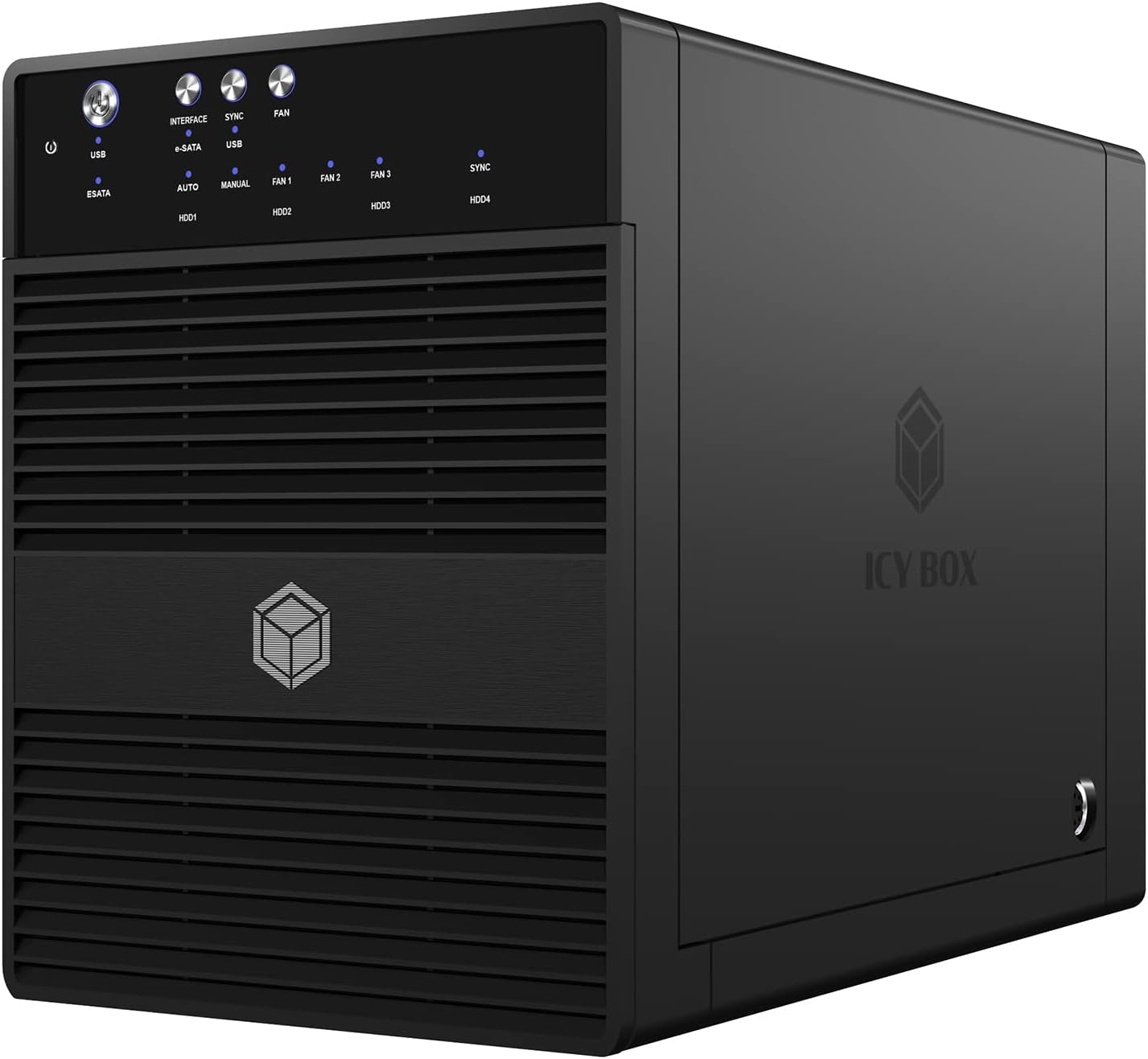
The ICY BOX IB-3640SU3 is a high-performance external JBOD enclosure designed for 3.5 SATA drives, featuring a 4-bay capacity, silent operation with a thermal-controlled fan, energy-saving sleep mode, and a user-friendly trayless design for easy assembly.


| ASIN | B009DH5Q2S |
| Best Sellers Rank | 81,746 in Computers & Accessories ( See Top 100 in Computers & Accessories ) 364 in Enclosures |
| Brand Name | ICY BOX |
| Colour | 3.5 inch |
| Compatible Devices | 3.5 inch SATA hard drives |
| Customer Reviews | 4.0 4.0 out of 5 stars (61) |
| Data Transfer Rate | 5 Gigabits Per Second |
| Enclosure Material | Plastic |
| Global Trade Identification Number | 04250078186328 |
| Hardware Interface | USB |
| Hardware Platform | Mac, Windows |
| Item Dimensions L x W x H | 21.5L x 12.6W x 16.6H centimetres |
| Item Weight | 1.9 Kilograms |
| Manufacturer | Icybox |
| Manufacturer Part Number | IB-3640SU3 |
| Model Number | IB-3640SU3 |
| Network Connectivity Technology | USB |
| Supported Devices Quantity | 4 |
| The Standard Size of the Hard Drive or the Bay the Hard Drive Is Compatible With (in inches) | 3.5 Inches |
| UPC | 880927338918 |
S**R
Basic but nice
I've chosen this box based on its price / performance. I wanted a storage box solution which adds drives as single drives. This box does just that: the JBOD implementation means that all drives are added seperately, so they show up as seperate disks. I am using the e-sata function. The performance is good. I am using FlexRaid with snapshot raid, which converts all disks into 1 virtual disk with one or more parity disks. This solution makes it possible to remove a single disk and keep its content on the disk. It's also possible to add disks dynamically (doesn't have to be the same size) to expand the storage pool. Since it's a single storage pool, the software determines on which disk the files are saved. This makes it hard to benchmark, as the files may be written / read from an internal drive. I did perform some basic tests before creating the drive pool. A single disk will write with ~70mb/s, which is about as fast as the disk will do. Read performance can go up to 80mb/s on a single disk, again this is the max for the drive. Dual writing operations to different disks will max at ~60mb/s per disk. This may be caused by the sata host controller, but I'm not complaining. The only downside to this box is that the fan is noisy. There also aren't any ventilation holes at the front to pull cold air from the front side of the box. I've made some holes in the front to improve the cooling, which seems to help a lot. The average temperature while reading data from disks dropped by 8 degrees C, simply by drilling some holes in the frontpanel. All in all, this is a very good box to increase your storage. I'm not aware of any other products with the same price / performance ratio.
M**E
Well built, usb3 detection issues.
Build quality is more than acceptable for the price tag (ยฃ100) Two points to note though: -The side mounted power adapter would have been better suited on the rear panel insteal but it's not a deal breaker. -Useless stock cooling system. Rear fan is directly mounted behind the PCB to draw hot air out. This isn't helped by a lack of external intake ventilation thus the fan is worthless and can not cool the system. This may be a deal breaker if you run 4 hdd with high uptime. As of yet though the poor cooling hasn't been an issue for 4 drives under infrequent load. You can either remove the front door as others have suggested or possibly look to mount a side fan at the front or cut your own front vent system on the sides and underbelly. The two issues i've had with this unit so far are: -No full manual in the package. I found a product review that went in depth on this unit that explained what the buttons do, i shall give a brief overview at the bottom for general help. -Usb 3.0 just wont detect the drives on windows 7 64bit using a lenovo w530 laptop. On the icy box forums it seems several people have had this issue as well. There appears to be some success in getting windows to detect the drives by plugging the connector into the system when the unit is powered on and attempts its handshake with the os. I haven't managed to get this to work but thankfully I run the system over esata anyway which does work well with port multiplying esata controllers. In short, the unit suffers some short sighted design flaws, may have connector issues in usb3 mode but overall works well for its price and on esata. Buttons: Power - press once to turn on. Hold to turn off. Interface - HOLD FOR THREE SECONDS to change output between usb and esata. It will power on at first in usb3.0 mode, without a usb cable connected the system will shut down after 5 seconds. <-- This is what the manual really needed to explain but doesn't, thus people believe the unit is defective. Sync - Hold for 3 seconds to turn Sync on. Sync, when on, will put the unit to sleep and wake it up with the computer it is connected to. An orange LED will be shown when Sync is turned on. Fan - press to cycle fan settings (automatic, 1/2/3) Automatic seems to work fine, 2 is loud enough but 3 is far too loud. As explained earlier though, the fan is almost worthless so i suggest buying an IR heat thermometer (<ยฃ10) to check internal temperatures during your first month of use.
S**T
Great Quality JBOD Case.
I had a QNAP TS410 NAS Unit but it was a few years old and the CPU and Transfers very slow (20MB/s over Gigabit), as I was only using it in JBOD Mode and for storing Movies I decided I may as well go for something cheap and chearful. No way was I springing for a Thunderbolt Enclosure for my Mac the Budget would not stretch to that. So for ยฃ88 what the heck lets give it a go Arrived Quickly well packed and easy to set up, I had read online some reviews that with a Mac it goes to sleep too quickly and the disks spin down messing up backups, but this can be corrected by Pressing the Sync Button till the Sync Light Turns Blue (Not Off or Orange, just Blue). NOw thats done it works 100% with my Mac. Fitted with 4 x Seagate 4Tb Drives, getting a solid 120MB/s Transfer to the drives in the ICY Box which I am very happy with. At the moment I have the front door propped open to allow ventilation, but plan to drill a few holes in the front door and put a fine mesh behind them to help the ventilation, as the fan the back stands no chance with the front door closed, its just sucking a vaccum. Would I recommend this unit. YOU BET. Already thinking about another one to up the library from 16 to 32TB
Trustpilot
3 weeks ago
2 weeks ago