Buy anything from 5,000+ international stores. One checkout price. No surprise fees. Join 2M+ shoppers on Desertcart.
Desertcart purchases this item on your behalf and handles shipping, customs, and support to Vanuatu.
📡 Convert, Connect, Captivate—Your Analog-to-HDMI Upgrade Awaits!
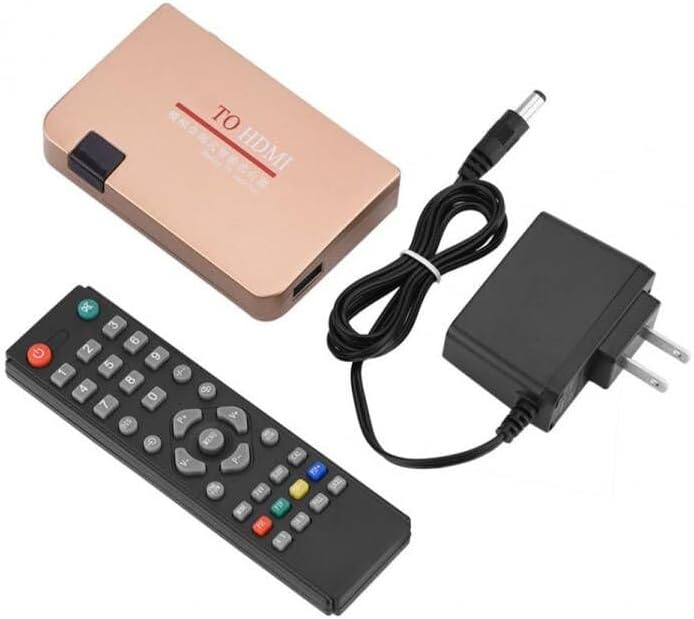
The SAIZHUO RF to HDMI Converter Adapter transforms analog TV signals into crisp HDMI output, supporting up to 251 channels with stable reception. Featuring a wide voltage range (110-240V) and energy-saving auto-shutdown, it’s compatible with all HDMI devices including projectors and multimedia systems. Controlled via an easy-to-use remote with clear display, this adapter is ideal for network engineering, teaching, and vintage media enthusiasts seeking modern connectivity.
| ASIN | B0CJJ9RYSP |
| Best Sellers Rank | #261 in Video Converters |
| Brand | SAIZHUO |
| Color | black |
| Compatible Devices | Projector |
| Connector Type | HDMI |
| Customer Reviews | 3.1 out of 5 stars 40 Reviews |
| Finish | Hdmi |
| Finish Type | Hdmi |
| Input Voltage | 240 Volts |
| Manufacturer | SAIZHUO |
| Model Number | df4766d4-0548-4df8-9011-e29474392c4a |
| Number of Items | 1 |
| Number of Ports | 2 |
| Package Quantity | 1 |
| Power Plug Type | Type A - 2 pin (North American) |
| Smart Home Compatibility | Not Smart Home Compatible |
| Specific Uses For Product | Projector |
| Unit Count | 1.0 Count |
R**K
** Here's how to get your 70's/80's game console to work with this **
It does work well. It's just not obvious. My Intellivision system is displaying through a modern projector, thanks to this adapter. Here's what to do: If your game system's output is an RCA cable, then you'll need some extra bits of hardware. Although I did see a variant of this item on Amazon which seemed to already have an RCA port built in, this particular variant does not. - Look up an Amazon "Female to PAL Male 9.5mm TV Satellite Antenna Coax Adapter". This SAIZUO converter actually came with one for me, but it's not advertised as part of the package so it may be safest to order one anyway. - Look up on Amazon, "Phono RCA Female to F Type Male RF Connector Coaxial Adapter" - 2 AAA batteries for the remote. And then there is the cryptic menu system. The manual isn't much help. After pressing the remote's menu button, 5 categories will be along the top row. Initially they are in Chinese. You'll want to do the settings in reverse order, so I've listed them that way below. Use left/right to select the column 1-5 below, then up-down to navigate their options, then left/right to change that option's value. Here are the settings I used for it to work for me: 4th column: "Sys Settings" • Select the very first row (It has "OSD" embedded in the Chinese characters), then press right. o Select the very first option, then press right. Everything should now switch to English. The remaining options below I'll list using their English names. o Display Mode - Color System • Set to "Ntsc" o Display Ratio - set to "HD P720" o Advanced Settings - Denoise • Set to "Middle" - Wide Screen • Set to "4:3" Make sure that you game system is turned on, then: 2nd column, "TV Menu" • Auto Scan o Select this, and hone in on an area where SOME signal of the game shows through, and stop the scan. It likely will be right away, no need to scan to infinity, probably. • Manual Scan o Fine - Use this to fine-tune to the best signal. Note that if it has a lot of static mixed with the game image, that’s due to the RF cable and/or its various adapters being loose or too tight. Play with those to improve the signal. • Sound Sys o Set to "M" Works great. I docked a star because it is not obvious how to set it up.
C**T
Would not Acquire Channels
I was unable to get this decoder to work, despite having 50 years professional experience with computers, electronics, etc. First of all, the "COAX" connection isn't standard US coax but looks like PAL. I asked the vendor what to use. After a day and a half, the reply was "type C to BNC." Huh? Type C is for USB and there are no BNC lugs on the input port. I asked again if they meant type F (which is standard screw-on coax), but never got a reply. The "coax" connection doesn't have BNC lugs on it, so I wasted some more time getting COAX to PAL adapters. Nowhere in the listing or Amazon recommendations is a special adapter mentioned. Another me-too Chinese product (same picture, functions, etc.) had a recommendation for PAL adapters, so I went with that. Next I had to figure out where to go to change the On Screen Display (OSD) from Chinese to English and set up other functions. The calendar has display issues, the dates don't show up well on the TV screen. I could never get any channels acquired, either with the "Auto Search" or manual functions despite several attempts. Having spent hours messing with this decoder, I just gave up and bought a different brand decoder, ZJBox, on Amazon for about $10 more. It HAS F-COAX connectors already built in. The menu on it starts up in English (OMG!), with the country as USA (double OMG). Next, auto search for channels. The ZJBox took a few minutes to scan (the same COAX connection, no issues there) and came up with 47 different channels, on all of which I could get a good picture. All that took a couple of minutes and couldn't have been simpler. So, if you want to get a decoder which works right out of the box, I recommend ZJBox (Asin B07Z5RGLK6). The SAIZHUO (is this some play on words for "Says Who?") isn't even heavy enough to use as a paper weight, so I returned it.
P**J
change format from pal to ntsc ...
awesome little device. the hardest part to get it to work was changing the language from chinese to english. the 2nd hardest part was changing the sound format to one that worked with my 10+ year old best buy insignia tv. 3rd hardest part wasn't hard because i read someone else's review that said you needed to make sure you had a pal to coax adapter. which i had already bought and found out the device came with one. i also already had the rf to coax adapter to plug into the atari 2600 and that into the pal adapter. speaking of pal, change the video setting on the device to ntsc instead of pal, and recommending 4x3 resolution instead of 16x9 for more of the classic look. two thumbs up. worked right the first time on an original 1982 atari 2600.
M**W
It works. It'd be nice if the picture was crisper.
It is working, but I get a lot of noise in the picture no matter how I have it set.
R**N
Well, it works. Takes a bit.
Works as advertised. Instructions are rudimentary. Getting into English is the first step. Aspect ratio, PAL vs. NTSC, and sound need to be set. Channel scan takes a while. But it is the cheapest demodulator I could find. I used it on a Colecovision.
D**N
Doesn’t work
Remote control doesn’t switch the device on. I tried 3 different sets of batteries. Even bought new ones, and still would not switch the device on. And the only way to switch it on is with the remote, so basically not functioning.
P**.
If you use it for what its made for, it is great.
I read the reviews so I was a little nervous about buying this, but it looked exactly what I needed, and it was! I needed a decoder that could accept as input a UK coac cable from a 1980's home computer (a zx spectrum) and convert it to HDMI so I could bring the ancient computer up on my monitor. Once I had figured out how to change the OSD to english from chinese and read the minute instructions, I tuned it in. The picture is not flawless, but I need to get a better cable from the computer, it is thin and over 40 years old, a bit like me if thin meant fat and 40 meant almost 60. Overall, a great little gadget which means I won't need to modify my vintage computers (thats right, I have several).
R**B
Works, but a massive headache
The only thing good I can say about this device is that it works. Here are the bad things: 1) The menu starts up in Chinese, and it's not obvious how to change the language. In fact, while you're reading through the menu pages the menu will automatically close itself after maybe 30 seconds so you'll have to start it up again. I ended up actually filming the menus as I flipped through so I could read each page. It took a long time to figure out how to get it into English mode. 2) The instructions are written in broken English. I took pictures of them and ran through ChatGPT to get more intelligible explanations. 3) I was trying to use this to run an Atari 2600 RF output through HDMI. I think you have to scan the channels for it to pick up the signal even though I know it's on channel 3. 4) When I DID get it working, it worked great. The picture was clear, actually much better than the RCA mod output I've seen from other Atari systems, BUT the next time I used it, it had lost the channel settings. I had to fiddle with it again to get it to project the output. This isn't really worth the hassle. Here's are some tips if you're trying to send an RF signal through a more modern input: 1) If you have an old VCR and your television has RCA input, buy an RCA Female to F Type Male RF Connector Coaxial Adapter, attach it to your RF cable, connect that to the antenna input of your VCR, and connect the RCA output of your VCR to the RCA input of your television. For most VCRs (I've tried it on 2), the signal is pretty good. Maybe not as good as the direct RF-to-HDMI conversion, but certainly not bad at all. 2) If you have an old VCR and your televion has only HDMI input, do the same thing I mentioned in tip 1 but also get an RCA to HDMI converter. You may need one that has the ability to change the aspect ratio to 4:3 if your newer television doesn't support that. Roku televions, for instance, no longer have that aspect ratio setting. My VCR did it automatically, but I'm not sure all VCRs or RCA-to-HDMI converters will. 3) If you don't have an old VCR, get one from Goodwill or Craigslist and see tips 1 and 2. 4) If tips 1-3 aren't an option...sigh...buy this thing and put up with it. Sorry.
A**ー
返金または交換して頂きたい
YouTubeで設定のやり方を出している方がいたのでそれを見ながらファミコンに無事接続出来ました。
R**I
ファミコン用に
日本のファミコンを液晶テレビに映す用に購入しました。 その場合そのままだとアンテナの端子を接続できないので変換コネクターもセットで買ってください。ご一緒にどうですか?みたいな画面に映っているやつで構わないです。 説明書が英語と中国語しかなくてわかりにくかったです。 翻訳して理解しました。 細かく設定するとブラウン管に映す時に近い画質でファミコンを映すことができました。多分PCエンジンとかも同じやり方で映ると思います。 ありがとうございます。
Trustpilot
4 days ago
2 months ago