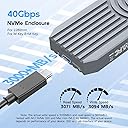
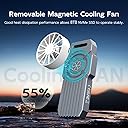
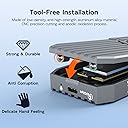
๐ Unlock lightning-fast storage with zero noise and zero fuss!
The MAIWO 40Gbps NVMe Enclosure is a premium, tool-free external SSD reader designed for M.2 NVMe 2280 PCIe Gen4 drives. Featuring a robust full-aluminum chassis for superior heat dissipation and fanless silent operation, it supports ultra-high-speed data transfers up to 40Gbps via USB4 and Thunderbolt 4/3. With compatibility for up to 8TB SSDs and broad port support including USB3.x and USB2.0, itโs tailored for power users and Apple M1/M2 professionals seeking fast, reliable, and sleek external storage.


| ASIN | B0CNG53DJD |
| Best Sellers Rank | #1,229 in Enclosures |
| Brand | MAIWO |
| Built-In Media | 1x 40Gbps NVMe SSD Enclosure, 1x Carabiner and Braided Strap, 1x Magnetic Fan and Attractive Sheet, 1x Silcone Thermal Pad, 1x Aluminum Thermal Pad, 1x Type-C to Type-C 40Gbps Data Cable |
| Compatible Devices | Desktop, Gaming Console, Laptop, Smartphone |
| Customer Reviews | 3.7 out of 5 stars 39 Reviews |
| Data Transfer Rate | 40 Gigabits Per Second |
| Enclosure Material | Aluminum |
| Hardware Interface | Thunderbolt 4 |
| Hardware Platform | x86_64 |
| Item Dimensions L x W x H | 4.65"L x 1.97"W x 0.51"H |
| Manufacturer | MAIWO |
| Material | Aluminum |
| Memory Storage Capacity | 8 TB |
| Mfr Part Number | 20/40GCase |
| Model Number | 40Gbps NVMe Enclosure with Fan |
| Product Dimensions | 4.65"L x 1.97"W x 0.51"H |
| Supported Devices Quantity | 1 |
| Warranty Description | One Year Manufacturer Warranty |
R**S
Good speed, very reliable, it does get hot
I like it. Very nice speed. I use it to boot my Mac mini from it and no issues. It gets hot so I use my old intel processor fan to keep it cool. It has been working great so far
C**T
So far so good but Windows users read this
I'm using Windows 11 with an MSI Motherboard and Thunderbolt 4 connections on the back. Inserted a WD_Black SN7100 2GB NVME. Its working good so far. Speeds are as expected for Thunderbolt 4 on Windows. There is one thing you need to do in order to get full write speed. You need to enable the write cache located in Device Manager > Disk drives > your NVME > Policies (see photo). Otherwise the write speed will be much lower. The cooling fan definitely keeps the enclosure cool but its not a quiet fan. Knocked off one star for that. Otherwise its working and will follow up long term if something happens.
M**Z
Good Speeds, Bad Design
This has to be the goofiest, worst designed nvme enclosure I've ever seen. It gets incredibly hot and even with all the metal that you would assume would make a decent heat spreader, they messed that up too. The included thermal pad does not make contact with the heat spreader, instead they added a sheet of metal that sits on top of the thermal pad, completely ruining the transfer of heat into the metal casing.
J**Y
Furturistic Sci-Fi Show Prop
Platform: AM5, Windows 10 Pro, USB40 Port SSD: Samsung 980 Pro 2TB (60% Full), Health 98% Cables Used: Cable Matters [Intel Certified] 40Gbps Thunderbolt 4 Cable 3.3ft, Anker USB C Cable (3.3FT, 240W), USB 4 Data Cable, 40Gbps & Included super short USB C Cable, all similar performance. Software used: CrystalDiskMark 8.0.4 (x64) Build quality is great, this thing is heavy for what it is & well built, fan is necessary, has a high pitch whine, but it removes 15-20ยฐC, hope you're ready to get used to it (gets quite hot without it, even on idle) or maybe improvise with another fan. Used my ORICO M.2 NVMe SSD Enclosure, USB 3.1 Gen 2 (10 Gbps) for comparison, only gets lukewarm to the touch, whether in use or idle. Performance was odd at first, the read speeds were what I expected, but the writes only around 558 MB/s, until I remembered to enable Write cache in the device manager, then write speeds shot up to where they should be, around 2800 MB/s. Photos - Left: Write Cache Enabled | Right: Write Cache Disabled
R**R
Terrible
Broken immediately upon plugging in. Build quality is trash.
A**R
Cools NVME
Works great with added fan, nvme is nice and cool.
A**A
needs 2nd usb to run the fan
Works great, is fast. What I don't like is that the fan is external and needs a 2nd USB power supply
B**D
Beefy And Aggressively Priced TB4 Enclosure That Is Actively Cooled
PROS * Active cooling and a very beefy enclosure (heatsink) to help fight the heat and these things get HOT. * Priced aggressively, this is one of the least expensive TB4 drives at ~$90 at the time of writing. Everything else is north of $100. * Fast. Manufacturer claimed 3105MB/s write speed and 3070MB/s read speeds using a Samsung 980 Pro. As a comparison, fast TB3 enclosures cap out around 1600 MB/s. * Fan attaches magnetically and can be easily attached / removed * Tooless design is where it's at. * Aluminum thermal pad can be adjusted, be sure to check fitment! Read my review for more details. CONS * Larger and heavier than TB3 enclosures make the TB3 enclosures more portable * Fan requires a separate USB A to USB C cable (included) * Some assembly is required. The aluminum and silicone pad need to be mounted to the top of the housing. Be sure to remove the 3 pieces of plastic between the two pieces!!!! VERDICT Hail to the new king! TB4 / USB 4 is the new standard, but TB4 enclosures are quite the premium over their TB3 / USB 3.2 predecessors. Thankfully pricing should come down as TB4 becomes more mainstream. I love that this drive can be actively cooled. The enclosure is thick and beefy which is needed to help keep those hot drives running cool, but if you're doing constant writes of a lot of data, I really do recommend using the active cooler even though it needs a separate USB A port to power it. Thankfully they've included a cable. Some assembly is required. The aluminum thermal pad has a sticker that needs to be removed and the silicone thermal pad has stickers on both sides. After removing all of the stickers, attach the aluminum thermal pad to the silicone thermal pad and then stick the combined thermal pad onto the top of the enclosure. Mine had an outline of where I thought it should fit, but when I closed the lid, it wasn't lining up with where the memory chips were on my drive. I ended up moving it about 3.5 mm lower than where their line was to ensure the memory chips near the socket were covered. Double check by closing the enclosure and peeking through the side to ensure that thermal pad sandwich is touching all of the memory chips or you'll French fry when you should have pizza'd and you're going to have a bad time.
P**R
A substantial enclosure, but with various Thunderbolt problems
Out of the box, this is an impressive enclosure. Mechanically, it's industrial strength. The body of the case and the cover both have substantial cooling fins. It's heavy - the inherent thermal mass will help keep a hi-performance SSD stick cool, as long as you use adequate thermal pads to couple the SSD to the top cover. It comes with a small cooling fan that cleverly attaches to the case's cover with a magnet. The fan requires power from another USB jack. The cover's latch is really slick. Instead of a tiny setscrew to fasten it, the MAIWO uses a pair of spring-loaded ball bearings that snap into machined recesses in the base. Very elegant. The cover can be removed without any tools (other than a quarter to unsnap the cover), but it's not going to come off accidentally. However, after marvelling at the mechanical design, I soon found problems. I discovered that the supplied USB4 cable was defective. The USB-C plug at one end was dodgy - the slightest bit of movement of the enclosure, the drive, or the Mac would cause the connection to drop. I had to order a replacement USB4/Thunderbolt cable (Cable Matters, ASIN: B0CP9VQ1TZ) to get past that roadblock. Then I found incompatibility between the enclosure and the MacBook (with macOS 14.6.1) and various SSDs. At first, the Mac didn't even see a new SSD and was unable to initialize it. Eventually, I found that if I used a USB 3.1 cable instead of a USB4 cable, the drive appeared and I could erase & partition it using Disk Utility. But operation over Thunderbolt was problematic. On a number of occasions, when copying a 500 MB file from the Mac to a newly-formatted SSD, macOS crashed with a brief pink screen of death, something I've never seen in years of using Macs. I tried troubleshooting using three different 1TB M.2 SSDs (from Crucial, Silicon Power and Fanxiang). All were problematic. I contacted MAIWO support, who made one suggestion (that I should buy a replacement USB4 cable). Eventually they concluded that the enclosure must be defective. They said they could not replace it since I had bought it here. Amazon's policy is that I can return it (and get a refund) but they're not able to replace it since it was "sold by" MAIWO. Instead I'd need to place an order for a new one. I decided not to. This MAIWO enclosure might function without issues on a Windows machine (as long as you get a quality USB4 cable), but based on my experience, I can't recommend it for use with macOS and M1-powered Mac computers.
C**S
Thunderbolt NVMe SSD enclosure that can also do USB 3.2 Gen 2x2, BUT runs hot without the fan
What I like about this MAIWO 40Gbps Thunderbolt NVMe enclosure is that it lets me connect an external NVMe SSD storage drive to my Mac mini at the best possible speed. But, better for my specific use case is that this enclosure also supports USB 3.2 Gen 2x2 (20Gbps), which means I can also connect it to my non-Thunderbolt desktop PC at its best available speed. (My older Thunderbolt enclosure only connected to my desktop PC at 10Gbps.) This ability makes this enclosure my best option for transferring very large files between my Mac mini and my desktop PC. Attached to my review are two screenshots; one is of Blackmagic Disk Speed Test on my Mac mini, showing performance of a Samsung 970 EVO 500GB drive in the enclosure. The other screenshot is of CrystalDiskMark on my Windows PC, showing performance of the same drive connected to my PC's USB 3.2 Gen 2x2 port. I had the drive formatted as ExFAT so that both macOS and Windows can read and write the contents. Unfortunately, as some of the other reviews have mentioned, this drive will run hot without the seemingly optional fan attached and running. I've included additional images to demonstrate. One photo shows the enclosure reaching temperatures of 114-117F without fan. The other photo shows the enclosure reaching a more moderate range of 86-88F when the included fan is attached and running. The fan is a separate device with its own separate USB-A to USB-C power cable, a design choice which may lead you to believe it is optional, but given how hot this enclosure can get without a fan, I wouldn't advise using it for any significant length of time without one. Unfortunately, the fan isn't completely quiet. IMHO, the manufacturer should consider an enclosure design that better dissipates heat and incorporates a good fan in a way that's less like an afterthought. I'd have given this a higher overall rating if the cooling were better designed, because otherwise this ticks all the boxes for me.
Trustpilot
1 month ago
2 months ago