Desertcart purchases this item on your behalf and handles shipping, customs, and support to Vanuatu.
📶 Track smarter, last longer, and weather any storm!
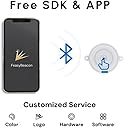
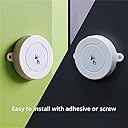
The FSC-BP104D DA14531 is a cutting-edge Bluetooth 5.1 location beacon offering an impressive 400m range and IP67 waterproof rating. Powered by replaceable AAA batteries, it delivers up to 10 years of continuous operation. Compatible with iBeacon and Eddystone protocols, it supports full customization through a free app and SDK for Android and iOS, making it ideal for professional-grade asset tracking and location services.


| ASIN | B078N2B7RD |
| Best Sellers Rank | #112 in Bluetooth Network Adapters |
| Brand | FEASYCOM |
| Color | white |
| Compatible Devices | Desktop, Laptop, Smartphone, Tablet |
| Compatible Operating System Family | Android |
| Customer Reviews | 3.5 out of 5 stars 115 Reviews |
| Data Link Protocol | Bluetooth |
| Hardware Interface | Bluetooth |
| Item Dimensions L x W x H | 2.36"L x 2.36"W x 0.71"H |
| Item Weight | 1.92 ounces |
| Manufacturer | Shenzhen Feasycom Co.,LTD. |
| Mfr Part Number | FSC-BP104 |
| Minimum Required Operating System Version | Android 4.3 Jelly Bean |
| Model Number | FSC-BP104 |
| Number of Items | 1 |
| Product Dimensions | 2.36"L x 2.36"W x 0.71"H |
| UPC | 711005812436 |
| Unit Count | 1 Count |
J**E
It was easy to use
Durable and effective. Does not have instructions. However, once you put batteries into unit. Use the downloaded app. It was easy to use. See tutorial attatched. Feasycom Beacon Tutorial How to configure your new feasy beacon. Jim @ Smartadslocal 08.12.2018 Smartadslical.fepages.com [email protected] INTRODUCTION Welcome to the world of Beacon technology. When Apple created the ibeacon platform and two years later Google followed with the Eddystone platform, local advertising was vastly improved. Small businesses can affordably utilize technology that large companies have been using for years. Beacons like the feasy beacon, are used to send a message or advertisement to mobile phones. When you utilize an advertisement with a beacon, you can send a stealthy message to any mobile phone who enters a particular area of space. Think of the beacon as an antenna beaming out a signal with a simple code to register a message or ad to be placed onto a mobile phone. The add or message is created on a advertisement platform and connects to the beacon by utilizing a unique connection code. Many advertisement platforms can be expensive. However, if you purchase your own beacons you can utilize a platform from smart ads local for as little as $5 a month. Just email at [email protected]. With the Google Eddystone platform no app is needed to place a nearby notification onto any android device using bluetooth. Apple’s iOS devices need to be using a chrome browser to receive the Eddystone message. However, Apple is in development to standardize the Eddystone platform for their iOS phones. How To Configure a Feasy Beacon Download the Feasy beacon app. I use the android play store app. 2. Make sure your feasy beacon has the batteries installed or if usb, plugged into power source. 3. Open feasybeacon app 4. Press the Settings button in the middle. 5. Press your beacon from list of local signals. It is a great idea to place beacon next to your phone. 6. Add password. The factory preset password is 000000. Six zero’s 7. Change password where it says pin and change beacon name. Interval is how often the signal pulse will transmit in milliseconds. The lower number will send more frequently and will also drain battery faster. Txpower is the distance you want the beacon to transmit. Every beacon has a distance max that varies. However, you still can lower the distance if desired and this will help with battery drain. -6db, -3db, 0db, 1db, 2db, 3db, 4db, 5db, are your choices with -6db short range and 5db longest range. 8. The beacon comes preset with an ibeacon setting in slot 1, and an url setting in slot 2. You can change these and the other 8 slots as follows. Press beacon type and a list of four selections will be presented. UID is used for android and allows for use without app download for android mobile phones. URL is used to send a website address to immediately open. The other two choices are self explanatory. I will demonstrate using UID. Press UID. Namespace is an unique 20 digit code you must create using letters a - f and numbers. Instance is a second unique 12 digit code. You will notice the red spaces lit when you are needing more digits, and will turn black when correct. The two sets of numbers are used to connect to your ad platform. When both numbers correspond the ad platform can communicate to the beacon and your message will be sent two mobile phones in the beacon range, also known as proximity range. I usually put four zeros for reserved at 0000, and a single zero 0. At RSSI at. The RSSI is distance from scanner. After all code is placed, turn your slot on or off using slide button on bottom of slot. Green is on, white is off. When finished with slot 1, move to next slot and set up a new unique code different from last slot. Do this for each slot and when finished, press save. Your beacon is now configured, and awaiting connection to the ad platform using the Namespace and instance code. Happy Advertising. PS. Many advertisement platforms can be expensive. However, if you purchase your own beacons you can utilize a platform from smart ads local for as little as $5 a month. You can also purchase preporagramed beacons and have Smart Ads Local help you create ads for a very affordable price per month. Just email at [email protected].
S**E
This is not a general purpose Bluetooth "marker".
I'm not sure what role this device is supposed to fill. I could never get my Android phone to pair with the device. It does work with their provided app. What I wanted it for was to provide a "known device" that my phone would recognize to enable extended unlock while in the vicinity of the beacon. I wish the device was open source, so that changes could be made.
J**S
Password fails. No access.
The default password in the instructions fail. The reset instructions per the faqs do not work. Customer service hung up on me telling me online support will get back. Online support auto-responder says they are on vacation. Leaving this here until issue is resolved.
S**T
Works great with Home Assistant!
This works perfectly with BLE proxies in Home Assistant. Great for trash cans and other things you want to track.
D**S
Great Product and Easy to Program
I received my Feasycom beacon long range 500m today. Total time to download app and program beacon took about 10 minutes. Note: Eddystone UID Namespace ID and Instance ID must added in settings. I added the beacon on my software system, entered a 40 character message and attached a pre-designed restaurant rewards card. Within a matter of seconds the beacon was broadcasting and the notification appeared on my android phone. Note: The beacon does not come with batteries and you will need to install (2) AAA batteries. If you are familiar with programming beacons, this product is very user friendly. Dan Hughes
L**Z
Interesante
Funciona muy bien
R**.
One Star
Product is very difficult to configure also IS NOT EDDYSTONE
P**C
Does not work as an iBeacon
This is advertised as a "long range" iBeacon. With 2AA batteries powering it, it can afford to be high power (and thus longer range). Unfortunately, it does not actually work as an iBeacon - it shows up in regions but does not support ranging, which means that any software that relies on iBeacon ranging to function (most) will not work with this device. I cannot say whether it's any good as an Eddystone beacon. If you need a working iBeacon, I can recommend the Radius Networks device: it works like an iBeacon is supposed to. 2 stars because it's "sort of almost" working - it might be useful in some situations.
脳**ス
Android版アプリにバクがある?
試しに買ってみて結構使えたので2台目の購入。 最大10台までビーコンを登録できて、発信間隔とか送信出力も設定できるようです。 機能的には満足してたのですが、ただ、Android版FeasyBeaconアプリでRESETTING DEVICEを行ったら、以降接続できなくなってしまいました。電池入れた後に1分以内に接続しても、デフォルトパスワード000000でエラーが出て入れません。 ふと思い立ってiOS版アプリの方で試してみると何事もなく接続できました。自分はiPhone持ってたからなんとかなったけど、Android機しか持ってない人はNGだろうなぁ Model:BP104D(No.46) Version: 5.3.7
A**E
Funcional
Barato y aunque no cumple con estándares de otras balizas ni funciona bien la aplicación de android, es funcional
J**E
Not for advertising notifications
Google has discontinued Android nearby notifications rendering these devices useless for advertising.
C**X
I
Still can’t figure how it works
ゆ**ち
完全アウト 技適なし
総務省のサイトにも載っていないため、完全にアウトだと思います。
Trustpilot
2 months ago
1 month ago